Picking the Right Case for Your iPad or Fire Tablet
OtterBox’s Defender Series offers the strongest drop protection among current iPad cases. Apple’s Smart Folio gives the closest factory fit with magnetic Pencil pairing. ZUGU’s case stands out for adjustable typing angles. Rankings below weigh published materials, compatibility and stand design rather than price.
A case that doesn’t match the exact tablet generation leaves ports misaligned and corners exposed. OtterBox’s Defender Series, Apple’s Smart Folio and ZUGU’s case solve that in different ways, from thick protective layers to a precise magnetic fit. Each one targets a different kind of daily use, from jobsites to typing on a keyboard case.
Compatibility shifts with every tablet generation, so a case built for one iPad Pro model rarely fits the next. We compared published materials, stand mechanisms, Apple Pencil support and owner feedback on fit accuracy across current Amazon listings.
The best picks, ranked
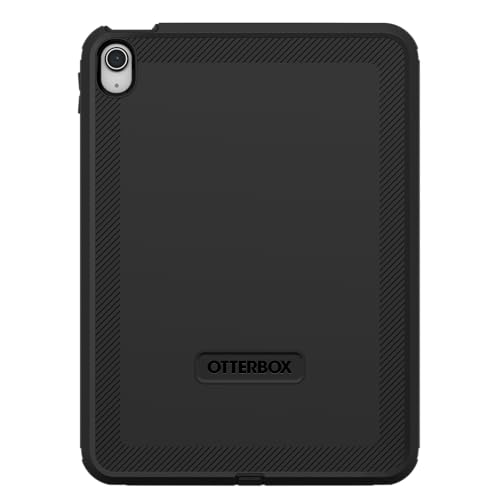
OtterBox Defender Series for iPad
Multiple layers of polycarbonate and silicone spread impact across the shell instead of concentrating it at one corner. A built-in screen film adds scratch resistance, so a separate glass protector becomes optional. Port covers seal out dust and debris, a detail that matters on jobsites or in classrooms.
Pros
- Multi-layer shell absorbs drops other cases pass through
- Port covers keep dust and debris off connectors
- Detachable stand doubles as a kickstand
Cons
- Adds noticeable bulk and weight to the tablet
- Port covers slow down cable access for charging

Apple Smart Folio for iPad
Apple engineers this folio around the exact magnets and camera cutouts of each iPad generation. Screen protection comes from a microfiber interior that lines the cover when closed. Folding the cover into two positions creates a typing or viewing angle without a separate kickstand.
Pros
- Precise fit matches the specific iPad generation
- Magnetic Pencil attachment holds pairing reliably
- Slimmer profile than rugged multi-layer cases
Cons
- Drop protection trails behind dedicated rugged cases
- Sold only for select current iPad models

ZUGU Case for iPad
A flexible stand folds into several typing and viewing angles, more than a standard folio allows. Shock-absorbent foam lines the corners without adding OtterBox-level bulk. Owners attach an Apple Pencil to a magnetic strip that includes its own small cover.
Pros
- Stand folds into multiple typing and viewing angles
- Pencil holder ships with a protective cover
- Lighter build than fully rugged competitors
Cons
- Impact protection falls short of dedicated rugged cases
- Stand mechanism adds some extra thickness

Fintie Slim Case for iPad
A slim polyurethane shell keeps weight down while a polycarbonate back adds structure underneath. Closing the cover triggers an auto sleep and wake magnet that shuts the screen off. Several fold positions cover typing, reading and video angles.
Pros
- Costs less than premium rugged or Apple options
- Auto sleep and wake magnet helps save battery
- Lighter than multi-layer rugged cases
Cons
- Drop protection trails rugged competitors
- Interior lining shows wear faster over time

Supcase Unicorn Beetle Pro for iPad
A TPU bumper wraps the corners while a polycarbonate frame reinforces the back panel. Built-in screen film skips the need for a separate tempered glass layer. Its kickstand folds flat instead of staying rigid when not in use.
Pros
- Corner bumper absorbs drops during classroom handling
- Built-in screen protector skips a separate purchase
- Kickstand folds flat for easier storage
Cons
- Bulkier profile than slim folio-style cases
- Built-in screen film can scratch over time

ESR Rebound Case for iPad
A magnetic strip on the side holds and charges an Apple Pencil, similar to Apple’s own folio. Polycarbonate on the back keeps the profile slim next to rugged options. Folding the front cover creates adjustable angles for typing or video calls.
Pros
- Magnetic Pencil holder costs less than Apple’s folio
- Slim build still keeps a folding kickstand
- Soft-touch coating resists fingerprint smudging
Cons
- Shock absorption trails rugged case designs
- Cover magnets can loosen after heavy daily folding

Fintie Case for Amazon Fire HD Tablets
Lightweight EVA foam cushions drops better than a hard shell alone, suited to kids using a Fire tablet. A built-in kickstand props the screen up for video without extra accessories. Fintie sizes this case per Fire HD generation to match each model’s camera and button cutouts.
Pros
- Foam exterior cushions everyday drops and bumps
- Built-in kickstand allows hands-free video viewing
- Costs less than premium iPad-focused cases
Cons
- Fits Fire tablets only, not iPad models
- Foam exterior can compress after years of use
What to look for
What to look for in a tablet case Compatibility comes first. Most cases fit one specific tablet generation, not an entire product line. Material affects weight and protection, ranging from OtterBox’s multi-layer polycarbonate to Apple’s slimmer polyurethane folio. A built-in stand changes how comfortably you can type or join a video call. Apple Pencil support, including magnetic charging, matters most for anyone taking notes on an iPad Pro or Air.
iPad cases versus Fire and Android tablet cases Premium cases like ZUGU’s and ESR’s Rebound follow iPad camera and button layouts precisely. Fire tablets use different dimensions, so Fintie sizes its Fire HD case separately from its iPad lineup. Android tablets outside Fire’s ecosystem often need a generic or brand-specific case instead of an iPad-first design. Checking the exact model number before buying prevents a mismatched camera cutout.
Best tablet cases for kids and classrooms Kids drop tablets more often, and usually without warning. Supcase’s Unicorn Beetle Pro adds a TPU bumper and built-in screen film built for that kind of handling. Foam padding in kid-friendly colors covers Fintie’s Fire HD case for younger users. Managing several devices in one classroom also benefits from a folding kickstand, a feature several models here include.
Tablet cases for typing and frequent video calls Long typing sessions favor multiple stand angles over one fixed position. ZUGU’s case and Apple’s Smart Folio both fold into distinct typing and viewing angles. ESR’s Rebound adds a similar adjustable stand while keeping Apple Pencil charging available. Video calls get harder to manage on a case that only lies flat with no angle options.
Side by side
| # | Model | Compatibility | Best for | Score | Price |
|---|---|---|---|---|---|
| 1 | OtterBox Defender Series for iPad | Specific iPad Pro, Air or 10.2-inch model by version | Best overall rugged iPad case | 9.4 | Check price |
| 2 | Apple Smart Folio for iPad | Specific iPad Pro or Air generation, sold per model | Best for exact Apple factory fit | 9.2 | Check price |
| 3 | ZUGU Case for iPad | iPad Air and Pro models, sold per generation | Best for typing and stand angles | 9.0 | Check price |
| 4 | Fintie Slim Case for iPad | Multiple iPad generations, sold per model | Best budget tablet case | 8.6 | Check price |
| 5 | Supcase Unicorn Beetle Pro for iPad | Specific iPad Pro or Air model | Best for kids and classroom drops | 8.4 | Check price |
| 6 | ESR Rebound Case for iPad | Specific iPad Pro or Air generation | Best for Apple Pencil charging | 8.2 | Check price |
| 7 | Fintie Case for Amazon Fire HD Tablets | Specific Fire HD generation, sold per model | Best for Amazon Fire tablets | 8.0 | Check price |
Frequently asked questions
Do tablet cases fit every iPad model the same way?
No. Most cases are sized for a specific iPad generation based on camera placement and button layout. Confirm the exact model number before ordering, since Pro, Air and standard iPads differ in cutout position.
What is the difference between a folio case and a rugged tablet case?
A folio case, like Apple’s Smart Folio, favors a slim profile with a foldable cover. A rugged case, like OtterBox’s Defender Series, trades that slimness for multiple protective layers.
Which tablet case works best for Apple Pencil charging?
ZUGU’s case and ESR’s Rebound both include a magnetic holder that keeps an Apple Pencil attached and charging. Not every case supports this, so check the listing before buying.
Are rugged tablet cases worth it for everyday use?
For classrooms, jobsites or kids, the extra protection in a case like Supcase’s Unicorn Beetle Pro often justifies the added bulk. Light home use may not need that much padding, so a slimmer folio can be enough.
Do tablet cases work with a keyboard attachment?
Most cases in this category leave the smart connector or keyboard port exposed for compatibility. Confirm the specific case supports your keyboard model before relying on it.
How do you find the right case for a Fire tablet?
Fintie and similar brands list the exact Fire HD generation and screen size on the product page. Matching that generation number avoids camera or button misalignment.
Is a built-in screen protector as good as tempered glass?
Built-in film, like the layer included with Supcase’s Unicorn Beetle Pro, resists scratches but usually offers less impact resistance than dedicated tempered glass. Some owners still add a separate glass layer for extra protection.
Can a tablet case affect Face ID or wireless charging?
Most iPad cases leave the Face ID sensor housing uncovered, so recognition still works. Wireless charging isn’t common on tablets, though thick rugged cases can occasionally block accessory alignment.
Best tablet case for kids versus a case for daily commuting?
Cases built for kids, like Supcase’s Unicorn Beetle Pro, prioritize corner bumpers and drop resistance over slimness. Commuter-friendly picks, like Apple’s Smart Folio or ESR’s Rebound, favor a slim profile that fits easily into a bag.
Our take
OtterBox’s Defender Series remains the strongest overall pick for drop protection and port coverage. Apple’s Smart Folio suits owners after the closest factory fit and reliable Pencil pairing. For kids or classroom tablets, Supcase’s Unicorn Beetle Pro and Fintie’s Fire HD case offer the most practical everyday protection.
Marcus Chen
Marcus covered consumer electronics for enthusiast tech publications for six years before joining ChoiceCrest. He specializes in translating manufacturer spec sheets into plain-language buying advice, with a focus on audio, computing accessories and smart-home gear.


