Fire TV, Roku or Apple TV: Which Streaming Box Fits You
Amazon’s Fire TV Stick 4K Max balances speed and price for most living rooms. Apple households get tighter integration from the Apple TV 4K. Power users chasing Plex transcoding or cloud gaming should look at the NVIDIA Shield TV Pro instead.
Amazon’s Fire TV Stick 4K Max suits most people, pairing Wi-Fi 6E speed with a low entry cost and an Alexa remote that also runs the TV. Its home screen leans hard into Amazon’s own content recommendations, a tradeoff worth knowing before buying. Apple TV 4K rewards households already inside Apple’s ecosystem, while the NVIDIA Shield TV Pro serves power users running Plex or cloud gaming.
Every device here streams Netflix and Prime Video without trouble, so the real gap sits in chipset speed, remote quality and how far each ecosystem pulls you in. We compared published specs, HDR format support and owner feedback on lag, overheating and remote reliability across all seven boxes.
The shortlist, ranked

Amazon Fire TV Stick 4K Max
Wi-Fi 6E support keeps 4K streams stable on crowded home networks better than older sticks manage. The Alexa Voice Remote adds preset app buttons and controls TV power and volume without a second remote. Owners report faster menu navigation than the standard Fire TV Stick, especially when reopening recently used apps.
Pros
- Wi-Fi 6E handles crowded networks well
- Alexa remote replaces the TV remote for power and volume
- Compact stick hides behind the TV
Cons
- Amazon app recommendations dominate the home screen
- Requires an Amazon account to set up

Apple TV 4K (Wi-Fi + Ethernet, 3rd generation)
An A15 Bionic chip renders menus and games noticeably faster than stick-based competitors here. AirPlay lets any iPhone mirror content in seconds, and Find My locates the compact remote if it goes missing. Owners without other Apple devices report less benefit relative to the higher cost.
Pros
- Fastest interface response in this group
- AirPlay and HomeKit integration for Apple users
- Includes an Ethernet port on the box itself
Cons
- Costs more than any other pick here
- Least useful outside the Apple ecosystem
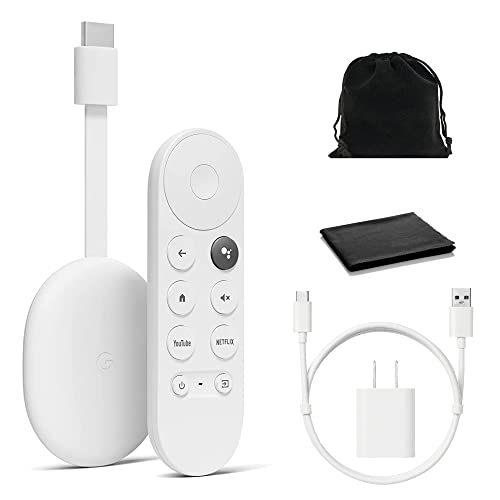
Google Chromecast with Google TV (4K)
Google TV organizes content across apps into one recommendation feed instead of forcing app-by-app hunting. Its backlit remote includes dedicated Netflix and YouTube buttons for one-touch launches. Owners say casting from Android phones works more reliably than on rival boxes.
Pros
- Lower cost than most 4K competitors
- Cross-app recommendation feed saves searching
- Backlit remote works in dark rooms
Cons
- 8GB storage fills up with app data over time
- Ads appear on the Google TV home screen
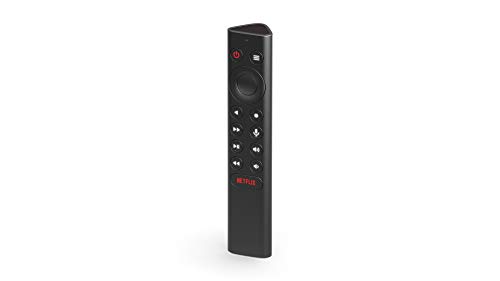
NVIDIA Shield TV Pro
A Tegra X1+ chip and 16GB of expandable storage let this box run a real Plex media server instead of just a client app. GeForce NOW turns it into a cloud gaming console for owners with a subscription. Setup takes longer than a plug-and-play stick, which puts off casual streamers.
Pros
- Transcodes local media files as a Plex server
- Cloud gaming through GeForce NOW
- Expandable storage via USB drive
Cons
- Bulkier box needs a spot near the TV, not behind it
- Overkill for anyone who only wants Netflix and Hulu

Roku Ultra
Roku’s grid interface skips the algorithmic recommendation feeds that clutter Fire TV and Google TV. Its Voice Remote Pro adds a lost remote finder and a headphone jack for private listening. Owners cite the search function as the best at surfacing a title across every installed app.
Pros
- Cross-app search finds titles and pricing across services
- Rechargeable remote with a locator function
- Ethernet port for a wired connection
Cons
- No built-in AirPlay 2 as smooth as an Apple TV
- Home screen sells ad space near the app grid

Roku Express 4K+
This is the cheapest way into 4K HDR on the Roku platform, suited to a bedroom TV or dorm setup. Its voice remote still controls TV power and volume despite the low price. Owners note it lacks the faster chip found in pricier Roku boxes when switching between demanding apps.
Pros
- Lowest cost 4K HDR streamer in this group
- Voice remote still controls the TV itself
- Simple setup for a secondary room
Cons
- Slower app switching than the Ultra
- No Ethernet port for a wired connection
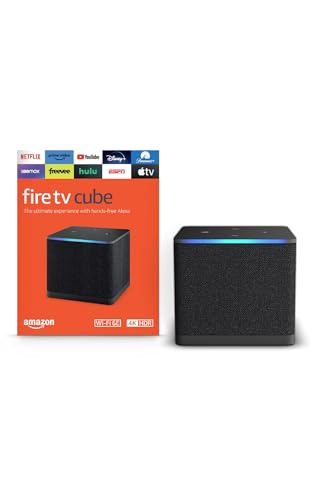
Amazon Fire TV Cube
Far-field microphones let the Cube respond to Alexa commands without pressing the remote, useful when your hands are full in the kitchen. An HDMI input passes through a cable box or game console with voice channel changing. Owners with soundbars appreciate the infrared control it offers for volume.
Pros
- Hands-free Alexa without pressing a button
- HDMI input controls a connected cable box by voice
- Doubles as a smart home hub for Alexa devices
Cons
- Largest, priciest box in the Amazon lineup
- Far-field mics pick up background noise in loud rooms
How they stack up
| # | Model | Max resolution | Best for | Score | Price |
|---|---|---|---|---|---|
| 1 | Amazon Fire TV Stick 4K Max | 4K Ultra HD at 60fps | Best overall | 9.3 | Check price |
| 2 | Apple TV 4K (Wi-Fi + Ethernet, 3rd generation) | Apple A15 Bionic | Best for Apple households | 9.1 | Check price |
| 3 | Google Chromecast with Google TV (4K) | 4K HDR at 60fps, Dolby Vision, HDR10+ | Best value | 8.9 | Check price |
| 4 | NVIDIA Shield TV Pro | NVIDIA Tegra X1+ | Best for power users | 8.8 | Check price |
| 5 | Roku Ultra | 4K Ultra HD at 60fps | Best remote and interface | 8.7 | Check price |
| 6 | Roku Express 4K+ | 4K HDR at 60fps | Best budget | 8.3 | Check price |
| 7 | Amazon Fire TV Cube | 4K Ultra HD, Dolby Vision, HDR10+ | Best for hands-free voice control | 8.5 | Check price |
Before you buy
What actually separates these streaming boxes Every device here streams 4K HDR from Netflix and Prime Video without trouble. Menu speed, remote quality and how much each platform pushes its own content create the real gap. A slower chip means longer waits reopening a paused show days later. Storage size also matters once apps start piling up.
Which HDR format matters for your TV Dolby Vision adjusts brightness scene by scene and looks best on OLED and higher-end LED televisions. HDR10+ does something similar on a smaller set of TVs, mostly Samsung. Check your TV’s supported formats before assuming the priciest player will look sharper on it.
Best pick for a secondary bedroom or guest room A budget box like the Roku Express 4K+ handles casual viewing without the cost of a flagship model. Slower app switching matters less on a TV used mostly for background viewing. Save the faster, pricier boxes for the main living room set.
When your phone or existing ecosystem should decide the pick An iPhone owner gets more daily value from AirPlay and Find My than from a faster chip alone. Someone already running a Plex server benefits more from the Shield TV Pro’s transcoding than from Roku’s cleaner interface. Match the box to the phones and services already in the house, not just the spec sheet.
Good to know
What is the best streaming media player for most people?
Amazon’s Fire TV Stick 4K Max suits most households, combining Wi-Fi 6E speed with a low entry cost. It runs every major app and controls the TV directly through its remote.
Is Apple TV 4K worth it over a cheaper stick?
Only if other Apple devices already live in the home. AirPlay mirroring, Find My remote support and HomeKit integration add real value there, while a non-Apple household gets little extra for the higher cost.
Do I need Dolby Vision or is standard HDR10 enough?
Dolby Vision gives more accurate scene-by-scene brightness on TVs built to support it, but many midrange televisions only handle standard HDR10. Confirm your TV’s supported formats first, since the player cannot add support the screen lacks.
Can a streaming box replace a smart TV’s built-in apps?
Yes, and it often runs smoother than an aging smart TV’s own software. Older smart TVs slow down as apps update, while a dedicated streaming box gets swapped out separately once it lags.
Which streaming player works best for Plex or local media files?
The NVIDIA Shield TV Pro is built for this, with a chip capable of transcoding video on the fly and expandable USB storage. Roku and Fire TV boxes handle local files far less gracefully.
Roku vs Fire TV: which interface is easier to use?
Roku’s grid layout skips algorithmic recommendations and leans on strong cross-app search. Fire TV surfaces more of its own content by default but bakes Alexa voice control into the remote. Preference comes down to how much curation you want.
Do streaming sticks slow down over time?
Storage and RAM limits cause slowdowns as more apps install and update. A stick with 8GB or less, like the Chromecast with Google TV, fills up faster than boxes with expandable storage such as the Shield TV Pro.
Is a streaming stick or a streaming box better for a small TV stand?
A stick like the Fire TV Stick 4K Max hides behind the television with no visible box. Boxes such as the Shield TV Pro or Fire TV Cube need a small dedicated spot nearby, which matters on a cramped entertainment stand.
How much storage does a streaming media player actually need?
8GB works for a handful of apps, but heavy users fill it fast with games and offline downloads. The NVIDIA Shield TV Pro’s expandable USB storage and the Apple TV 4K’s 64GB or 128GB options avoid that ceiling entirely.
Our pick
Amazon’s Fire TV Stick 4K Max earns the overall recommendation for its Wi-Fi 6E speed and low cost relative to what it does. Apple device owners should pick the Apple TV 4K instead for the ecosystem integration alone. Anyone running a home Plex server or wanting cloud gaming should skip both and get the NVIDIA Shield TV Pro.
Marcus Chen
Marcus covered consumer electronics for enthusiast tech publications for six years before joining ChoiceCrest. He specializes in translating manufacturer spec sheets into plain-language buying advice, with a focus on audio, computing accessories and smart-home gear.