Streaming Boxes Compared by Speed and App Support
The Roku Ultra balances speed, app coverage and a lost-remote finder feature better than most rivals. Gamers who want cloud gaming power should look at the NVIDIA Shield TV Pro, while anyone wanting the simplest setup can rely on the compact Amazon Fire TV Stick 4K Max.
The Roku Ultra earns the top spot for pairing fast app loading with a straightforward interface and a remote finder feature competitors lack entirely. Its main limitation is a smart home ecosystem that trails Amazon’s and Google’s in third-party device support. Buyers deep in a specific smart home ecosystem or wanting dedicated gaming power have better-suited options below.
We compared published processor specifications, storage capacity, remote features and app store coverage rather than running our own frame rate or benchmark testing.
The shortlist, ranked

Roku Ultra
This streaming box pairs a fast quad-core processor with Roku’s simple tile-based interface, avoiding the algorithmic clutter found on some rival platforms. A built-in Ethernet port offers a wired connection option that stick-style devices generally lack. The included remote has a Find Remote feature that triggers a sound from the box, useful for locating a remote lost in couch cushions.
Pros
- Fast app loading without algorithmic home screen clutter
- Built-in Ethernet port for a wired connection option
- Find Remote feature helps locate a misplaced remote
Cons
- Smart home ecosystem support trails Amazon and Google
- No dedicated gaming features like cloud game streaming

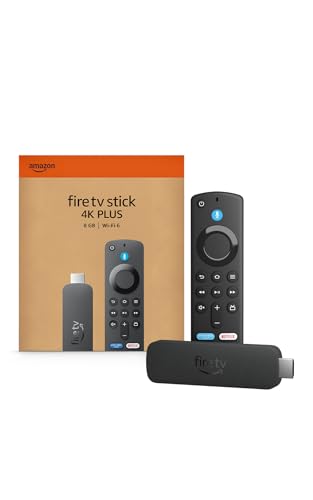
Amazon Fire TV Stick 4K Max
This stick plugs directly into an HDMI port, skipping the external box footprint of the Roku Ultra or NVIDIA Shield TV Pro entirely. Wi-Fi 6E support helps maintain a stable connection in homes with heavy network traffic from other devices. Hands-free Alexa lets viewers search or control playback by voice without pressing the remote’s microphone button.
Pros
- Compact stick design has no external box to place
- Wi-Fi 6E helps in homes with many connected devices
- Hands-free Alexa works without pressing the remote first
Cons
- No Ethernet port option without a separate adapter
- Home screen promotes Amazon content more heavily than Roku’s
Apple TV 4K (3rd Generation)
An A15 Bionic chip gives this box more raw processing power than most streaming competitors, useful for smoother app transitions and gaming through Apple Arcade. AirPlay lets content cast directly from an iPhone or Mac without a separate app on the source device. Thread networking support lets it act as a smart home hub for compatible Matter devices.
Pros
- A15 Bionic chip outperforms most rivals for app speed
- AirPlay simplifies casting from Apple devices
- Thread support allows smart home hub functionality
Cons
- Costs more than most other streaming devices here
- Best ecosystem benefits require other Apple devices
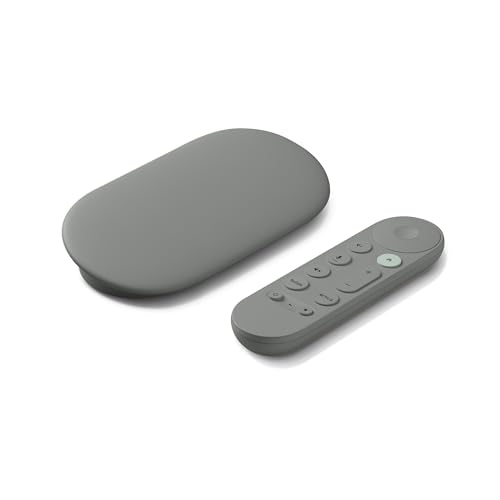
Google TV Streamer
Replacing the Chromecast with Google TV, this box adds a dedicated remote and a built-in hub for Google Home and Matter smart devices. Wired Ethernet and Wi-Fi are both available, a step up from stick-style Google devices that rely on Wi-Fi alone. Its Google TV interface shares the same recommendation-driven home screen found on Google TV sets from Hisense, TCL and Sony.
Pros
- Built-in Google Home hub controls compatible smart devices
- Wired Ethernet option beyond Wi-Fi only connectivity
- Shares the same app library as Google TV smart TVs
Cons
- Home screen shows more sponsored content than Roku’s interface
- Less raw processing power than the Apple TV 4K or Shield TV Pro
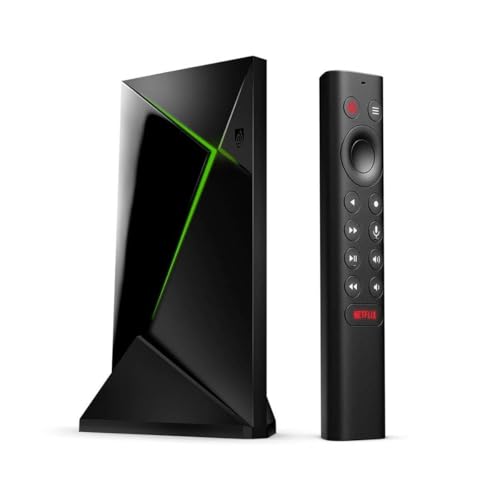
NVIDIA Shield TV Pro
An NVIDIA Tegra X1+ processor gives this box enough power for GeForce NOW cloud gaming and demanding Plex media server tasks that other streaming boxes cannot handle as smoothly. Two USB ports support external storage or a wired game controller, a feature missing from stick-style competitors entirely. Android TV underlies the interface, giving access to a broader sideloaded app selection than more locked-down platforms.
Pros
- Strong processing power suits cloud gaming and media server tasks
- USB ports support external storage and wired controllers
- Android TV base allows broader app and sideloading flexibility
Cons
- Costs more than most stick-style streaming devices
- Larger box footprint than compact sticks like the Fire TV Stick
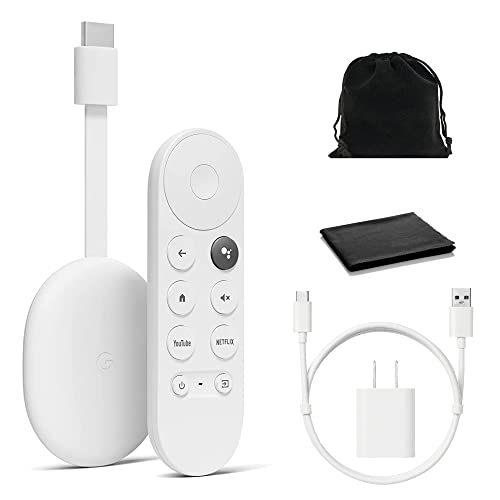
Chromecast with Google TV (HD)
This smaller, HD-focused Chromecast keeps cost down compared to the 4K Google TV Streamer while still running the full Google TV interface and app library. It suits secondary TVs or smaller screens where 4K resolution matters less than on a main living room display. A compact remote and plug design keep setup simple for a guest room or bedroom.
Pros
- Lower cost than 4K streaming devices in this list
- Runs the same Google TV app library as pricier models
- Compact design suits secondary TVs or smaller rooms
Cons
- Capped at 1080p HD, not suitable for a 4K television
- Lower storage than the full Google TV Streamer

Walmart Onn 4K Streaming Box
Running Google TV at a notably lower cost than Google’s own Streamer, this box covers 4K HDR playback and the full Google TV app library for budget-conscious buyers. Performance lags slightly behind pricier boxes when switching between demanding apps, though everyday streaming stays smooth. It includes a standard remote without the extra smart home hub features found on the Google TV Streamer.
Pros
- Lower cost than Google’s own 4K Google TV Streamer
- Full 4K HDR support and complete Google TV app library
- Simple setup similar to other Google TV devices
Cons
- Performance lags slightly behind pricier boxes on demanding apps
- No built-in smart home hub features like the Google TV Streamer
How to pick the right one
What separates streaming devices beyond app availability Nearly every streaming device today covers the same major apps, so the real differences show up in processor speed, remote features and extra capabilities like gaming or smart home hub support. A faster processor, like the Apple A15 Bionic or NVIDIA Tegra X1+, matters most for households that frequently switch between demanding apps or stream in 4K HDR. Remote design and voice assistant choice affect daily convenience more than most buyers expect before using one.
Matching a device to an existing smart home setup Households using Google Home or Matter devices gain the most from the Google TV Streamer’s built-in hub feature. Apple device owners benefit from the Apple TV 4K’s AirPlay and Thread support for a more connected setup. Alexa-first homes get the smoothest experience from the Fire TV Stick 4K Max, since hands-free voice control matches existing Echo device habits.
Gaming and media server capability The NVIDIA Shield TV Pro stands apart for GeForce NOW cloud gaming and Plex media server performance, backed by USB ports most competitors skip entirely. The Apple TV 4K supports Apple Arcade titles at a smaller scale than dedicated cloud gaming. Buyers who do not game on their streaming device can ignore this factor entirely and focus on app speed and remote features instead.
Budget options and secondary room setups A primary living room TV benefits most from a faster, more capable device like the Roku Ultra or Apple TV 4K. Secondary bedrooms or guest rooms can use a lower-cost option like the Walmart Onn 4K Streaming Box or the HD-only Chromecast with Google TV without a noticeable downside for casual viewing. Buyers furnishing multiple rooms should reserve premium devices for the main screen and fill in the rest with budget picks.
How they stack up
| # | Model | Processor | Best for | Score | Price |
|---|---|---|---|---|---|
| 1 | Roku Ultra | Quad-core | Best Overall | 9.2 | Check price |
| 2 | Amazon Fire TV Stick 4K Max | Quad-core | Best Compact Stick | 9.0 | Check price |
| 3 | Apple TV 4K (3rd Generation) | Apple A15 Bionic | Best for Apple Ecosystem Households | 8.9 | Check price |
| 4 | Google TV Streamer | Quad-core | Best for Google Smart Home Integration | 8.7 | Check price |
| 5 | NVIDIA Shield TV Pro | NVIDIA Tegra X1+ | Best for Gaming and Local Media Servers | 8.6 | Check price |
| 6 | Chromecast with Google TV (HD) | Quad-core | Best Budget Pick | 8.2 | Check price |
| 7 | Walmart Onn 4K Streaming Box | Quad-core | Best Low-Cost 4K Option | 8.0 | Check price |
Common questions
Which streaming device is fastest?
The Apple TV 4K’s A15 Bionic chip and the NVIDIA Shield TV Pro’s Tegra X1+ processor both outperform most rivals for app switching speed and gaming.
Do I need a 4K streaming device if my TV is not 4K?
No. A 1080p-focused device like the Chromecast with Google TV HD covers standard and HD content without paying for unused 4K support.
Can a streaming device replace my smart TV’s built-in apps?
Yes, for most users a streaming device like the Roku Ultra or Fire TV Stick 4K Max offers faster performance and quicker software updates than an aging smart TV’s built-in platform.
What is the difference between a streaming stick and a streaming box?
A stick, like the Fire TV Stick 4K Max, plugs directly into the HDMI port without an external case. A box, like the Roku Ultra or NVIDIA Shield TV Pro, sits separately and often includes extra ports.
Does a streaming device need Wi-Fi?
Most rely on Wi-Fi, though devices like the Roku Ultra and Google TV Streamer also support wired Ethernet for a steadier connection.
Can I play games on a streaming device?
The NVIDIA Shield TV Pro supports cloud gaming through GeForce NOW, and the Apple TV 4K supports Apple Arcade, though neither matches a dedicated gaming console.
Which streaming device works best with Alexa?
The Amazon Fire TV Stick 4K Max offers the deepest Alexa integration, including hands-free voice control without pressing the remote first.
Do budget streaming boxes support 4K HDR?
Yes. The Walmart Onn 4K Streaming Box supports 4K HDR at a lower cost than premium devices, though app switching speed trails pricier options.
Can a streaming device act as a smart home hub?
The Apple TV 4K and Google TV Streamer both support acting as a smart home hub for Thread or Matter compatible devices.
Final word
The Roku Ultra is the strongest overall pick for most households thanks to its speed, simple interface and remote finder feature. Buyers who want cloud gaming or a Plex media server should choose the NVIDIA Shield TV Pro instead, since its processor and USB ports outperform every other device here for that use. Anyone furnishing a secondary room on a budget can skip the premium options and rely on the Walmart Onn 4K Streaming Box for solid everyday streaming.
Marcus Chen
Marcus covered consumer electronics for enthusiast tech publications for six years before joining ChoiceCrest. He specializes in translating manufacturer spec sheets into plain-language buying advice, with a focus on audio, computing accessories and smart-home gear.


