Stream Decks Compared for Streamers and Video Editors
The Elgato Stream Deck MK.2 leads with 15 customizable buttons and the widest plugin support for streaming software. Larger streaming setups needing more shortcuts should consider the Elgato Stream Deck XL instead, while video editors should look at the Loupedeck CT for its dial-based timeline control.
The Elgato Stream Deck MK.2 takes the top spot because its 15 LCD buttons and deep plugin library cover more streaming software integrations than any competitor here. Its main limitation is button count, since larger overlays or scene collections can outgrow 15 slots quickly. Streamers running many scenes or sources should look at the Elgato Stream Deck XL instead.
We compared button or control count, software compatibility and editing-specific features across seven current control decks rather than ranking them by brand alone. Streamers, video editors and photo editors each use these devices differently, so the right pick depends more on the actual software workflow than on raw button count.
How to pick the right one
What to look for in a control deck Control type sets the first fork in the road, since a grid of flat buttons suits quick one-tap actions like scene switches while dials suit gradual adjustments like volume or color temperature. Software support determines whether a deck actually plugs into the programs someone already uses, and streaming tools, video editors and photo editors each have different levels of plugin support across these devices. Desk space matters more than it seems at first, since a 32-button deck takes up considerably more room than a compact 6-button model. Use case, whether live streaming or offline editing, should guide the choice more than overall button count.
Button grids versus dial-based control The Elgato Stream Deck MK.2, Stream Deck XL and Stream Deck Mini all stick to a straightforward button grid, differing mainly in how many shortcuts fit before folders become necessary. The Stream Deck + adds dials and a touch strip on top of a smaller button grid, suited to streamers who also want analog-style control. The Loupedeck Live, Loupedeck CT and TourBox Elite lean further into dials and wheels, aimed more at editors adjusting sliders and color values than streamers tapping scene buttons.
Best fit for streamers managing scenes and audio Streamers running a simple one-camera setup with a handful of scenes should start with the Elgato Stream Deck Mini, since its 6 buttons cover the essentials without wasted space. Streamers managing several scenes, overlays and audio sources at once should move up to the Elgato Stream Deck XL instead, trading desk space for fewer folder dives mid-stream. Anyone who also wants analog control over things like mic volume or transition speed should consider the Elgato Stream Deck + over either button-only option.
Best fit for video and photo editors Video editors doing regular color grading work should look at the Loupedeck CT, since its dedicated color wheel dials map directly onto Premiere Pro and Lightroom controls. Photo and video editors who prefer tactile mechanical dials over a touch screen should choose the TourBox Elite instead, especially for single-hand operation alongside a mouse or tablet pen. Streamers who occasionally edit highlight clips can get reasonable dual-use value from the Loupedeck Live, which covers both OBS and common editing software at a lower price than the CT.
The best picks, ranked

Elgato Stream Deck MK.2
Elgato’s Stream Deck MK.2 gives each of its 15 buttons a small LCD icon that updates based on the assigned action, making it clear at a glance what each button does. A large plugin library covers OBS, Streamlabs, Discord and most major streaming software without custom scripting. Multi-action folders let one button open a set of related shortcuts instead of cluttering the main grid.
Pros
- Deep plugin library covers most major streaming software
- LCD icons make each button’s function clear at a glance
- Folders keep a large shortcut set organized on one device
Cons
- 15 buttons can fill up quickly on complex streaming setups
- Requires a free USB-A or USB-C port on the computer
Elgato Stream Deck XL
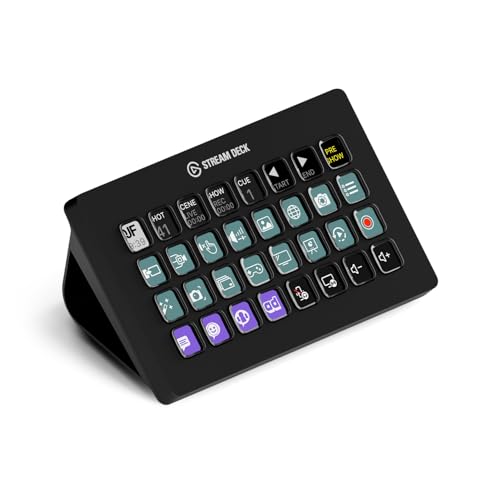
The Stream Deck XL doubles down on button count with 32 LCD keys, suited to streamers juggling many scenes, overlays and audio sources at once. It runs the same software and plugin ecosystem as the smaller MK.2, so profiles and button actions transfer between the two. The larger footprint takes up noticeably more desk space in exchange for fewer folder dives during a live stream.
Pros
- 32 buttons reduce the need to dig through folders live
- Same plugin library and software support as smaller Stream Decks
- Profiles transfer easily from other Stream Deck models
Cons
- Takes up significantly more desk space than compact models
- Costs more than the standard MK.2 for the extra buttons

Elgato Stream Deck Mini
Elgato shrinks the Stream Deck down to 6 buttons with the Mini, aimed at streamers who only need a handful of critical shortcuts like scene switches or a mute toggle. It still runs the same core software and most major plugins, just with less room for folders before things feel cramped. The smaller footprint fits easily next to a keyboard without crowding a compact desk.
Pros
- Small footprint fits tight desk spaces easily
- Covers core streaming shortcuts without extra bulk
- Lower price than larger Stream Deck models
Cons
- 6 buttons limit how many shortcuts fit without folders
- Frequent folder diving needed for more complex setups

Elgato Stream Deck +
The Stream Deck + combines 8 LCD buttons with 4 rotary dials and a touch strip, adding analog-style control for things like audio levels or scene transition speed that a flat button cannot represent well. Dials can be pressed as well as turned, giving each one two functions in a tight space. The touch strip adds sliders or quick app shortcuts beneath the dials.
Pros
- Dials suit audio and transition controls better than flat buttons
- Touch strip adds another layer of quick shortcuts
- Press-and-turn dials pack two functions into one control
Cons
- Fewer flat buttons than the MK.2 for simple scene switching
- Learning dial-based workflows takes longer than button-only setups
Loupedeck Live
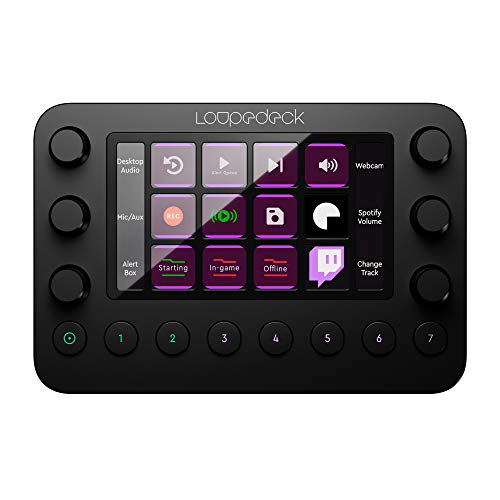
Loupedeck undercuts Elgato’s pricing with the Live, pairing 6 touch-screen buttons with 6 dials and 8 customizable buttons around the edge. Software support covers streaming tools like OBS alongside creative apps like Photoshop and Premiere Pro, broadening its use beyond streaming alone. Profiles switch automatically based on which application is currently active on screen.
Pros
- Lower price than Elgato’s dial-equipped Stream Deck +
- Automatic profile switching saves manual setup per app
- Works across both streaming and creative editing software
Cons
- Smaller plugin community than Elgato’s Stream Deck ecosystem
- Touch buttons feel less tactile than physical LCD keys
Loupedeck CT (Creative Tool)
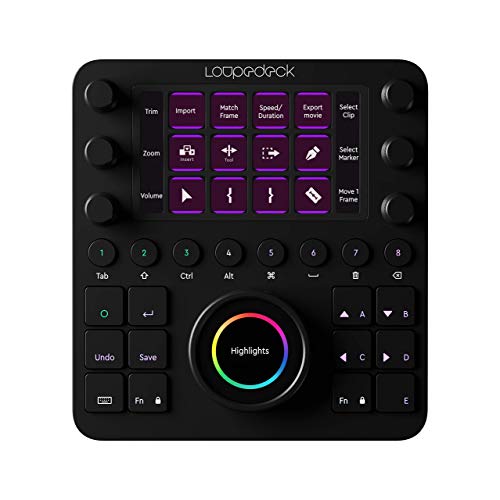
Loupedeck aims the CT squarely at video and photo editors, with a large central dial for timeline scrubbing alongside smaller dials mapped to color wheels in software like Premiere Pro or Lightroom. A row of touch-screen buttons adjusts based on the active editing tool, reducing menu digging during a color grade. Twelve customizable side keys cover frequently used keyboard shortcuts.
Pros
- Dedicated dials map naturally to color grading controls
- Central dial speeds up timeline scrubbing in video editors
- Touch buttons adapt automatically to the active editing tool
Cons
- Large footprint takes up significant desk space
- Higher price than button-focused streaming decks

TourBox Elite
TourBox builds the Elite around physical dials, a scroll wheel and a knob rather than touch screens, giving editors tactile feedback while nudging a slider or scrubbing through footage. Buttons and dials remap per application, covering Photoshop, Lightroom, Premiere Pro and several other creative tools. The console sits comfortably under one hand, leaving the other free for a mouse or tablet pen.
Pros
- Physical dials and wheel give tactile feedback touch screens lack
- Single-hand design frees the other hand for a mouse or pen
- Wide per-application remapping across major creative software
Cons
- No touch screen for visual confirmation of current settings
- Smaller user base than Elgato’s Stream Deck lineup
How they compare
| # | Model | Buttons | Best for | Score | Price |
|---|---|---|---|---|---|
| 1 | Elgato Stream Deck MK.2 | 15 LCD buttons | Best overall for streaming software control | 9.2 | Check price |
| 2 | Elgato Stream Deck XL | 32 LCD buttons | Best for large streaming setups needing more shortcuts | 8.9 | Check price |
| 3 | Elgato Stream Deck Mini | 6 LCD buttons | Best compact option for minimal desk space | 8.3 | Check price |
| 4 | Elgato Stream Deck + | 8 LCD buttons, 4 dials, 1 touch strip | Best for dial and touch strip control | 8.7 | Check price |
| 5 | Loupedeck Live | 6 touch buttons, 6 dials, 8 side buttons | Best budget alternative with dial-based control | 8.0 | Check price |
| 6 | Loupedeck CT (Creative Tool) | Central dial, multiple smaller dials, touch buttons, 12 side keys | Best for advanced video and photo editing | 8.5 | Check price |
| 7 | TourBox Elite | Mechanical dials, scroll wheel, knob, buttons | Best for precision editing control with physical dials and a wheel | 8.2 | Check price |
Common questions
What is the difference between the Stream Deck MK.2 and Stream Deck XL?
The MK.2 has 15 buttons suited to simpler setups, while the Stream Deck XL has 32 buttons for streamers managing more scenes and sources at once.
Are stream decks only useful for streaming?
No. Devices like the Loupedeck CT and TourBox Elite are built mainly for video and photo editing software rather than streaming tools.
Do stream decks work with OBS?
Yes. The Elgato Stream Deck lineup, Loupedeck Live and Loupedeck CT all support OBS through dedicated plugins.
What is the benefit of dials over buttons on a control deck?
Dials, found on the Stream Deck +, Loupedeck Live, Loupedeck CT and TourBox Elite, handle gradual adjustments like volume or color temperature more naturally than a flat button.
Is the Stream Deck Mini big enough for a full streaming setup?
It covers basic shortcuts well but suits simpler one-camera setups better than streams juggling many scenes, which fit the larger Stream Deck XL better.
Can a control deck help with video color grading?
The Loupedeck CT maps dedicated dials directly to color wheel controls in software like Premiere Pro and Lightroom, speeding up color grading work.
Do these devices need a constant internet connection?
No. All seven connect to a computer over USB-C or Bluetooth and run locally, needing internet only for initial software updates.
What is the best control deck for someone who both streams and edits video?
The Loupedeck Live covers both use cases reasonably well at a lower price, though dedicated editors may prefer the Loupedeck CT for deeper editing control.
Can I use a mouse alongside a control deck like the TourBox Elite?
Yes. The TourBox Elite is designed for single-hand operation specifically so the other hand stays free for a mouse or a tablet pen.
Do stream decks support custom icons for each button?
Yes. The Elgato Stream Deck lineup displays a custom icon on each LCD button, making it easy to recognize an action at a glance.
Our pick
Most streamers should start with the Elgato Stream Deck MK.2 for its button count and deep plugin support. Larger streaming setups with many scenes should upgrade to the Elgato Stream Deck XL instead. Video and photo editors doing regular color work should skip button-only decks entirely and choose the Loupedeck CT.
Marcus Chen
Marcus covered consumer electronics for enthusiast tech publications for six years before joining ChoiceCrest. He specializes in translating manufacturer spec sheets into plain-language buying advice, with a focus on audio, computing accessories and smart-home gear.