Standing Desk Converters Compared for Every Desk Size
Vari Pro Plus 36 leads this roundup for its vertical spring lift and fully assembled two tier build. FlexiSpot M2B matches that stability for less through a gas spring X frame. VIVO DESK-V000K is the budget pick that still supports a monitor and laptop combination.
Vari Pro Plus 36 tops this list for a vertical spring lift that keeps monitors steady at any height. FlexiSpot M2B delivers nearly the same stability through a gas spring X frame, for less. VIVO DESK-V000K rounds out the budget tier while still handling a monitor and laptop pairing.
Choosing a converter is harder than choosing a full desk, since the unit has to support a monitor load on top of furniture that was not built for it. We compared lift mechanisms, stated weight capacities, footprint dimensions and keyboard tray designs across seven listings. Owner feedback on stability and shipping damage rounded out the comparison.
The shortlist, ranked

Vari Pro Plus 36 Standing Desk Converter
Vari ships this converter fully assembled, so setup takes minutes instead of an afternoon with a screwdriver. A spring assisted lift moves in a straight vertical path, keeping the monitor at the same distance from your eyes whether you sit or stand. Two decks separate the keyboard from the display, matching the drop height ergonomists recommend for wrist comfort.
Pros
- Arrives fully assembled
- Vertical lift keeps monitor steady
- Stable even at full height
Cons
- Adds real weight to the desk
- Needs deep desk surface
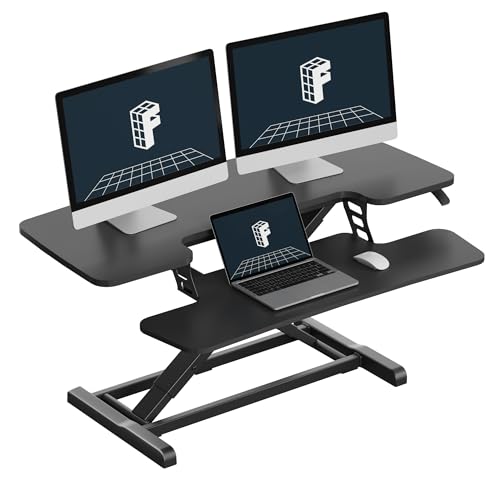
FlexiSpot M2B Standing Desk Converter
FlexiSpot pairs a gas spring lift with an X frame base, matching pricier converters on smoothness. Side handles raise or lower the whole unit in one motion, with no separate release lever needed. Owners report the removable keyboard tray adapts well to shared desks where someone else prefers a single flat surface.
Pros
- Removable keyboard tray
- One motion height adjustment
- Ships pre assembled
Cons
- X frame arcs slightly forward as it rises
- Handles require a firm grip

VIVO DESK-V000K Height Adjustable Standing Desk Converter
VIVO built its name on affordable monitor mounts, and this converter follows that formula. Gas spring assist and a two tier surface hold a monitor and laptop combination without strain. Finish quality trails the premium picks, according to the listing photos, but the lift mechanism performs the same core job.
Pros
- Low cost for the surface size
- Wide height adjustment range
- Handles a monitor plus laptop
Cons
- Basic finish compared to pricier units
- Some flex reported at maximum height
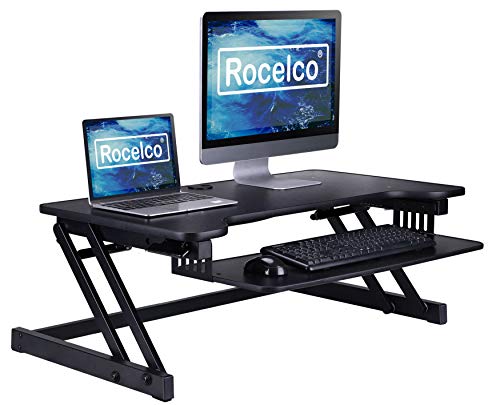
Rocelco DADR Deluxe Standing Desk Converter
Rocelco’s deluxe model extends higher than most converters in this lineup, a detail that matters for anyone over six feet. Gas spring assist supports a heavier load than entry level units. An optional monitor arm mounts directly to the frame, freeing the main deck for notes or a tablet.
Pros
- Reaches higher than most rivals
- Higher stated weight capacity
- Accepts an optional monitor arm
Cons
- Larger footprint needs a bigger desk
- Monitor arm requires separate assembly

Ergotron WorkFit-T Sit Stand Desktop Workstation
Ergotron built the WorkFit-T around Constant Force lift technology, adjustable with one finger and stopping exactly where released. A single surface replaces the usual two tier layout, which some buyers prefer for extra desk space. Commercial grade construction keeps the unit still while typing at full standing height.
Pros
- Smooth one finger adjustment
- No wobble while typing
- Commercial grade build quality
Cons
- Single tier raises keyboard height
- Costs more than most rivals here

FEZIBO Standing Desk Converter
FEZIBO targets desks too narrow for a full 36 inch converter, using a smaller frame and lighter overall build. A laptop plus a single monitor fits comfortably, though dual screen setups push past its comfort zone. Corner desks and shared tables often only accept a converter this size.
Pros
- Fits desks too small for larger units
- Light enough to reposition often
- Priced for tight budgets
Cons
- Lower stated weight capacity
- Limited room for extra peripherals

Seville Classics AIRLIFT Sit Stand Desk Converter
Seville Classics designed the AIRLIFT around pneumatic lift assist, suited to laptop and single monitor use rather than heavy multi screen setups. A squeeze handle raises or lowers the surface in seconds. Surface material resists scuffing from a laptop sliding on and off daily, according to owner feedback.
Pros
- Fast pneumatic height changes
- Scuff resistant surface finish
- Good fit for laptop only setups
Cons
- Not rated for heavy monitor loads
- Some assembly required out of the box
How to choose
What matters most in a standing desk converter Three factors decide whether a converter earns its spot on your desk: lift mechanism, weight capacity and footprint. Gas spring and pneumatic lifts raise the surface with a squeeze handle, while spring assisted vertical lifts move straight up without arcing forward. Weight capacity needs to cover your actual monitors, laptop and dock, not just the base unit. Footprint determines whether the converter leaves room for anything else on your desk.
How much desk depth does a converter need Depth trips up more buyers than width. A converter has to sit far enough back that the keyboard tray does not overhang the desk edge when extended. Measure your usable surface first, then subtract anything bolted down like a monitor arm base. A 36 inch converter on a 40 inch deep desk leaves almost no room for a mouse pad or notebook.
Single tier vs two tier: which keyboard tray layout is better Two tier converters drop the keyboard below the monitor surface, matching the elbow angle most ergonomists recommend. Single tier designs put everything on one plane, which suits anyone who writes by hand or spreads out paperwork. Neither layout is wrong on its own. The choice comes down to whether you value wrist comfort or a bigger flat surface.
Best converter setup for tall users, small desks and laptop only workflows Height matters for anyone over six feet, since many converters top out just below standing eye level for taller frames. Small or corner desks need a narrower unit with a lighter frame to avoid overhang. Laptop only setups get by with lower weight capacity and a compact single tray, unlike a dual monitor rig that needs headroom to spare. Match the converter to your heaviest realistic use case, not the average one.
Side by side
| # | Model | Width | Best for | Score | Price |
|---|---|---|---|---|---|
| 1 | Vari Pro Plus 36 Standing Desk Converter | 36 in surface | Best overall | 9.4 | Check price |
| 2 | FlexiSpot M2B Standing Desk Converter | 35 in surface | Best value | 9.2 | Check price |
| 3 | VIVO DESK-V000K Height Adjustable Standing Desk Converter | 36 in surface | Best budget | 9.0 | Check price |
| 4 | Rocelco DADR Deluxe Standing Desk Converter | 46 in option available | Best for tall users | 8.8 | Check price |
| 5 | Ergotron WorkFit-T Sit Stand Desktop Workstation | Constant Force technology | Best for stability | 8.6 | Check price |
| 6 | FEZIBO Standing Desk Converter | Narrow surface options | Best for small desks | 8.3 | Check price |
| 7 | Seville Classics AIRLIFT Sit Stand Desk Converter | Pneumatic | Best for laptops | 8.0 | Check price |
Questions worth asking
Are standing desk converters worth it compared to a full standing desk?
Converters cost less and let you keep a desk you already own. They take up more surface space than a built in sit stand desk, but the ergonomic benefit for most home offices is nearly identical.
How much weight can a standing desk converter hold?
Stated capacities in this roundup range from about 22 to 40 pounds. Add up your monitors, laptop and dock before choosing, since a rating close to your total load leaves no safety margin.
Do standing desk converters wobble at full height?
Wobble increases with height, load and how much the desk underneath flexes. A sturdy desk base paired with a vertical lift mechanism reduces movement noticeably compared to an arcing X frame.
Will a standing desk converter fit a corner desk?
Often yes, though angled surfaces reduce usable depth. Measure the flat area available and confirm the converter base rests entirely on solid surface before ordering.
What is the difference between a two tier and single tier converter?
Two tier models separate the keyboard from the monitor surface for better wrist angles. Single tier models give one larger flat surface, which some users prefer for writing or spreading out documents.
How long should you stand at a converter each day?
Common ergonomic guidance suggests alternating position every thirty to sixty minutes rather than standing continuously. Comfort should guide the schedule more than any fixed total.
Are standing desk converters hard to assemble?
Several models in this roundup ship fully assembled, which is worth prioritizing if you want to skip setup. Units that do need assembly are usually straightforward, though having a second person helps with the weight.
Can you attach a monitor arm to a standing desk converter?
Some models include a mounting point or a clamp compatible rear edge, like the Rocelco DADR Deluxe. Check the listing specifically, since many converter surfaces are too thin or shallow for a standard clamp.
Standing desk converter vs full standing desk: which should you buy?
A converter suits renters or anyone who wants to keep their current desk. A full standing desk suits a permanent home office setup where surface space and cable management matter more.
Final word
Vari Pro Plus 36 earns its place by arriving assembled and lifting straight up without wobble, exactly what the category should deliver. FlexiSpot M2B is the sharper buy for most budgets, matching that stability through a lighter frame. VIVO DESK-V000K proves a genuinely low cost converter can still support two screens.
Marcus Chen
Marcus covered consumer electronics for enthusiast tech publications for six years before joining ChoiceCrest. He specializes in translating manufacturer spec sheets into plain-language buying advice, with a focus on audio, computing accessories and smart-home gear.


