Smart Paper That Feels Like Paper: Top Picks
For most people, the reMarkable 2 is the top pick because it offers the most paper-like writing experience and a distraction-free interface. Its main advantage is the textured surface and low-latency stylus that make writing feel natural. However, it lacks a front light, so you need external lighting to use it in the dark.
Specialty paper smart devices have evolved beyond simple e-readers. They now offer writing, note-taking, and even color displays, all while maintaining the feel of paper. But with so many options, choosing the right one can be tough.
We’ve compared the leading models based on specifications, user reviews, and features. Whether you’re a student, professional, or avid reader, our guide will help you find the best smart paper for your needs.
The shortlist, ranked

reMarkable 2
The reMarkable 2 is a slim, 4.7 mm tablet designed specifically for writing and reading. It uses a 10.3 inch monochrome E Ink display with a textured surface that mimics paper. The Marker Plus stylus offers low latency and high precision, and the device has no distractions like web browsing or email. It syncs to cloud services and offers handwriting conversion, but it lacks a front light and is not waterproof.
Pros
- Best in class writing feel
- Ultra thin and lightweight
- Distraction free
Cons
- No front light
- Expensive with required accessories

Boox Note Air3 C
The Boox Note Air3 C is a 10.3 inch color E Ink tablet that runs on Android 12. It offers a vibrant color display for highlighting and annotating, and it can run various apps. It has a built-in front light and stereo speakers, and it supports stylus input. However, the color screen is darker than monochrome, and the battery life is shorter.
Pros
- Color display for vivid highlighting
- Android apps available
- Adjustable front light
Cons
- Color resolution is lower
- Heavier and thicker than monochrome

Supernote A5 X
The Supernote A5 X is a 10.3 inch e-ink tablet that focuses on note organization. It uses a unique file system with keywords and links to jump between notes. The stylus requires no charging and the screen has a soft feel. It offers long battery life and a mobile companion app, but it has no color and limited app support.
Pros
- Excellent file organization tools
- No charging needed for stylus
- Lightweight and durable
Cons
- No front light
- Limited third-party apps
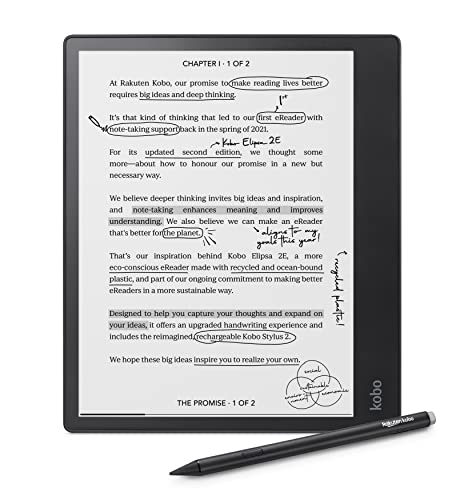
Kobo Elipsa 2E
The Kobo Elipsa 2E is a 10.3 inch e-reader with note-taking capabilities. It has a sharp 227 PPI display and a comfortable front light. It integrates seamlessly with the Kobo bookstore, and you can annotate ebooks directly. The stylus is included, but the writing feel is less paper-like than others. It also lacks Android apps.
Pros
- Great for Kobo bookstore users
- Comfortable front light
- Includes stylus
Cons
- Writing feel not as natural
- Not suitable for Android apps

Kindle Scribe
The Kindle Scribe is Amazon’s first note-taking e-reader. It has a 10.2 inch 300 PPI display, the highest resolution in this roundup. It offers a premium feel with a flush front light, and it integrates with Kindle books and Audible. You can write on sticky notes in books, but the note organization is less advanced than others.
Pros
- Sharp 300 PPI display
- Native Kindle store access
- Premium build with front light
Cons
- Note organization is basic
- Limited to Amazon ecosystem
Boox Tab Ultra C
The Boox Tab Ultra C is a color e-ink tablet with a powerful processor. It can run Android apps, and it has a fingerprint sensor and a camera. It offers a fast refresh rate, but it is heavier and more expensive. It also has a shorter battery life than monochrome models.
Pros
- Powerful performance
- Large storage capacity
- Android apps and camera
Cons
- Heavier and thicker
- Battery drains faster

Sony Digital Paper DPT-CP1
The Sony Digital Paper DPT-CP1 has a 13.3 inch display, ideal for reading A4-sized documents. It is extremely thin and light, and it supports PDF annotation. It has a long battery life, but it is expensive and lacks a front light. Its software is limited to basic note-taking.
Pros
- Large screen for full-size documents
- Ultra thin and light
- Excellent for PDF reading
Cons
- Very expensive
- No front light
How they compare
| # | Model | Display | Best for | Score | Price |
|---|---|---|---|---|---|
| 1 | reMarkable 2 | 10.3 inch E Ink, 1872 x 1404, 226 PPI | Most paper-like writing experience | 9.4 | Check price |
| 2 | Boox Note Air3 C | 10.3 inch Kaleido 3, 2480 x 1860 (B/W), 1240 x 930 (color) | Color note-taking and reading | 9.1 | Check price |
| 3 | Supernote A5 X | 10.3 inch E Ink, 1872 x 1404, 226 PPI | Organized note-taking and file management | 9.0 | Check price |
| 4 | Kobo Elipsa 2E | 10.3 inch E Ink Carta 1200, 1404 x 1872, 227 PPI | Reading and note-taking with Kobo store | 8.8 | Check price |
| 5 | Kindle Scribe | 10.2 inch E Ink, 300 PPI | Amazon ecosystem and large display | 8.7 | Check price |
| 6 | Boox Tab Ultra C | 10.3 inch Kaleido 3, 2480 x 1860 (B/W), 1240 x 930 (color) | Productivity and color display | 8.5 | Check price |
| 7 | Sony Digital Paper DPT-CP1 | 13.3 inch E Ink Mobius, 2200 x 1650, 207 PPI | Large screen for documents | 8.0 | Check price |
What matters most
Frequently asked questions
Can smart paper tablets replace regular paper?
Many users find them to be good replacements for paper because they feel similar and offer digital organization. However, the feel is not exactly the same, and some people may still prefer physical paper for certain tasks.
Do smart paper tablets have a front light?
Some models have a front light, like the Kindle Scribe and Kobo Elipsa, while others like the reMarkable 2 and Supernote A5 X do not. If you plan to use the device in low light, choose one with a front light.
Can I read ebooks on a smart paper tablet?
Yes, most smart paper tablets support ebook reading. Some have access to specific stores like Kindle or Kobo, while others, like Boox, can run various reading apps.
Can I upload my own PDFs and documents?
Yes, all these devices allow you to upload documents via cloud services or USB. They are particularly good for annotating PDFs.
What is the writing latency on these devices?
The latency is very low on most models, often under 30 milliseconds. The reMarkable 2 and Supernote are praised for their low latency, making writing feel responsive.
Are smart paper tablets good for artists?
They are suitable for sketching and drawing, but they are not as advanced as graphics tablets. They lack pressure sensitivity levels and color options in monochrome models.
How long does the battery last?
Battery life varies from about a week to several weeks. Monochrome models typically last longer because they use less power than color models.
Can I sync my notes to my phone or computer?
Yes, most devices offer cloud sync and companion apps. You can export notes as PDFs or text files.
Do these devices have a web browser?
Some do, like the Boox tablets, because they run Android. Others, like reMarkable and Supernote, do not have a full browser to keep you focused.
Which is better, reMarkable 2 or Supernote A5 X?
Both are excellent for writing. The reMarkable 2 has a more paper-like feel, while the Supernote offers better file organization and a stylus that never needs charging. Your choice depends on which features matter more to you.
Our take
If you want the closest feel to writing on paper, the reMarkable 2 is the clear winner. For a color display and app compatibility, go with the Boox Note Air3 C. For a large document reader, the Sony Digital Paper is the best, despite its high price. Choose based on your priority: writing feel, color, or screen size.
Marcus Chen
Marcus covered consumer electronics for enthusiast tech publications for six years before joining ChoiceCrest. He specializes in translating manufacturer spec sheets into plain-language buying advice, with a focus on audio, computing accessories and smart-home gear.
You might also need

Top Picks for Portable Printer Paper That Won’t Let You Down

Top Graph Paper Picks for School Projects and Math Classes

Top Smart Rings for Health Tracking on the Go
