Speaker Isolation Pads: Which Type Stops Desk Rattle
The IsoAcoustics ISO-L8R155 leads for tilt-adjustable decoupling on desktop monitors. Bookshelf speakers on shelving suit the Primacoustic Recoil Stabilizer Small better, while larger studio monitors need the Auralex MoPAD-XL. Each type separates the cabinet from its surface, cutting resonance transfer without touching the drivers or crossover.
Vibration from a speaker cabinet travels straight into whatever surface it sits on. A desk or shelf then resonates along with the low end, muddying bass and blurring stereo imaging. Isolation pads break that link using foam, rubber, or elastomer, and the right choice depends on cabinet weight, footprint, and whether the monitors need tilting toward ear level.
Manufacturer specifications for material, weight capacity, and tilt range were compared across current Amazon listings. Owner feedback on wobble, footprint fit, and long-term foam or elastomer compression was cross-checked against those specs.
The shortlist, ranked

IsoAcoustics ISO-L8R155
A spring-loaded elastomer core sits inside an ABS shell, decoupling monitors from a desk. Rearward tilt angles tweeters toward ear level without stacking books or wedges underneath. Owners report a noticeable tightening of bass definition on nearfield monitors.
Pros
- Tilt adjustment aligns tweeters at ear level
- Elastomer core resists compression over time
- Sold and priced per stand for exact pairs
Cons
- Taller profile raises monitors more than flat pads
- Undersized for monitors over 22 lbs

Primacoustic Recoil Stabilizer Small
Two MDF plates sandwich a closed-cell foam layer, isolating small bookshelf cabinets from bookcases and stands. A low profile keeps speakers close to their original height on the shelf. It ships as a pair sized for compact two-way monitors.
Pros
- Low profile fits tight shelf clearances
- MDF plates resist sagging under sustained weight
- Foam layer dampens shelf-borne vibration
Cons
- No tilt option for ear-level angling
- Footprint too small for larger three-way cabinets

Auralex MoPAD
These acoustic foam wedges flip between flat and angled orientations depending on desk height. Two pads cover one monitor, so a stereo pair needs two sets. Tight budgets favor them over a rigid stand for softening desk resonance.
Pros
- Reversible wedge shape adds tilt without a stand
- Compact footprint suits small desks
- Lightweight enough for easy repositioning
Cons
- Foam compresses faster than elastomer under heavy monitors
- Four pads needed for a tilted pair
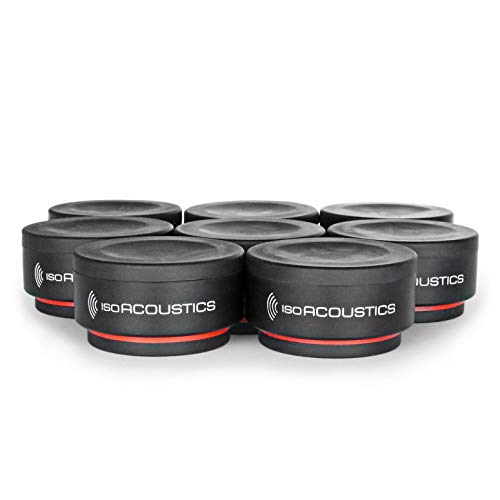
IsoAcoustics ISO-Puck
Puck-shaped isolators decouple small desktop monitors and studio headphone amps without raising them much. Four pucks per set spread contact points under a single cabinet or component. A flat design keeps a low center of gravity on crowded desks.
Pros
- Minimal height increase suits shallow desk clearance
- Elastomer holds shape better than foam over years
- Works under monitors, amps, or turntables alike
Cons
- No angling for tweeter alignment
- Four pucks per speaker adds to total footprint

Gator Frameworks GFW-SPK-ISOLGT
Studio monitors too big for standard foam wedges get a dedicated large-format pad here. A dense foam core spans an 11 inch square base, spreading weight evenly under wide cabinets. Two pads cover a full pair of larger monitors.
Pros
- Large base supports wide-cabinet monitors
- Highest weight capacity in this comparison
- Even foam distribution reduces edge sag
Cons
- Footprint overhangs smaller desks and stands
- No tilt for ear-level angling

Auralex MoPAD-XL
This scaled-up MoPAD variant handles monitors with bigger woofers than the standard pad supports. The same reversible wedge design allows flat or 15 degree tilt seating. It bridges the gap between desktop foam and full isolation stands.
Pros
- Larger surface fits mid-size studio monitors
- Reversible design still offers tilt without a stand
- Higher capacity than the standard MoPAD
Cons
- Bulkier profile takes up more desk space
- Foam still compresses faster than elastomer over years
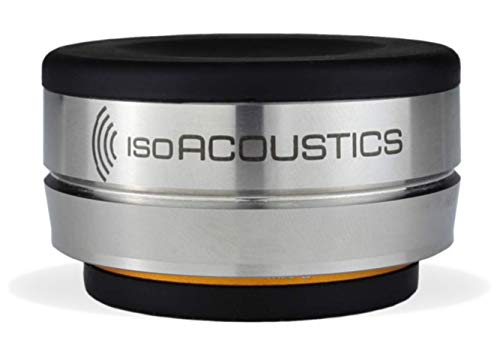
IsoAcoustics OREA Bass
OREA Bass feet target subwoofers and power amps rather than nearfield monitors. Each foot decouples vertically, and a set of four spreads under a single cabinet corner by corner. A compact footprint fits under gear with limited underside clearance.
Pros
- Individual feet fit tight under-cabinet clearance
- Vertical decoupling suits heavy subwoofer cabinets
- Set of four spreads load across all corners
Cons
- No tilt option, unsuited to nearfield angling
- Smaller footprint than dedicated monitor pads
Before you buy
What speaker isolation pads actually do A speaker cabinet transfers vibration into any surface it touches. Desks, shelves, and stands then resonate along with the low end, blurring bass and smearing stereo imaging. Foam, rubber, or elastomer pads absorb that energy before it reaches the surface. Materials differ in how they age: foam wedges compress gradually under sustained weight, while elastomer cores tend to hold their shape longer.
Matching pad size and weight capacity to your monitors A 20 lb capacity pad strained by a 25 lb cabinet compresses unevenly and loses its decoupling effect. Check a monitor’s actual weight and footprint before picking a pad. Corners go unsupported when the pad is narrower than the cabinet base, which can tip smaller stands. Large-format pads like the Gator GFW-SPK-ISOLGT exist specifically for wide, heavy cabinets that standard foam wedges cannot support.
Desktop monitors vs floor-standing speakers Small footprint pads or pucks work well for desktop nearfield monitors without crowding the desk. Floor-standing speakers and subwoofers carry more weight and need broader contact points, often four individual feet rather than one shared pad. Bookshelf speakers on shelving fall between the two, favoring a low-profile pad that will not push cabinets past the shelf’s edge.
Tilt and angle adjustment for ear-level listening Nearfield monitors sound most accurate when the tweeter points at ear level. Flat pads and pucks leave that angle fixed, which suits monitors already at the right height. Reversible foam wedges and tilt-adjustable stands solve the problem when a desk sits lower than the listening position. A few degrees of rearward tilt can correct the axis without stacking books under the cabinet.
The lineup, side by side
| # | Model | Material | Best for | Score | Price |
|---|---|---|---|---|---|
| 1 | IsoAcoustics ISO-L8R155 | Thermoplastic elastomer with ABS shell | Best overall | 9.4 | Check price |
| 2 | Primacoustic Recoil Stabilizer Small | Closed-cell foam over MDF base | Best for bookshelf speakers | 8.8 | Check price |
| 3 | Auralex MoPAD | Acoustic foam wedge | Best budget | 8.2 | Check price |
| 4 | IsoAcoustics ISO-Puck | Elastomer polymer disc | Best for compact desktop monitors | 8.6 | Check price |
| 5 | Gator Frameworks GFW-SPK-ISOLGT | High-density foam core | Best value for large monitors | 8.5 | Check price |
| 6 | Auralex MoPAD-XL | Acoustic foam wedge | Best for larger studio monitors | 8.7 | Check price |
| 7 | IsoAcoustics OREA Bass | Elastomer isolation foot | Best for subwoofers and amps | 8.0 | Check price |
Frequently asked questions
What do speaker isolation pads actually do?
They physically decouple a speaker cabinet from the surface beneath it, using foam, rubber, or elastomer to absorb vibration. Without one, the desk or shelf resonates along with the bass, blurring low-end detail and imaging.
Do isolation pads improve bass response?
Owners commonly report tighter, less muddy bass after adding pads, since the surface stops vibrating in sympathy with the cabinet. The effect is more noticeable on desks and thin shelving than on solid floor stands.
Which speaker isolation pads work best for desktop studio monitors?
Compact options like the IsoAcoustics ISO-Puck or ISO-L8R155 suit desktop monitors, since their footprint fits most 5 to 8 inch nearfield cabinets without crowding the desk.
Foam pads vs isolation stands, which is better?
Foam wedges cost less and work fine for lighter monitors, but they compress faster over years of use. Elastomer stands like the ISO-L8R155 hold shape longer and often add tilt adjustment foam pads lack.
Can isolation pads replace acoustic room treatment?
No. Isolation pads address vibration transfer into a surface, not room reflections or standing waves. Acoustic panels and bass traps handle a different problem and work best alongside, not instead of, isolation pads.
How much weight can a speaker isolation pad hold?
Capacity varies by model, from around 15 lbs per pad on lighter foam wedges up to 30 lbs on large-format pads built for bigger studio monitors. Check the pad’s rated capacity against your monitor’s actual weight before buying.
Are isolation pads worth it for bookshelf speakers?
On a hard shelf or bookcase, a low-profile pad like the Primacoustic Recoil Stabilizer Small reduces buzz and vibration transfer into the furniture. The benefit shrinks on speakers already on dedicated floor stands.
Is tilt adjustment necessary for near-field monitors?
It depends on desk height relative to the listener. Flat pads work fine if the tweeter already sits at ear level. A few degrees of tilt from a stand or reversible wedge corrects the axis when monitors sit low.
What is the difference between isolation pads and isolation feet?
Pads spread contact under the full cabinet base as one piece, while feet like the OREA Bass decouple each corner individually. Feet suit heavier gear or uneven weight distribution better than a single flat pad.
Are speaker isolation pads worth it for subwoofers?
Subwoofers move more air and vibrate harder than nearfield monitors, so a higher-capacity foot or pad like the OREA Bass or Gator GFW-SPK-ISOLGT handles the extra load better than lightweight foam wedges.
Our take
Cabinet weight and footprint should drive the choice more than brand name. Desktop setups do well with the ISO-L8R155 or ISO-Puck, bookshelf speakers benefit from the Recoil Stabilizer Small, and larger studio monitors need the added capacity of the MoPAD-XL or Gator GFW-SPK-ISOLGT.
Marcus Chen
Marcus covered consumer electronics for enthusiast tech publications for six years before joining ChoiceCrest. He specializes in translating manufacturer spec sheets into plain-language buying advice, with a focus on audio, computing accessories and smart-home gear.


