Smart Thermostats That Actually Lower a Power Bill
The Google Nest Learning Thermostat fits most households wanting a model that adapts to habits automatically. The Ecobee Smart Thermostat Premium suits buyers wanting room sensors for even temperature coverage. The Amazon Smart Thermostat fits budget conscious buyers wanting basic smart scheduling.
The Google Nest Learning Thermostat is the best overall pick here, building a schedule automatically from a household’s actual temperature adjustments rather than requiring manual programming from day one. Its main limitation is a higher cost than thermostats that rely on simple pre set schedules instead of true learning algorithms.
Smart thermostat value comes down to three things: how well it learns or adapts to a household’s actual patterns, whether it supports remote room sensors for homes with uneven temperatures, and whether it is compatible with a specific HVAC system, including older systems without a C-wire. This comparison weighs published compatibility specs and owner feedback on real world energy savings.
What to look for
Learning Algorithms vs Manual Scheduling A true learning thermostat, like the Google Nest Learning Thermostat, builds its schedule from observed behavior rather than requiring a household to program every setback and setpoint manually. Manual scheduling models, like the Amazon Smart Thermostat and Wyze Thermostat, still save energy through app based schedules and geofencing, but they require more upfront setup effort from the owner. Households that rarely think about their thermostat benefit most from true learning, while households that like fine grained manual control may prefer a model without automatic overrides.
Best for Homes With Uneven Temperatures Multi story homes or houses with poor duct balancing often run warmer or cooler in specific rooms than wherever the thermostat happens to be mounted. The Ecobee Smart Thermostat Premium ships with one remote sensor included specifically to address this, while the Honeywell Home T9 scales further, supporting up to 20 sensors for larger homes with many distinct zones. Averaging temperature readings across multiple rooms, rather than relying on a single thermostat location, produces more even comfort throughout a home.
Checking HVAC Compatibility Before Buying Not every smart thermostat works with every heating and cooling system, and the most common sticking point is the presence or absence of a C-wire, which provides continuous power to the thermostat. The Emerson Sensi Touch 2 specifically markets compatibility without a C-wire on most systems, while other models like the Nest Learning Thermostat and Honeywell T9 offer adapter accessories to work around a missing C-wire. Checking a current system’s wiring against a thermostat’s compatibility list before purchase avoids a frustrating return process.
When a Simpler, Cheaper Thermostat Makes Sense Not every household needs room sensors or a learning algorithm to see energy savings over a basic non programmable thermostat. The Amazon Smart Thermostat and Wyze Thermostat both deliver real app based scheduling and remote control at a price well below the Nest or Ecobee premium models. Renters or anyone planning to move within a year or two often find the lower upfront cost of these simpler models a better fit than investing in a premium thermostat with features they may not use fully.
The best picks, ranked

Google Nest Learning Thermostat (4th Gen)
Nest’s learning algorithm watches a household’s manual temperature adjustments for about a week, then builds an automatic schedule that continues adjusting over time as habits change. A sunlight sensor and auto away detection factor into heating and cooling decisions beyond a simple timer. Owners cite the near zero manual programming required as the main advantage over thermostats with fixed schedules.
Pros
- Builds a schedule automatically without manual programming
- Sunlight and motion sensing improve adjustment accuracy
- Wide HVAC compatibility with adapter options for older systems
Cons
- Higher cost than thermostats using simple pre set schedules
- No remote room sensor support for individual rooms

Ecobee Smart Thermostat Premium
Ecobee ships a wireless remote sensor in the box that monitors temperature and occupancy in a separate room, averaging that reading with the main thermostat to even out hot or cold spots common in multi story homes. A built in air quality monitor tracks indoor particulates and humidity beyond basic temperature control. Owners with a bedroom or living room that runs noticeably warmer or cooler than the thermostat’s location cite the included sensor as solving a real problem.
Pros
- Included room sensor balances uneven home temperatures
- Air quality monitoring adds a feature most rivals skip
- Strong compatibility with heat pump systems
Cons
- Additional sensors beyond the included one cost extra
- Setup with multiple sensors takes more initial configuration

Amazon Smart Thermostat
Amazon keeps hardware simple, relying on Alexa voice control and app scheduling rather than a built in learning algorithm or sensors. Energy Star certification confirms it meets efficiency standards despite the lower price point. Owners on a tighter budget cite the core smart scheduling and remote app control as sufficient without paying for premium sensor features.
Pros
- Lowest cost smart thermostat in this comparison
- Energy Star certified for efficiency
- Simple Alexa voice control integration
Cons
- No built in display, relies on an LED ring and the app
- No automatic learning, requires manual schedule setup
Honeywell Home T9
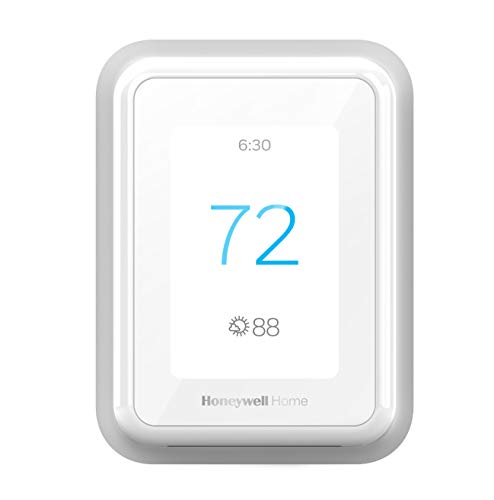
Honeywell built the T9 to scale further than most competitors, supporting up to 20 remote room sensors for households that want precise coverage across many rooms rather than just one or two. Smart Room sensing lets a user prioritize specific rooms over others depending on time of day. Owners managing a larger home with many distinct zones cite the sensor scalability as the deciding factor over Ecobee or Nest.
Pros
- Supports far more remote sensors than most competitors
- Geofencing adjusts temperature based on phone location
- Flexible room prioritization for larger homes
Cons
- Additional sensors beyond a basic single sensor setup add cost
- App interface is less polished than Nest or Ecobee

Emerson Sensi Touch 2
Emerson keeps the Sensi Touch 2 focused on dependable scheduling and a responsive touchscreen rather than adding sensors or learning algorithms that some owners find unnecessary. Works without a C-wire on most systems, a common sticking point for older homes adopting smart thermostats. Owners who want straightforward app and touchscreen control without extra complexity cite its simplicity as a selling point.
Pros
- Works without a C-wire on most older HVAC systems
- Responsive touchscreen simplifies manual adjustments
- Straightforward setup without excess complexity
Cons
- No built in learning algorithm like Nest
- No remote sensor support for individual rooms

Google Nest Thermostat
This simplified Nest model trades the Learning Thermostat’s automatic schedule building for manual scheduling through the app, keeping the familiar Nest interface at a lower price point. A mirrored display design is a notable departure from the Learning Thermostat’s dial, favoring a flatter, more modern look. Owners already using other Google Nest or Home devices cite the ecosystem integration as worth choosing over a cheaper non Nest alternative.
Pros
- Familiar Nest app experience at a lower cost
- Integrates cleanly with other Google Home devices
- Simple flat design fits modern wall decor
Cons
- No automatic schedule learning like the Learning Thermostat
- No remote room sensor support

Wyze Thermostat
Wyze extends its budget smart home product line into thermostats, keeping cost well below Nest or Ecobee while still offering app based scheduling and compatibility checking before purchase. An included accessory kit handles wiring for systems without a C-wire in many cases. Owners already using other Wyze cameras and sensors cite the single app ecosystem as a reason to add a Wyze thermostat over a separate brand.
Pros
- Lowest cost in this comparison with real smart scheduling
- Included adapter kit helps with C-wire-less installations
- Integrates with the broader Wyze smart home app
Cons
- No automatic learning or room sensor support
- Build quality feels less premium than Nest or Ecobee
The lineup, side by side
| # | Model | Learning ability | Best for | Score | Price |
|---|---|---|---|---|---|
| 1 | Google Nest Learning Thermostat (4th Gen) | Automatic schedule learning | Best overall | 9.3 | Check price |
| 2 | Ecobee Smart Thermostat Premium | Smart Home and Away adjustment | Best for uneven temperature homes | 9.1 | Check price |
| 3 | Amazon Smart Thermostat | Manual scheduling via app | Best budget | 8.3 | Check price |
| 4 | Honeywell Home T9 | Geofencing and schedule based | Best for multi room sensor expansion | 8.8 | Check price |
| 5 | Emerson Sensi Touch 2 | Manual and geofencing schedule | Best for simple touchscreen control | 8.5 | Check price |
| 6 | Google Nest Thermostat | Manual scheduling via app, no auto learning | Best value for Google ecosystem households | 8.7 | Check price |
| 7 | Wyze Thermostat | Manual scheduling via app | Best for Wyze smart home households | 8.0 | Check price |
Common questions
Do I need a C-wire for a smart thermostat?
Not always. The Emerson Sensi Touch 2 works without one on most systems, and several other models in this comparison, including the Nest Learning Thermostat and Wyze Thermostat, offer adapter kits to work around a missing C-wire.
How much can a smart thermostat actually save on energy bills?
Savings vary by household and climate, but models with learning algorithms or geofencing, like the Nest Learning Thermostat and Ecobee Smart Thermostat Premium, generally reduce unnecessary heating and cooling when a home is empty or asleep compared to a fixed schedule thermostat.
What is a remote room sensor and do I need one?
A remote room sensor measures temperature and sometimes occupancy in a room separate from the main thermostat, then factors that reading into heating and cooling decisions. Homes with uneven temperatures between floors or rooms benefit most, as offered by the Ecobee Smart Thermostat Premium and Honeywell Home T9.
Can a smart thermostat work with a heat pump system?
Yes, though compatibility varies by model. The Ecobee Smart Thermostat Premium specifically highlights strong heat pump compatibility, and most other models in this comparison support heat pumps with the correct wiring configuration.
Do smart thermostats work with voice assistants?
Most do. The Google Nest models integrate with Google Assistant, the Amazon Smart Thermostat integrates with Alexa, and several others, including the Honeywell T9 and Emerson Sensi Touch 2, support voice assistant integration as well.
How long does it take a learning thermostat to build an accurate schedule?
The Google Nest Learning Thermostat typically builds an initial schedule within about a week of manual adjustments, then continues refining that schedule as it observes more of a household’s patterns over subsequent weeks.
Is a smart thermostat worth it for a rental property?
It depends on the lease terms and how long a tenant plans to stay. A simpler, lower cost model like the Amazon Smart Thermostat or Wyze Thermostat offers real smart scheduling benefits without as much investment as a premium Nest or Ecobee model.
Our pick
The Google Nest Learning Thermostat remains the best overall pick for most households, since its automatic schedule building removes the setup effort other models still require. Homes with uneven temperatures between rooms should choose the Ecobee Smart Thermostat Premium instead, taking advantage of its included remote sensor. Buyers on a tighter budget still get genuine smart scheduling from the Amazon Smart Thermostat without paying for features they may not need.
Marcus Chen
Marcus covered consumer electronics for enthusiast tech publications for six years before joining ChoiceCrest. He specializes in translating manufacturer spec sheets into plain-language buying advice, with a focus on audio, computing accessories and smart-home gear.