Smart Lights with USB-C: Our Top Picks
For most people, the Govee RGBIC LED Strip Light M1 is the best smart lighting with USB-C. It offers vibrant colors, easy app control, and works with Alexa and Google Assistant. Its main limitation is that it requires a Wi-Fi connection for remote access.
USB-C has become the standard for charging devices, and now it’s making its way into smart lighting. This means you can power your lights with the same cables you use for your phone or laptop, simplifying your setup and reducing cable clutter.
We’ve rounded up the best smart lighting options that feature USB-C connectivity, from versatile LED strips to portable lamps. Whether you’re looking to add ambient glow to your workspace or create a dynamic gaming setup, there’s a USB-C powered smart light for you.
What to look for
The shortlist, ranked

Govee RGBIC LED Strip Light M1
The Govee RGBIC LED Strip Light M1 offers impressive color accuracy and brightness. It features segmented control, allowing different colors on the same strip. With app and voice control, it integrates seamlessly into any smart home. Its adhesive backing ensures easy installation on various surfaces.
Pros
- Excellent color mixing and brightness
- Works with Alexa and Google Assistant
- App includes music sync and scene modes
Cons
- Requires stable Wi-Fi for full features
- Adhesive may not stick to textured surfaces

Twinkly LED Strip Gen II
Twinkly’s second-generation LED strip uses advanced mapping technology to create stunning effects. Each LED is individually addressable, enabling complex animations. The app offers a vast library of effects, and it supports both Wi-Fi and Bluetooth. It comes with a USB-C power adapter and controller.
Pros
- Individual LED control for unique effects
- High-quality construction and brightness
- Works with Alexa, Google, and HomeKit
Cons
- Premium price point
- Setup can be complex for some users

Razer Aether Lamp Pro
The Razer Aether Lamp Pro is a table lamp that doubles as a smart light. It features Razer Chroma RGB, allowing synchronization with games and other Chroma devices. With USB-C power, it fits neatly into a gaming setup. It supports Matter, making it compatible with various smart home ecosystems.
Pros
- Immersive Chroma integration
- Matter support for broad compatibility
- Stylish design with a fabric shade
Cons
- Bulky for small spaces
- Requires Razer Synapse for full features

LIFX Beam
LIFX Beam consists of interlocking light bars that create custom geometric shapes on your wall. Each bar has multiple zones for dynamic color effects. The magnetic mounts allow easy installation. It connects directly to Wi-Fi, and power is supplied via USB-C.
Pros
- Unique modular design
- No hub required
- Smooth color transitions
Cons
- Expensive per bar
- Requires careful planning for layout

Logitech Litra Glow
The Logitech Litra Glow is a compact LED light designed for content creators. It offers true-to-life color rendering and adjustable brightness and temperature. It mounts on a monitor or stands alone. Power is delivered via USB-C, and it has a built-in Lux adjustment feature.
Pros
- Excellent color accuracy
- Flicker-free lighting
- Compact and adjustable
Cons
- No smart features
- Not RGB

Anker B600 Video Conference Light
The Anker B600 is a webcam light that clips onto monitors and laptops. It provides multiple lighting modes and color temperatures to improve video quality. It includes a remote control for easy adjustments. USB-C powered, it also has a built-in battery for wireless use.
Pros
- Improves video call appearance
- Clip design fits many devices
- Battery backup for portability
Cons
- Not a full room light
- App requires Bluetooth connection
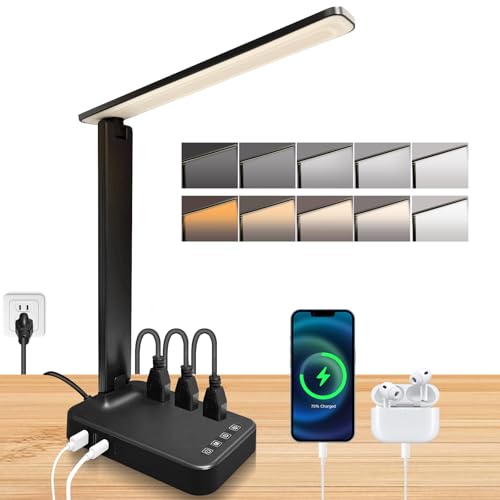
AUKEY LED Desk Lamp with USB-C
The AUKEY LED Desk Lamp provides bright, adjustable lighting for work or reading. It has a flexible arm and multiple brightness levels and color temperatures. It includes a USB-A port for charging other devices. The lamp is powered via USB-C, making it versatile.
Pros
- Affordable
- Flexible gooseneck
- Integrated USB port
Cons
- No smart home features
- Plastic build feels less premium
Compared at a glance
| # | Model | Length | Best for | Score | Price |
|---|---|---|---|---|---|
| 1 | Govee RGBIC LED Strip Light M1 | 5 meters | Best overall for vibrant colors and app control | 9.4 | Check price |
| 2 | Twinkly LED Strip Gen II | 5 meters | Best for advanced effects and mapping | 9.2 | Check price |
| 3 | Razer Aether Lamp Pro | Table lamp | Best for PC gamers and streamers | 9.0 | Check price |
| 4 | LIFX Beam | Light bars (6 pieces) | Best for linear accent lighting | 8.9 | Check price |
| 5 | Logitech Litra Glow | Desktop light | Best for video calls and streaming | 8.8 | Check price |
| 6 | Anker B600 Video Conference Light | Clip-on light | Best for remote work setups | 8.7 | Check price |
| 7 | AUKEY LED Desk Lamp with USB-C | Desk lamp | Best for desk illumination | 8.5 | Check price |
Frequently asked questions
Can I use any USB-C charger to power these smart lights?
Most USB-C smart lights accept standard 5V USB-C chargers, but some may require higher wattage for full brightness or features. Always check the product specifications for recommended power input. Using a charger with insufficient power may result in dimmer output or the light not functioning properly.
Do all USB-C smart lights require a Wi-Fi connection?
No, many offer Bluetooth connectivity as well, allowing local control. However, Wi-Fi is often needed for remote access and voice assistant integration. Some lights like the Govee M1 use both Wi-Fi and Bluetooth for flexibility.
Can I connect multiple USB-C smart lights to one adapter?
It depends on the power output of the adapter and the power requirements of the lights. For safety, it is recommended to use a multi-port adapter that provides adequate power per port. Avoid daisy-chaining multiple lights to a single low-power adapter, as this may cause malfunctions.
Are USB-C smart lights compatible with Apple HomeKit?
Some are, but not all. For example, the Razer Aether Lamp Pro supports Matter, which works with HomeKit. Others like the Twinkly Gen II also support HomeKit. Always verify compatibility before purchasing if HomeKit integration is important to you.
What is the advantage of USB-C over traditional USB-A for smart lights?
USB-C offers higher power delivery, which can support brighter LEDs and additional features. It is also reversible, making it easier to plug in. As USB-C becomes more universal, you can share cables and adapters across devices, reducing clutter.
Can I control these lights without a smartphone?
Most smart lights rely on a mobile app for setup and control. Some also include physical controls or remote controls, like the Anker B600. However, for advanced features like schedules or scenes, a smartphone is typically required.
Are there any safety concerns with USB-C smart lights?
As with any electronic device, ensure you use the provided or a certified adapter. Avoid using damaged cables or adapters. USB-C is designed with safety features like overcurrent protection, but it’s still important to follow manufacturer guidelines.
How long do USB-C smart lights typically last?
LED lights generally have a long lifespan, often rated for 25,000 to 50,000 hours of use. The USB-C port and controller may be the limiting factors, but with proper use, these lights can last for years.
Our take
For a vibrant, feature-packed smart lighting experience, choose the Govee RGBIC LED Strip Light M1. It balances performance, ease of use, and versatility. If you need a light for video calls, the Logitech Litra Glow is the best choice. For gamers, the Razer Aether Lamp Pro offers unique Chroma integration. Ultimately, the best USB-C smart light for you will depend on your specific use case, but the Govee M1 stands out as the overall winner.
Marcus Chen
Marcus covered consumer electronics for enthusiast tech publications for six years before joining ChoiceCrest. He specializes in translating manufacturer spec sheets into plain-language buying advice, with a focus on audio, computing accessories and smart-home gear.


