Road Trip Ready Android Auto Adapters for Every Car
The Motorola MA1 stands out as the top pick for most drivers because it delivers reliable wireless Android Auto with a simple setup and consistent connection. Its main limitation is that it only works with Android Auto, not Apple CarPlay, and it requires a car with a wired Android Auto head unit.
Road trips demand reliable navigation, hands-free calls, and easy music control. Wired Android Auto can be clunky, but a wireless adapter removes the cable clutter and connects your phone instantly.
We compared seven top adapters for road trip use. Our picks range from plug and play dongles to feature packed hubs, all designed to make your drive smarter and safer.
The top picks, ranked

Motorola MA1 Wireless Android Auto Car Adapter
The Motorola MA1 is a compact dongle that converts wired Android Auto to wireless. Owners report fast connection times and stable performance on long drives. Setup is simple: plug into the USB port, pair via Bluetooth, and follow the on screen prompts. It supports 5 GHz Wi-Fi for a strong signal.
Pros
- Plug and play setup
- Stable connection reported
- Compact design
Cons
- No CarPlay support
- Requires wired Android Auto head unit

AAWireless Android Auto Wireless Adapter
AAWireless offers a dongle with a companion app that lets you tweak settings like DPI and Wi-Fi frequency. This flexibility helps solve connection quirks in some cars. Users appreciate the regular firmware updates that add features and improve compatibility.
Pros
- Customizable settings via app
- Frequent firmware updates
- Compact and light
Cons
- Setup can be technical
- No CarPlay support
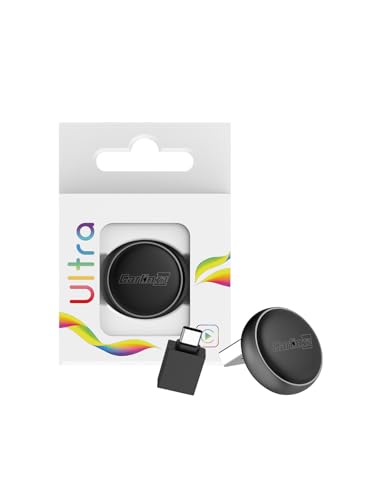
Carlinkit 3.0 Wireless CarPlay and Android Auto Adapter
Carlinkit 3.0 supports both wireless CarPlay and Android Auto, making it ideal for households with mixed phones. It switches between the two protocols automatically. Owners note that it works well with most factory head units that have wired CarPlay or Android Auto.
Pros
- Works with iPhone and Android
- Auto switching
- Wide compatibility
Cons
- Occasional connection delay
- Bulky compared to others

Carlinkit 5.0 Wireless Android Auto Adapter
Carlinkit 5.0 is an upgraded version that boasts faster processing and quicker startup. It connects within seconds and maintains a stable link. Some users report that it handles long trips without dropouts, but it is designed primarily for Android Auto only.
Pros
- Fast connection
- Stable on long drives
- Sleek design
Cons
- Android only
- May require firmware update
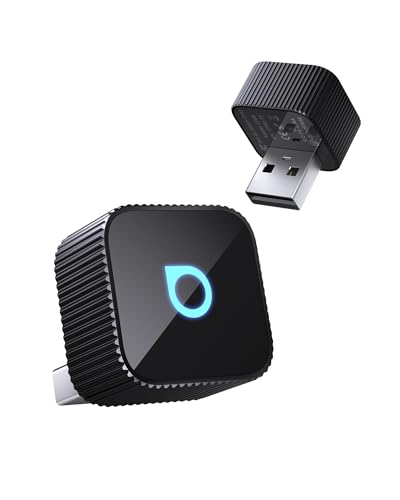
Ottocast A2Air Pro Wireless Android Auto Adapter
The Ottocast A2Air Pro is one of the smallest adapters on the market, barely sticking out from the USB port. It delivers reliable wireless Android Auto with minimal lag. Its tiny footprint makes it a favorite for rental cars or vehicles with tight USB locations.
Pros
- Very compact
- Good connection stability
- Easy to carry
Cons
- No CarPlay
- Limited troubleshooting options

Teeran Wireless Android Auto Adapter
Teeran offers an affordable way to go wireless. It provides the essential functions of Android Auto without extra frills. Owners say it works well for basic navigation and music, though connection may occasionally drop in congested urban areas.
Pros
- Budget friendly
- Simple setup
- Dual band Wi-Fi
Cons
- Occasional dropouts
- Plastic build feels cheap
Crius Car Wireless Android Auto Adapter
The Crius adapter allows multiple phones to connect and switch easily, perfect for a family sharing a car. It uses a dual Bluetooth design to keep connections stable. Users appreciate the ability to have two phones paired at once, but note that only one can display Android Auto at a time.
Pros
- Multiple phone pairing
- Stable connection
- Good for family use
Cons
- Bulky design
- Only one active at a time
How to choose
Compatibility Check Before buying, verify that your car’s head unit supports wired Android Auto. Most adapters only work with factory or aftermarket stereos that already have Android Auto built in. Check your owner’s manual or the stereo’s settings.
Connection Quality Wireless Android Auto relies on a stable Wi-Fi connection between your phone and the adapter. Look for adapters that support 5 GHz Wi-Fi, as this offers better performance and less interference. Users report that some cars have specific issues, so read reviews for your vehicle model.
Setup and Use Setup is typically simple: plug the adapter into a USB port, pair your phone via Bluetooth, and follow the prompts. Some adapters have companion apps for advanced settings. For road trips, you want a device that connects quickly every time you start the car.
Build and Portability If you travel with rental cars or switch between vehicles, consider the size and durability of the adapter. Compact dongles are less likely to get knocked, but they may be harder to remove. Check the dimensions to ensure it fits your car’s USB port location without blocking other controls.
How they compare
| # | Model | Connection | Best for | Score | Price |
|---|---|---|---|---|---|
| 1 | Motorola MA1 Wireless Android Auto Car Adapter | Wireless Android Auto via USB | Best Overall for Reliable Wireless Connection | 9.4 | Check price |
| 2 | AAWireless Android Auto Wireless Adapter | Wireless Android Auto | Best for Customization and App Control | 9.2 | Check price |
| 3 | Carlinkit 3.0 Wireless CarPlay and Android Auto Adapter | Wireless CarPlay and Android Auto | Best for Dual Compatibility | 9.0 | Check price |
| 4 | Carlinkit 5.0 Wireless Android Auto Adapter | Wireless Android Auto | Best for Fast Performance | 8.8 | Check price |
| 5 | Ottocast A2Air Pro Wireless Android Auto Adapter | Wireless Android Auto | Best for Compact Size | 8.6 | Check price |
| 6 | Teeran Wireless Android Auto Adapter | Wireless Android Auto | Best Budget Option | 8.3 | Check price |
| 7 | Crius Car Wireless Android Auto Adapter | Wireless Android Auto with dual Bluetooth | Best for Multi Device Households | 8.0 | Check price |
Common questions
Do all Android Auto adapters work with any car?
No. They require a head unit that already supports wired Android Auto. If your car does not have Android Auto, an adapter will not add it. Check your infotainment system’s compatibility before purchase.
Can I use an Android Auto adapter with an iPhone?
Most adapters are designed for Android Auto only. Some models like the Carlinkit 3.0 support both CarPlay and Android Auto. Look for dual compatible adapters if you have mixed devices.
Will wireless Android Auto drain my phone battery faster?
Yes, wireless connections consume more battery than wired. However, many adapters support wireless charging if your car has it. For long road trips, consider having a charging cable or wireless charger available.
How do I set up a wireless Android Auto adapter?
Plug the adapter into your car’s USB port. On your phone, enable Bluetooth and Wi-Fi. The adapter will appear in the Android Auto settings. Follow the on screen prompts to complete the setup. Most adapters connect automatically after the initial pairing.
Why does my adapter keep disconnecting?
Disconnections can be caused by Wi-Fi interference, outdated firmware, or an incompatible phone. Try moving the adapter to a different USB port, updating the adapter’s firmware, or checking your phone’s Wi-Fi settings. Some adapters allow you to change the Wi-Fi frequency to 2.4 GHz for better range.
Are there any monthly fees for using these adapters?
No. These adapters are one time purchases. Android Auto itself is free, and the adapter only facilitates the wireless connection. There are no subscription costs.
Can I use an adapter with a rental car?
Yes, if the rental car’s head unit supports wired Android Auto. Since adapters are portable, you can take them with you and plug them in when you rent a car. Just remember to remove the adapter before returning the vehicle.
Do these adapters affect sound quality?
No. Audio is transmitted digitally, so there is no degradation in sound quality. You will still get the same high quality audio as a wired connection.
Final word
For most road trippers, the Motorola MA1 is the best choice because it offers a reliable, straightforward wireless connection that gets you on the road without fuss. If you need both CarPlay and Android Auto, the Carlinkit 3.0 is the smart pick. Budget conscious drivers can save with the Teeran, but be prepared for occasional drops. Choose the Motorola MA1 for a stress free experience.
Tony Russo
Tony trained as an automotive technician and spent years in service and parts retail before moving into writing. He focuses on garage tools, car care products and accessories from a hands-on maintenance perspective.

