Smart Display Boards for Home and Office That Deliver
For most people, the Vibe Smart Board 55 Pro stands out as the top pick because it combines a 4K display, seamless cloud collaboration, and a smooth writing experience, though its premium price may be a limitation. Alternatively, the Samsung Flip 2 offers a polished, TV-like experience with excellent image quality but comes at a cost.
Smart display boards have transformed how we present, teach, and collaborate. They replace traditional whiteboards with interactive digital canvases that support touch, stylus, and cloud integration.
Choosing the right one can be tricky with so many models. We compared specifications and user feedback to help you find the best fit for your space and budget.
The shortlist, ranked

Vibe Smart Board 55 Pro
The Vibe Smart Board 55 Pro offers a 55-inch 4K display with precise touch recognition and a robust software suite. It supports multiple users simultaneously and integrates with popular apps like Zoom and Google Workspace. Owners praise its smooth writing feel and easy setup, but note that the stand and camera are sold separately.
Pros
- Crisp 4K resolution
- Intuitive collaboration tools
- Built-in Android OS
Cons
- Pricey accessory ecosystem
- No integrated camera
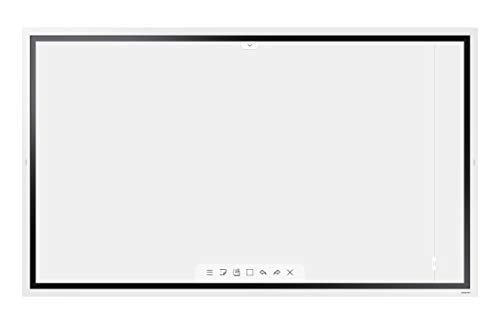
Samsung Flip 2 WM55B
The Samsung Flip 2 WM55B combines a stunning 55-inch 4K display with a near-zero latency writing experience. It offers a sleek design and intuitive interface. Users appreciate the crisp visuals and reliable performance, but the high price and limited app store compared to rivals may be drawbacks.
Pros
- Outstanding image quality
- Responsive stylus with no lag
- Sleek and modern design
Cons
- Very expensive
- Fewer apps available

Newline Interactive Q Series 55
The Newline Interactive Q Series 55 is a reliable choice for classrooms and training rooms. It features a 4K display, dual-pen support, and built-in Android. Teachers like the easy annotation over any content and the robust build. Some users mention occasional software glitches, but overall it is a solid performer.
Pros
- Pre-installed educational tools
- Durable and teacher-friendly
- Affordable for schools
Cons
- Software updates can be slow
- Built-in speakers are average

Promethean ActivPanel 55
The Promethean ActivPanel 55 is a respected name in education. It offers a responsive touchscreen, a wide viewing angle, and a suite of teaching tools. Educators report that the panel is reliable and easy to use. However, the cost is higher than some competitors, and the operating system is less open for third-party apps.
Pros
- Excellent teaching software
- Durable and built for daily use
- Great viewing angles
Cons
- Premium price
- Limited app ecosystem

Samsung 65 Inch Flip Pro WM65B
The Samsung Flip Pro WM65B is a 65-inch 4K smart display that offers a generous canvas for brainstorming. It supports up to 20 touch points and includes a built-in camera and microphone for video conferencing. Users find it versatile, but the size may be overwhelming for smaller spaces, and the price reflects its premium status.
Pros
- Huge screen for large groups
- Integrated camera and mic
- Superb touch accuracy
Cons
- Requires ample wall space
- High cost
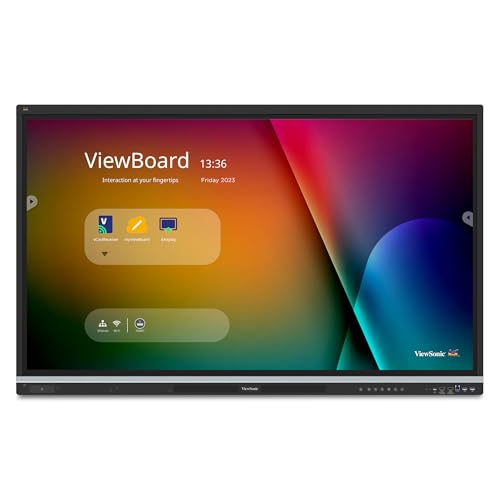
ViewSonic ViewBoard IFP5550
The ViewSonic ViewBoard IFP5550 delivers a 55-inch 4K display with interactive features at a more accessible price. It works well for small to medium conference rooms and offers dual-pen support. Users appreciate the value, but some note that the built-in speakers and software could be better.
Pros
- Budget-friendly for features
- Easy to set up and use
- Good for basic collaboration
Cons
- Lower touch point count
- Speakers are weak
Maxhub V5 Classic 55
The Maxhub V5 Classic 55 is a 55-inch smart display that emphasizes wireless sharing and video conferencing. It includes a built-in camera, microphone array, and speakers, making it easy to start meetings. Users find it convenient, but the display resolution is only 1080p, and the software interface can be less polished than rivals.
Pros
- Integrated camera and mic
- Simple wireless screen sharing
- Reasonable price
Cons
- Only 1080p resolution
- Software feels less refined
What matters most
Side by side
| # | Model | Display | Best for | Score | Price |
|---|---|---|---|---|---|
| 1 | Vibe Smart Board 55 Pro | 55 inch 4K UHD | Office collaboration and cloud-based teamwork | 9.4 | Check price |
| 2 | Samsung Flip 2 WM55B | 55 inch 4K UHD | High-quality presentations and TV-like experience | 9.2 | Check price |
| 3 | Newline Interactive Q Series 55 | 55 inch 4K UHD | Education and classroom environments | 9.0 | Check price |
| 4 | Promethean ActivPanel 55 | 55 inch 4K UHD | Interactive lessons and presentation tools | 8.8 | Check price |
| 5 | Samsung 65 Inch Flip Pro WM65B | 65 inch 4K UHD | Large conference rooms and boardrooms | 8.7 | Check price |
| 6 | ViewSonic ViewBoard IFP5550 | 55 inch 4K UHD | Budget-friendly business use | 8.5 | Check price |
| 7 | Maxhub V5 Classic 55 | 55 inch Full HD | Wireless sharing and remote meetings | 8.3 | Check price |
Good to know
What is a smart display board?
A smart display board is an interactive screen that combines a digital whiteboard, computer, and display. You can write on it with a stylus or your finger, share content wirelessly, and run apps, making it ideal for meetings and classrooms.
Can smart display boards replace traditional whiteboards?
Yes, smart display boards can replace traditional whiteboards because they offer similar annotation capabilities but with added benefits like saving your work digitally, sharing it in real time, and integrating with other software.
Do I need a computer to use a smart display board?
Most smart display boards have a built-in operating system (like Android) and can operate independently. However, you can also connect a laptop or PC to use more advanced software or to mirror your screen.
Can multiple people write on a smart display board at the same time?
Yes, many models support multi-touch and multi-pen input, allowing two or more people to write or draw simultaneously. The number of touch points varies by model, ranging from 10 to 20 or more.
How do I share my screen on a smart display board?
You can share your screen wirelessly using protocols like Miracast, AirPlay, or proprietary casting apps. Alternatively, you can connect via HDMI or USB-C cable. Most boards come with instructions for both methods.
Are smart display boards suitable for educational settings?
Absolutely. Many models are designed specifically for classrooms, with features like lesson planning tools, annotation over videos, and student engagement apps. They are durable and can replace traditional projectors and whiteboards.
What is the difference between IR and capacitive touch?
Infrared (IR) touch uses sensors around the edges to detect touch, offering lower cost and the ability to use any object. Capacitive touch uses a conductive layer and is more precise but usually requires a special stylus or finger. For most office use, IR is fine, but for drawing, capacitive may be better.
Can I use a smart display board for video conferencing?
Yes, many smart display boards come with built-in cameras, microphones, and speakers, or support external ones. They can run apps like Zoom or Teams, making them all-in-one solutions for remote meetings.
How much does a smart display board cost?
Prices vary widely. Entry-level models start around current price while premium large-screen models can exceed current price. Costs also depend on additional accessories and software subscriptions.
What is the ideal size for my room?
As a rule of thumb, the board should be about 1/6 the distance from the last row of seats to the screen. For a small meeting room, 55 inches works. For larger spaces, consider 65 inches or more to ensure readability.
Our take
Choose the Vibe Smart Board 55 Pro for the best balance of features and usability in an office setting. For classrooms, the Newline Q Series offers education-specific tools at a fair price. If you need a large, premium display for a big conference room, the Samsung Flip Pro 65 is the top option, provided your budget allows.
Marcus Chen
Marcus covered consumer electronics for enthusiast tech publications for six years before joining ChoiceCrest. He specializes in translating manufacturer spec sheets into plain-language buying advice, with a focus on audio, computing accessories and smart-home gear.
You might also need

Bulk Display Boards for Schools and Offices

Business Card Holders for Home Office: Keep Your Desk Tidy
What Does an Ergonomic Home Office Desk Setup Look Like?
