Turning Old Slides and Negatives Into Digital Photos
The Kodak Slide N SCAN suits most home collections with its large preview screen and simple slide feed. The Plustek OpticFilm 8200i SE fits anyone who wants true optical resolution for printing. The Wolverine Titan 8-in-1 fits households also holding old film reels.
The Kodak Slide N SCAN is the best overall pick for most people clearing out a box of family slides, thanks to its 5 inch preview screen and one slide at a time feed that needs no computer. Its main limitation is interpolated resolution that will not match a true optical flatbed scan.
Slide scanners split into two real categories: fast standalone digitizers that save JPEGs to an SD card, and slower flatbed or film scanners that capture more optical detail for printing or archiving. This comparison weighs published resolution specs, supported formats, and owner feedback on speed against that tradeoff rather than marketing resolution numbers alone.
Our top picks
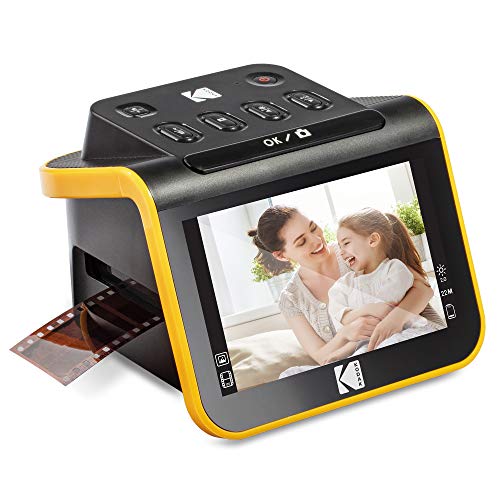
Kodak Slide N SCAN Film and Slide Scanner
A 5 inch LCD screen lets a user preview and crop each slide before saving, which speeds up sorting a large collection. The scanner accepts 35mm, 126, and 110 slides plus negative strips through adapter trays. Saved files land on an SD card as JPEGs, so no scanning software or computer is required.
Pros
- Large screen makes cropping and rotation easy
- No computer or software needed to scan
- Fast one slide at a time feed
Cons
- Resolution is interpolated, not true optical
- Color accuracy depends on slide condition and age
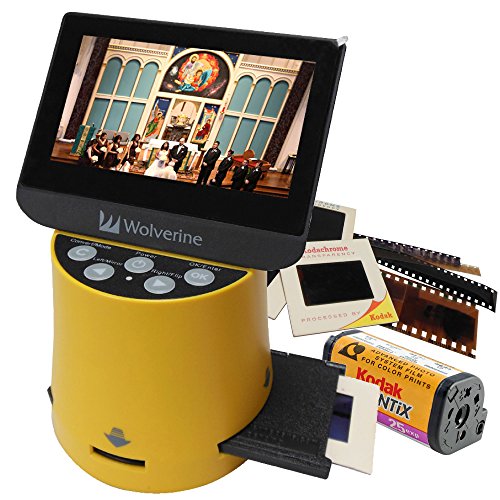
Wolverine Titan 8-in-1 Film to Digital Converter
Beyond standard slides and negatives, the Titan handles 8mm and Super 8 movie film reels through a separate feed path, which few competitors offer in one unit. A 4.3 inch screen previews each frame before capture. Owners who inherited mixed boxes of family media get the most value from the extra formats.
Pros
- Handles movie film reels, not just slides
- Compact unit works without a separate computer
- Included card gets a household scanning immediately
Cons
- Movie reel feed runs slower than slide feed
- Interpolated resolution limits large print quality

Magnasonic All-In-One 24MP Film and Slide Scanner
Magnasonic’s scanner ships with adapter trays sized for 110 and 126 negative formats that many scanners skip in favor of 35mm only. A 2.4 inch screen is smaller than the Kodak’s, which slows down reviewing a large stack. Built in editing lets a user adjust brightness and flip orientation before saving.
Pros
- Covers more vintage negative formats than most rivals
- Built in brightness and flip editing before saving
- Compact size stores easily between uses
Cons
- Small screen makes detailed review harder
- Interpolated resolution caps enlarged print quality

Plustek OpticFilm 8200i SE
Unlike the standalone digitizers in this group, the OpticFilm 8200i SE is a dedicated film scanner that connects to a computer and uses true optical resolution rather than interpolation. Bundled SilverFast SE software handles color correction and dust removal during the scan. Anyone planning to print enlargements gets noticeably sharper results here.
Pros
- True optical resolution beats interpolated specs
- USB powered, so it travels without a power brick
- Bundled software handles color correction well
Cons
- Requires a connected computer to operate
- Scanning each slide takes longer than standalone units

Epson Perfection V600 Photo Scanner
The V600 is a flatbed scanner that also handles prints and documents, making it the most versatile unit here outside of slide duty. A slide holder fits up to four 35mm frames per pass, which speeds up large batches compared to one at a time feeders. Epson’s bundled software includes basic dust and scratch correction.
Pros
- Doubles as a flatbed scanner for prints and documents
- Batch slide holder speeds up large collections
- Dust and scratch correction built into the software
Cons
- Slower per slide than a dedicated standalone digitizer
- Software setup is less intuitive for first time users

DIGITNOW 24MP Film and Slide Scanner
DIGITNOW keeps the standalone, no computer workflow of the Kodak and Wolverine at a lower price point. A 2.4 inch screen and simple button layout make it approachable for a first time user clearing out an old slide box. Owners note the plastic feed tray feels less sturdy under repeated daily use.
Pros
- Lowest cost standalone scanner in this comparison
- Simple button layout suits first time users
- No software or computer required
Cons
- Feed tray feels less durable than pricier rivals
- Limited to 35mm format only
Esky Film and Slide Scanner NegaScan22
The NegaScan22 is the most compact unit in this group, which suits anyone short on desk space for an occasional scanning project. A built in memory buffer lets a user preview a scan before it saves to an SD card. Image quality trails the Kodak on color accuracy according to owner reports.
Pros
- Most compact scanner in this comparison
- Built in memory buffer previews before saving
- Simple to pack away between projects
Cons
- Color accuracy trails the Kodak and Wolverine
- Smaller screen slows down reviewing a large batch
How to pick the right one
Standalone Digitizer or Computer Connected Scanner Standalone digitizers like the Kodak Slide N SCAN and Wolverine Titan save JPEGs directly to an SD card without a computer, trading some optical quality for speed. Computer connected scanners like the Plustek OpticFilm and Epson V600 capture true optical resolution through dedicated software, which takes longer per slide but produces sharper files for printing. Anyone digitizing a few hundred slides for casual viewing usually prefers the standalone route. Anyone planning to print large enlargements should lean toward the optical flatbed or film scanner instead.
Best for Large Family Slide Collections Large collections favor speed over maximum resolution, since most slides end up viewed on a screen rather than printed oversized. The Kodak Slide N SCAN and Wolverine Titan both use a quick single slide feed with a preview screen for cropping on the fly. A bigger screen, like the Kodak’s 5 inch display, makes reviewing hundreds of frames less tedious than the smaller 2.4 inch screens on budget models.
Best for Mixed Formats and Old Movie Reels Households that kept slides alongside 110 or 126 negatives, or even 8mm movie reels, need broader format support than a basic 35mm only scanner. The Wolverine Titan 8-in-1 is the only unit here that also digitizes Super 8 and 8mm film. The Magnasonic scanner covers 110 and 126 negatives that many competitors skip, which matters for slides shot before 35mm became standard.
When Optical Resolution Is Worth the Extra Time Interpolated resolution numbers on standalone digitizers look high on paper but do not match true optical capture. The Plustek OpticFilm 8200i SE scans at a genuine 7200 dpi optical resolution, which shows up clearly once a slide is printed larger than a standard photo size. Anyone archiving slides for a museum, a family history book, or wall art should budget the extra scanning time a computer connected unit requires.
The lineup, side by side
| # | Model | Max resolution | Best for | Score | Price |
|---|---|---|---|---|---|
| 1 | Kodak Slide N SCAN Film and Slide Scanner | 22MP interpolated | Best overall | 9.3 | Check price |
| 2 | Wolverine Titan 8-in-1 Film to Digital Converter | 20MP interpolated | Best for mixed media collections | 9.0 | Check price |
| 3 | Magnasonic All-In-One 24MP Film and Slide Scanner | 24MP interpolated | Best for small negatives | 8.8 | Check price |
| 4 | Plustek OpticFilm 8200i SE | 7200 dpi | Best for true optical resolution | 8.7 | Check price |
| 5 | Epson Perfection V600 Photo Scanner | 6400 dpi | Best for batch scanning multiple slides | 8.5 | Check price |
| 6 | DIGITNOW 24MP Film and Slide Scanner | 24MP interpolated | Best budget | 8.2 | Check price |
| 7 | Esky Film and Slide Scanner NegaScan22 | 22MP interpolated | Best for compact storage | 8.0 | Check price |
Frequently asked questions
What resolution do I need to scan old slides?
For screen viewing and small prints, 10 to 14 true megapixels is enough. For enlargements beyond 8 by 10 inches, an optical scanner rated near 7200 dpi, like the Plustek OpticFilm, preserves more real detail than an interpolated standalone unit.
Can a slide scanner damage old or brittle slides?
Most standalone feeders handle slides gently, but very old or warped cardboard mounts can jam a motorized feed. A flatbed scanner avoids this risk entirely since slides sit still on the glass during the scan.
Is interpolated resolution the same as optical resolution?
No. Optical resolution reflects what the sensor actually captures, while interpolated resolution uses software to add pixels afterward. A true 10 megapixel optical scan usually looks sharper than a 24 megapixel interpolated scan.
Do slide scanners work with 126 and 110 format negatives?
Not all of them. The Kodak Slide N SCAN and Magnasonic scanner both include adapter trays for 126 and 110 formats, while several budget scanners in this category support 35mm only.
How long does it take to scan a box of slides?
A standalone digitizer like the Kodak or Wolverine can process a slide every few seconds once loaded, so a box of 200 slides often finishes in under an hour. A computer connected optical scanner takes longer per frame because of the higher capture resolution.
Can I scan slides without a computer?
Yes. The Kodak Slide N SCAN, Wolverine Titan, Magnasonic scanner, DIGITNOW scanner, and Esky NegaScan22 all save directly to an SD card and need no computer or software.
Which slide scanner is best for printing enlargements?
The Plustek OpticFilm 8200i SE and Epson Perfection V600 both capture true optical resolution well above the interpolated standalone units, making them the better choice for prints larger than a standard photo.
Do slide scanners also handle negative film strips?
Most models in this comparison include a negative strip holder alongside the slide tray, covering 35mm negatives at minimum, with the Kodak and Magnasonic also covering 110 and 126 negative formats.
What file format do slide scanners save to?
Standalone digitizers save JPEG files to an SD card by default. Computer connected scanners through SilverFast or Epson’s software can also export to TIFF for archival quality.
Our take
The Kodak Slide N SCAN fits most households clearing out a box of family slides, since its screen and simple feed make the job fast without a computer. Anyone planning to print enlargements or archive at full quality should choose the Plustek OpticFilm 8200i SE instead, despite the slower per slide workflow. Families with old movie reels mixed into the collection get more use from the Wolverine Titan 8-in-1.
Marcus Chen
Marcus covered consumer electronics for enthusiast tech publications for six years before joining ChoiceCrest. He specializes in translating manufacturer spec sheets into plain-language buying advice, with a focus on audio, computing accessories and smart-home gear.