UHS-I or UHS-II? Choosing an SD Card for Your Camera
SanDisk Extreme PRO SDXC UHS-I covers most mirrorless and DSLR owners, writing at 140MB/s so burst buffers drain quickly. Everyday stills and 4K clips run just as well on Samsung PRO Plus. Own a UHS-II body? Lexar Professional 2000x adds a V90 sustained write floor.
SanDisk Extreme PRO SDXC UHS-I is the card to buy if you shoot stills and the occasional 4K clip. Writes of 140MB/s clear a RAW buffer quickly, and V30 certification covers video in nearly every current body. Put it in a UHS-II camera and the older bus caps reads at 200MB/s, wasting half the slot.
Packaging pushes read speed in large type while write speed quietly decides what records cleanly. We compared bus interface, video speed class, published write figures, capacity ladders and warranty terms, then weighed owner reports on card failures and counterfeit listings.
Our top picks

SanDisk Extreme PRO SDXC UHS-I
Writes hit 140MB/s and reads reach 200MB/s, which drains a RAW buffer fast on crop or full frame bodies. Capacity runs from 32GB up to 1TB, so a wedding or a wildlife hide fits on one card. V30 certification covers 4K in nearly every current mirrorless camera.
Pros
- Fastest writes the UHS-I bus allows
- Capacity ladder climbs to 1TB
- RescuePRO Deluxe recovery software included
Cons
- UHS-I wiring leaves a UHS-II slot underused
- V30 floor gives no margin for high bitrate codecs

Samsung PRO Plus SDXC UHS-I
Samsung rates 180MB/s reads and 130MB/s writes, near enough to the Extreme PRO that a shooting day feels identical. Six proof protection covers water, magnets, X-rays, temperature swings, drops and wear. Capacity spans 128GB to 512GB, sized for mixed days of stills plus 4K clips.
Pros
- Writes land within 10MB/s of the class leader
- Rated against water, magnets and airport X-rays
- Carries a 10 year limited warranty
Cons
- Lineup stops at 512GB
- V30 rating leaves no headroom above 4K

Lexar Professional 2000x SDXC UHS-II
Second pin row roughly doubles bandwidth, lifting reads to 300MB/s and writes to 260MB/s. V90 certification guarantees a 90MB/s sustained floor, steady enough for 6K and high bitrate 4K. Lexar bundles a UHS-II USB reader, so offloads skip the slow slot built into most laptops.
Pros
- V90 floor keeps long takes from dropping frames
- Bundled reader removes the offload bottleneck
- Buffer empties fast on continuous drive
Cons
- Capacity ceiling sits below UHS-I families
- Falls back to UHS-I speeds in single pin row cameras

Sony TOUGH-G Series SDXC UHS-II
Sony molds the shell from one piece, deleting the ribs and write protect switch that usually snap first. IP68 sealing and a stated 5 meter drop rating suit storm work, surf sessions and dusty trails. Speed sits at the top of the class, 300MB/s read and 299MB/s write, with V90 certification.
Pros
- No ribs or plastic switch left to break
- Sealed against dust and water immersion
- V90 write floor for demanding video codecs
Cons
- Fewer capacity choices than UHS-I lines
- Rated offload speed needs a UHS-II reader

ProGrade Digital SDXC UHS-II V60 Gold
V60 marking promises 60MB/s of sustained write throughput, which covers the codecs in most hybrid cameras. Reads run to 250MB/s across the UHS-II bus, cutting transfer time against any UHS-I card. Refresh Pro software lets owners check wear and card health before a shoot day.
Pros
- Sustained V60 floor protects long takes
- UHS-II reads shorten card to computer transfers
- Card health utility ships with the card
Cons
- V60 writes trail V90 cards on 8K work
- More card than a stills only shooter needs
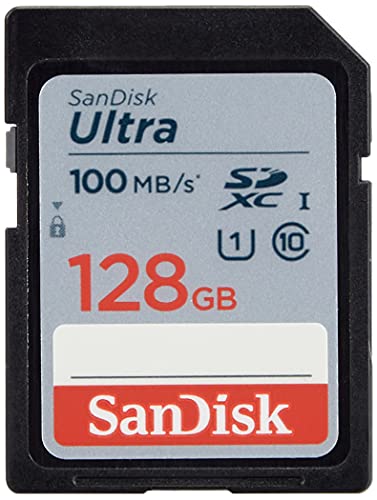
SanDisk Ultra SDXC UHS-I
U1 and Class 10 ratings cover 1080p recording and general photography, nothing heavier. Reads reach 150MB/s, though SanDisk publishes no write figure, and owners report slow buffer clearing on continuous drive. Sensible in a point and shoot, an older DSLR, or as the spare card living in your bag.
Pros
- Wide capacity range for light shooters
- Handles 1080p video and casual stills
- Stocked almost everywhere, easy to replace
Cons
- Unrated write speed rules it out for 4K
- Buffer clearing drags during long bursts
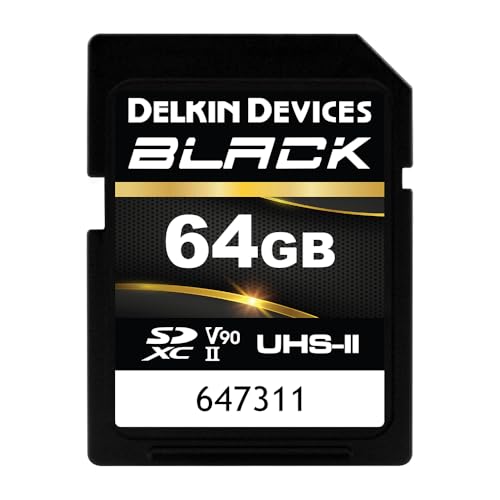
Delkin Devices BLACK SDXC UHS-II V90
Delkin backs the BLACK line with a lifetime warranty and a 48 hour replacement promise, which matters on paid jobs. Rated operating range covers minus 25 to 85 degrees Celsius, with shock and X-ray resistance stated on the listing. Speeds of 300MB/s read and 250MB/s write keep it firmly in V90 territory.
Pros
- Lifetime warranty with 48 hour replacement
- V90 sustained writes for professional video
- Rated for extreme cold and heat
Cons
- Narrow selection of capacities
- No reader included in the box
How to pick the right one
What the markings on an SD card mean Three symbols carry all the useful information. Bus type, printed as UHS-I or UHS-II, sets the ceiling, and UHS-II adds a second row of pins that roughly doubles bandwidth. Video speed class, written V30, V60 or V90, promises a sustained write floor in megabytes per second. Large read figures on the front describe copying files to a computer and say nothing about recording.
Matching a card to your camera slot Check the body before paying for speed you cannot use. A UHS-II card in a UHS-I camera runs at UHS-I rates, with the extra pins sitting idle. Dual slot cameras often pair one fast slot with one slower slot, and overflow recording drops to the slower card’s pace. Every manual lists a minimum card requirement per video mode, and that figure is the one to shop against.
How much capacity you need for stills and video Compressed RAW files from a 24MP sensor land near 25MB each, so 128GB holds roughly four thousand frames. Video burns through storage far faster. Recording 4K at 100Mbps eats about 45GB an hour, turning a 64GB card into one short afternoon. Two mid size cards beat a single huge one on risk, because a failure then costs half the day rather than all of it.
When UHS-II earns its place, and when it does not Portrait, travel and family shooters rarely fill a buffer, so a V30 UHS-I card like the Samsung PRO Plus is the smarter spend. Three situations justify UHS-II: long continuous bursts of sport or birds, video above roughly 200Mbps, and tight deadlines where offload minutes matter. Skip V90 entirely on an older body, since the camera cannot address the second pin row anyway.
The lineup, side by side
| # | Model | Bus interface | Best for | Score | Price |
|---|---|---|---|---|---|
| 1 | SanDisk Extreme PRO SDXC UHS-I | UHS-I | Best overall | 9.4 | Check price |
| 2 | Samsung PRO Plus SDXC UHS-I | UHS-I | Best value | 9.2 | Check price |
| 3 | Lexar Professional 2000x SDXC UHS-II | UHS-II | Best for burst RAW shooting | 9.0 | Check price |
| 4 | Sony TOUGH-G Series SDXC UHS-II | UHS-II | Best for rough conditions | 8.8 | Check price |
| 5 | ProGrade Digital SDXC UHS-II V60 Gold | UHS-II | Best for 4K video | 8.6 | Check price |
| 6 | SanDisk Ultra SDXC UHS-I | UHS-I | Best budget | 8.3 | Check price |
| 7 | Delkin Devices BLACK SDXC UHS-II V90 | UHS-II | Best for long term reliability | 8.0 | Check price |
Good to know
What is the difference between UHS-I and UHS-II SD cards?
UHS-II adds a second row of contacts on the back of the card, roughly doubling available bandwidth. UHS-I tops out near 200MB/s in practice, while UHS-II cards such as the Lexar Professional 2000x reach 300MB/s. Your camera needs the matching pin row for any of that to apply.
Which SD card is best for 4K video?
Treat V30 as the minimum and V60 as the safe choice for high bitrate modes. ProGrade Digital Gold V60 guarantees 60MB/s sustained, which covers the codecs in most hybrid cameras. Confirm the required class in your camera manual before ordering.
Can I use a UHS-II card in a UHS-I camera?
Yes, the format stays backward compatible. Your card simply runs at UHS-I speed while the second pin row goes unused. Upgrading the body later unlocks the full speed, and a UHS-II reader already speeds up offloads today.
How much SD card storage do I need?
For stills, 128GB covers roughly four thousand 24MP RAW files. For 4K at 100Mbps, budget near 45GB per hour of footage. Two 128GB cards spread the risk better than one 256GB card.
Does a faster SD card make my camera shoot faster?
No. Frame rate and autofocus come from the camera processor, not the card. Faster writes only shorten how long the buffer stays full, letting you resume shooting sooner.
What does V30 mean on an SD card?
V30 guarantees at least 30MB/s of sustained write throughput. V60 and V90 lift that floor to 60MB/s and 90MB/s. Recording depends on those floors far more than on any peak read number.
Is SanDisk Extreme PRO or Samsung PRO Plus the better buy?
Extreme PRO writes at 140MB/s against 130MB/s and scales to 1TB, so heavy burst shooters gain a little room. Samsung counters with six proof durability and a 10 year warranty. Travel and family shooters will struggle to notice the gap.
How long do SD memory cards last?
Flash wears with write cycles, and most owners retire cards after several years rather than watching one fail. Formatting in camera before each shoot keeps the file system clean. Cards recording video daily should rotate out sooner than stills cards.
How do you avoid counterfeit SD cards?
Buy from the brand store or a listing shipped and sold by Amazon itself. Run a capacity and speed check the day it arrives, before any real shoot. Fakes typically report full capacity while writing far below the printed class.
Should you format an SD card in the camera or on a computer?
Format in the camera that will use it. Each body writes its own directory structure, and a computer format can leave a file system it handles poorly. Copy every file off first, since formatting clears the card.
Our pick
Pick the SanDisk Extreme PRO SDXC UHS-I unless your camera has a UHS-II slot you genuinely use, because it writes fast enough for sports bursts, scales to 1TB and slots into any SD camera made. Shooting high bitrate video on a UHS-II body changes the call to Lexar Professional 2000x, whose V90 floor holds through long takes. Family photos and 1080p clips lose nothing on the SanDisk Ultra, so save the speed premium for a lens.
Marcus Chen
Marcus covered consumer electronics for enthusiast tech publications for six years before joining ChoiceCrest. He specializes in translating manufacturer spec sheets into plain-language buying advice, with a focus on audio, computing accessories and smart-home gear.