Rugged POS Tablets Outlast Consumer Devices in a Food Truck
The Samsung Galaxy Tab Active5 is the strongest all-round food truck POS tablet, with a swappable battery and a drop-rated body. The Zebra ET40 suits operators running dedicated ordering software, while the Panasonic Toughbook A3 handles year-round outdoor weather.
Most food trucks are best served by the Samsung Galaxy Tab Active5, which balances rugged protection with standard Android app support. Fixed order stations do better with the Zebra ET40, and trucks working through winter weather need the Panasonic Toughbook A3.
Choosing a rugged tablet for a service window is harder than it looks, because the failure modes are specific: glare that hides the order screen at midday, a touch layer that stops responding with wet or gloved fingers, and a battery that dies mid-shift with no way to swap it. We compared published IP and drop ratings, screen nit ratings, battery architecture and touchscreen modes against what operators report about running card readers and cloud POS apps in a hot truck.
What we recommend

Samsung Galaxy Tab Active5
Standard Android apps run on this rare rugged tablet, meaning it works with the mainstream POS and card reader software food trucks already use. A removable battery lets you hot swap a fresh pack mid-service instead of tethering to a cable. Owners report wet touch and glove modes matter most on a busy window.
Pros
- Hot swappable battery avoids mid shift downtime
- Runs standard Android POS and payment apps
- Wet touch works with damp or gloved hands
Cons
- Eight inch screen is tight for large menus
- Heavier than a consumer tablet of the same size

Zebra ET40 Enterprise Tablet
Retail and hospitality floors are what Zebra built this for, with an optional integrated barcode scanner and enterprise device management built in. That makes it a strong fit for trucks running multiple units, or a fleet where remote configuration saves time. A larger display option leaves room for a full menu grid without scrolling.
Pros
- Integrated scanner option for prepacked items
- Strong remote management for multiple trucks
- Larger screen option fits a full menu
Cons
- Battery is not swappable on the base model
- Enterprise setup is more involved than a consumer tablet
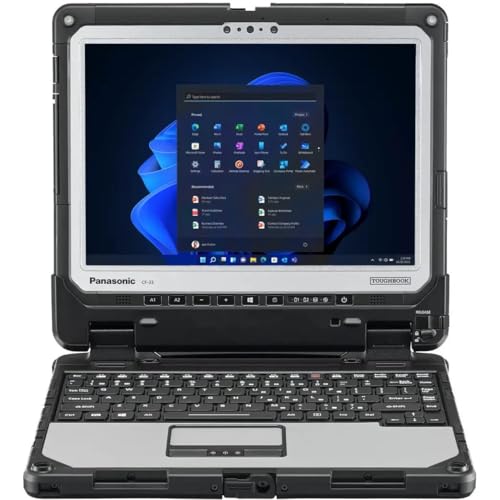
Panasonic Toughbook A3
Rain, dust and freezing temperatures that would shut down a consumer device barely slow this tablet, the most heavily protected in the group. A bright display stays readable in direct sun, which matters when the order screen faces outward. Trucks that trade outdoors year round rather than at indoor markets get the most from it.
Pros
- Highest environmental protection in this group
- Dual battery option for long shifts
- Readable in direct sunlight
Cons
- Large and heavy for handheld use
- Windows setup takes more configuration than Android
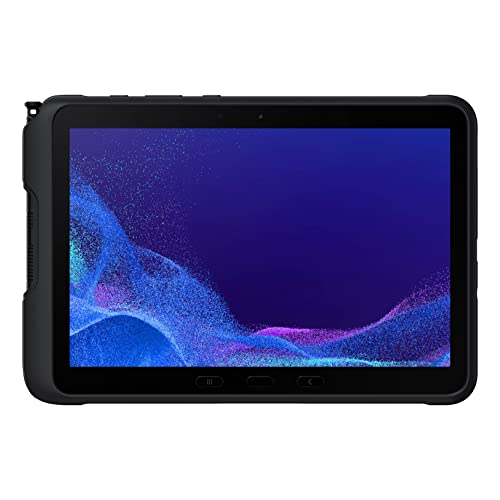
Samsung Galaxy Tab Active4 Pro
Most of what makes the Active5 work shows up here in a larger 10.1 inch body, suiting trucks with long menus or split kitchen and window views. A removable battery and included stylus carry over, so order notes get written on screen with wet hands. Owners report this is the value pick now that the newer generation sits above it.
Pros
- Larger screen fits more menu items
- Removable battery like the Active5
- Stylus works through rain and gloves
Cons
- Dimmer screen than the newer generation
- Bulky to hold one handed for long periods

Dell Latitude 7230 Rugged Extreme Tablet
An exceptionally bright display sets this tablet apart, built for field crews working in open sun and solving the single biggest complaint about outward-facing order screens. Full Windows runs on it, so desktop POS software that never got a tablet version still works. Weight makes it a serious machine rather than something to carry around the truck all day.
Pros
- Very bright display beats midday glare
- Runs legacy Windows POS software
- Hot swappable dual batteries
Cons
- Heaviest option here
- Overspecified for simple order taking

Getac ZX10 Rugged Tablet
A fully rugged Android build pairs with hot swappable batteries aimed at crews working double shifts away from mains power. A sunlight-readable screen and glove touch mode suit outdoor service. This model is less common in retail channels than Samsung or Zebra, so check accessory availability before committing a fleet.
Pros
- Very long runtime with dual batteries
- High drop and ingress protection
- Multiple touch modes for messy hands
Cons
- Accessories are harder to source
- Thicker body than mainstream tablets
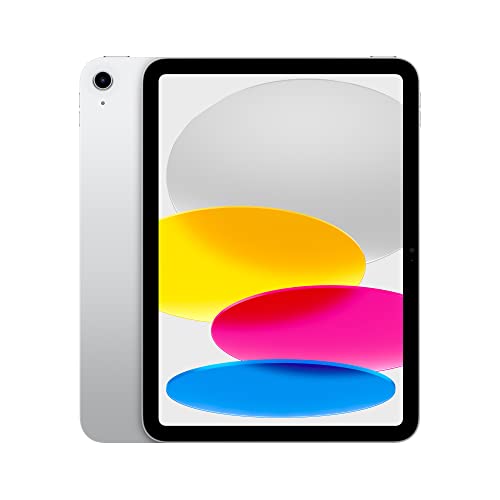
Apple iPad 10.9-inch (10th Generation)
Plenty of trucks run an iPad, because almost every POS and payment platform supports iPadOS first and best. On its own it is not rugged at all, so this only belongs in a truck inside a heavy-duty protective case with a screen shield. Owners report the software experience is the smoothest here, while the hardware is the most fragile.
Pros
- Broadest POS and card reader app support
- Familiar interface for seasonal staff
- Light and easy to hand around
Cons
- No inherent water or drop protection
- Sealed battery cannot be swapped mid shift
How they stack up
| # | Model | Protection | Best for | Score | Price |
|---|---|---|---|---|---|
| 1 | Samsung Galaxy Tab Active5 | IP68, MIL-STD-810H | Best overall | 9.4 | Check price |
| 2 | Zebra ET40 Enterprise Tablet | IP65, drop rated to 1.2 m | Best for dedicated order stations | 9.2 | Check price |
| 3 | Panasonic Toughbook A3 | IP65, MIL-STD-810H, 5 ft drop | Best for harsh weather | 9.0 | Check price |
| 4 | Samsung Galaxy Tab Active4 Pro | IP68, MIL-STD-810H | Best value | 8.8 | Check price |
| 5 | Dell Latitude 7230 Rugged Extreme Tablet | IP65, MIL-STD-810H | Best for bright sunlight | 8.6 | Check price |
| 6 | Getac ZX10 Rugged Tablet | IP66, MIL-STD-810H, 6 ft drop | Best for long shifts | 8.3 | Check price |
| 7 | Apple iPad 10.9-inch (10th Generation) | None, requires a rugged case | Best for app choice | 8.0 | Check price |
How to pick the right one
What does an IP rating actually protect against? The two digits in an IP rating cover solids and liquids separately. IP65 means dust tight and protected against water jets, which handles a wash down and rain at the window. IP68 adds immersion protection, useful if the tablet might end up in a sink or a puddle. For a food truck the dust digit matters more than people expect, since flour, spice dust and grease aerosol get everywhere over a season.
Best for outdoor service: screen brightness A tablet that looks fine indoors can become unreadable at a lunchtime service in open sun. Brightness is quoted in nits, and anything under about 500 struggles outdoors, while 800 and above stays usable. An anti-glare or matte screen protector helps, and angling the screen away from direct overhead sun does more than any setting. Budget for the brighter option if the tablet faces customers.
Best for long shifts: battery strategy A long service day will outlast almost any sealed battery, so the real question is what happens when it runs low. Swappable battery designs let you drop in a charged pack in seconds, which is why several tablets here are built that way. A sealed device calls for a permanent powered mount with a dedicated circuit, rather than relying on a cable someone will trip over.
Best for wet or gloved hands: touchscreen and mounting Wet hands, disposable gloves and flour all defeat a standard capacitive touchscreen, so look for explicit wet touch and glove modes rather than assuming they work. Mounting is the other overlooked detail: a VESA or clamp mount keeps the tablet out of the splash zone and stops it walking off the counter. The screen will be wiped down with sanitiser several times a day, so cleanability counts too.
Questions worth asking
Do I really need a rugged tablet for a food truck?
It depends on where the tablet sits. A unit mounted inside a dry cab with a protective case can be a consumer tablet, but anything living at the service window faces grease, splashes, temperature swings and drops. Operators report that consumer tablets in that position typically fail within a season or two.
Will these tablets work with common POS platforms?
The Android and iPadOS devices here run the mainstream cloud POS and card reader apps directly. Windows tablets run desktop POS software, including legacy systems that never got a mobile version. Always confirm your specific processor supports the device before buying, since card reader pairing is the usual sticking point.
What IP rating should I look for in a POS tablet?
IP65 is the practical minimum for a food service environment, giving dust-tight sealing and protection from water jets. IP68 adds immersion resistance, worth having if the tablet is handled with wet hands near a sink. Ratings only apply with all ports and covers properly closed.
How do I stop glare on the order screen?
Combine a high-brightness display with a matte anti-glare protector, and position the screen so it is not facing open sky. A small shade or hood over the mount solves most remaining cases. Raising the screen brightness drains the battery faster, another argument for swappable packs.
Can these tablets run all day on one charge?
Rarely at full brightness with cellular data and a card reader connected. Devices with hot swappable batteries sidestep the problem entirely, and a powered mount handles it for sealed devices. Plan for the tablet drawing power all service rather than hoping the battery lasts.
Do rugged tablets work with gloves on?
Most of the rugged models here have an explicit glove mode that raises touch sensitivity, and several also add a wet touch mode that ignores water droplets. Consumer tablets generally do not, a real workflow issue in a kitchen environment.
Is cellular connectivity necessary for a food truck tablet?
For a truck that moves between locations, yes. A tablet with built-in cellular avoids depending on a phone hotspot that drops mid transaction. Many operators run cellular on the tablet and keep a hotspot as backup, since a payment failure at the window costs more than the data plan.
How should a POS tablet be cleaned at a food truck?
Wipe with a damp cloth and a food-safe sanitiser, avoiding solvents that damage oleophobic coatings and port seals. Check the port covers are closed before any wash down, since almost every ingress failure happens with a flap left open.
iPad vs Samsung Galaxy Tab Active5 for a food truck: which is better?
The iPad wins on app selection and staff familiarity but needs a rugged case to survive a service window. The Active5 ships rugged out of the box, with a swappable battery and wet touch support, at the cost of a smaller native app ecosystem than iPadOS.
The verdict
The Samsung Galaxy Tab Active5 fits most food trucks best, running standard POS apps on hardware that survives the window and swapping batteries in seconds when a shift runs long. Choose the Zebra ET40 for a fleet needing central management, or the Panasonic Toughbook A3 if the tablet works outdoors through winter.
Tony Russo
Tony trained as an automotive technician and spent years in service and parts retail before moving into writing. He focuses on garage tools, car care products and accessories from a hands-on maintenance perspective.