Robot Kits to Buy in Bulk for a Whole Class or Club
LEGO Education SPIKE Prime is the strongest bulk buy for schools, because single elements stay orderable for years. Learning Resources Botley 2.0 handles screen-free early years groups. Makeblock mBot Neo carries older students from block coding into Python on an aluminium chassis built for daily handling.
LEGO Education SPIKE Prime is the safest multi-unit purchase for a classroom, since replacement elements and lesson plans both stay supported. Roughly 520 pieces per set fund several build cycles a term. Storage is the trade, because every set needs sorted trays and an inventory check. Under-eights learn more from Botley 2.0, which teaches sequencing with no screen involved.
Buying robotics in quantity raises questions a single gift never does. Spare parts, charging logistics and how many children share one box outrank headline features. We compared published age ranges, coding environments, part counts and available curriculum material. Teacher and club-leader feedback then covered breakages, battery handling and how much of a lesson setup eats.
The shortlist, ranked

LEGO Education SPIKE Prime Set
A programmable hub, distance and force sensors and roughly 520 elements support several build cycles per term. Students begin in word blocks, then shift to Python inside the same app. Individual bricks and motors can be reordered, which decides whether a kit survives five years in a school cupboard.
Pros
- Single elements and motors remain orderable
- One app spans word blocks through to Python
- Sorting trays and lesson plans built for group use
Cons
- Highest cost per unit across a bulk order
- Sorting and inventory add time after every lesson

Learning Resources Botley 2.0 The Coding Robot Activity Set
Programming happens on a handheld remote, so no tablet, login or reading fluency is required. Cards, tiles and obstacles from the 78 piece set lay out a coding path on any classroom floor. Object detection and looping commands keep the challenge growing as children advance.
Pros
- No devices or accounts to manage across a class
- Floor tiles turn a lesson into a group challenge
- Plastic shell survives repeated drops onto hard floors
Cons
- Runs on AAA cells rather than a rechargeable pack
- Command set runs out around age eight

Makeblock mBot Neo
An aluminium chassis and the CyberPi controller outlast plastic rivals in the same bracket. mBlock covers block coding, Python and simple AI tasks such as speech recognition. Assembly runs to about twenty minutes, which fits inside one club session.
Pros
- Metal chassis takes repeated classroom handling
- Add-on packs extend the same base robot
- Built-in screen shows live sensor values while debugging
Cons
- App updates can shift menu layouts mid-term
- Extra sensors arrive as separate purchases

ELEGOO Smart Robot Car Kit V4.0
Students wire an UNO style board to ultrasonic, line-tracking and infrared modules, then upload C++ sketches. Nothing hides behind a simplified app, so the electronics stay visible throughout. Build time reaches a couple of hours, which suits a multi-week club rather than one lesson.
Pros
- Real wiring and sketch uploading, not a toy abstraction
- Low enough per unit to order several sets
- Tutorials walk through each module separately
Cons
- 18650 batteries are bought separately
- Loose jumper wires vanish in shared storage
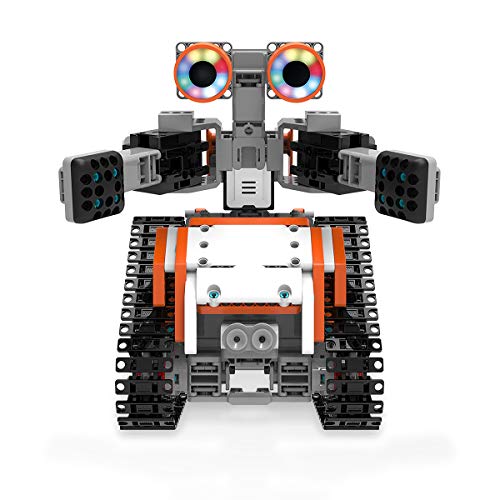
UBTECH JIMU Robot TankBot Kit
Rotating 3D instructions on a tablet walk children through a servo-driven tracked robot. Blockly then drives the servos and the infrared sensor. Snap-fit connectors mean no screwdriver, so a session can pack away fast.
Pros
- 3D instructions cut how often an adult is needed
- Snap connectors need no tools or screws
- Servos allow expressive motion beyond driving
Cons
- Tablets must be available for every group
- Small connector parts go missing between sessions

Sillbird STEM 12-in-1 Solar Robot Kit
One box yields twelve solar machines across two difficulty levels, stretching a small budget over many sessions. A small photovoltaic panel supplies the drive, so lessons need sunlight or a strong lamp. Coding never enters the picture, making this a mechanics and energy topic instead.
Pros
- Twelve builds out of a single inexpensive box
- Solar drive demonstrates energy conversion directly
- Nothing to charge, swap or replace
Cons
- Indoor use needs bright light to run properly
- No programming element at any level

OWI 14-in-1 Solar Robot Kit
Fourteen configurations, land and water, come out of one small box that suits handing one to each pair. Parts snap together with no glue or soldering. Gearbox alignment is the sticking point, so younger builders will want an adult nearby.
Pros
- Cheapest route to one kit per pair of children
- Water builds add variety to a session
- Stores in a small amount of shelf space
Cons
- Gearbox stage frustrates younger builders
- Thin plastic parts snap when forced
How they stack up
| # | Model | Age range | Best for | Score | Price |
|---|---|---|---|---|---|
| 1 | LEGO Education SPIKE Prime Set | 10 and up | Best overall for classrooms | 9.4 | Check price |
| 2 | Learning Resources Botley 2.0 The Coding Robot Activity Set | 5 and up | Best for early years | 9.2 | Check price |
| 3 | Makeblock mBot Neo | 8 and up | Best coding progression | 9.0 | Check price |
| 4 | ELEGOO Smart Robot Car Kit V4.0 | 12 and up | Best for Arduino learners | 8.8 | Check price |
| 5 | UBTECH JIMU Robot TankBot Kit | 8 and up | Best app-guided building | 8.6 | Check price |
| 6 | Sillbird STEM 12-in-1 Solar Robot Kit | 8 and up | Best value multi-build | 8.3 | Check price |
| 7 | OWI 14-in-1 Solar Robot Kit | 10 and up | Best budget bulk buy | 8.0 | Check price |
What to look for
What to check before buying robotics in quantity Three things decide whether a bulk order survives the school year: spare parts, power and storage. Kits with orderable replacement elements outlive kits where one dead motor retires the whole box. Rechargeable hubs beat a drawer of flat AAA cells. Sorted trays cut the pack-down that otherwise swallows the last ten minutes of a lesson. Curriculum material matters too, since a kit without lesson plans shifts all the planning onto the teacher.
Matching the coding path to the age group Under-eights pick up sequencing fastest without a screen, which is Botley 2.0’s entire design. From about eight, block coding introduces loops, conditions and variables. Teenagers need a kit that keeps going: SPIKE Prime and mBot Neo both reach Python, and the ELEGOO car runs Arduino C++. Match the ceiling, not the floor. A kit outgrown within a term is a kit bought twice.
How many children should share one kit Pairs beat trios for building. One child holds parts while the other assembles, and both stay busy. Add a third and someone ends up watching. Fifteen kits cover a class of thirty properly, while ten works if builds rotate across the session. Solar kits from Sillbird and OWI make one per pair realistic where a premium set never could.
Clubs, home use and mixed-age groups Weekly clubs gain from kits that stay assembled between meetings, which points at mBot Neo and the ELEGOO car. Home buyers with one child get more life from multi-build boxes such as the Sillbird or OWI sets, because a single fixed robot loses novelty within weeks. Mixed-age groups work well pairing an older child with a younger one on a SPIKE Prime build. Avoid handing an ELEGOO car to under-tens, where loose jumper wires and IDE setup frustrate more than they teach.
Good to know
What is the best robot building kit for a classroom?
LEGO Education SPIKE Prime is the usual answer, because replacement elements, sorting trays and published lesson plans are all designed around repeated group use.
How many robot kits do I need for a class of 30?
Fifteen lets every child work in a pair, which is the most productive grouping. Ten still works if builds rotate, though some children spend part of the lesson watching.
Which robot kits suit 5 to 7 year olds?
Botley 2.0 leads at that age. Commands go in on a handheld remote, so no tablet, account or reading requirement slows the lesson down.
Do robot building kits teach real coding?
The better ones do. SPIKE Prime and mBot Neo both progress from blocks into Python, and the ELEGOO car uses genuine Arduino C++ sketches.
Are solar robot kits worth buying for schools?
For mechanics and energy lessons, yes, and nothing needs charging. Programming is absent, so run them alongside a coding kit rather than in place of one.
LEGO SPIKE Prime vs mBot Neo: which is better for a club?
SPIKE Prime fits open-ended design work where students invent their own machines. mBot Neo fits clubs focused on driving, sensors and code, since its chassis arrives mostly formed.
Can robot kits be stored assembled between sessions?
mBot Neo and the ELEGOO car stay built without trouble. LEGO sets are normally stripped back into trays, which is part of the learning but adds sorting time.
Which robot kit works without any tablets or devices?
Botley 2.0 programs entirely from its remote. Sillbird and OWI solar kits involve no electronics setup at all, so neither needs a device either.
What spare parts should I order with a bulk purchase?
Motors, battery packs and small connector pieces fail or disappear first. A few spares ordered upfront stop a whole kit sitting idle mid-term.
The bottom line
LEGO Education SPIKE Prime earns its place in a school budget, since orderable elements and a blocks-to-Python route keep sets teaching for years. Early years groups should buy Botley 2.0 instead and skip devices altogether. Clubs counting every purchase get the most sessions from the ELEGOO Smart Robot Car Kit V4.0, as long as a leader is comfortable with the Arduino IDE.
Rachel Simmons
Rachel previously worked in child-product retail and brings a practical, detail-first eye to gear reviews, focusing on safety standards, ease of use and the fine print that matters most for new caregivers.


