RGB Gaming Mouse Pads Compared by Surface and Software
Corsair MM700 RGB Extended leads for full desk coverage synced through iCUE software. Razer Firefly V2 Pro suits compact desks that need a hard, fast tracking surface. SteelSeries QcK Prism Cloth delivers cloth comfort with software-matched lighting at a lower cost than either rival.
Corsair MM700 RGB Extended tops this list for gamers who want one mat covering keyboard, mouse and synced iCUE lighting in a single piece. Its size becomes a drawback on smaller or shared desks. Razer Firefly V2 Pro answers that with a compact hard surface built for fast flick aim, while SteelSeries QcK Prism Cloth keeps cost down without dropping software-matched lighting.
RGB pads split into two camps: cloth surfaces that favor control, and hard surfaces built for speed. Lighting ecosystem matters as much as looks, since Corsair lighting will not sync natively with a Razer keyboard. We compared surface type, lighting software, size and cable routing, then weighed owner feedback on fraying edges and software stability.
Our top picks
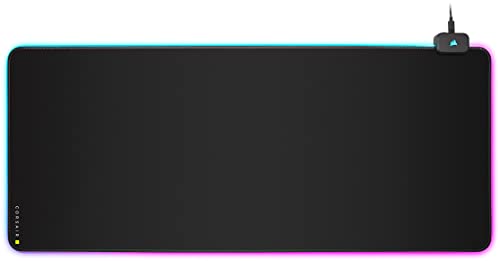
Corsair MM700 RGB Extended Gaming Mouse Pad
This cloth mat spans 930 by 400mm, wide enough for a keyboard, mouse and wrist rest in one piece. A 15-zone RGB edge syncs with other iCUE peripherals for one unified lighting profile. Built-in USB 3.0 passthrough keeps a receiver cable within reach instead of routed behind the desk.
Pros
- Covers keyboard and mouse in a single mat
- Syncs lighting across the iCUE peripheral lineup
- Passthrough port keeps a receiver cable reachable
Cons
- Too large for small or shared desks
- Needs iCUE software running in the background

Razer Firefly V2 Pro Hard Gaming Mouse Mat
A hard polycarbonate surface with a micro-textured finish cuts friction for fast flick shots. Chroma RGB lighting wraps the border and syncs through Synapse with compatible keyboards and mice. Rigid construction stays flat on a desk, unlike cloth mats that curl at the edges over time.
Pros
- Low friction favors fast, precise swipes
- Stays flat without edge curl
- Syncs with other Chroma-enabled Razer gear
Cons
- Compact 355 by 255mm size leaves no keyboard room
- Hard surface feels less comfortable for wrists

SteelSeries QcK Prism Cloth Gaming Mouse Pad
QcK Prism keeps the soft cloth top from the original QcK, then adds a two-zone RGB border through SteelSeries GG software. A rubber base grips the desk during quick swipes. Medium and XL sizes fit different desk layouts without forcing one footprint on every setup.
Pros
- Soft cloth surface suits long sessions
- Rubber base resists sliding during play
- Sold in multiple sizes for different desks
Cons
- Cloth surface wears faster than hard mats
- Two lighting zones limit customization
Corsair MM800 RGB Polaris Gaming Mouse Pad
Polaris uses a glass-like polymer surface for consistent glide and a 15-zone RGB edge visible even under a keyboard overhang. Rigid construction resists warping better than cloth mats stored rolled up. Its compact footprint suits a mouse-only setup rather than a full desk mat.
Pros
- Consistent glide across the entire surface
- Rigid build will not warp in storage
- Bright RGB edge visible from most angles
Cons
- Small footprint fits mouse only
- Slicker surface reduces stopping control
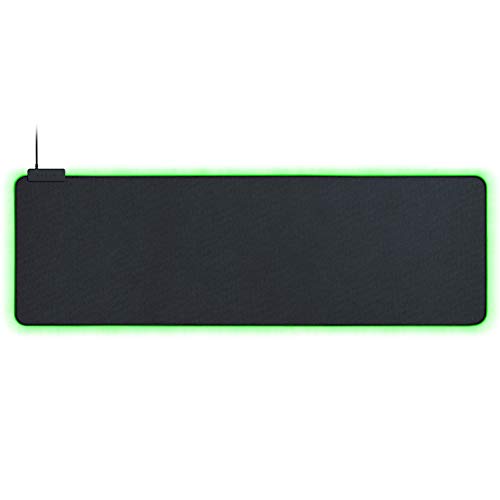
Razer Goliathus Chroma Extended Gaming Mouse Mat
Goliathus Chroma stretches to a 920 by 294mm cloth mat with a woven surface tuned for balanced glide and stopping power. Chroma lighting runs along the top edge and syncs through Synapse. Stitched borders resist fraying better than unstitched cloth pads under daily mouse contact.
Pros
- Stitched edges resist fraying over time
- Balanced glide suits flicks and precision aim alike
- Extended length covers a wide desk area
Cons
- Narrower depth than some full-desk rivals
- Cloth surface picks up dust and oils

HyperX Pulsefire Mat RGB Gaming Mouse Pad
Pulsefire Mat pairs a hard, low-friction surface with a single RGB light bar controlled through HyperX NGENUITY software. Design matches other Pulsefire peripherals rather than chasing lighting complexity. A compact 300 by 350mm size keeps it practical for smaller desk setups.
Pros
- Matches other HyperX Pulsefire gear visually
- Low-friction coating suits fast swipes
- Compact footprint fits tighter desks
Cons
- Single lighting zone limits effects
- Software offers fewer features than rival apps
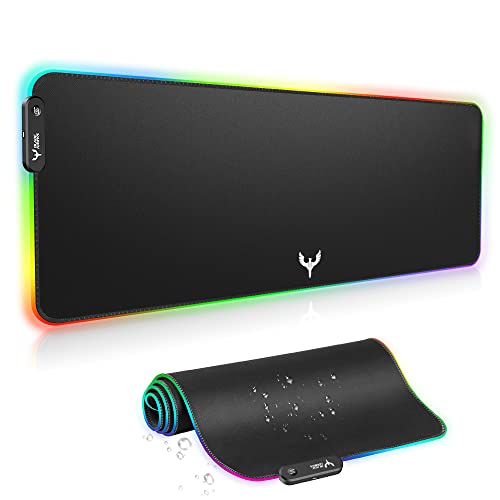
Havit RGB Gaming Mouse Pad
Havit runs its lighting off a built-in controller instead of brand software, so it lights up on any PC without an app installed. Stitched cloth surface and a non-slip rubber base keep it planted during use. It will not sync with keyboard lighting, but it works reliably on its own for less.
Pros
- Works with any PC, no software needed
- Non-slip base holds position during play
- Costs less than brand-ecosystem pads
Cons
- Will not sync with keyboard or mouse lighting
- Fewer lighting effects than app-controlled pads
How to choose
Cloth or hard surface Cloth surfaces add slight friction that favors tracking control, which suits strategy and MMO play. Hard surfaces glide faster with less resistance, favoring quick flicks in shooters. Genre should guide this choice before lighting features enter the decision, since surface changes how a mouse feels every match.
Matching lighting software to the rest of your setup RGB pads sync best within one brand’s ecosystem. A Corsair pad lights up alongside iCUE keyboards, while a Razer pad needs Synapse and Chroma-enabled peripherals for one unified profile. Mixing brands still works, though each app then runs its lighting independently instead of a single synced show.
Sizing an RGB pad for your desk Extended pads covering keyboard and mouse look best with real desk depth behind them, or they crowd a monitor stand. Compact pads suit smaller desks or setups where the keyboard already sits on its own mat. Measuring the desk before buying matters, since cut cloth mats are rarely returnable.
Keeping an RGB pad clean and fray-free Stitched edges resist fraying longer than raw-cut cloth borders. Hard surfaces will not fray but can pick up scratches from rough mouse feet. A damp cloth works better than a washing machine, since some RGB models route wiring through the fabric that water can damage.
Compared at a glance
| # | Model | Surface | Best for | Score | Price |
|---|---|---|---|---|---|
| 1 | Corsair MM700 RGB Extended Gaming Mouse Pad | Micro-woven cloth | Best overall | 9.4 | Check price |
| 2 | Razer Firefly V2 Pro Hard Gaming Mouse Mat | Hard polycarbonate, micro-texture | Best for fast tracking | 9.1 | Check price |
| 3 | SteelSeries QcK Prism Cloth Gaming Mouse Pad | Cloth with rubber base | Best value | 8.8 | Check price |
| 4 | Corsair MM800 RGB Polaris Gaming Mouse Pad | Hard polymer, glass-like finish | Best for hard-surface RGB | 8.6 | Check price |
| 5 | Razer Goliathus Chroma Extended Gaming Mouse Mat | Woven cloth, stitched edges | Best for wide monitor setups | 8.4 | Check price |
| 6 | HyperX Pulsefire Mat RGB Gaming Mouse Pad | Hard, low-friction coating | Best for HyperX and Kingston setups | 8.2 | Check price |
| 7 | Havit RGB Gaming Mouse Pad | Stitched cloth, rubber base | Best budget | 8.0 | Check price |
Frequently asked questions
What is the best RGB gaming mouse pad for a full desk setup?
Corsair MM700 RGB Extended and Razer Goliathus Chroma Extended both cover keyboard and mouse in one mat, syncing lighting through their own brand software.
Do RGB mouse pads need software to work?
Most do, since brand apps such as iCUE, Synapse or GG control the lighting zones and effects. A few, including the Havit RGB pad, run an onboard controller that lights up with no app installed.
Is a hard or cloth mouse pad better for gaming?
Hard surfaces glide faster and suit quick flick aiming in shooters. Cloth surfaces add friction that helps tracking precision, which fits strategy games and general use better.
Can an RGB mouse pad sync with a different brand keyboard?
Only within the same software ecosystem. A Corsair pad syncs with Corsair keyboards through iCUE, but it will not sync natively with a Razer or SteelSeries keyboard’s lighting.
How do you clean an RGB gaming mouse pad?
Wipe cloth surfaces with a damp cloth and mild soap, then let them air dry flat. Skip the washing machine on pads with embedded RGB wiring, since water can damage the circuitry.
Are extended RGB mouse pads worth the larger size?
They are worth it when a desk has the depth and the goal is unified keyboard and mouse lighting on one mat. Smaller desks do better with a compact pad instead.
Do RGB mouse pads use much power?
Very little. They draw power over USB, similar to a keyboard, and will not noticeably affect a desktop’s power draw or a laptop’s battery life through a hub.
Which RGB mouse pad works best on a budget?
Havit RGB Gaming Mouse Pad delivers standalone lighting with no brand software required, making it the most affordable option that still lights up reliably out of the box.
RGB mouse pad vs regular mouse pad, is the lighting worth it?
Lighting adds no tracking benefit by itself, so the choice comes down to matching a themed setup. Surface material still matters more for actual mouse performance.
Final word
Gamers who want one mat covering keyboard, mouse and synced iCUE lighting should pick the Corsair MM700 RGB Extended. Anyone chasing fast flick aim gets more from the Razer Firefly V2 Pro and its low-friction hard surface. Builders working with a tighter budget still get reliable RGB, without ecosystem lock-in, from the Havit pad.
Marcus Chen
Marcus covered consumer electronics for enthusiast tech publications for six years before joining ChoiceCrest. He specializes in translating manufacturer spec sheets into plain-language buying advice, with a focus on audio, computing accessories and smart-home gear.