What to Look for in a Reliable Receipt Printer
The Epson TM-T20III is the best all round receipt printer, with driver support across nearly every point of sale system. The Star TSP143IIIU suits tablet based setups best, and the MUNBYN ITPP047 is the value pick for lower volume counters.
Most counters should buy the Epson TM-T20III. Tablet based systems fit better with the Star TSP143IIIU, and the MUNBYN ITPP047 makes sense when volume is low and every dollar counts.
Compatibility, not hardware, is the hard part of this purchase. A printer that works flawlessly with one POS app can be invisible to another. We compared current models on published specifications and interface coverage, alongside what owners report about paper jams, cutter reliability, and behavior when a connection drops mid transaction.
What we recommend

Epson TM-T20III Thermal Receipt Printer
Broad driver support makes the TM-T20III the safe recommendation for almost any counter. Drop in paper loading turns a roll change into a five second task rather than a fiddle with spindles. Owners report the auto cutter holds up better under daily retail use than most rivals, which is exactly where cheaper printers tend to fail first.
Pros
- Excellent driver and POS compatibility
- Reliable auto cutter under daily load
- Drop in paper loading
Cons
- No built in Bluetooth on the base model
- Interface must be chosen at purchase
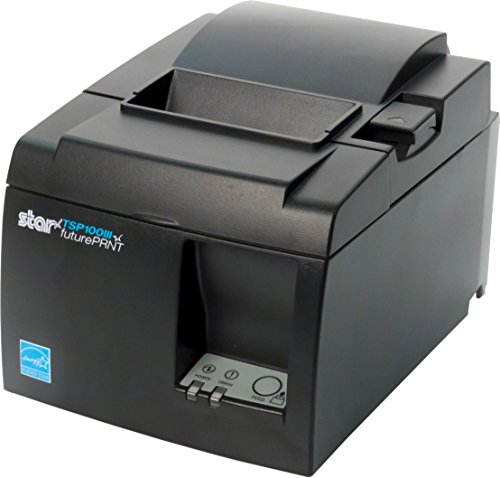
Star Micronics TSP143IIIU USB Receipt Printer
Many tablet based point of sale systems are built around Star’s TSP143III family, and the USB version can even power the tablet while it prints. Setup on those platforms is usually plug in and go instead of a driver hunt. Based on specifications it matches the Epson on speed while adding the convenience of charging the device it prints from.
Pros
- Widely supported by tablet POS apps
- Charges the connected tablet
- Fast and quiet in operation
Cons
- USB only on this variant
- Larger footprint than compact rivals

Epson TM-m30II Bluetooth Receipt Printer
Counters that are not tied to a fixed till suit the m30II best, since it offers Bluetooth and network options in a compact square footprint. Top or front paper exit lets it mount wherever space allows. Owners report it pairs reliably with tablet systems and recovers cleanly once a device wakes back up.
Pros
- Flexible wireless connectivity
- Compact square footprint
- Top or front exit for tight mounting
Cons
- Higher outlay than wired models
- Bluetooth pairing quirks on some tablets

Bixolon SRP-350plusIII Thermal Receipt Printer
Bixolon built this for counters that print continuously through a shift, rating the mechanism and cutter for that kind of duty. Several emulations are supported, which helps when swapping in a replacement without rewriting existing integrations. Specifications put it among the faster units here, useful when queues stack up at peak trading times.
Pros
- Built for continuous high volume printing
- Emulation support eases printer replacement
- Fast print speed for busy queues
Cons
- Less common in consumer POS documentation
- Bulkier than compact models

Citizen CT-S310II Thermal Receipt Printer
Citizen built its reputation in this category on mechanisms that keep working through dust, heat, and spills in hospitality settings. Both common paper widths fit the CT-S310II, and the housing resists splashes. Owners report it routinely outlasts the point of sale system it was originally bought to run.
Pros
- Robust in hospitality environments
- Handles both common paper widths
- Long mechanism service life
Cons
- Slower than the fastest rivals
- Plain styling for customer facing counters
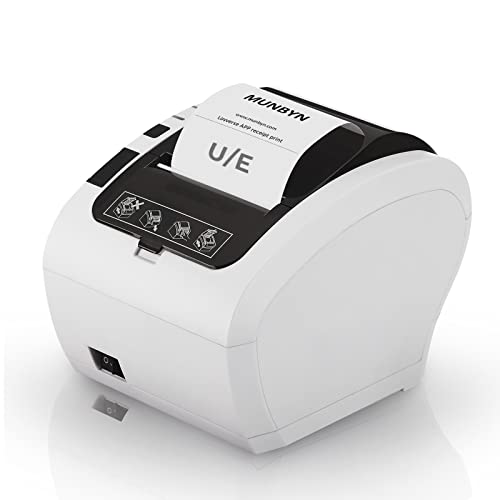
MUNBYN ITPP047 Thermal Receipt Printer
Small online and market sellers have made MUNBYN the default choice when they need a working thermal printer without a commercial support contract. USB and network connections come standard, along with a cash drawer port. Owners report driver setup takes some trial and error on less common systems, but it prints reliably once configured.
Pros
- Strong specification for the outlay
- Multiple interfaces included
- Popular with small independent sellers
Cons
- Driver setup can take trial and error
- Support is email based rather than local
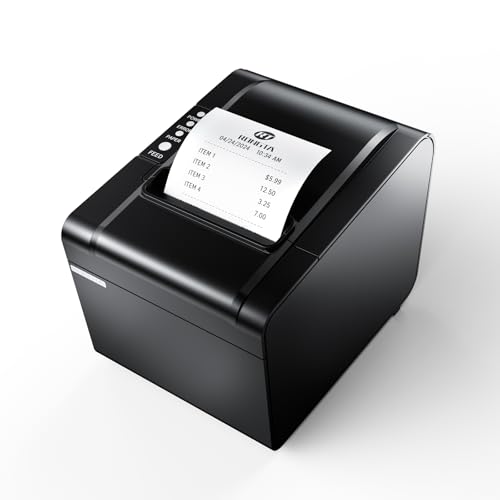
Rongta RP80 Thermal Receipt Printer
Rongta covers the entry level with the standard 80 mm thermal format, adding an auto cutter and cash drawer port. A market stall, pop up shop, or occasional second till suits it better than an all day counter. Specifications put its mechanism duty rating below commercial units, so treat it as light duty gear.
Pros
- Lowest cost route into thermal printing
- Includes cutter and drawer port
- Standard paper size is easy to source
Cons
- Lower duty rating than commercial models
- Documentation is minimal
How to pick the right one
Thermal versus impact: which type fits your counter Thermal printers dominate retail because they print fast and quiet with no ribbons to replace, heating chemically coated paper instead. Impact printers survive heat and grease better and can print multi part paper, which is why kitchens still rely on them. A printer over a grill or in a warm pass needs impact durability. Everywhere else, thermal is the right default.
Why compatibility decides the purchase, not print speed Confirm your point of sale software explicitly supports a model before comparing print speeds. Tablet based systems often list only a handful of approved printers and behave unpredictably with anything else. Desktop systems are more flexible but still need a driver for your operating system. A slightly slower printer your software recognizes instantly beats a faster one that eats a weekend of configuration.
Interfaces and cash drawer support for different setups USB works best for a single fixed till, Ethernet suits multiple stations sharing one printer, and Bluetooth fits mobile or pop up setups. Most receipt printers also drive a cash drawer through a modular port, which is how the drawer pops open automatically at the end of a sale. Check that the port exists rather than assuming it does.
Paper width, cutters, and running costs over time 80 mm paper is the retail standard and the easiest to source, while 58 mm suits compact mobile printers. Thermal rolls are cheap, but receipts fade over time, which matters for anything kept as a warranty record. The auto cutter is usually the first part to fail under heavy use, so for a busy counter, prioritize a well regarded cutter over a slightly higher headline speed.
How they stack up
| # | Model | Print speed | Best for | Score | Price |
|---|---|---|---|---|---|
| 1 | Epson TM-T20III Thermal Receipt Printer | Up to 250 mm per second | Best overall | 9.4 | Check price |
| 2 | Star Micronics TSP143IIIU USB Receipt Printer | Up to 250 mm per second | Best for tablet POS | 9.2 | Check price |
| 3 | Epson TM-m30II Bluetooth Receipt Printer | Up to 250 mm per second | Best for mobile setups | 9.0 | Check price |
| 4 | Bixolon SRP-350plusIII Thermal Receipt Printer | Up to 300 mm per second | Best for high volume | 8.7 | Check price |
| 5 | Citizen CT-S310II Thermal Receipt Printer | Up to 160 mm per second | Best for durability | 8.5 | Check price |
| 6 | MUNBYN ITPP047 Thermal Receipt Printer | Up to 300 mm per second | Best value | 8.2 | Check price |
| 7 | Rongta RP80 Thermal Receipt Printer | Up to 300 mm per second | Best budget | 8.0 | Check price |
Questions worth asking
Do I need special paper for a thermal receipt printer?
Yes. Thermal printers need heat sensitive paper rather than plain rolls. It is inexpensive and widely sold in 80 mm and 58 mm widths, but ordinary paper will not produce an image at all.
Will any receipt printer work with my POS app?
No. Compatibility varies significantly, especially with tablet based systems that support only a specific approved list. Check the software vendor’s supported hardware page first, since that single step prevents most setup problems.
What paper width should I choose for a receipt printer?
80 mm is the retail and hospitality standard, giving a readable receipt and the widest choice of rolls. 58 mm suits mobile and compact printers where space is tight but produces a narrower receipt.
How does a receipt printer open a cash drawer?
Most models send a pulse through a modular cash drawer port at the end of a transaction. The drawer connects to the printer rather than the computer, so confirm the port exists on whichever model you pick.
Why do my printed receipts fade over time?
Thermal prints fade with exposure to heat, light, and certain plastics over months or years. For records you need to keep, store a digital copy or switch to an impact printer with ribbon and plain paper.
Are impact printers still worth buying?
In kitchens, yes. Heat and grease damage thermal paper quickly, and impact printers handle both while also printing multi part slips. For a front of house counter they run noisier and slower with no real benefit.
How fast does a receipt printer need to be?
Around 150 mm per second feels instant for a typical short receipt. Higher speeds matter mainly at very busy counters or when receipts include long itemized lists and promotional footers.
What usually fails first on a receipt printer?
The auto cutter fails first, followed by the print head after heavy use. Keeping the paper path clean, using quality rolls, and clearing jams carefully rather than yanking paper extends the life of both.
Receipt printer or POS built in printer, which is better for a small shop?
A dedicated printer like the Epson TM-T20III or MUNBYN ITPP047 gives wider compatibility and easier replacement than a printer built into a specific POS terminal, which locks you to that hardware if it fails.
Our pick
The Epson TM-T20III remains the printer to buy for compatibility with almost any point of sale system and cutting that stays reliable under daily use. Choose the Star TSP143IIIU when your till runs on a tablet, or the Epson TM-m30II when the counter needs to move. The MUNBYN ITPP047 is the pragmatic pick for lower volume setups where a little driver work is acceptable.
Marcus Chen
Marcus covered consumer electronics for enthusiast tech publications for six years before joining ChoiceCrest. He specializes in translating manufacturer spec sheets into plain-language buying advice, with a focus on audio, computing accessories and smart-home gear.
You might also need
Nintendo Game & Watch: Super Mario Bros Review: Still Worth It as a Collectible?

Ray-Ban Meta (Gen 2) Wayfarer Smart Glasses: Worth $379 for Clear Lenses?
AlyKets Nikon UC-E6 Replacement USB Cable: Does a $7.95 Cord Work as Well as the Original?
