Professional Grade Switches for Reliable Network Performance
If you need a reliable, scalable network backbone, the Cisco CBS350-24T-4X is the best professional switch for most businesses. It offers 24 Gigabit ports plus 4 x 10G uplinks, advanced Layer 2+ features, and a user-friendly web interface. Its main limitation is that it lacks PoE, so you will need separate power for IP cameras or phones.
Professional switches are the backbone of any modern business network, ensuring stable connectivity for workstations, servers, and IP devices. Unlike consumer models, they offer advanced management, security, and scalability.
This roundup covers top-tier switches from leading brands like Cisco, Netgear, and Ubiquiti. We compared specifications and user feedback to help you choose the one that fits your network’s demands.
The best picks, ranked

Cisco CBS350-24T-4X
A powerful managed switch that combines 24 Gigabit ports with 4 x 10G SFP+ uplinks. It offers robust Layer 2+ features, including VLANs, QoS, and security. Ideal for growing businesses that need a reliable core switch.
Pros
- Excellent build quality and reliable performance
- Comprehensive management options
- Lifetime warranty
Cons
- No PoE support
- Higher price point

Netgear Nighthawk Pro Gaming SX10
While marketed for gaming, this switch offers professional features like link aggregation and advanced QoS. With 8 Gigabit ports and 2 10G ports, it suits power users and small studios.
Pros
- Two 10G ports for high-speed devices
- Low latency for real-time applications
- Plug-and-play setup
Cons
- Limited port count
- Not fully managed
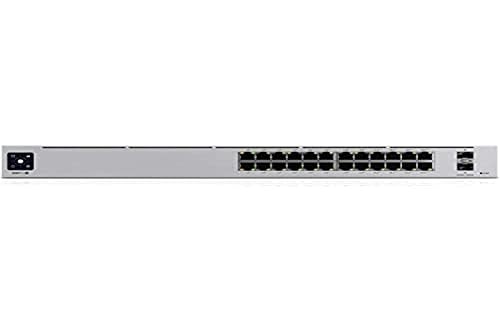
Ubiquiti UniFi Switch 24 PoE+ (USW-24-POE)
A 24-port Gigabit switch with 16 PoE+ ports, delivering up to 250W of power. It integrates seamlessly with the UniFi controller for centralized management, perfect for IP cameras and access points.
Pros
- High PoE budget
- Intuitive UniFi management
- Silent operation
Cons
- Requires UniFi ecosystem for full features
- No 10G uplinks

TP-Link JetStream T2600G-28TS
A cost-effective L2+ managed switch with 24 Gigabit ports and 4 SFP slots. It provides comprehensive VLAN, QoS, and security features, making it a solid choice for small to medium businesses.
Pros
- Affordable price
- Full management feature set
- Reliable performance
Cons
- No PoE
- Interface could be more modern
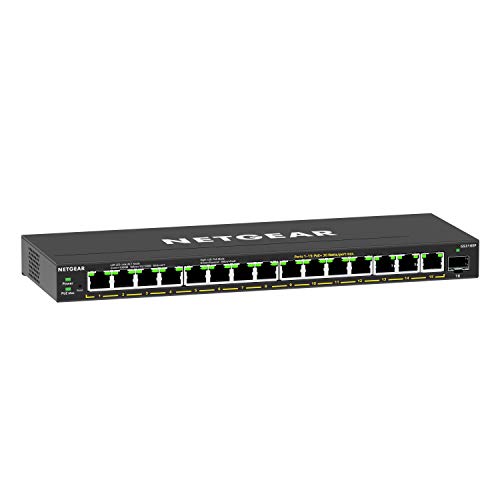
NETGEAR 16-Port Gigabit PoE+ Ethernet Plus Switch (GS316EP)
This switch offers 16 Gigabit ports with 8 PoE+ ports and a 120W budget. It is easy to set up with a web-based management interface, ideal for small offices needing PoE for phones or cameras.
Pros
- Plug-and-play with optional management
- Good PoE budget
- Fanless design
Cons
- Limited advanced features
- No SFP ports

Cisco Catalyst 2960-X Series 48 Port Gigabit Switch (WS-C2960X-48TS-L)
A robust 48-port Gigabit switch from Cisco’s Catalyst line, featuring advanced security, QoS, and management. It is designed for mission-critical applications in larger networks.
Pros
- High port density
- Excellent security features
- Proven enterprise reliability
Cons
- No PoE on this model
- CLI may be steep for beginners

TRENDnet 24-Port Gigabit L2 Managed Switch (TEG-7124WS)
A fanless 24-port Gigabit switch with a full suite of L2 management features. It operates silently, making it perfect for open offices or studios. Includes 4 SFP slots for fiber uplinks.
Pros
- Completely silent operation
- Affordable price
- Includes SFP slots
Cons
- No PoE
- Limited third-party integration
Compared at a glance
| # | Model | Ports | Best for | Score | Price |
|---|---|---|---|---|---|
| 1 | Cisco CBS350-24T-4X | 24 x Gigabit Ethernet + 4 x 10G SFP+ | Best overall for advanced networking features | 9.4 | Check price |
| 2 | Netgear Nighthawk Pro Gaming SX10 | 8 x Gigabit + 2 x 10G (copper/SFP+) | Best for gaming and low-latency networks | 8.7 | Check price |
| 3 | Ubiquiti UniFi Switch 24 PoE+ (USW-24-POE) | 24 x Gigabit (16 PoE+) | Best for PoE devices and central management | 9.1 | Check price |
| 4 | TP-Link JetStream T2600G-28TS | 24 x Gigabit + 4 x SFP | Best budget-friendly managed switch | 8.9 | Check price |
| 5 | NETGEAR 16-Port Gigabit PoE+ Ethernet Plus Switch (GS316EP) | 16 x Gigabit (8 PoE+) | Best for simple PoE needs with basic management | 8.3 | Check price |
| 6 | Cisco Catalyst 2960-X Series 48 Port Gigabit Switch (WS-C2960X-48TS-L) | 48 x Gigabit + 4 x SFP | Best for enterprise reliability and security | 9.0 | Check price |
| 7 | TRENDnet 24-Port Gigabit L2 Managed Switch (TEG-7124WS) | 24 x Gigabit + 4 x SFP | Best for quiet environments | 8.1 | Check price |
How to choose
Common questions
What is the difference between a managed and an unmanaged switch?
A managed switch allows you to configure and monitor the network through a web interface or CLI, offering features like VLANs, QoS, and security. An unmanaged switch is fixed in configuration, providing no options for optimization or monitoring. For professional use, managed switches are essential to ensure security and performance.
Why do I need PoE in a professional switch?
PoE (Power over Ethernet) provides electrical power to network devices such as IP cameras, VoIP phones, and wireless access points through the Ethernet cable, eliminating the need for separate power outlets. This simplifies installation and allows for centralized power management.
Can I use a consumer switch in a business environment?
Consumer switches may work for very small networks, but they lack advanced features like VLANs, QoS, and remote management, which are crucial for security and performance in business settings. Professional switches also offer better reliability and support, making them a safer investment.
How many ports do I need for my business network?
Count the number of devices you need to connect, including computers, printers, servers, and network devices. Add extra ports for future expansion. A 24-port switch is common for small to medium businesses, while larger enterprises may require 48 or more ports.
What is a 10G uplink used for?
A 10G uplink port (often SFP+ or copper) provides a high-speed connection to other switches or a core network, allowing for increased bandwidth and faster data transfer between segments of the network. It is useful for connecting to servers or network storage.
Are all professional switches noisy?
No, many professional switches are fanless, making them silent, but they may have limited port densities or PoE budgets. Switches with PoE or high port counts often include fans for cooling, which can generate noise. Consider fanless models for quiet office environments.
Can I manage a professional switch from a mobile app?
Some switches, such as those from Ubiquiti and Netgear, offer mobile apps for monitoring and basic configuration. However, most enterprise-grade switches rely on web interfaces or CLI, which are best accessed from a computer. Apps are convenient for quick checks but may not offer full functionality.
What does ‘lifetime warranty’ mean for switches?
A lifetime warranty typically covers the product for as long as it is owned, with free replacement or repair if it fails under normal use. Cisco and Netgear offer lifetime warranties on many business switches, reflecting their confidence in reliability.
Do I need a Layer 3 switch?
If your network has multiple VLANs and devices need to communicate between them, a Layer 3 switch can route traffic without an external router. For most small to medium networks, a Layer 2 switch with a router is sufficient. Layer 3 is recommended for larger, more complex networks.
How do I secure my network switch?
Professional switches offer security features such as 802.1X authentication, access control lists (ACLs), and port security. Ensure you disable unused ports, change default credentials, and keep firmware updated. For remote management, use secure protocols like SSH or HTTPS.
The verdict
For most professional settings, the Cisco CBS350-24T-4X is the top recommendation due to its advanced features, reliability, and future-proof 10G uplinks. If your network relies on PoE for IP cameras or phones, the Ubiquiti UniFi Switch 24 PoE+ offers excellent value and easy management. For tight budgets, the TP-Link JetStream T2600G-28TS delivers managed features without breaking the bank.
Jake Monroe
Jake worked as a residential contractor for over a decade before shifting to full-time writing. He evaluates power tools, hand tools and workshop gear through the lens of someone who has actually used them on job sites, not just read the box.