Electronic Learning Toys That Hold Attention Past Week One
LeapFrog LeapStart takes the top spot, since swapping books changes both subject and difficulty across preschool to first grade. Osmo Genius Starter Kit turns an iPad you already own into a tactile math and spelling station. Botley 2.0 teaches sequencing with no screen involved at all.
LeapFrog LeapStart fits families who want one device to carry a child from letter sounds into early reading. Content sits in the books rather than the console, so difficulty rises by moving up a level. Audio prompts ask for an answer instead of allowing passive watching. Those books are the catch, because the library is an ongoing purchase.
Many toys in this category teach one trick and then live in a cupboard. We compared stated age bands, subject coverage, tablet requirements, expansion content and battery demand across current listings. Owner reports about attention span beyond the first fortnight settled several placements. Nothing here is ranked on noise, lights or box claims.
The top picks, ranked

LeapFrog LeapStart Interactive Learning System
Touching the stylus to a LeapStart page makes the console read, question or explain what is under it. Book levels climb from preschool letter sounds to first grade reading and problem solving. Because the content lives in the books, a single console covers roughly ages two to seven.
Pros
- One console spans several school years of content
- Audio questions push a child to answer, not just listen
- Works without a tablet or an internet connection
Cons
- Books sell separately, so content is a repeat purchase
- Daily play chews through AA batteries

Osmo Genius Starter Kit for iPad
A reflector clips over the iPad camera so the app can see wooden tiles and drawings on the table. Five kits cover numbers, spelling, tangram shapes, physics puzzles and drawing. Hands stay on real pieces while the screen reacts, which builds number sense better than tapping glass.
Pros
- Wooden tiles keep hands off the screen surface
- Five subject kits arrive in one box
- Difficulty scales automatically as answers improve
Cons
- Does nothing without a supported iPad
- Reflector is small and easily lost

VTech Touch and Learn Activity Desk Deluxe
One piece of furniture folds into three setups, a sit down desk, an upright easel and a chalkboard. Interactive pages slot onto the desktop and respond to touch with letters, numbers and music. A two year old gets a defined place to work, which parents often report helps focus.
Pros
- Converts into three configurations as the child grows
- Gives preschoolers a dedicated activity station
- Included pages start teaching straight out of the box
Cons
- Claims real floor space in a small room
- Stays loud even on the lower volume setting

Learning Resources Botley 2.0 The Coding Robot
Children build sequences on a handheld remote, up to 150 steps, and Botley runs them. Nothing pairs to a phone or tablet, so coding logic arrives without added screen time. Obstacle pieces and coding cards turn a living room floor into a course to solve.
Pros
- Teaches sequencing with no display anywhere in the loop
- Object detection supports simple if then challenges
- Setup takes minutes, with no accounts or app downloads
Cons
- Needs clear floor space away from rugs and cables
- Older children solve the challenges fairly quickly

Snap Circuits Jr. SC-100 Electronics Kit
Colour coded parts snap onto a plastic grid to make working circuits, no soldering involved. Over one hundred projects run from a simple lamp up to a photosensor and an alarm. Genuine components mean a child learns how switches, resistors and motors behave rather than watching an animation.
Pros
- Real parts show genuine electronics behaviour
- Manual sequences projects from easy to harder
- Expansion sets build on the same base grid
Cons
- Small parts scatter without a storage box
- Younger builders need an adult to read the diagrams

Fisher-Price Laugh & Learn Smart Stages Puppy
Smart Stages switches the content as a baby develops, from simple sounds to short phrases and question prompts. More than seventy five songs, sounds and phrases cover body parts, colours and counting. Soft fabric construction survives being dropped, chewed and dragged from room to room.
Pros
- Content level steps up as the baby develops
- Soft body handles chewing and repeated drops
- Light up heart gives a visual cue with each response
Cons
- Electronics inside rule out a washing machine
- Phrases repeat often enough to wear on adults
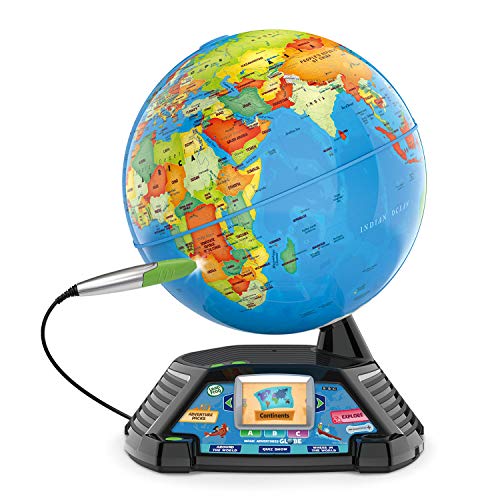
LeapFrog Magic Adventures Globe
Pointing the stylus at a country plays short BBC video clips and spoken facts about it. A 2.7 inch colour screen sits in the stand, so no tablet enters the picture. Quiz and challenge modes turn browsing into something a child returns to.
Pros
- Video clips add context a paper globe cannot give
- Still functions as an ordinary globe for homework
- Quiz modes encourage repeat sessions
Cons
- Small screen limits how much detail each clip shows
- One subject only, so it appeals less broadly than LeapStart
Before you buy
What makes an electronic learning toy worth keeping Ask whether the child produces something or only triggers a sound. Toys demanding an answer, a sequence or a finished circuit create learning, while toys that sing on contact create noise. Check next whether difficulty can climb, through switchable levels like Smart Stages or added content like LeapStart books. Open ended play matters most of all, since a toy with one correct outcome gets solved once and shelved.
Matching a learning toy to your child’s age Under three, cause and effect plus language exposure carry the weight, which is Smart Stages Puppy territory. Between three and five, letter sounds, early numbers and a defined work surface fit better, so the VTech desk and preschool LeapStart books land here. Five to eight brings sequencing and logic within reach, where Botley 2.0 and the Magic Adventures Globe belong. Real components suit eight and up, which is exactly where Snap Circuits Jr. starts.
Screen free toys vs tablet based sets Botley 2.0 and Snap Circuits need no display, which helps households already rationing device time. Osmo runs the opposite way, using an iPad but forcing physical manipulation of tiles in front of it. LeapStart and the Magic Adventures Globe sit between the two, with small dedicated screens instead of a general purpose tablet. For a first coding toy before age seven, the screen free route tends to hold attention longer.
Batteries, durability and what you buy later Battery drain is the most repeated complaint in this category, so plan on rechargeable AAs for LeapStart and Snap Circuits. Think about what happens once the included content runs dry, since LeapStart books and Snap Circuits expansion packs are separate purchases. Cleaning rules vary as well, because fabric toys with electronics inside wipe clean but never go through a machine. Skip the category entirely if you want something a toddler can soak, chew and throw without a second thought.
Side by side
| # | Model | Age range | Best for | Score | Price |
|---|---|---|---|---|---|
| 1 | LeapFrog LeapStart Interactive Learning System | About 2 to 7 years | Best overall | 9.4 | Check price |
| 2 | Osmo Genius Starter Kit for iPad | About 6 to 10 years | Best for tablet based STEM | 9.2 | Check price |
| 3 | VTech Touch and Learn Activity Desk Deluxe | About 2 to 5 years | Best for preschoolers | 9.0 | Check price |
| 4 | Learning Resources Botley 2.0 The Coding Robot | 5 years and up | Best screen free coding | 8.8 | Check price |
| 5 | Snap Circuits Jr. SC-100 Electronics Kit | 8 years and up | Best for electronics basics | 8.6 | Check price |
| 6 | Fisher-Price Laugh & Learn Smart Stages Puppy | 6 to 36 months | Best for babies | 8.3 | Check price |
| 7 | LeapFrog Magic Adventures Globe | 5 years and up | Best for geography | 8.0 | Check price |
Questions worth asking
Do electronic learning toys actually help children learn?
The useful ones make a child respond, sequence or build rather than listen. Snap Circuits and Botley sit firmly in that group. A toy that plays a song on contact is entertainment, which is fine, just not instruction.
What age should a child start with a coding robot?
Around five suits remote programmed robots like Botley 2.0, since planning a short sequence is the whole task. Younger children press the buttons happily but miss the logic. Screen based coding apps generally land better from six upward.
Is Osmo worth buying if we already own an iPad?
Yes, because the value sits in the tiles and reflector rather than the apps alone. Check your iPad model against the supported list before ordering. Families without an iPad get more from LeapStart.
Which learning toys work without a screen?
Botley 2.0 and Snap Circuits Jr. use no display whatsoever. VTech’s activity desk and the Fisher-Price puppy rely on audio and lights instead. LeapStart reads printed books with a stylus, so there is no video to watch.
Are LeapFrog LeapStart books sold separately?
Yes, and a console usually arrives with a sample rather than the full library. Books are organised by level, so purchases follow the child forward. Budget for that when comparing it against a one box kit.
What is the best learning toy for a two year old?
VTech Touch and Learn Activity Desk Deluxe gives a toddler a defined place to work with letters and numbers. Below two, the Fisher-Price puppy still earns its keep. LeapStart also opens at this age with preschool level books.
How do you clean electronic learning toys?
Hard plastic toys such as the VTech desk and Botley take a barely damp cloth. Fabric toys with electronics inside, Smart Stages Puppy included, allow surface cleaning only. Nothing with a battery compartment should ever be submerged.
Botley or Osmo for a six year old?
Botley 2.0 suits a child cutting screen time who enjoys building floor courses. Osmo suits one already at ease with a tablet who needs math and spelling drill. Coding logic comes from Botley, academic reinforcement from Osmo.
Which electronic learning toys last more than a few weeks?
Longevity tracks with added content and rising difficulty. LeapStart adds books, Snap Circuits adds expansion sets, and Smart Stages switches levels. Single mode toys with one fixed set of responses fade fastest.
Can a learning toy replace reading with a child?
No, and none of these claim to. LeapStart reads aloud and asks questions, which supports practice between sessions with an adult. Shared reading still does the work these toys reinforce.
Final word
LeapStart is the pick for a family wanting one system to carry a child from letter sounds to early reading, provided buying books along the way is acceptable. Households trimming screen time should take Botley 2.0 instead, since sequencing gets taught with a remote and floor space alone. For a child already fluent with an iPad, the Osmo Genius Starter Kit covers the most subjects per box.
Rachel Simmons
Rachel previously worked in child-product retail and brings a practical, detail-first eye to gear reviews, focusing on safety standards, ease of use and the fine print that matters most for new caregivers.