Top Display Boards for Professional Presentations
For most professionals, the Samsung 75-inch QLED 4K display board stands out because it combines ultra-bright QLED picture quality with a built-in business platform. It offers the clearest image in bright rooms and comes with Tizen software for easy wireless presentations. Its main limitation is a higher price compared to other boards.
Selecting the right display board can transform how you present ideas, collaborate with teams, or teach complex subjects. A professional display board must deliver sharp images, reliable connectivity, and intuitive controls. The market offers many options, from large-format 4K screens to interactive touch panels.
We compared seven top-selling models based on specifications, owner feedback, and feature sets. Our goal is to help you choose a board that fits your space, budget, and usage. Whether you need a simple presentation screen or a collaborative touch display, this guide covers the essential factors.
What to look for
The best picks, ranked

Samsung 75-inch QLED 4K UHD Business Display
This Samsung display uses QLED technology to deliver vibrant colors and high brightness, making it ideal for well-lit conference rooms. It includes Tizen OS with built-in wireless screen mirroring and supports multiple content sources. Owners praise its picture quality and easy setup, though it lacks touch interactivity.
Pros
- Excellent picture quality with high brightness
- Integrated Tizen platform for wireless sharing
- Sleek design suitable for professional environments
Cons
- No touch support
- Premium price point

ViewSonic 55-inch 4K Ultra HD Professional Display
ViewSonic offers a reliable 4K display with 24/7 operation capability, making it a solid choice for digital signage or presentations. It features multiple HDMI inputs and a built-in media player. Users report consistent performance and good color accuracy, but the built-in speakers are weak.
Pros
- Affordable for 4K resolution
- Designed for 24/7 use
- Multiple connectivity options
Cons
- Weak built-in speakers
- No touch capability

LG 86-inch UltraFine 4K UHD Display
LG’s 86-inch UltraFine display offers a massive screen with stunning 4K clarity. It supports HDR10 and has wide viewing angles. The board is designed for professional use, with a slim bezel and multiple input options. Owners appreciate the immersive experience, but it requires ample wall space.
Pros
- Massive screen for impactful presentations
- Wide viewing angles
- HDR support for vivid content
Cons
- Very large and heavy
- Higher price

BenQ 65-inch 4K Interactive Flat Panel
BenQ’s interactive flat panel combines 4K resolution with 20-point touch, allowing multiple users to write and annotate simultaneously. It includes BenQ’s EZWrite software and supports wireless screen sharing. Owners find the touch response accurate and the software intuitive. It is a top pick for classrooms and brainstorming sessions.
Pros
- Smooth and accurate touch response
- Comes with robust annotation software
- Multiple connectivity options including USB-C
Cons
- Higher cost than non-interactive models
- 65-inch size may be small for large rooms

Newline 75-inch Interactive 4K Display
Newline’s 75-inch interactive display runs on Android and includes a built-in camera, microphone, and speakers, making it a complete video conferencing hub. It supports wireless screen sharing and comes with a stylus. Users report that it simplifies meetings, but the camera quality is average.
Pros
- All-in-one video conferencing features
- Built-in Android apps
- Large screen with interactive touch
Cons
- Average camera quality
- Limited app ecosystem compared to other platforms
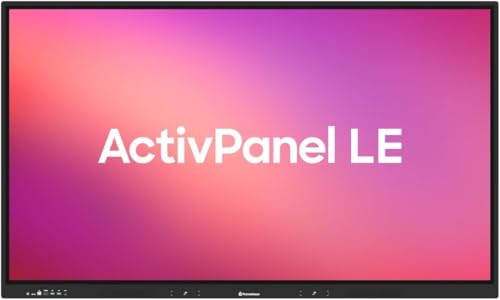
Promethean 65-inch ActivPanel 4K
Promethean is a trusted name in education, and the ActivPanel delivers a durable, responsive touch screen with a wide range of teaching tools. It includes cloud-based software and easy connectivity. Teachers appreciate the intuitive interface and reliable performance, but the initial setup can be complex.
Pros
- Purpose-built for education with teaching software
- Durable anti-glare screen
- Excellent touch accuracy
Cons
- Setup may require professional assistance
- Premium price for education sector

Vibe 55-inch Smart Board
Vibe’s 55-inch smart board offers a compact interactive solution with a rolling stand (sold separately) and an optional camera. It runs on Android and supports popular collaboration apps like Zoom and Miro. Owners like its ease of use and portability, but the screen size may be limiting for larger groups.
Pros
- Compact and easy to move with optional stand
- Preloaded with popular collaboration apps
- More affordable than larger interactive boards
Cons
- Smaller screen may not suit large rooms
- Rolling stand and camera are sold separately
The lineup, side by side
| # | Model | Screen Size | Best for | Score | Price |
|---|---|---|---|---|---|
| 1 | Samsung 75-inch QLED 4K UHD Business Display | 75 inches | Best overall for bright rooms and wireless presentations | 9.4 | Check price |
| 2 | ViewSonic 55-inch 4K Ultra HD Professional Display | 55 inches | Best budget-friendly 4K option for small to medium rooms | 8.8 | Check price |
| 3 | LG 86-inch UltraFine 4K UHD Display | 86 inches | Best for large conference rooms and command centers | 9.0 | Check price |
| 4 | BenQ 65-inch 4K Interactive Flat Panel | 65 inches | Best for interactive presentations and annotations | 9.1 | Check price |
| 5 | Newline 75-inch Interactive 4K Display | 75 inches | Best for collaborative teams needing all-in-one solution | 8.7 | Check price |
| 6 | Promethean 65-inch ActivPanel 4K | 65 inches | Best for education and training environments | 8.9 | Check price |
| 7 | Vibe 55-inch Smart Board | 55 inches | Best portable and affordable interactive board | 8.0 | Check price |
Questions worth asking
What is the best display board for a conference room?
For a typical conference room, a 65 to 75 inch 4K display with wireless sharing is a solid choice. The Samsung 75-inch QLED is excellent for bright rooms, while the BenQ 65-inch interactive panel is great if you need touch capabilities.
Are interactive display boards worth the extra cost?
If you regularly collaborate, annotate, or teach, yes. Interactive boards like the BenQ or Promethean allow multiple users to write and share ideas directly on the screen, which can increase productivity. For simple presentations, a non-interactive display may be more cost-effective.
Can I use a consumer TV as a professional display board?
You can, but professional displays are designed for longer operation hours, better brightness, and often include commercial features like RS-232 control and 24/7 usage. Consumer TVs may not be as durable and may lack the necessary connectivity for business use.
What is the ideal screen size for a classroom?
For a standard classroom, a 65 to 75 inch display is common. Larger rooms may benefit from an 86 inch screen. The Promethean ActivPanel is a popular education choice due to its durable design and teaching software.
Do these displays come with a stand?
Most displays are intended for wall mounting and do not include a stand. Some models, like the Vibe 55, offer an optional rolling stand. Check the product details to see what is included and what you need to purchase separately.
How do I connect my laptop to a display board?
Most display boards offer HDMI and USB-C connections. Simply plug in your laptop using the appropriate cable. Many also support wireless sharing through Wi-Fi, using protocols like AirPlay, Miracast, or proprietary apps like Samsung’s Tizen or BenQ’s InstaShare.
What is the difference between a smart board and an interactive flat panel?
Both terms are used interchangeably. A smart board typically refers to an interactive whiteboard system, while an interactive flat panel is a large LCD screen with touch overlay. Modern interactive flat panels are more common and offer higher resolution and better image quality.
Can I use a display board for video conferencing?
Yes, some models like the Newline 75-inch come with a built-in camera and microphone. Others may require you to attach a separate webcam and speaker. Ensure the display supports the conferencing apps you use, such as Zoom, Teams, or Google Meet.
The bottom line
For most professional settings, the Samsung 75-inch QLED 4K is the best all-around choice, offering exceptional picture quality, reliable performance, and built-in wireless features. If you need interactive capabilities, choose the BenQ 65-inch 4K Interactive Flat Panel, which provides smooth touch and powerful annotation tools. If budget is a concern, the ViewSonic 55-inch 4K offers great value for smaller rooms. Ultimately, the right board depends on your specific needs, but the Samsung or BenQ will satisfy the majority of business and educational users.
Marcus Chen
Marcus covered consumer electronics for enthusiast tech publications for six years before joining ChoiceCrest. He specializes in translating manufacturer spec sheets into plain-language buying advice, with a focus on audio, computing accessories and smart-home gear.