Presentation Remotes Compared: Laser vs Highlight
Logitech Spotlight leads because its on screen highlight shows up on LED panels and inside a screen share. Logitech R500s pairs over Bluetooth or a bundled receiver, which helps on locked conference PCs. Kensington Presenter Expert covers auditoriums with a green laser rated to 45 m.
Logitech Spotlight fits presenters who bounce between a projector, an LED panel and a video call. Its highlight is drawn onto the slide itself, so people on the call see the same emphasis as the room. One limitation matters. Highlight, magnify and timers all run through the Logitech Presentation app, which locked down work laptops often block.
Two clickers with the same button count can behave nothing alike once the room changes. Red laser dots vanish against an LED wall. Bluetooth saves a port but fails on a shared PC you cannot pair. We compared pointer technology, stated wireless range, receiver compatibility and battery format. Owner feedback on button feel and reconnect speed decided the rest.
How to choose
What to look for in a presentation remote Start with the pointer, because it sets where the remote works at all. Lasers need a reflective projection screen. Digital highlights render anywhere the slide itself appears. Receivers come next. A 2.4 GHz dongle wants a free USB-A port, which thin laptops no longer offer, while Bluetooth skips the dongle and struggles on managed machines. Treat stated range as a ceiling and leave headroom, since bodies and walls cut it. Four buttons is the practical floor: forward, back, blank screen and pointer.
Laser pointer vs digital highlighting Laser dots are instant and need nothing installed, which keeps them dominant. Two situations break them. LED video walls swallow the dot entirely, and anyone watching over a call never sees it. Digital highlighting fixes both by drawing at the operating system layer, so screen capture includes the emphasis. Payment for that is a driver install and an admin prompt. Where IT blocks unapproved software, a green laser is the safer purchase.
Connecting to USB-C laptops, iPads and shared PCs Ports quietly decide this category. Norwii ships a USB-C adapter in the box, so a laptop with two USB-C ports needs nothing extra. Bluetooth models such as R500s and Spotlight pair straight to iPadOS and macOS, useful when you present from a tablet. Guest computers flip the logic. A 2.4 GHz receiver needs no pairing dialog and no admin rights, so it works on a locked conference PC where Bluetooth will not. Carrying a receiver based clicker is the habit that avoids a cold start in front of an audience.
Matching the remote to your room size Room depth narrows the list quickly. Under about 15 m, almost anything here works, and cursor control or media keys deliver more value than extra range. Training rooms favor the Targus for that reason. Past 20 m, switch to green output and check the rating, since Kensington at 45 m and R800 at 30 m are the two built for halls. AA cells last longer through back to back sessions than AAA. Presenting mostly on video calls inverts all of it, because no laser reaches a remote audience and Spotlight becomes the only real answer.
The shortlist, ranked

Logitech Spotlight Presentation Remote
Spotlight replaces the laser dot with a software circle drawn onto the slide. That circle survives LED video walls and screen shares, which no laser manages. Three buttons handle next, back and highlight, while the desktop app adds magnify and digital ink.
Pros
- Highlight reads clearly on LED walls and in remote screen shares
- A one minute charge covers roughly three hours of presenting
- Vibrating time alerts configurable in the Logitech app
Cons
- Highlight and timers need the desktop app installed
- Three buttons only, so no blank screen or media shortcut
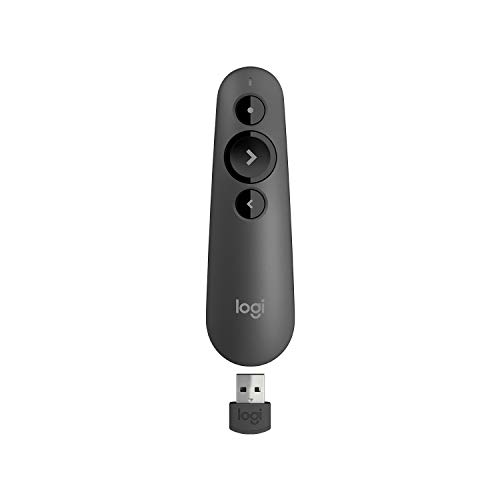
Logitech R500s Laser Presentation Remote
R500s slips into a laptop sleeve without adding bulk. Bluetooth covers phones, tablets and current laptops, and the bundled receiver rescues you on older conference room PCs. Four buttons give forward, back, blank screen and laser.
Pros
- Two connection modes suit personal and shared machines
- Blank screen button pulls attention back without alt tabbing
- Single AAA lasts roughly a year of normal meeting use
Cons
- Red dot washes out against bright LED panels
- Slim body feels small in larger hands

Kensington Presenter Expert Wireless Presenter with Green Laser
Human eyes register green light as brighter than red at matching output, which is why lecture halls favor it. Kensington pairs that diode with a 45 m stated range, enough to walk the aisles and keep advancing slides. A cursor button opens embedded links without a trip back to the podium.
Pros
- Green dot stays visible on large and brightly lit screens
- Longest stated range in this group
- Cursor control handles embedded links and video playback
Cons
- No Bluetooth mode, so a free USB-A port is required
- Green diodes drain cells faster than red ones

Logitech Professional Presenter R800
R800 carries an LCD showing elapsed time and battery state. Set a limit and the body vibrates as your slot runs down, so pacing a conference talk needs no glance at a clock. Green laser output and 30 m of range cover big stages.
Pros
- LCD timer with silent vibration keeps talks on schedule
- Green laser holds up under stage lighting
- Receiver stores inside the body for transport
Cons
- AA cells make it bulkier than pocket clickers
- No Bluetooth option for tablets or port limited laptops

Norwii N76 Wireless Presenter Remote
Norwii packs a USB-C adapter alongside the standard receiver, solving the port problem on thin laptops. Hyperlink and volume keys let you start an embedded video from the back row. Its internal cell recharges rather than eating AAAs.
Pros
- Runs on USB-C only laptops without buying a hub
- Hyperlink and volume keys drive embedded media
- Recharges, so no spare batteries to pack
Cons
- Red laser disappears on LED video walls
- Plastic shell feels lighter than the Logitech models

DinoFire Wireless Presenter Remote
DinoFire sticks to the four functions speakers actually press: next, back, blank screen and laser. Plug in the receiver and it works, with no drivers or pairing menus. Owners report keeping it as the spare clicker that lives in a work bag.
Pros
- No software or pairing on Windows, macOS or Linux
- Rechargeable cell removes mid talk battery swaps
- Light enough to hold through a long session
Cons
- Shallow button travel feels less positive than premium models
- No timer, cursor control or app support

Targus Multimedia Presentation Remote AMP13AP
Targus adds a cursor pad and media keys to a standard clicker layout. Trainers benefit most, since a session often jumps between slides, a browser tab and a video. Range tops out at 15 m, which suits classrooms rather than auditoriums.
Pros
- Cursor pad replaces walking back to the laptop
- Volume and media keys control embedded video
- Receiver clips into the remote for travel
Cons
- Shortest stated range in this group
- Extra buttons slow down one handed use at first
How they compare
| # | Model | Connection | Best for | Score | Price |
|---|---|---|---|---|---|
| 1 | Logitech Spotlight Presentation Remote | Bluetooth Low Energy or 2.4 GHz USB receiver | Best overall | 9.4 | Check price |
| 2 | Logitech R500s Laser Presentation Remote | Bluetooth Low Energy or USB receiver | Best value | 9.2 | Check price |
| 3 | Kensington Presenter Expert Wireless Presenter with Green Laser | 2.4 GHz USB receiver | Best for large rooms | 9.0 | Check price |
| 4 | Logitech Professional Presenter R800 | 2.4 GHz USB receiver | Best for timed talks | 8.8 | Check price |
| 5 | Norwii N76 Wireless Presenter Remote | 2.4 GHz USB-A receiver plus USB-C adapter | Best for USB-C laptops | 8.6 | Check price |
| 6 | DinoFire Wireless Presenter Remote | 2.4 GHz USB receiver | Best budget | 8.3 | Check price |
| 7 | Targus Multimedia Presentation Remote AMP13AP | 2.4 GHz USB receiver | Best for cursor control | 8.0 | Check price |
Questions worth asking
What is the best presentation remote for PowerPoint and Google Slides?
Logitech Spotlight handles both, since it sends standard page up and page down keystrokes rather than app specific codes. Every 2.4 GHz clicker here does the same. Only extras like highlight and timers depend on vendor software.
Do presentation remotes need software or drivers?
Plain clickers do not. They register as a keyboard and start working when the receiver goes in. Highlight, magnify and timer features on Spotlight and R800 require the Logitech app on the presenting machine.
Which is better, a green laser or a red laser?
Green appears brighter to the eye at equal output, so it wins in large or well lit rooms. Red draws less power and ships on far more models. Neither shows on an LED video wall, where a digital highlight is the only option.
Can I use a presentation remote with an iPad or a Mac?
Bluetooth models such as R500s pair directly with iPadOS and macOS. Receiver based remotes need a USB-A port, so a USB-C only Mac wants an adapter. Norwii includes one, which saves buying a hub.
How far does a wireless presenter actually reach?
Less than the box figure. Manufacturers measure with clear line of sight, and audience bodies, metal fittings and thick walls all cut it. A remote rated to 30 m stays reliable in a room around 20 m deep.
Is a presenter remote with a built in timer worth it?
Conference speakers and lecturers get real use from one. Vibration cues pace a talk without checking a phone or hunting for a stage clock. In a 20 minute internal update, the feature sits unused.
Logitech Spotlight vs R500s, which should I buy?
Take Spotlight when you present on LED screens or over video calls, since the highlight survives both. Choose R500s for traditional projectors, Bluetooth plus a receiver in one body, and a AAA cell instead of a charging cable.
Will a presentation clicker work on a shared conference room PC?
A 2.4 GHz receiver will, because it asks for no pairing and no admin rights. Bluetooth only remotes often stall there, since guests cannot open pairing settings on a managed machine.
How many buttons does a presentation remote need?
Four covers most talks: forward, back, blank screen and pointer. Teaching and product demos justify more, where a cursor pad and volume keys save trips to the laptop. Spotlight goes the other way with three, betting that the app replaces the rest.
Our take
Logitech Spotlight earns the recommendation, because a digital highlight is the only pointer that survives both an LED wall and a remote screen share. Speakers working large halls on ordinary projectors should buy the Kensington Presenter Expert instead, where green output and 45 m of range outweigh software features. For a backup clicker that lives permanently in a bag, DinoFire covers the four buttons that actually get pressed.
Marcus Chen
Marcus covered consumer electronics for enthusiast tech publications for six years before joining ChoiceCrest. He specializes in translating manufacturer spec sheets into plain-language buying advice, with a focus on audio, computing accessories and smart-home gear.


