Smart Presentation Remotes That Keep You in Control
The Logitech Spotlight is the top pick for presenters who need a premium, feature-rich remote. It offers advanced pointer control, vibration feedback, and a long range, but its higher price and lack of a built-in battery indicator are drawbacks.
A smart presentation remote does more than advance slides. It can control volume, launch apps, highlight content, and even act as a mouse. This roundup focuses on remotes that offer smart features like Bluetooth connectivity, rechargeable batteries, and software integration.
We analyzed specifications, user feedback, and compatibility to bring you a list of seven reliable options. Whether you need a budget-friendly clicker or a high-end presenter, you will find a suitable choice here.
What we recommend

Logitech Spotlight
The Logitech Spotlight is a premium presentation remote known for its metal construction and precise pointer. It highlights and magnifies content on screen, and its vibration alerts keep you on track. Owners report a comfortable grip and reliable Bluetooth connection.
Pros
- Excellent build quality
- Precise highlighting and magnifying
- Vibration feedback for timer
Cons
- Expensive
- No battery indicator
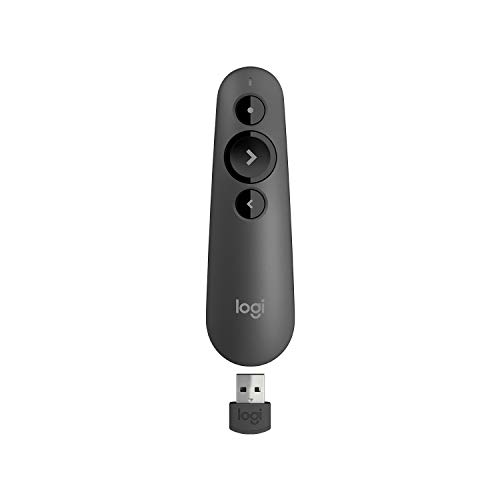
Logitech R500s
The Logitech R500s offers a red laser pointer, works with virtually any presentation software, and has a long wireless range. It features a compact design and uses two AAA batteries. Users appreciate its plug-and-play simplicity.
Pros
- Universal compatibility
- Reliable red laser
- Affordable price
Cons
- No rechargeable battery
- No vibration feedback

Kensington Expert Wireless
The Kensington Expert Wireless features a bright green laser that is more visible in bright rooms. It has a 100-foot range, works with major presentation apps, and includes a USB receiver that stores inside. It runs on two AAA batteries.
Pros
- Green laser is very visible
- Long range
- Receiver storage
Cons
- Bulky design
- No rechargeable battery

Amazon Basics Wireless Presenter
The Amazon Basics Wireless Presenter is an affordable remote that works up to 50 feet. It has a red laser and basic slide control. It is plug-and-play with Windows and macOS. Users find it decent for the price.
Pros
- Very affordable
- Simple operation
- Small size
Cons
- Limited range
- No advanced features

DinoFire Wireless Presenter
The DinoFire Wireless Presenter has a rechargeable battery, a red laser, and a 100-foot range. It includes a USB receiver and can also act as a mouse with a tilt sensor. Owners like the battery life and the convenience of USB-C charging.
Pros
- Rechargeable battery
- Air mouse function
- Long range
Cons
- Build feels cheap
- Air mouse can be finicky

SMARTOOL Wireless Presenter
The SMARTOOL Wireless Presenter features a 164-foot range, making it suitable for large rooms. It has a red laser and uses a USB receiver. It is compatible with Windows and macOS. Users note it is basic but functions well.
Pros
- Exceptional range
- Straightforward operation
- Low cost
Cons
- Plastic build
- No rechargeable option

Rii i4 Mini Bluetooth Presentation Remote
The Rii i4 is a mini Bluetooth remote that works with smart TVs and presentation software. It features voice control, a backlit keyboard, and a rechargeable battery. It is ideal for controlling presentations from a distance or using as a media remote.
Pros
- Voice control feature
- Compact and portable
- Works with smart TVs
Cons
- No laser pointer
- Range limited to 33 ft
How they compare
| # | Model | Range | Best for | Score | Price |
|---|---|---|---|---|---|
| 1 | Logitech Spotlight | Up to 100 ft | Presenters who want premium build and advanced pointer control | 9.4 | Check price |
| 2 | Logitech R500s | Up to 65 ft | Presenters needing a laser pointer and universal compatibility | 8.9 | Check price |
| 3 | Kensington Expert Wireless | Up to 100 ft | Professionals who want a durable remote with a green laser | 8.7 | Check price |
| 4 | Amazon Basics Wireless Presenter | Up to 50 ft | Budget-conscious presenters who need a simple remote | 8.3 | Check price |
| 5 | DinoFire Wireless Presenter | Up to 100 ft | Presenters who want a rechargeable remote with a mouse function | 8.6 | Check price |
| 6 | SMARTOOL Wireless Presenter | Up to 164 ft | Presenters who need a simple remote for large venues | 8.1 | Check price |
| 7 | Rii i4 Mini Bluetooth Presentation Remote | Bluetooth 3.0, 2.4G wireless | Presenters who want a compact remote with voice control | 8.0 | Check price |
What matters most
Questions worth asking
What is a smart presentation remote?
A smart presentation remote is a device that goes beyond simple slide control. It may include features like voice control, app integration, air mouse functionality, and advanced pointer options. These remotes connect via Bluetooth or USB and often have rechargeable batteries.
How do I connect a smart presentation remote to my computer?
Most remotes come with a USB receiver that you plug into your computer. Some also support Bluetooth pairing. For Bluetooth, enable pairing mode on the remote and select it from your computer’s Bluetooth settings. Follow the manufacturer’s instructions for best results.
Can I use a smart presentation remote with a Mac?
Yes, many smart remotes are compatible with macOS. Check the product specifications to see if it lists macOS support. Most USB receivers work with Mac, but some may require drivers. Bluetooth remotes often work natively with Keynote and other Mac apps.
What is the difference between a red and green laser?
Green lasers are more visible to the human eye, especially in bright environments. They use more power and are typically more expensive. Red lasers are common and adequate for most indoor presentations. Green lasers may be subject to regulations due to higher output.
Do smart presentation remotes work with PowerPoint?
Yes, most remotes work with PowerPoint on Windows and macOS. They emulate keyboard presses like Page Down and Page Up. Some remotes offer additional features like starting slideshows or controlling media. Always check compatibility with your operating system and software version.
How far can a presentation remote work?
The range varies by model. Typical ranges are 30 to 100 feet. Some remotes advertise up to 164 feet. Actual range depends on obstacles and interference. For large venues, choose a remote with a longer range and a USB receiver, which often provides better connectivity than Bluetooth.
Can I use a smart presentation remote as a mouse?
Some smart remotes include an air mouse feature. This allows you to move the cursor by tilting or moving the remote. It is useful for navigating non-slide content. Not all remotes have this, so check specifications if you need that feature.
Are smart presentation remotes rechargeable?
Many modern remotes have built-in rechargeable batteries with USB charging. Others use AAA batteries. Rechargeable models are convenient and eco-friendly. However, they need to be charged periodically. Some have battery indicators to show remaining power.
Do I need a smart remote or a basic one?
If you only advance slides and point at the screen, a basic remote may suffice. If you need advanced features like highlighting, magnifying, voice control, or app integration, invest in a smart remote. Consider your presentation environment and personal preferences.
What is the best budget smart presentation remote?
The Amazon Basics Wireless Presenter is a budget option that offers basic slide control and a laser. For a bit more, the DinoFire Wireless Presenter provides rechargeable battery and air mouse at a reasonable price. Budget remotes may lack premium features but are reliable for standard presentations.
Our pick
For most presenters, the Logitech Spotlight offers the best balance of smart features, build quality, and usability, making it worth the investment. If you need a reliable laser pointer on a budget, the Logitech R500s is a solid choice. For a rechargeable option with extra functionality, consider the DinoFire Wireless Presenter.
Marcus Chen
Marcus covered consumer electronics for enthusiast tech publications for six years before joining ChoiceCrest. He specializes in translating manufacturer spec sheets into plain-language buying advice, with a focus on audio, computing accessories and smart-home gear.


