Which presence sensor keeps lights on while you sit?
Aqara Presence Sensor FP2 leads here. Its 60GHz radar keeps a room marked occupied while you sit still, and it maps up to 30 zones over Wi-Fi. Eve Motion suits Apple Home users who want Thread and battery power. Philips Hue Motion Sensor pairs fastest with Hue bulbs.
Aqara Presence Sensor FP2 fits most smart homes, because 60GHz radar registers people who barely move. Reading chairs and desk automations stop dropping out mid task. Zone mapping splits one room into separate triggers. Permanent USB-C power is the catch, which rules out battery-only corners.
Listings blur the line between motion and presence, and that difference decides whether lights stay on. We compared sensing technology, stated range and field of view, power source, protocol support and zone controls. Owner feedback on false triggers, wall penetration and setup time broke the close calls.
The best picks, ranked

Aqara Presence Sensor FP2
A 60GHz mmWave module tracks up to five people and reports where each one sits or stands. Zone mapping in the Aqara app turns one sensor into separate triggers for a desk, a couch and a doorway. Connection runs over 2.4GHz Wi-Fi, so no Aqara hub sits in the chain.
Pros
- Holds occupancy for people sitting motionless
- One unit drives several room automations
- Built-in lux reading gates daylight triggers
Cons
- Needs a permanent outlet for USB-C power
- Zone tuning takes patience after install

Eve Motion (Matter over Thread)
Matter over Thread joins this sensor to a mesh through a HomePod or Apple TV border router, which cuts trigger delay. Coverage spans 120 degrees, with detection quoted near nine metres. IPX3 splash resistance makes a covered porch fair game.
Pros
- Runs on batteries with no bridge box
- Thread mesh keeps trigger latency low
- Rated for covered outdoor spots
Cons
- Requires a Thread border router
- PIR cannot see a still occupant
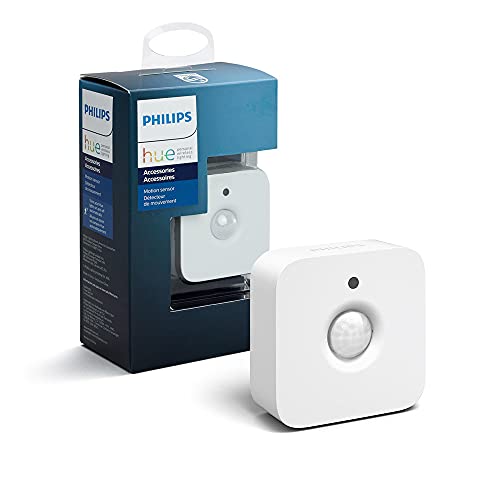
Philips Hue Motion Sensor
Pairing finishes in seconds when a Hue Bridge already runs the lights. Its daylight reading blocks lamps from firing at noon in a bright hallway. Magnetic mounting grabs a radiator bracket, or the supplied plate screws to a wall.
Pros
- Setup takes seconds inside the Hue app
- Daylight threshold avoids pointless triggers
- Magnetic ball mount aims in any direction
Cons
- Bridge needed for full automation control
- About 5 m range trails the radar options

Aqara Motion and Light Sensor P2
Thread radio and Matter support make the P2 unusually flexible for a basic sensor. Detection reaches roughly seven metres across a 170 degree arc, and its lux reading can gate an automation. One CR2450 coin cell runs it for years rather than months.
Pros
- Appears in Apple, Alexa and Google apps
- 170 degree arc suits open plan rooms
- Coin cell keeps the body slim
Cons
- Needs a Thread border router on the network
- Drops occupancy once you stop moving
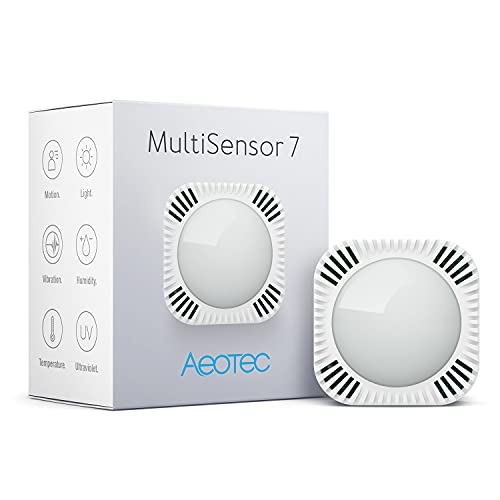
Aeotec MultiSensor 7
Six readings come from one puck: motion, temperature, humidity, light, ultraviolet and vibration. Z-Wave Plus 700 series radio suits Hubitat, Home Assistant or SmartThings setups already running Z-Wave. Power arrives by USB-C for frequent reporting, or by battery for a tidy shelf install.
Pros
- Replaces several single purpose sensors
- Reporting intervals are configurable
- Small enough to hide on a shelf
Cons
- Requires a Z-Wave hub
- Battery mode slows reporting

SwitchBot Motion Sensor
Adhesive pads and a magnetic base mean nothing gets screwed into a rented wall. Detection stretches to roughly nine metres across a 110 degree arc, with a night mode that suppresses daytime firing. Voice control and phone alerts need a SwitchBot Hub on the same account.
Pros
- Mounts without tools or drill holes
- Nine metre reach from a small body
- Triggers SwitchBot curtains and bots directly
Cons
- Hub required for Alexa or Google
- Automations stay inside the SwitchBot app

THIRDREALITY Smart Motion Sensor
Zigbee 3.0 pairing covers SmartThings, Hubitat, Home Assistant and Echo units carrying a Zigbee radio. Response stays quick enough for hallway and closet lights, where a second of lag goes unnoticed. Two AAA cells keep replacements cheap across a whole house.
Pros
- Affordable enough to buy in multiples
- Joins most Zigbee 3.0 hubs
- Standard AAA cells, no coin batteries
Cons
- Zigbee hub required
- No zone control or lux threshold
How they compare
| # | Model | Sensing | Best for | Score | Price |
|---|---|---|---|---|---|
| 1 | Aqara Presence Sensor FP2 | 60GHz mmWave radar | Best overall | 9.4 | Check price |
| 2 | Eve Motion (Matter over Thread) | PIR with light sensor | Best for Apple Home | 9.1 | Check price |
| 3 | Philips Hue Motion Sensor | PIR plus daylight sensor | Best for Hue lighting | 8.9 | Check price |
| 4 | Aqara Motion and Light Sensor P2 | PIR with light sensor | Best value | 8.7 | Check price |
| 5 | Aeotec MultiSensor 7 | PIR plus five environment sensors | Best for Z-Wave systems | 8.5 | Check price |
| 6 | SwitchBot Motion Sensor | PIR with light detection | Best for renters | 8.2 | Check price |
| 7 | THIRDREALITY Smart Motion Sensor | PIR | Best budget | 8.0 | Check price |
How to choose
What to look for in a presence sensor Sensing technology comes first, because it dictates everything downstream. PIR watches heat move across a field of view, while 60GHz radar measures reflections from a body that barely shifts. Power follows, since radar draws too much current for coin cells and those models live on USB. Protocol is the third gate, as Zigbee, Z-Wave and Thread each need matching hardware already on your network. Match detection range and field of view to the room, then look for a built-in lux sensor if automations should skip daylight hours.
mmWave vs PIR: which one do you actually need? Radar earns its keep where people settle. Home offices, reading chairs, dining tables and bathrooms defeat a PIR sensor within minutes. Corridors, stairs, pantries and entry doors are the opposite, since somebody is always walking through. PIR wins those spots on battery life, simplicity and outlay. Radar also reacts to a spinning fan blade, a curtain in a draught or a pet crossing a zone, so zone editing becomes part of the install. Owners report best results from a mix: radar in two or three sitting rooms, PIR everywhere else.
Best presence sensor for a home office or bathroom Tight zone control matters more than raw range in a small room. One FP2 can hold a desk lamp on while ignoring the doorway that feeds a hall light. Bathrooms suit radar because showering involves long motionless stretches, though the sensor should sit away from direct spray. For a spare room or closet, an Aqara P2 or a THIRDREALITY sensor covers the job without any wiring. Mount height shifts results noticeably, and a wall position near chest height usually beats a ceiling mount for seated detection.
False triggers, pets and running power to the sensor Every sensor here misfires somewhere, and placement fixes it more often than a replacement does. Point PIR units away from heating vents, sunlit floors and glass doors. With radar, exclude the zone covering a ceiling fan or the corridor behind a partition wall, because drywall does not stop 60GHz the way it stops light. Cat and dog owners should raise PIR units or tilt them upward. One practical note: an FP2 tethered to USB-C looks untidy unless you choose the outlet before the mounting spot.
Frequently asked questions
What is a presence sensor?
It reports whether a space is occupied rather than whether something just moved. Radar models read tiny body movements such as breathing, then hold the occupied state until the room empties.
How is a presence sensor different from a motion sensor?
Motion sensors fire once and run a countdown timer. Presence sensors keep reporting while you stay put, which stops lights cutting out mid page.
Can a presence sensor detect someone sitting still?
Radar units such as the Aqara FP2 can. PIR models including the Hue and SwitchBot sensors cannot, because they only register heat crossing their field.
Do presence sensors need a hub?
It depends on the radio. FP2 joins Wi-Fi alone, Thread models need a border router like a HomePod or Apple TV, and Zigbee or Z-Wave units need a matching hub.
Do presence sensors work with Alexa and Google Home?
Most on this list do, either directly or through their own hub. Check the listing for Matter support if one sensor needs to appear in several assistant apps at once.
Which presence sensor is best for a home office?
Aqara Presence Sensor FP2, because desk work means long motionless stretches. Zone editing also keeps the desk lamp automation separate from the doorway.
Can mmWave sensors see through walls?
Radar at 60GHz passes through drywall and thin partitions, so the next room can trigger it. Excluding that area in the app is the standard fix.
Are presence sensors worth it if I already have motion sensors?
Add one only where lights currently drop on people sitting still. Two radar sensors in living areas plus existing PIR units in corridors costs far less than replacing everything.
How high should you mount a presence sensor?
A wall position near chest height reads seated people better than a ceiling mount. PIR units aimed across a doorway also catch movement sooner than ones facing it head on.
Do presence sensors detect pets?
Radar picks up a cat or dog crossing a mapped zone, and PIR often does too. Raising the sensor or angling it upward reduces triggers from floor level.
Our pick
Choose the Aqara Presence Sensor FP2 when an outlet sits near the room you want automated, since nothing else here holds occupancy for a motionless person as reliably. Apple Home owners who will not run a cable should take Eve Motion on Thread. Keep a THIRDREALITY sensor or two for hallways and closets, where a basic PIR does the same job.
Marcus Chen
Marcus covered consumer electronics for enthusiast tech publications for six years before joining ChoiceCrest. He specializes in translating manufacturer spec sheets into plain-language buying advice, with a focus on audio, computing accessories and smart-home gear.

