Top Video Cables for 4K and 8K Setups
The Zeskit Maya 8K HDMI 2.1 cable is our top pick for most people. It handles 8K60 and 4K120 with full bandwidth, and it passes all certification tests. Its main limitation is the stiff cable, which can be hard to bend in tight spaces.
Choosing the right video cable is crucial for getting the best picture from your 4K or 8K TV, monitor, or projector. A poor cable can cause flickering, signal dropouts, or limited refresh rates.
Premium cables offer better shielding, higher bandwidth, and more durable connectors. They ensure a stable connection for gaming, streaming, and professional work. We compared top models to help you decide.
The shortlist, ranked

Zeskit Maya 8K HDMI 2.1 Cable 6.5ft
This cable is certified for HDMI 2.1 with 48Gbps bandwidth. It supports 8K60 and 4K120 with HDR, dynamic HDR, and eARC. Users report rock-solid performance with no signal drops. The braided jacket adds durability, but the cable is stiff and may not bend easily around corners.
Pros
- Full 48Gbps bandwidth
- Certified for HDMI 2.1
- Durable braided build
Cons
- Stiff cable
- No right-angle connector

Belkin UltraHD High Speed HDMI 2.1 Cable
Belkin is known for quality, and this cable delivers. It supports 8K60 and 4K120 with 48Gbps. The connectors are gold-plated and the cable is thick and sturdy. Owners mention it feels premium, but the stiffness can be a drawback in tight installations.
Pros
- High build quality
- Reliable performance
- Supports eARC
Cons
- Expensive
- Very stiff

AudioQuest Pearl 48 HDMI Cable
AudioQuest is a premium brand, and the Pearl 48 is their entry-level HDMI 2.1 cable. It supports 8K60 and 4K120. The cable has a solid construction with a soft flexible jacket. Users report excellent sound and picture quality, but the price is high for a cable.
Pros
- Excellent audio performance
- Flexible cable
- High-quality connectors
Cons
- Pricey
- Limited length options

Cable Matters 8K DisplayPort 1.4 Cable
This DisplayPort 1.4 cable supports 8K60 and 4K144. It is VESA certified and offers high bandwidth of 32.4Gbps. The cable is well-shielded and has a latch-free connector. Gamers report smooth performance with no flicker, and the length options are plenty.
Pros
- Supports high refresh rates
- VESA certified
- Good value
Cons
- No 8K120 support
- Stiff cable

Silkland 8K DisplayPort 1.4 Cable
For longer distances, this Silkland cable is a solid choice. It supports 8K60 and 4K120 with 32.4Gbps. The cable is durable with a nylon braid. Users report stable connections even at 10 feet, but it is not as flexible as shorter cables.
Pros
- Long lengths available
- Stable performance
- Durable braid
Cons
- Thick and heavy
- Latch can be stiff
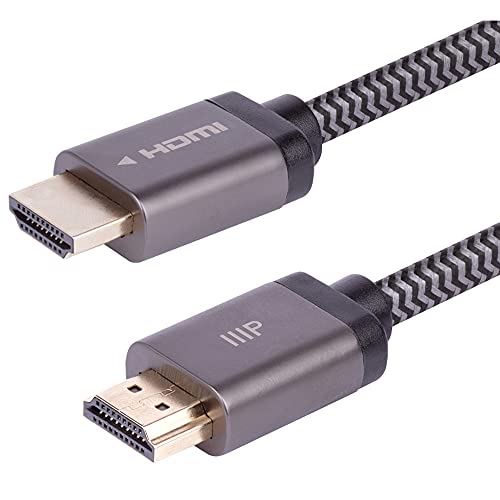
Monoprice 8K Certified HDMI 2.1 Cable
Monoprice offers certified HDMI 2.1 cables at a lower price. It supports 8K60 and 4K120. The cable has a braided jacket and is flexible. Users say it performs as well as more expensive cables, making it a great deal.
Pros
- Affordable
- Certified
- Flexible
Cons
- Connectors not as premium
- No eARC in some versions

Ivanky 8K HDMI 2.1 Cable with Braided Cord
This cable from Ivanky is designed for gaming. It supports 8K60 and 4K120 with VRR and ALLM. The cable is flexible and has a right-angle option. Gamers report no issues with high refresh rates and HDR, but the cable is not as thick as others.
Pros
- Supports gaming features
- Flexible
- Right-angle available
Cons
- Less durable braid
- Some users report loose fit
Compared at a glance
| # | Model | Length | Best for | Score | Price |
|---|---|---|---|---|---|
| 1 | Zeskit Maya 8K HDMI 2.1 Cable 6.5ft | 6.5 ft (also available in other lengths) | Best Overall for 8K and 4K120 | 9.4 | Check price |
| 2 | Belkin UltraHD High Speed HDMI 2.1 Cable | 6.6 ft | Best for Reliability and Build Quality | 9.2 | Check price |
| 3 | AudioQuest Pearl 48 HDMI Cable | 1.5m (5 ft) | Best for Audiophiles and Home Theater | 9.0 | Check price |
| 4 | Cable Matters 8K DisplayPort 1.4 Cable | 6 ft (also 10 ft) | Best for PC Gaming and High Refresh Rates | 9.1 | Check price |
| 5 | Silkland 8K DisplayPort 1.4 Cable | 10 ft (also 6 ft, 15 ft) | Best for Long Runs with High Bandwidth | 8.9 | Check price |
| 6 | Monoprice 8K Certified HDMI 2.1 Cable | 6 ft (also 3 ft, 10 ft) | Best Value for Certified Performance | 9.0 | Check price |
| 7 | Ivanky 8K HDMI 2.1 Cable with Braided Cord | 6.6 ft | Best for 8K Gaming and HDR | 8.8 | Check price |
What to look for
Frequently asked questions
Do expensive HDMI cables make a difference?
Not always. If a cable is certified for the required bandwidth, a budget option may work. However, premium cables often have better shielding and build quality, which can reduce interference and last longer. For long runs or demanding setups, investing in a quality cable is wise.
What is the difference between HDMI 2.0 and 2.1?
HDMI 2.1 supports higher bandwidth (48Gbps vs 18Gbps), enabling 8K resolution and 4K at 120Hz. It also adds features like eARC, VRR, and ALLM. HDMI 2.0 is limited to 4K60 and does not support these advanced features.
Can I use a DisplayPort cable with my TV?
Most TVs do not have DisplayPort inputs. They typically use HDMI. Some monitors have DisplayPort, and some projectors might. If your TV lacks DisplayPort, you cannot use a DP cable directly. You would need an adapter, but that may limit features.
What is the maximum length for HDMI 2.1 cables?
Standard passive copper HDMI cables can reliably transmit 8K signals up to about 10 feet. Beyond that, signal degradation may occur. For longer runs, you need an active or optical HDMI cable, which can extend to 100 feet or more.
Are all HDMI cables the same?
No. HDMI cables vary in bandwidth, shielding, and connector quality. Cheap cables may not meet the spec for 8K or 4K120. Always look for cables certified for the version you need, such as HDMI 2.1 certified cables.
How do I know if my cable supports eARC?
Check the cable’s specifications. HDMI 2.1 cables typically support eARC, but not all do. Look for the eARC logo or mention in the description. If you need to pass high-quality audio from your TV to a soundbar, ensure the cable supports eARC.
Can a cable affect input lag?
No. Cables do not affect input lag. Input lag is caused by the display and processing. A cable either carries the signal correctly or not. If your cable is faulty, you may experience drops, but not increased lag.
What does Ultra High Speed HDMI certification mean?
Ultra High Speed HDMI certification ensures the cable meets the full HDMI 2.1 spec of 48Gbps. It is tested to support 8K60 and 4K120, as well as features like eARC, VRR, and ALLM. This certification gives you confidence in the cable’s performance.
Final word
For most people, the Zeskit Maya 8K HDMI 2.1 cable is the best choice. It offers full bandwidth, certification, and reliable performance at a fair price. If you need a DisplayPort cable for PC gaming, the Cable Matters 8K DisplayPort 1.4 is an excellent pick. For those with long cable runs, consider an optical HDMI cable, but for standard setups, any of these premium cables will serve you well.
Marcus Chen
Marcus covered consumer electronics for enthusiast tech publications for six years before joining ChoiceCrest. He specializes in translating manufacturer spec sheets into plain-language buying advice, with a focus on audio, computing accessories and smart-home gear.