Top Tier SSDs for Speed and Reliability
The Samsung 990 Pro leads our list for its top-tier PCIe 4.0 speeds and strong endurance, ideal for gamers and creators who demand the best. Its main limitation is that it is a PCIe 4.0 drive, so it won’t fully utilize the bandwidth of PCIe 5.0 slots, but for most users, the speed difference is negligible.
Premium SSDs deliver more than just fast boot times. They offer high sustained write speeds, better endurance, and often include features like hardware encryption and dynamic thermal throttling. Whether you’re editing 4K video or loading massive game worlds, a top-tier drive can make a noticeable difference.
This roundup compares the leading premium solid state drives available on Amazon. We looked at real-world performance reports, warranty terms, and user reviews to help you choose the right one. Expect to pay more for these drives, but the performance and reliability justify the cost.
Our top picks

Samsung 990 Pro
The Samsung 990 Pro is a PCIe 4.0 NVMe SSD that pushes the limits of the interface. Owners report sequential read speeds up to 7,450 MB/s and write speeds up to 6,900 MB/s, making it one of the fastest drives available. It uses Samsung’s in-house controller and V-NAND TLC, ensuring excellent endurance. The drive includes a heatsink option for PS5 compatibility, and its Dynamic Thermal Guard technology prevents throttling during heavy loads. For gamers and professionals, this is a top pick.
Pros
- Blazing fast PCIe 4.0 performance
- Excellent endurance rating
- Available with heatsink for PS5
Cons
- Not PCIe 5.0, so slower than newer drives
- Can run hot without adequate cooling

WD Black SN850X
The WD Black SN850X is designed with gamers in mind, offering PCIe 4.0 speeds up to 7,300 MB/s read and 6,600 MB/s write. It features a game mode that helps with load times and resource management. The drive is available in capacities up to 4TB and includes a low-profile heatsink option. Users appreciate its reliable performance and the WD Dashboard software for monitoring. Some have noted that sustained write speeds can drop after the cache is filled, but for most gaming scenarios, this is not an issue.
Pros
- Game Mode for optimized performance
- High capacities available
- Good cooling with heatsink option
Cons
- Sustained write speeds may drop after cache
- Software can be intrusive

Crucial T500
The Crucial T500 offers near-flagship performance at a more accessible price point. With read speeds up to 7,400 MB/s and write speeds up to 7,000 MB/s, it rivals pricier drives. It features a compact design that works in laptops and desktops. The drive uses Micron’s advanced 232-layer NAND and includes a heatsink option for PS5. Users report stable performance and good thermals. It may not have the same brand recognition as Samsung or WD, but it delivers exceptional value.
Pros
- Great price-to-performance ratio
- High endurance
- Available in various capacities
Cons
- Not as well-known as competitors
- No hardware encryption on some models

Sabrent Rocket 4 Plus
The Sabrent Rocket 4 Plus is a PCIe 4.0 drive that offers sustained performance thanks to its large SLC cache and robust controller. It reaches read speeds of 7,100 MB/s and write speeds of 6,600 MB/s. The drive comes with a solid heatsink that helps manage thermals. Sabrent is known for using high-quality components, and owners report consistent speeds even during long write sessions. It also offers a high TBW rating, making it a good choice for heavy workloads. Some users find the software less polished, but the hardware is reliable.
Pros
- High endurance rating
- Included heatsink
- Consistent sustained performance
Cons
- Limited software features
- May be overkill for casual users
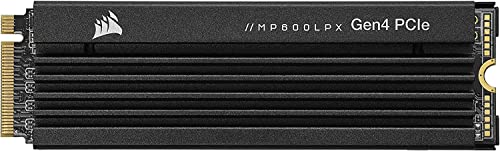
Corsair MP600 Pro LPX
The Corsair MP600 Pro LPX is a low-profile PCIe 4.0 NVMe SSD that is officially licensed for the PS5. It includes a pre-installed aluminum heatsink that fits perfectly in the PS5’s slot. Speeds reach 7,100 MB/s read and 5,800 MB/s write, which meets the PS5’s requirements. The drive is also suitable for desktops and laptops with M.2 slots. Users praise its easy installation and reliable performance. It lacks the highest write speeds of some rivals, but for gaming and general use, it is excellent.
Pros
- Officially licensed for PS5
- Included heatsink
- Good thermal performance
Cons
- Write speeds lower than some competitors
- No standalone version without heatsink
Seagate FireCuda 530
The Seagate FireCuda 530 is a high-performance PCIe 4.0 drive with impressive endurance and a five-year warranty that includes three years of Rescue Data Recovery Services. It offers read speeds up to 7,300 MB/s and write speeds up to 6,900 MB/s. The drive is built with Seagate’s own controller and uses a specialized firmware that enhances reliability. Owners report that it runs cool and delivers consistent performance. It is available with or without a heatsink, and the heatsink version is ideal for PS5. The drive is priced at a premium, but the added data recovery service provides peace of mind.
Pros
- Five-year warranty with data recovery
- High endurance
- Consistent performance
Cons
- Premium price
- Heatsink version may be bulky for some laptops

Western Digital WD_Black SN850P
The WD_Black SN850P is specifically designed for the PS5, with an integrated heatsink that matches the console’s aesthetic. It is licensed by Sony and available in capacities up to 4TB. Performance is similar to the SN850X, with read speeds up to 7,300 MB/s. The drive is easy to install and works flawlessly with the PS5’s operating system. Some users note that the heatsink is not removable, so it may not fit in all laptops or desktops. For PS5 owners who want the best performance and a seamless fit, this is a top choice.
Pros
- Designed for PS5 with licensed heatsink
- High read speeds
- Easy installation
Cons
- Heatsink not removable
- Limited to PS5 use for best fit
Before you buy
How they stack up
| # | Model | Capacity | Best for | Score | Price |
|---|---|---|---|---|---|
| 1 | Samsung 990 Pro | 1TB, 2TB, 4TB | Overall performance | 9.6 | Check price |
| 2 | WD Black SN850X | 1TB, 2TB, 4TB | Gaming and heavy workloads | 9.4 | Check price |
| 3 | Crucial T500 | 500GB, 1TB, 2TB, 4TB | Value and performance | 9.2 | Check price |
| 4 | Sabrent Rocket 4 Plus | 1TB, 2TB, 4TB | High endurance and performance | 9.0 | Check price |
| 5 | Corsair MP600 Pro LPX | 500GB, 1TB, 2TB, 4TB | PS5 and compact builds | 8.8 | Check price |
| 6 | Seagate FireCuda 530 | 500GB, 1TB, 2TB, 4TB | Durability and warranty | 9.1 | Check price |
| 7 | Western Digital WD_Black SN850P | 1TB, 2TB, 4TB | PS5 enthusiasts | 8.8 | Check price |
Common questions
What is the difference between SATA and NVMe SSDs?
SATA SSDs use the older AHCI interface and have a maximum bandwidth of about 600 MB/s, while NVMe SSDs use the PCIe bus and can achieve speeds over 7,000 MB/s. NVMe drives are much faster and are recommended for modern systems, especially for gaming and professional workloads. However, SATA drives are still fine for basic use and are more affordable.
Can I use a PCIe 4.0 SSD in a PCIe 3.0 slot?
Yes, PCIe 4.0 SSDs are backward compatible with PCIe 3.0 slots. They will run at PCIe 3.0 speeds, which are about half of PCIe 4.0, but still much faster than SATA. If you have an older motherboard, you can still use a PCIe 4.0 drive, but you won’t get the full performance.
Do I need a heatsink for my SSD?
It depends on your system. High-performance SSDs can generate heat, but many motherboards come with built-in heatsinks. If your motherboard has a heatsink, you can use it. For laptops or the PS5, a low-profile heatsink is often required. If you are prone to heavy sustained workloads, a heatsink can help maintain performance.
What does TBW mean and why is it important?
TBW stands for Terabytes Written, which is a measure of how much data can be written to the drive over its lifetime. A higher TBW rating indicates a more durable drive. For example, a drive with 600 TBW can handle 600 terabytes of writes before the warranty expires. For most users, even 300 TBW is more than enough, but for heavy users, a higher TBW provides peace of mind.
Can I use an NVMe SSD in an external enclosure?
Yes, you can use an NVMe SSD in an external enclosure via USB or Thunderbolt. This can give you very fast external storage. Ensure the enclosure supports NVMe and has adequate cooling. Some enclosures are designed for PCIe 4.0 speeds, but over USB 3.2 Gen 2, you’ll be limited to about 10 Gbps (around 1,000 MB/s).
What is the best SSD for a PS5?
The PS5 supports PCIe 4.0 NVMe SSDs with capacities from 250GB to 4TB, and it requires a heatsink. Drives like the Samsung 990 Pro with heatsink, WD_Black SN850P, or Corsair MP600 Pro LPX are excellent choices. They meet the speed requirements and are designed to fit the PS5’s slot.
How do I clone my existing drive to a new SSD?
Most SSD manufacturers provide free cloning software, such as Samsung Data Migration or WD Acronis True Image. You can also use third-party tools like Macrium Reflect or Clonezilla. The process involves connecting the new SSD (via USB or M.2), running the software, and selecting the source and target drives. It’s a straightforward process, but back up important data first.
Are these SSDs compatible with laptops?
Most NVMe SSDs are M.2 2280 form factor, which fits most laptops with an M.2 slot. However, some laptops may have limited space for a heatsink. Drives like the Crucial T500 without heatsink are slim and ideal for laptops. Check your laptop’s specifications to ensure compatibility.
What is the difference between TLC and QLC NAND?
TLC (Triple-Level Cell) stores 3 bits per cell, offering a good balance of speed, endurance, and cost. QLC (Quad-Level Cell) stores 4 bits per cell, which is cheaper and allows higher capacities but has lower endurance and slower write speeds. Premium SSDs typically use TLC for better performance and reliability.
How do I know if my motherboard supports PCIe 4.0?
Check your motherboard’s specifications. Most modern motherboards with AMD 500-series chipsets or Intel 11th generation and newer support PCIe 4.0. If you have an older motherboard, it may only support PCIe 3.0. You can also check your system’s BIOS or use a software tool like CPU-Z.
Final word
For most people, the Samsung 990 Pro is the best premium SSD overall because it combines top-tier speed, reliability, and a trusted brand. If you are a gamer on a budget, the Crucial T500 offers similar performance at a lower price. If you own a PS5, the WD_Black SN850P is the easiest choice. Ultimately, any of these drives will provide a significant upgrade over a SATA SSD, so pick based on your specific needs and budget.
Marcus Chen
Marcus covered consumer electronics for enthusiast tech publications for six years before joining ChoiceCrest. He specializes in translating manufacturer spec sheets into plain-language buying advice, with a focus on audio, computing accessories and smart-home gear.