Top Premium Mesh WiFi for Big Homes and Heavy Streaming
For most large homes, the TP-Link Deco BE85 is the top pick thanks to its Wi-Fi 7 readiness and blazing throughput. It suits users with gigabit internet and many devices. Its main limitation is the high price, which may be overkill for smaller spaces.
Premium mesh WiFi systems promise to eliminate dead zones and deliver fast, reliable internet to every corner of your home. Whether you stream 4K movies, game online, or work from home, a top-tier system can handle it all.
But with so many options, choosing the right one can be overwhelming. We’ve compared the best premium models to help you find the perfect balance of speed, coverage, and advanced features.
The top picks, ranked

TP-Link Deco BE85 (2-pack)
The Deco BE85 is TP-Link’s flagship mesh system, offering Wi-Fi 7 speeds up to 9.2 Gbps. It includes a 10G Ethernet port and a dedicated 6GHz backhaul for maximum throughput. Owners report seamless roaming and impressive range, though the cost is steep.
Pros
- Exceptional speed and low latency
- Future-proof with Wi-Fi 7
- Easy setup via Deco app
Cons
- Very expensive
- Requires gigabit internet to benefit

Netgear Orbi 960 (2-pack)
The Orbi 960 is a tri-band Wi-Fi 6E system that covers up to 6,000 sq ft with its two-pack. It features a dedicated 5GHz backhaul and a 10G WAN port. Users praise its stability and strong signal, but note the lack of a third satellite for very large estates.
Pros
- Excellent range and throughput
- Dedicated backhaul for stable performance
- Robust parental controls
Cons
- No Wi-Fi 7 support
- Bulkier design than competitors
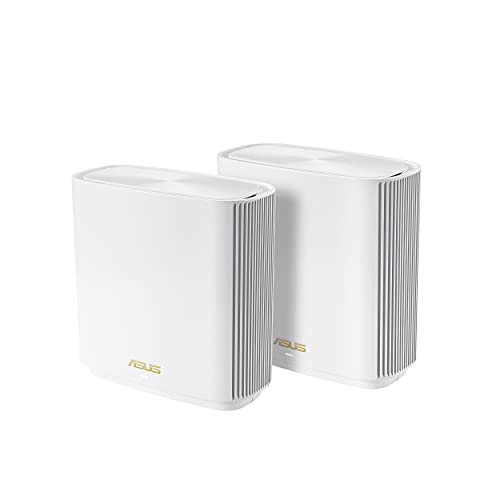
ASUS ZenWiFi ET8 (2-pack)
The ZenWiFi ET8 offers tri-band Wi-Fi 6E with a dedicated 5GHz backhaul and a 2.5G port. It includes advanced gaming features like adaptive QoS and AiMesh support for adding other ASUS routers. Gamers appreciate the low ping and robust security.
Pros
- Gaming-specific optimizations
- Supports AiMesh for expansion
- Strong security features
Cons
- Setup can be complex for novices
- Limited 10G ports

Eero Pro 6E (3-pack)
The Eero Pro 6E is a tri-band Wi-Fi 6E system that covers up to 5,000 sq ft with its three-pack. It’s known for its extremely straightforward app and automatic updates. Owners report reliable performance, though it lacks advanced customization.
Pros
- Plug-and-play setup in minutes
- Compact and unobtrusive design
- Automatic security updates
Cons
- No dedicated backhaul
- Limited Ethernet ports

Linksys Velop MX4200 (3-pack)
The Velop MX4200 offers tri-band Wi-Fi 6 with a dedicated backhaul and a 2.5G port. It’s a solid performer for the price, covering up to 6,000 sq ft with its three-pack. Users note that it lacks Wi-Fi 6E, but it’s still a great choice for most homes.
Pros
- More affordable than Wi-Fi 6E systems
- Strong coverage and stability
- Simple parental controls
Cons
- No Wi-Fi 6E support
- App interface feels dated
Netgear Orbi RBKE963 (2-pack)
The RBKE963 is Netgear’s top-tier quad-band Wi-Fi 6E mesh, offering a dedicated 6GHz backhaul and a 10G WAN port. It’s the fastest Orbi system, but it’s also the most expensive. Owners report blistering speeds and excellent range, but the price is a barrier.
Pros
- Ultra-fast performance
- Dedicated 6GHz backhaul
- Massive coverage
Cons
- Extremely high price
- Overkill for many homes

Arris Surfboard Max AX6600 (2-pack)
The Surfboard Max AX6600 is a tri-band Wi-Fi 6 system with a dedicated backhaul and a 2.5G port. It offers local-only management without requiring a cloud account. Users appreciate the privacy and ease of setup, but it lacks advanced features like parental controls.
Pros
- No mandatory cloud account
- Simple setup process
- Reliable performance
Cons
- Fewer advanced features
- Limited parental controls
Compared at a glance
| # | Model | Wi-Fi Standard | Best for | Score | Price |
|---|---|---|---|---|---|
| 1 | TP-Link Deco BE85 (2-pack) | Wi-Fi 7 (802.11be) | Ultra-fast Wi-Fi 7 performance | 9.4 | Check price |
| 2 | Netgear Orbi 960 (2-pack) | Wi-Fi 6E (802.11ax) | Large homes needing maximum coverage | 9.2 | Check price |
| 3 | ASUS ZenWiFi ET8 (2-pack) | Wi-Fi 6E (802.11ax) | Gamers and custom networking options | 9.0 | Check price |
| 4 | Eero Pro 6E (3-pack) | Wi-Fi 6E (802.11ax) | Simplest setup and easy management | 8.8 | Check price |
| 5 | Linksys Velop MX4200 (3-pack) | Wi-Fi 6 (802.11ax) | Budget-conscious buyers wanting premium performance | 8.6 | Check price |
| 6 | Netgear Orbi RBKE963 (2-pack) | Wi-Fi 6E (802.11ax) | Maximum wired and wireless speeds | 8.4 | Check price |
| 7 | Arris Surfboard Max AX6600 (2-pack) | Wi-Fi 6 (802.11ax) | Users who prefer a non-cloud-based mesh | 8.2 | Check price |
What matters most
Questions worth asking
What is a mesh WiFi system?
A mesh WiFi system uses multiple nodes to create a single, seamless network. Instead of relying on a single router, nodes work together to provide consistent coverage throughout your home, eliminating dead zones.
Is it worth paying extra for Wi-Fi 6E or Wi-Fi 7?
If you have many devices or use high-bandwidth applications like 4K streaming or online gaming, Wi-Fi 6E offers faster speeds and less interference. Wi-Fi 7 is even faster but is still new, and you’ll need Wi-Fi 7 compatible devices to benefit fully.
How many nodes do I need for a large home?
For homes up to 3,000 sq ft, a 2-pack is often adequate. For larger homes, consider a 3-pack or systems with higher coverage ratings, like the Netgear Orbi 960 which covers up to 6,000 sq ft with two nodes.
Can I mix different brands of mesh nodes?
No, mesh systems are proprietary. You must use nodes from the same brand and model line. Some brands like ASUS offer AiMesh, which allows mixing compatible routers, but it’s not standard.
Do premium mesh systems include security features?
Most premium systems include built-in security like WPA3 encryption and automatic threat detection. Some offer parental controls and device quarantine. Check the specific model’s features.
What is a dedicated backhaul?
A dedicated backhaul is a radio band used exclusively for communication between nodes. This prevents data traffic between nodes from competing with your device traffic, resulting in faster and more stable performance.
Can I use a mesh system with my existing modem?
Yes, mesh systems connect to your existing modem or modem-router via Ethernet. Most systems come with a WAN port to connect to your modem.
How do I set up a mesh WiFi system?
Setup is typically done via a mobile app. You connect your phone to the system, follow the instructions, and place the nodes in optimal locations. Most apps guide you through the process step by step.
Our pick
If you want the absolute best performance and have a large budget, the TP-Link Deco BE85 is the clear winner. For most homeowners, the Eero Pro 6E offers a perfect balance of ease, reliability, and coverage at a more reasonable price. Do not overlook the Netgear Orbi 960 if you need extensive coverage without breaking the bank.
Marcus Chen
Marcus covered consumer electronics for enthusiast tech publications for six years before joining ChoiceCrest. He specializes in translating manufacturer spec sheets into plain-language buying advice, with a focus on audio, computing accessories and smart-home gear.


