Which POS Printer Fits Your Store’s Checkout Flow?
Epson TM-T20III is the most dependable all-round POS printer for small retail, backed by the broadest driver support here. Star Micronics TSP143IIIU suits iPad-based tills through USB power passthrough. Epson TM-T88VI fits high-volume counters that cannot risk downtime.
Epson TM-T20III suits most small businesses shopping for a receipt printer. Star Micronics TSP143IIIU leads for tablet-based tills. Epson TM-T88VI is built for counters that print all day without a break.
Compatibility decides more than print quality, since a fast printer your till software cannot drive is useless. We compared interface options, published speed and cutter ratings, and what owners report about driver setup across common point of sale platforms.
The top picks, ranked

Epson TM-T20III Thermal Receipt Printer
Epson’s TM-T20III prints at up to 250mm per second and switches between 80mm and 58mm paper without extra parts. Driver support here is the broadest of any brand, cutting most integration headaches. Owners report years of daily use before the cutter needs attention.
Pros
- Broadest driver and software compatibility here
- Fast printing for a counter-class printer
- Switches between two paper widths
Cons
- No wireless option on the base model
- Bulkier than compact tablet printers
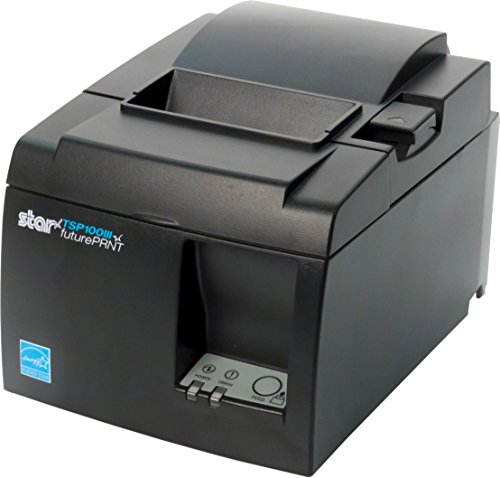
Star Micronics TSP143IIIU Thermal Receipt Printer
Star’s USB variant charges a connected tablet while it prints, running an iPad till off one cable all day. Software support covers most major cloud point of sale platforms. It also drives a cash drawer directly through its port.
Pros
- Charges a tablet through the same cable
- Broad compatibility with cloud till platforms
- Drives a cash drawer without extra hardware
Cons
- USB only on this specific variant
- Limited to 80mm paper

Epson TM-T88VI Thermal Receipt Printer
Epson’s TM-T88 series shows up behind busy counters for a reason, rated for a high cutter cycle count and a strong mean time between failures. Ethernet and USB ship standard, with wireless available as an option. Downtime at a busy till costs more than the higher price here.
Pros
- Built for continuous, heavy daily use
- Fastest print speed in this lineup
- Widest range of interface options
Cons
- Highest cost among these seven printers
- More printer than a low-volume counter needs

Star Micronics mPOP Combined Printer and Cash Drawer
Star’s mPOP combines a receipt printer and a cash drawer into one low-profile unit, saving space on tight counters. Bluetooth and USB connectivity cover both tablets and computers. Its drawer holds less cash than a standard till drawer.
Pros
- Saves significant counter space
- Clean, low-profile appearance suits storefronts
- Bluetooth connects easily to tablet tills
Cons
- Smaller cash drawer than standard tills
- Limited to narrow 58mm receipts

Bixolon SRP-350plusIII Thermal Receipt Printer
Bixolon nearly matches premium Epson speeds at a lower cost. A splash-resistant design suits food service counters near spills. Most configurations ship with multiple interfaces in the box, though driver support is not as universal as Epson’s.
Pros
- Speed close to premium printers for less
- Splash-resistant housing suits food service
- Multiple interfaces included on most units
Cons
- Driver coverage is less universal than Epson
- Setup documentation could be more thorough
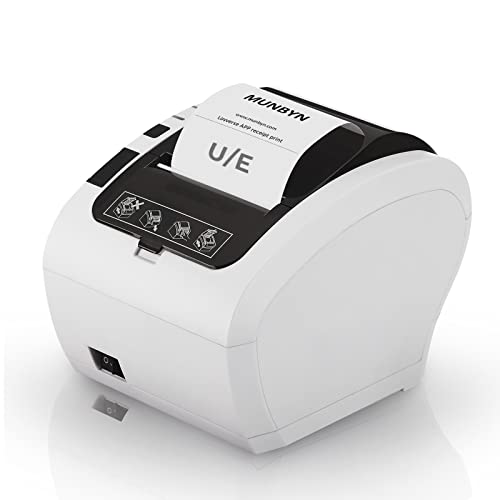
MUNBYN ITPP047 Thermal Receipt Printer
MUNBYN covers the basics of an 80mm counter printer at a fraction of premium brand pricing. USB, serial, and Ethernet all ship on the standard model. It suits a second till or a market stall well.
Pros
- Low cost relative to print speed offered
- Three interfaces included as standard
- Responsive brand support for setup issues
Cons
- Cutter life shorter than premium units
- ESC POS setup needs manual configuration
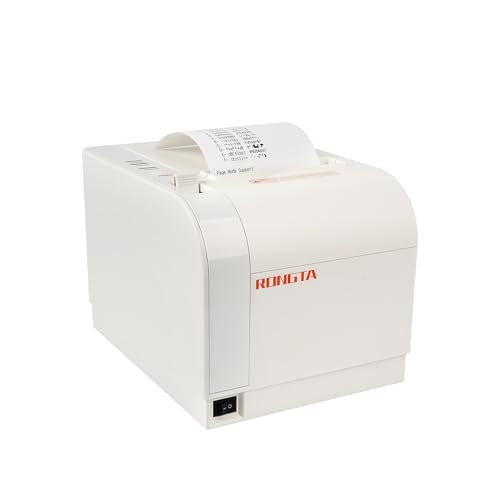
Rongta RP80US Thermal Receipt Printer
Rongta’s RP80US runs plain ESC POS commands, which suits custom or open-source till software directly. Build quality stays basic but handles moderate print volume. Owners report easy setup on Linux-based systems.
Pros
- Works cleanly with custom till software
- Straightforward setup on Linux systems
- Lowest purchase cost in this roundup
Cons
- Basic build materials throughout
- Limited vendor support after purchase
The lineup, side by side
| # | Model | Print speed | Best for | Score | Price |
|---|---|---|---|---|---|
| 1 | Epson TM-T20III Thermal Receipt Printer | Up to 250mm per second | Best overall | 9.4 | Check price |
| 2 | Star Micronics TSP143IIIU Thermal Receipt Printer | Up to 250mm per second | Best for tablet tills | 9.2 | Check price |
| 3 | Epson TM-T88VI Thermal Receipt Printer | Up to 350mm per second | Best for high volume | 9.0 | Check price |
| 4 | Star Micronics mPOP Combined Printer and Cash Drawer | Integrated printer and drawer | Best all in one counter unit | 8.8 | Check price |
| 5 | Bixolon SRP-350plusIII Thermal Receipt Printer | Up to 300mm per second | Best value for busy counters | 8.6 | Check price |
| 6 | MUNBYN ITPP047 Thermal Receipt Printer | Up to 300mm per second | Best budget pick | 8.3 | Check price |
| 7 | Rongta RP80US Thermal Receipt Printer | Up to 300mm per second | Best for simple ESC POS setups | 8.0 | Check price |
What matters most
Will this printer work with my till software? A driver your point of sale platform does not support is the top reason receipt printers get returned. Square, Shopify, Lightspeed, and Clover all publish hardware compatibility lists. Check yours before comparing print speeds, since an unsupported printer works as nothing more than a paperweight.
USB, Ethernet, or Bluetooth: which interface fits your setup? USB suits a single computer till best. Ethernet works when several terminals share one printer, or the printer sits away from the till itself. Bluetooth fits tablets well, though pairing can be less reliable than a cable. Some models add USB power passthrough, removing a separate tablet charger entirely.
What paper width does a POS printer need? Most retail counters run 80mm paper, leaving room for logos, item lines, and barcodes. 58mm paper costs less to stock and suits compact or mobile printers. Switching later means restocking paper, so decide early and check whether your printer supports both widths.
How long should a receipt printer’s cutter last? The auto cutter typically fails before any other part on a receipt printer. Manufacturers publish cutter cycle ratings, and premium units are rated well past a million cuts. For a counter printing hundreds of receipts daily, that rating matters more than a 50mm per second speed difference.
Common questions
Do POS printers need special paper?
They use thermal receipt paper, which prints without ink. Match roll width and diameter to your printer’s specification, and store rolls away from heat since thermal paper darkens on its own.
Can a receipt printer work with an iPad?
Yes. Look for Bluetooth models or USB units with charging passthrough, such as the Star TSP143IIIU. Confirm your specific till app lists the printer as supported before buying.
What is ESC POS?
ESC POS is a command language originally built by Epson, now used across most thermal receipt printers. Software that speaks ESC POS can usually drive any compliant printer, which is why it appears on nearly every spec sheet.
How fast does a POS printer need to be?
Anything above 200mm per second prints a standard receipt in a couple of seconds for most counters. Speed matters most in high-volume settings like busy cafes and supermarkets where lines build fast.
Can one receipt printer serve multiple tills?
Yes, over Ethernet or a shared network connection. Each terminal sends jobs to the same network address, which is common in restaurants where several order stations feed one kitchen printer.
Do POS printers open a cash drawer automatically?
Most include a drawer kick port that triggers the drawer when a receipt prints. Confirm the port exists and matches your drawer’s connector, since budget models sometimes skip it.
Is thermal receipt printing permanent?
No. Thermal receipts fade over months or years depending on heat and light exposure. Keep a digital copy for records that need to last.
What maintenance do receipt printers need?
Clean the print head periodically with an alcohol wipe and clear paper dust from the cutter. Owners report most jams and faded print trace back to a dirty head or cheap paper.
Which POS printer is best for a tablet-based till?
Star Micronics TSP143IIIU stands out for tablet setups, since its USB variant charges the tablet while printing and covers most cloud point of sale platforms.
Epson TM-T20III vs TM-T88VI: which should I buy?
TM-T20III suits most small counters at a lower cost. TM-T88VI adds faster printing and a higher cutter cycle rating, worth the extra cost only for high-volume counters.
Our pick
Epson TM-T20III is the safest choice for a small counter, pairing broad driver support with a build that keeps working through daily use. Move up to the TM-T88VI if your till runs at volume all day, or choose the Star TSP143IIIU when the till is a tablet needing one cable for printing and charging.
Marcus Chen
Marcus covered consumer electronics for enthusiast tech publications for six years before joining ChoiceCrest. He specializes in translating manufacturer spec sheets into plain-language buying advice, with a focus on audio, computing accessories and smart-home gear.