Top Portable USB Flash Drives for Fast, Reliable Storage
The SanDisk Extreme Pro is our top pick for most users, offering blazing fast transfer speeds and rugged durability. It excels for professionals who move large files frequently, though its premium price may be overkill for casual users.
USB flash drives remain essential for transferring files between devices, backing up important documents, or carrying your work anywhere. With so many options on the market, choosing the right one can feel overwhelming.
We looked at real user feedback and specifications to identify the drives that deliver consistent performance, reliable construction, and good value. Our picks range from budget-friendly basics to high-speed powerhouses.
How to choose
Our top picks

SanDisk Extreme Pro USB 3.2 Flash Drive
The SanDisk Extreme Pro delivers exceptional read speeds up to 420 MB/s and write speeds up to 380 MB/s, making it ideal for moving large video files or running portable apps. Its aluminum and rubber housing is both stylish and durable, with a retractable design that protects the connector.
Pros
- Very fast performance
- Durable metal and rubber build
- Retractable connector design
Cons
- Premium price
- Can get warm during heavy use

Samsung BAR Plus USB 3.1 Flash Drive
The Samsung BAR Plus features a full metal body that is waterproof, shockproof, and magnet-resistant, making it a reliable companion for outdoor and on-the-go use. It offers read speeds up to 300 MB/s, which is plenty for standard file transfers and media storage.
Pros
- Metal casing feels premium
- Rugged and durable
- Key ring loop for easy attachment
Cons
- Write speeds slower than read speeds
- Can be difficult to insert in tight ports

SanDisk Ultra Luxe USB 3.2 Flash Drive
The SanDisk Ultra Luxe offers a stylish metal casing and read speeds up to 150 MB/s, making it a solid choice for everyday file storage. With capacities up to 1TB, it provides ample space for large media libraries without breaking the bank.
Pros
- Affordable for large capacities
- Sleek metal design
- Reliable performance
Cons
- No write speed specification
- Not as fast as premium models
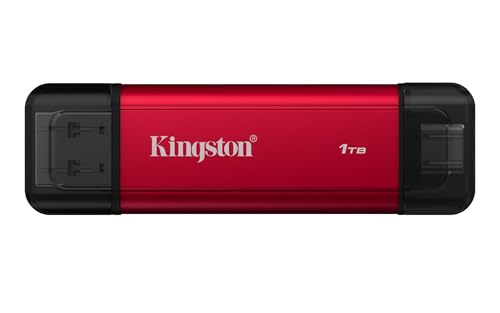
Kingston DataTraveler Max USB 3.2 Gen 2
The Kingston DataTraveler Max pushes the limits with read speeds up to 1000 MB/s and write speeds up to 900 MB/s, perfect for transferring massive video files or running applications directly from the drive. Its sleek metal housing is both durable and heat dissipating.
Pros
- Blazing fast speeds
- Ideal for 4K video and large backups
- Sturdy metal design
Cons
- Requires USB 3.2 Gen 2 port for full speed
- Pricey for the performance

PNY Elite-X Drive USB 3.1
The PNY Elite-X Drive offers a balance of price and performance with read speeds up to 200 MB/s. It is a reliable choice for students and everyday users who need dependable storage without extra frills.
Pros
- Budget friendly
- Decent read speeds
- Compact and portable
Cons
- Write speeds are slower
- Plastic casing feels less durable

Corsair Flash Survivor Stealth USB 3.0
The Corsair Flash Survivor Stealth is built to withstand extreme conditions, featuring a waterproof and pressure-resistant housing that meets military standards. It is a top choice for field workers and adventurers who need data security in harsh environments.
Pros
- Extreme durability
- Waterproof and pressure resistant
- Secure push-pull cap
Cons
- Slower transfer speeds
- Bulky size compared to others
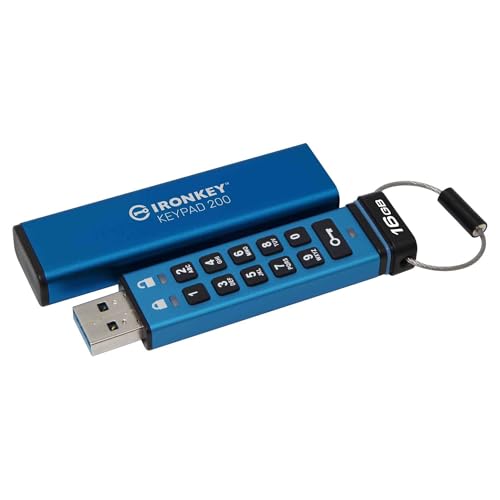
Kingston IronKey D300S Encrypted USB 3.0
The Kingston IronKey D300S provides hardware-based AES 256-bit encryption to keep your data safe. It features an intuitive on-screen keyboard to enter your password, protecting against keyloggers. Ideal for business and personal confidential files.
Pros
- Strong encryption
- On-screen password entry
- Tamper resistant design
Cons
- Lower capacities compared to others
- Slow transfer speeds
How they compare
| # | Model | Capacity | Best for | Score | Price |
|---|---|---|---|---|---|
| 1 | SanDisk Extreme Pro USB 3.2 Flash Drive | 128GB, 256GB, 512GB, 1TB | Fast transfers and heavy workloads | 9.4 | Check price |
| 2 | Samsung BAR Plus USB 3.1 Flash Drive | 64GB, 128GB, 256GB, 512GB | Durability and everyday carry | 9.1 | Check price |
| 3 | SanDisk Ultra Luxe USB 3.2 Flash Drive | 128GB, 256GB, 512GB, 1TB | High capacity at a good price | 8.9 | Check price |
| 4 | Kingston DataTraveler Max USB 3.2 Gen 2 | 256GB, 512GB, 1TB | Ultra-fast performance for creators | 9.0 | Check price |
| 5 | PNY Elite-X Drive USB 3.1 | 64GB, 128GB, 256GB, 512GB | Budget-friendly storage | 8.5 | Check price |
| 6 | Corsair Flash Survivor Stealth USB 3.0 | 64GB, 128GB, 256GB | Rugged environments and military use | 8.7 | Check price |
| 7 | Kingston IronKey D300S Encrypted USB 3.0 | 4GB, 8GB, 16GB, 32GB, 64GB, 128GB | Security and encryption | 8.8 | Check price |
Common questions
What is the most important factor when buying a USB flash drive?
It depends on your use case. For everyday file transfers, capacity and price matter most. For professionals, read and write speeds are critical. If you carry sensitive data, security features like hardware encryption are essential.
How much storage do I need?
For documents and light media, 32GB to 64GB is usually sufficient. For photos and videos, 128GB to 256GB is recommended. If you work with large video files or need a portable backup, consider 512GB or 1TB.
What are the differences between USB 3.0, 3.1, and 3.2?
USB 3.0 (now USB 3.2 Gen 1) supports up to 5 Gbps, while USB 3.1 (now USB 3.2 Gen 2) doubles to 10 Gbps. USB 3.2 Gen 2×2 reaches 20 Gbps but is rare. Actual drive speeds are lower than these limits due to controller and flash memory limitations.
Can I use a USB flash drive with my smartphone?
Yes, many flash drives have dual connectors (USB-A and USB-C) or support On-The-Go (OTG) with an adapter. Check the drive’s specifications for compatibility with your phone.
What is the lifespan of a USB flash drive?
Flash drives can last for years or even decades, but they have a limited number of write cycles (typically 10,000 to 100,000). With normal use, you are more likely to lose the drive than wear it out. Always keep backups of important data.
How do I know the real speed of a flash drive?
Look for the sustained read and write speeds in MB/s. Manufacturers often advertise the maximum read speed, which is higher than write speed. Independent reviews can give you real-world numbers. Use a benchmark tool like CrystalDiskMark to test the drive yourself.
Are expensive flash drives worth it?
If you transfer large files frequently, a faster drive saves time and boosts productivity. If you only occasionally move small files, a budget drive is fine. Price also reflects build quality and security features, so decide based on your needs.
How do I protect my data on a USB flash drive?
You can encrypt the entire drive using built-in software (like BitLocker in Windows) or purchase a drive with hardware encryption. Always use a strong password. Additionally, avoid using public computers with your drive, as they may have malware.
What is the difference between USB-A and USB-C flash drives?
USB-A is the traditional rectangular connector found on most computers. USB-C is newer, reversible, and found on modern laptops and smartphones. Some drives have both connectors for versatility. Make sure the drive matches your device’s port or use an adapter.
Can I run applications from a USB flash drive?
Yes, you can run portable applications (like browsers or office suites) directly from a flash drive. For best performance, choose a drive with high read and write speeds, such as the SanDisk Extreme Pro or Kingston DataTraveler Max.
Our pick
If you need a fast, durable drive for professional use, the SanDisk Extreme Pro is the best choice. Its high speeds and rugged build justify the price. For budget-conscious buyers, the PNY Elite-X offers solid performance at a lower cost. If security is your priority, the Kingston IronKey D300S provides robust encryption. Ultimately, the SanDisk Extreme Pro delivers the best balance of speed, durability, and reliability for most users.
Marcus Chen
Marcus covered consumer electronics for enthusiast tech publications for six years before joining ChoiceCrest. He specializes in translating manufacturer spec sheets into plain-language buying advice, with a focus on audio, computing accessories and smart-home gear.



