Compact Chromebooks That Travel as Well as You Do
The Lenovo Chromebook Duet 3 is the top choice for most travelers because it is a lightweight detachable with a sharp 2K display and all-day battery life. Its main limitation is the small 11 inch screen, which can feel cramped for heavy multitasking.
A portable Chromebook should disappear into your bag and last through a full day of classes, meetings, or coffee shop sessions. The best models combine light weight, sturdy construction, and dependable battery life without breaking your budget.
We looked at current models from top brands, focusing on devices under 3 pounds with solid performance for web apps, streaming, and light productivity. Our picks range from compact 11 inch tablets to 14 inch laptops that still travel well.
The shortlist, ranked

Lenovo Chromebook Duet 3
The Duet 3 is a 11 inch detachable that weighs just over 2 pounds with its keyboard cover. It offers a bright 2K display, a sturdy kickstand, and a battery that easily lasts a full day of mixed use.
Pros
- Sharp, vibrant display
- Excellent battery life
- Detachable design with included keyboard
Cons
- Only one USB-C port
- Performance is modest for heavy multitasking

Asus Chromebook Flip CM3
This 12 inch convertible flips into tablet mode and supports the USI stylus for note taking and sketching. Its 3:2 aspect ratio gives extra vertical space, making it great for reading and document work.
Pros
- Tall 3:2 display
- USI stylus support
- Comfortable keyboard
Cons
- Screen resolution is lower than rivals
- Build feels a bit plastic

Google Pixelbook Go
The Pixelbook Go is a 13.3 inch laptop that weighs just 2.3 pounds. Its matte finish resists fingerprints, and the speakers are loud and clear for a laptop this size. Owners love the quiet backlit keyboard.
Pros
- Fanless design runs silent
- Excellent battery life
- Premium build and feel
Cons
- Expensive for the specs
- No stylus support
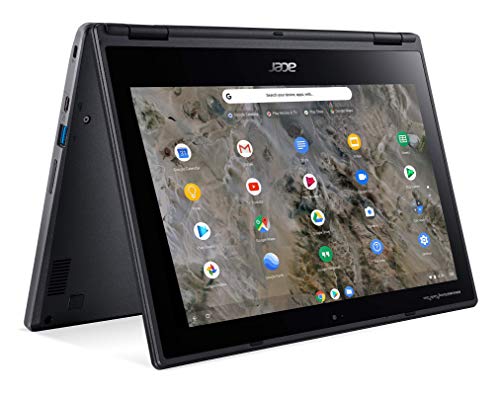
Acer Chromebook Spin 311
This 11.6 inch convertible is one of the most affordable portable Chromebooks. It is rugged enough for kids with a spill resistant keyboard and reinforced corners, yet light enough for daily commutes.
Pros
- Very affordable
- Durable build
- 360 degree hinge
Cons
- Low resolution screen
- Limited storage

Samsung Galaxy Chromebook 2
The Galaxy Chromebook 2 has a vivid QLED display and stereo speakers tuned by AKG, making it a great choice for streaming. It is a 13.3 inch clamshell that weighs 2.7 pounds, a bit heavier than others but still portable.
Pros
- Stunning QLED display
- Great audio
- Fast performance
Cons
- Slightly heavier
- Battery life shorter than claimed

HP Chromebook x2 11
The HP Chromebook x2 11 is a detachable with a magnetic keyboard and an included USI pen. Its 11 inch display is sharp and bright, and the aluminum build feels more solid than most in this class.
Pros
- Premium aluminum build
- Includes pen
- Sharp display
Cons
- Keyboard is sold separately in some bundles
- Limited ports

ASUS Chromebook Detachable CM3
This 10.5 inch detachable from ASUS offers a bright display and a built in kickstand, making it a versatile travel companion. It is the lightest option here at just 1.2 pounds for the tablet alone.
Pros
- Very lightweight
- Great value
- Optional USI stylus support
Cons
- Keyboard is an extra purchase
- Small screen for productivity
Side by side
| # | Model | Display | Best for | Score | Price |
|---|---|---|---|---|---|
| 1 | Lenovo Chromebook Duet 3 | 11 inch 2K (2000×1200) IPS touchscreen | Best overall portable Chromebook | 9.4 | Check price |
| 2 | Asus Chromebook Flip CM3 | 12 inch (1366×912) touchscreen | Best convertible for stylus users | 9.1 | Check price |
| 3 | Google Pixelbook Go | 13.3 inch Full HD (1920×1080) touch | Best premium ultraportable | 9.0 | Check price |
| 4 | Acer Chromebook Spin 311 | 11.6 inch HD (1366×768) touch | Best budget pick | 8.8 | Check price |
| 5 | Samsung Galaxy Chromebook 2 | 13.3 inch QLED (1920×1080) touch | Best for media lovers | 8.7 | Check price |
| 6 | HP Chromebook x2 11 | 11 inch 2K (2160×1440) touch | Best detachable with premium feel | 8.6 | Check price |
| 7 | ASUS Chromebook Detachable CM3 | 10.5 inch (1920×1200) touch | Best budget detachable | 8.4 | Check price |
What to look for
Good to know
How much RAM do I need in a portable Chromebook?
Most portable Chromebooks come with 4GB or 8GB of RAM. For basic browsing and streaming, 4GB is enough. If you tend to keep many tabs open or use Android apps heavily, 8GB is a safer choice.
Can a portable Chromebook replace a laptop for work?
Yes, if your work is done in a browser or via web apps. Google Workspace, Microsoft Office online, and many cloud based tools work well. For heavy offline software, a Chromebook is not ideal.
Do all portable Chromebooks support Android apps?
Most current Chromebooks support Android apps from the Google Play Store. However, some older or budget models may have limited support. Check the specifications before buying.
What is the difference between a convertible and a detachable Chromebook?
A convertible has a keyboard that rotates 360 degrees to become a tablet. A detachable has a keyboard that can be completely removed. Detachables are often lighter as tablets, but convertibles usually have a sturdier keyboard hinge.
Can I use a stylus with these Chromebooks?
Many portable Chromebooks support USI styluses, but not all include one. Models like the Asus Chromebook Flip CM3 and HP Chromebook x2 11 are compatible. The Lenovo Duet 3 does not support a stylus.
How long do Chromebook batteries typically last?
Manufacturers often claim 10 to 12 hours, but real world use often yields 7 to 9 hours. Screen brightness, active tabs, and streaming affect battery life significantly.
Are portable Chromebooks good for students?
Yes, they are excellent for students because they are lightweight, have long battery life, and are inexpensive. Their reliance on cloud storage makes it easy to access homework from any device.
What is the best screen size for portability?
For maximum portability, 11 to 12 inch screens are best. They are lighter and smaller, but typing may feel cramped. A 13.3 inch screen is a good balance between portability and usability.
Can I use Microsoft Office on a Chromebook?
Yes, you can use the web versions of Word, Excel, and PowerPoint. Android apps are also available. The offline experience is more limited compared to Windows or Mac.
Do Chromebooks get viruses?
Chromebooks are less vulnerable to traditional viruses because of their sandboxed design. But you should still practice safe browsing and avoid installing unknown Android apps.
Our take
For most people, the Lenovo Chromebook Duet 3 offers the best combination of portability, battery life, and value. If you need a larger screen, consider the Google Pixelbook Go for its premium feel and performance. Choose the Acer Spin 311 if you are on a strict budget.
Marcus Chen
Marcus covered consumer electronics for enthusiast tech publications for six years before joining ChoiceCrest. He specializes in translating manufacturer spec sheets into plain-language buying advice, with a focus on audio, computing accessories and smart-home gear.