Pocket Digital Angle Gauges For Fast, Accurate Bevel Checks
The Wixey WR300 leads this group with a magnetic base that locks onto a saw blade or fence for a steady reading. The Klein Tools 935DAG suits electricians bending conduit, and the Empire Digital Angle Finder covers occasional checks at the lowest cost here.
The Wixey WR300 is the strongest all-around pick for checking bevel and miter angles, since its magnetic base locks flat against a saw blade or fence without needing a free hand to hold it steady. The display reads to a tenth of a degree, which catches small setup errors before they show up in a finished cut. It is built mainly for woodworking setups rather than the rugged field use an electrician or contractor might put a gauge through.
A pocket angle gauge earns its keep by giving a trustworthy number fast, without the slow back-and-forth of a protractor and a square. We compared mounting method, display clarity, and how each gauge held its reading when moved between checks.
What we recommend

Wixey WR300 Digital Angle Gauge
Wixey fits this gauge with a strong magnetic base that holds flat against a table saw blade or miter saw fence, freeing both hands to adjust the setting. The large LCD reads angle to a tenth of a degree and includes a zero-reference button for quick recalibration. Woodworkers setting up bevel cuts get a fast, repeatable way to confirm accuracy before cutting.
Pros
- Magnetic base frees both hands during setup
- Zero-reference button simplifies recalibration
- Large display reads easily in shop lighting
Cons
- Magnetic base will not hold on aluminum fences
- Built more for woodworking than field electrical work

General Tools 822 Digital Angle Finder
General Tools pairs a backlit display with a sturdy aluminum body, suited to checking table saw and miter saw angles in dim shop corners. A hold function locks the reading on screen after you remove the gauge from an awkward angle. Hobbyist and semi-professional woodworkers get dependable readings for most bevel and miter setup tasks.
Pros
- Backlit display helps in dim shop lighting
- Hold function locks readings for awkward angles
- Durable aluminum body resists shop wear
Cons
- No magnetic base for hands-free mounting
- Narrower angle range than full 360-degree models

Klein Tools 935DAG Digital Angle Gauge
Klein Tools builds this gauge to survive a tool bag full of conduit benders and pipe wrenches, with a reinforced housing rated for job site drops. Electricians use it to check bend angles on rigid or EMT conduit against code-required specifications. The rugged design adds weight compared to woodworking-focused gauges.
Pros
- Reinforced housing survives job site drops
- Magnetic strip helps mount on steel conduit
- Trusted brand among electrical contractors
Cons
- Slightly lower accuracy than woodworking-focused models
- Bulkier than pure pocket-size gauges

iGaging Digital Protractor
iGaging adds magnetic strips to both long edges of this gauge, letting it mount on either side of a miter saw fence or blade depending on the check needed. The stainless steel body resists the sawdust and moisture common around a miter station. Woodworkers calibrating saws after transport or blade changes benefit from the flexible mounting options.
Pros
- Magnetic edges on both sides add mounting flexibility
- Stainless body resists sawdust and moisture
- Full 360-degree range covers all common checks
Cons
- Display lacks backlighting for dim conditions
- No hold function for awkward-angle readings
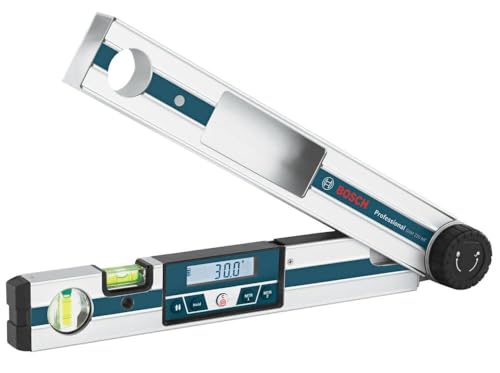
Bosch GAM 220 Digital Angle Finder
Bosch wraps this gauge in an impact-resistant casing designed to survive drops onto concrete, a common hazard on active job sites. The large buttons work fine even with work gloves on, unlike smaller touch-sensitive models. General contractors checking angles across framing, trim, and fixtures get a tool built for rough daily handling.
Pros
- Impact-resistant casing survives job site drops
- Large buttons operate fine with work gloves
- Durable enough for daily contractor use
Cons
- No magnetic mounting option included
- Accuracy trails the most precise woodworking models

Johnson Level Digital Angle Locator
Johnson Level strips this gauge down to a simple two-button interface, covering basic angle readings without extra features like backlighting or hold functions. The straightforward design suits buyers who just want a reliable number without a learning curve. Occasional DIYers checking a stair stringer or fence angle get adequate accuracy here.
Pros
- Simple two-button operation has no learning curve
- Reasonable accuracy for everyday DIY checks
- Affordable price for a digital angle gauge
Cons
- No magnetic base or backlight included
- Lacks the hold function found on pricier models

Empire Digital Angle Finder
Empire keeps this gauge compact and affordable, small enough to ride in a shirt pocket alongside a tape measure. It covers basic angle checks for trim, framing, and general DIY tasks without the precision woodworkers need for fine joinery. Buyers wanting an inexpensive backup gauge get solid basic function here.
Pros
- Lowest price point among the gauges compared here
- Compact pocket size travels easily
- Covers basic framing and trim angle checks
Cons
- Lowest accuracy rating in this comparison
- Narrower angle range than premium models
How to choose
What a pocket digital angle gauge measures The gauge reads the angle between its flat reference edge and whatever surface it rests against, displaying the result in degrees on a small screen. That replaces squinting at a protractor or trusting a saw’s factory scale, which can drift out of calibration over time. Most models zero themselves against a flat reference before taking a measurement.
Magnetic mounting versus flat-edge only A magnetic base, like Wixey’s or iGaging’s dual-sided edges, holds the gauge steady against a steel blade or fence without a free hand to brace it. A flat-edge-only gauge, such as Johnson Level’s or Empire’s, works fine on non-magnetic surfaces but needs manual holding during the reading. Steel-heavy environments like table saws favor magnetic designs.
Matching accuracy to the task Fine woodworking joinery benefits from a 0.1-degree gauge like the Wixey or iGaging model, where small errors compound across multiple cuts. General framing, trim, or electrical conduit work tolerates the 0.2 to 0.3-degree accuracy found on the Klein Tools, Bosch, or Empire gauges without a practical difference in the finished result.
Durability for job sites versus a home shop A rugged, impact-resistant gauge, like the Bosch or Klein Tools model, survives drops onto concrete or getting tossed in a tool bag with heavier gear. A home shop gauge, such as the General Tools or Wixey model, rarely faces that kind of abuse and can prioritize display clarity or magnetic strength instead.
Compared at a glance
| # | Model | Angle range | Best for | Score | Price |
|---|---|---|---|---|---|
| 1 | Wixey WR300 Digital Angle Gauge | 0 to 360 degrees | Best overall pocket angle gauge | 9.2 | Check price |
| 2 | General Tools 822 Digital Angle Finder | 0 to 225 degrees | Best for woodworking setup checks | 8.9 | Check price |
| 3 | Klein Tools 935DAG Digital Angle Gauge | 0 to 225 degrees | Best for electrical conduit bending | 8.7 | Check price |
| 4 | iGaging Digital Protractor | 0 to 360 degrees | Best for miter saw calibration | 8.6 | Check price |
| 5 | Bosch GAM 220 Digital Angle Finder | 0 to 220 degrees | Best for jobsite durability | 8.5 | Check price |
| 6 | Johnson Level Digital Angle Locator | 0 to 225 degrees | Best value pick | 8.3 | Check price |
| 7 | Empire Digital Angle Finder | 0 to 200 degrees | Best budget pick | 8.0 | Check price |
Good to know
How accurate are pocket digital angle gauges?
Most read within 0.1 to 0.3 degrees, which is tighter than a standard protractor and accurate enough for both fine joinery and general construction work.
Can a digital angle gauge replace a protractor?
Yes, for most practical purposes. It gives a faster, more precise reading without needing to align a protractor’s arm visually against a line.
Do these gauges need calibration before use?
Most zero automatically against a known flat surface, like a table saw top, before taking a reading. Recalibrate if the display seems off after a drop.
Will a magnetic angle gauge work on an aluminum fence?
No, magnetic bases only grip ferrous metals like steel. Aluminum fences need a flat-edge gauge or a non-magnetic mounting method instead.
Can electricians use a woodworking angle gauge for conduit bending?
Basic function works similarly, but a rugged model like the Klein Tools 935DAG is built specifically to survive the drops and rough handling conduit work involves.
How long does the battery last in a digital angle gauge?
Most run on a coin-cell or small battery that lasts a year or more with occasional use, since the display only draws power when active.
What angle range do most gauges cover?
Many cover 0 to 225 degrees for standard checks, while a few, like the Wixey and iGaging models, offer a full 360-degree range for less common angles.
Is a backlit display worth paying extra for?
If you work in dim garages, basements, or job site trailers, yes. It prevents misreads that a non-backlit screen can cause in low light.
Final word
The Wixey WR300 is the best overall choice for most woodworking shops, since its magnetic base and tenth-degree accuracy cover the widest range of setup tasks. Electricians bending conduit on job sites should pick the Klein Tools 935DAG instead, since its rugged housing survives rough daily handling better. Buyers who just need occasional angle checks on a budget get the most practical value from the Empire Digital Angle Finder.
Jake Monroe
Jake worked as a residential contractor for over a decade before shifting to full-time writing. He evaluates power tools, hand tools and workshop gear through the lens of someone who has actually used them on job sites, not just read the box.