Seven numeric keypads for spreadsheets and accounting
Satechi Slim Aluminum Wired Keypad suits most desks, with 18 keys, USB-C and no batteries. Keychron Q0 Number Pad answers heavy entry with hot-swappable switches and QMK remapping. Need Tab and Esc beside the digits? Macally Wired USB Numeric Keypad carries 28 keys.
Satechi Slim Aluminum Wired Keypad is the pick for most desks. Its 18-key Mac layout and USB-C cable skip pairing screens and battery swaps entirely, which matters on a machine you leave plugged in. Scissor keys stay quiet beside a colleague. Hands entering figures for six hours straight will want deeper travel than this pad offers.
Listings hide the differences that actually bite. Key count swings from 18 to 28, Apple layouts put Clear where Windows expects Num Lock, and a 2 foot cable will never reach a tower on the floor. We compared current Amazon listings on switch type, connection, key count and stated compatibility, then weighed recurring owner feedback about case flex, cable length and battery drain.
The shortlist, ranked

Satechi Slim Aluminum Wired Keypad
Brushed aluminum housing sits flush beside an iMac or MacBook rather than looking bolted on. Scissor keys press with a short, quiet stop that suits open-plan rooms and late evenings. USB-C carries power and data together, so nothing pairs and nothing charges.
Pros
- Runs on bus power with no batteries
- Quiet enough for a shared office
- Anodised finish matches Apple hardware
Cons
- Shallow travel tires hands over long sessions
- Clear key has no Windows equivalent

Keychron Q0 Number Pad
A CNC aluminum case and gasket-mounted plate drop the typing pitch well below any plastic pad. Hot-swap sockets accept 3-pin and 5-pin switches, so linear becomes tactile in minutes without a soldering iron. QMK and VIA handle remapping, which lets you park an accounting macro on the equals key.
Pros
- Switch changes need no soldering
- VIA remapping runs in a browser
- Case weight stops mid-session drift
Cons
- Too heavy to carry in a laptop bag
- Wired only, with no wireless variant

Macally Wired USB Numeric Keypad
Twenty-eight keys bring Tab, Esc, backspace and a dedicated equals key over to the right hand. Spreadsheet entry speeds up once cell navigation stops bouncing back to the main keyboard. Roughly five feet of USB-A cable reaches a tower parked under the desk.
Pros
- Tab and Esc keep both hands in place
- Cable clears a floor-standing tower
- Registers as standard HID, no driver
Cons
- Plastic shell flexes under firm presses
- USB-A needs a hub on newer laptops

Omoton Bluetooth Numeric Keypad
Bluetooth covers iPad, MacBook, Windows machines and most Android tablets while leaving every port free. An aluminum top plate holds the profile thin enough to slide into a laptop sleeve. Auto sleep stretches two AAA cells across months of part-time use.
Pros
- No dongle occupying a USB port
- Thin enough for a laptop sleeve
- Sleep mode preserves the AAA cells
Cons
- Short wake delay after it sleeps
- Cells are alkaline, not rechargeable
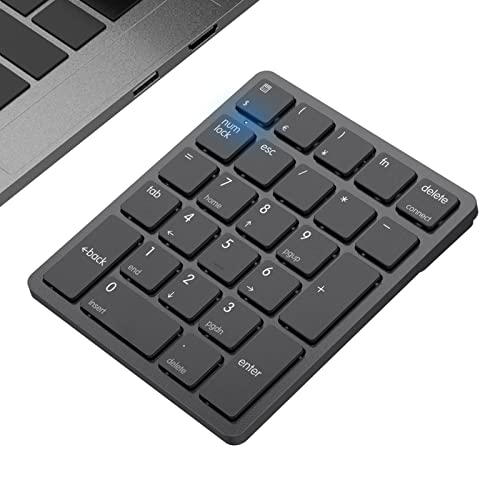
Jelly Comb Wireless Number Pad
A nano receiver carries the link, which sidesteps the pairing menus that stall on locked-down work machines. Double zero and dedicated arithmetic keys cut keystrokes during invoicing and stock counts. Range stretches to roughly 33 feet, enough to keep typing from an adjacent chair.
Pros
- Connects the moment the receiver goes in
- Double zero shortens currency entry
- Receiver clips inside the case
Cons
- Occupies a USB-A port permanently
- Losing the receiver ends its use
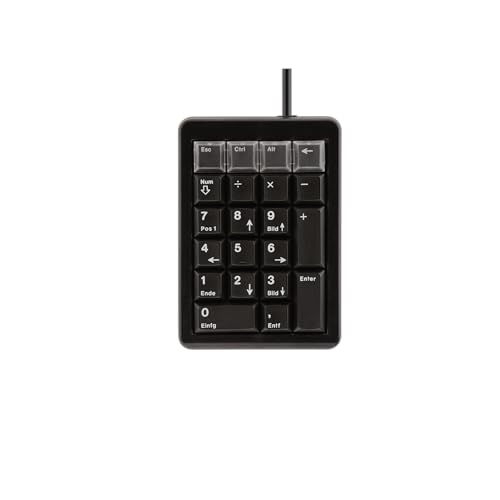
Cherry G84-4700 Keypad
Cherry ML mechanical switches sit under all 21 keys, each rated for 20 million actuations. Retail counters and lab benches favour this pad because every press gives a clear stop, which cuts double entries during fast runs. An ultra-flat case keeps the top row near standard keyboard height.
Pros
- Stroke rating suits all-day counting
- Flat case slides under a monitor arm
- Narrow footprint on a crowded counter
Cons
- Industrial look beside a modern desk
- Twenty-one keys leave out Tab and Esc
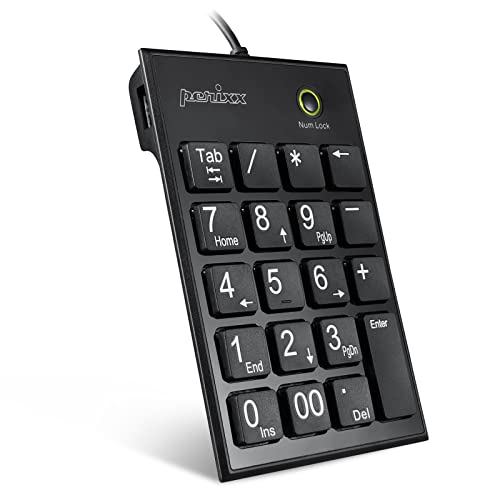
Perixx PERIPAD-201
Eighteen keys, one USB-A cable and zero software make this the simplest way to give an older tower a number pad. Rubber feet hold position on laminate without tape or a mat. Travel stays shallow, so occasional figures suit it better than eight-hour bookkeeping.
Pros
- Types the second it is plugged in
- Rubber feet stop desk drift
- Light enough to move between desks
Cons
- Shallow travel over long sessions
- No USB-C or wireless variant
What matters most
What to look for in a numeric keypad Key count sets the ceiling. Eighteen keys handle digits and basic math. Twenty-two adds a double zero for currency work. Twenty-eight pulls Tab, Esc and backspace across from the main board. Switch type decides comfort after that: scissor keys stay flat and quiet, mechanical switches give a defined stop point. Check cable length before ordering, since five feet reaches a floor-standing tower and two feet will not. Weight rarely appears in listings, yet a light plastic pad slides around under fast fingers.
Wired or wireless: which connection fits your ports Wired USB removes batteries, pairing and lag, which makes it the default for a fixed workstation. A 2.4 GHz receiver links instantly but claims a USB-A port that thin laptops no longer provide. Bluetooth keeps every port free and works with iPadOS, at the cost of a brief wake delay. Count your free ports first, then decide. Anyone moving between two machines daily saves more time with Bluetooth than with a cable they keep unplugging.
Best numeric keypad for accounting and heavy data entry Travel depth outranks everything else once you are entering figures for hours. Mechanical options such as the Keychron Q0 and Cherry G84-4700 give a clear actuation point, which reduces double entries during fast runs. Case weight helps here too, since an aluminum body stays planted under heavy strikes. Remappable firmware pays off when one shortcut repeats hundreds of times a day. Enter numbers for under an hour and none of this applies, so take a quiet scissor pad instead.
Mac, iPad and thin laptop compatibility Apple layouts place Clear where Windows places Num Lock, so a Mac-focused pad behaves oddly on a PC. iPadOS accepts Bluetooth keypads but ignores most 2.4 GHz receivers, which makes the Omoton the practical tablet option. Machines with only USB-C ports need a hub for any USB-A pad, and that hub becomes one more thing to carry. Confirm the port first, then the operating system, before you order.
How they stack up
| # | Model | Connection | Best for | Score | Price |
|---|---|---|---|---|---|
| 1 | Satechi Slim Aluminum Wired Keypad | Wired USB-C | Best overall | 9.4 | Check price |
| 2 | Keychron Q0 Number Pad | Wired USB-C | Best for mechanical feel | 9.2 | Check price |
| 3 | Macally Wired USB Numeric Keypad | Wired USB-A | Best value | 9.0 | Check price |
| 4 | Omoton Bluetooth Numeric Keypad | Bluetooth wireless | Best for iPad and Mac | 8.8 | Check price |
| 5 | Jelly Comb Wireless Number Pad | 2.4 GHz nano receiver | Best for laptop users | 8.6 | Check price |
| 6 | Cherry G84-4700 Keypad | Wired USB | Best for long shifts | 8.3 | Check price |
| 7 | Perixx PERIPAD-201 | Wired USB-A | Best budget | 8.0 | Check price |
Common questions
What is the best numeric keypad for accounting?
Mechanical models fit accounting best, because a defined actuation point is easier to feel and cuts double entries. Keychron Q0 offers hot-swappable switches plus macro layers. Cherry G84-4700 rates each key for 20 million actuations on a flat, counter-friendly case.
Do numeric keypads work with a MacBook?
Yes. Wired pads register as standard HID devices on macOS with no driver install, and Bluetooth models pair through System Settings. Mac-focused pads such as the Satechi replace Num Lock with Clear, matching Apple’s own keyboard layout.
Can you use a number pad with an iPad?
Bluetooth keypads connect to iPadOS directly, which is why the Omoton works. Pads relying on a 2.4 GHz USB receiver usually will not, since most iPads offer no usable USB-A port for the dongle.
Which is better, a wired or wireless numeric keypad?
Wired wins on reliability and needs no batteries, so it suits a permanent desk. Wireless wins for hot-desking, tablets and tidy cable runs. Someone alternating between a work laptop and a home tower will find Bluetooth faster than replugging.
How many keys should a numeric keypad have?
Eighteen keys cover digits and basic arithmetic. Choose 22 keys when currency entry makes a double zero worthwhile. Pick 28, as on the Macally, if Tab and Esc would keep your right hand from jumping back to the main keyboard.
Are mechanical numeric keypads worth it?
For daily heavy entry, yes. Switch ratings run into tens of millions of strokes, and the tactile stop reduces missed presses. Casual users adding a few figures a week will not notice enough difference to justify the extra bulk and weight.
Why is my numeric keypad not typing numbers?
Num Lock is usually off, leaving the pad acting as a navigation cluster with arrows and Home. Press Num Lock on the pad itself, not the main keyboard. On macOS, check that Clear has not switched the pad into another mode.
Do number pads need drivers or software?
Standard pads are plug and play across Windows, macOS and Linux. Only programmable models need configuration, and the Keychron Q0 uses browser-based VIA rather than an installed driver, so locked-down work laptops stay usable.
Is Bluetooth or 2.4 GHz better for a laptop keypad?
Bluetooth leaves your ports free, which matters on a two-port ultrabook. A 2.4 GHz receiver connects without pairing, useful on machines where IT blocks Bluetooth device setup. Check which restriction applies to your laptop before choosing.
Are wireless number pads fast enough for data entry?
Modern 2.4 GHz and Bluetooth pads keep up with normal entry speeds. Noticeable lag usually points to a low battery or a receiver blocked by a monitor stand. Move the dongle to a front port or a short extension cable.
Final word
Satechi Slim Aluminum Wired Keypad takes the top spot: USB-C power, quiet scissor keys and a correct Mac layout suit the widest range of desks with no setup at all. Bookkeepers running figures all day should pay more for the Keychron Q0 and its swappable, remappable switches. Tablet users and hot-deskers skip both and take the Omoton, which pairs over Bluetooth and leaves every port open.
Marcus Chen
Marcus covered consumer electronics for enthusiast tech publications for six years before joining ChoiceCrest. He specializes in translating manufacturer spec sheets into plain-language buying advice, with a focus on audio, computing accessories and smart-home gear.
You might also need
Nintendo Game & Watch: Super Mario Bros Review: Still Worth It as a Collectible?

Ray-Ban Meta (Gen 2) Wayfarer Smart Glasses: Worth $379 for Clear Lenses?
AlyKets Nikon UC-E6 Replacement USB Cable: Does a $7.95 Cord Work as Well as the Original?
