Top Network Adapters for Serious Professionals
For professionals who demand reliable wired connections, the TP-Link Archer TX20E Plus stands out as the top pick due to its exceptional WiFi 6 performance and robust build. It is ideal for desktop users needing low latency and high throughput. Its main limitation is that it requires a PCIe slot and antenna placement, which may not suit all setups.
A reliable network adapter is the backbone of a productive professional setup. Whether you’re working from a cramped office or a sprawling workstation, the right adapter ensures stable connections for video calls, large uploads, and cloud computing.
This roundup highlights adapters that excel in performance, durability, and feature sets. From USB-C dongles to PCIe cards, we cover options that cater to different interfaces and use cases, ensuring you find a match for your work environment.
Our top picks

TP-Link Archer TX20E Plus
A PCIe adapter with the latest WiFi 6 technology. It supports dual-band speeds up to 2402 Mbps on 5 GHz. Owners report stable connections and easy installation. Its external antennas can be positioned for optimal signal.
Pros
- Excellent throughput and low latency
- Bluetooth 5.2 for peripherals
- Magnetic antenna base for flexible placement
Cons
- Requires a free PCIe x1 slot
- Not compatible with laptops

ASUS USB-AX56
A dual-band USB 3.2 Gen 1 adapter that brings WiFi 6 to laptops and desktops. It features external antennas for better reception. Users appreciate its plug-and-play functionality and compact design. It supports WPA3 security for enterprise-level protection.
Pros
- Portable and easy to use
- External antennas enhance signal
- Broad compatibility with Windows and macOS
Cons
- USB connection may bottleneck on some systems
- Antennas can be bulky
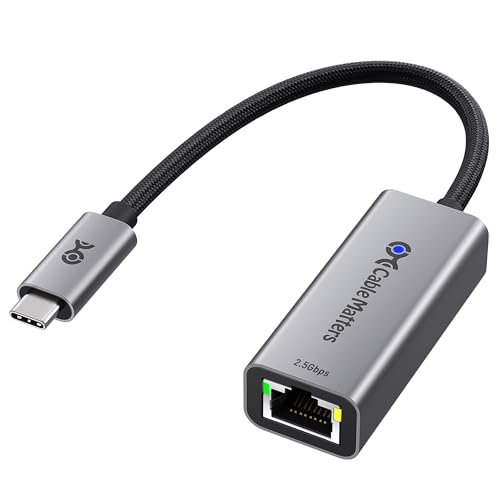
Cable Matters USB C to 2.5G Ethernet Adapter
A reliable USB-C adapter that delivers 2.5 Gbps wired speeds. It is ideal for professionals who need fast, stable ethernet connections on laptops. Built with a durable aluminum housing, it runs cool and is recognized for its compatibility with multiple operating systems.
Pros
- High-speed wired connection
- Compact and sturdy design
- No external power needed
Cons
- Requires USB C port with sufficient power
- Not waterproof

TP-Link UE300
A simple USB 3.0 to Gigabit ethernet adapter. It offers reliable speeds up to 1000 Mbps. Professionals on a budget find it a solid choice for stable connections. Its plug-and-play design works with many devices. Users report consistent performance for everyday tasks.
Pros
- Very affordable
- Easy to use
- Compact and portable
Cons
- Limited to gigabit speeds
- No advanced features

Intel Gigabit CT Desktop Adapter
A PCIe gigabit adapter from Intel, known for its stability and low CPU usage. It is a popular choice for professionals upgrading older desktops. It supports WoL and VLAN tagging for advanced network management. Users praise its driver support and long-term reliability.
Pros
- Excellent driver support
- Low CPU overhead
- Reliable for critical applications
Cons
- No wireless capability
- Older technology, lacks 2.5G support

TP-Link Archer TX3000E
A PCIe WiFi 6 adapter with a heatsink for sustained performance. It delivers speeds up to 2402 Mbps and includes Bluetooth 5.0. Its external antennas are designed to reduce interference. Users report stable connections and excellent range.
Pros
- High throughput and low latency
- Advanced heatsink for cool operation
- Easy to install with magnetic base
Cons
- Antennas are large
- No USB option

StarTech.com USB 3.0 to 2.5G Ethernet Adapter
A USB 3.0 adapter that provides 2.5 Gbps speeds, ideal for connecting to multi-gig switches. It features a metal housing and includes a detachable cable. Users value its compatibility with Windows, macOS, and Linux. It is a practical solution for laptops without ethernet ports.
Pros
- True 2.5G speed over USB 3.0
- Durable metal construction
- Supports WoL and other advanced features
Cons
- Slightly higher price
- Requires USB 3.0 port for full speed
How to pick the right one
Side by side
| # | Model | Interface | Best for | Score | Price |
|---|---|---|---|---|---|
| 1 | TP-Link Archer TX20E Plus | PCIe | Desktop users wanting top WiFi 6 speeds | 9.4 | Check price |
| 2 | ASUS USB-AX56 | USB 3.2 Gen 1 | Professionals needing a portable USB adapter | 9.1 | Check price |
| 3 | Cable Matters USB C to 2.5G Ethernet Adapter | USB C | Wired connections without PCIe | 9.0 | Check price |
| 4 | TP-Link UE300 | USB 3.0 | Budget-friendly gigabit wired connection | 8.8 | Check price |
| 5 | Intel Gigabit CT Desktop Adapter | PCIe | Enterprise and legacy systems | 8.7 | Check price |
| 6 | TP-Link Archer TX3000E | PCIe | Gamers and power users needing low latency | 9.2 | Check price |
| 7 | StarTech.com USB 3.0 to 2.5G Ethernet Adapter | USB 3.0 | Network professionals needing multi-gig on the go | 8.9 | Check price |
Good to know
What is the difference between WiFi 5 and WiFi 6?
WiFi 6 offers faster speeds, lower latency, and better performance in crowded networks. It uses advanced technologies like OFDMA and MU-MIMO to handle multiple devices more efficiently. For professionals, WiFi 6 ensures smoother video conferencing and quicker file transfers.
Can I use a USB network adapter on a desktop?
Yes, USB adapters work on desktops, but they may not achieve the same performance as PCIe cards due to USB bus limitations. For high-speed wired connections, ensure your USB port supports the adapter’s speed, such as USB 3.0 or higher for 2.5G adapters.
Do I need a 2.5G adapter if my internet plan is below 1Gbps?
Not necessarily. If your internet plan provides less than 1Gbps, a gigabit adapter is sufficient. However, if you transfer files between computers on a local network, a 2.5G adapter can significantly speed up those transfers, making it a worthwhile investment for professionals.
How do I install a PCIe network adapter?
Installation involves opening your computer case, inserting the card into a PCIe slot, and securing it. Then you may need to install drivers. Many adapters come with detailed instructions. Always power off your computer before installation.
What is WPA3 and why is it important?
WPA3 is the latest Wi-Fi security protocol, providing stronger encryption and protection against password guessing. It is crucial for professionals handling sensitive data, as it secures wireless communications against unauthorized access.
Are external antennas better than internal ones?
Often yes. External antennas can be repositioned to get better signal, especially in environments with obstacles. Some adapters have high-gain antennas that improve range and stability. However, internal antennas may be sufficient for close-range connections.
Will a network adapter work on my Mac?
Many adapters support macOS, but check compatibility. Some require extra drivers. Apple silicon Macs might have restrictions. Look for adapters that explicitly state macOS compatibility and have a good track record for driver updates.
How can I tell if my computer has a free PCIe slot?
You can check your motherboard’s manual or use system information tools. Most desktops have multiple PCIe x1 slots. A PCIe x1 adapter fits into any PCIe x1, x4, x8, or x16 slot. Ensure physical space inside your case for the card and antennas.
What is the real-world speed of a 2.5G adapter?
Real-world speeds depend on your network infrastructure, including cable quality and switch/router capabilities. Typically, you can expect around 2.3 to 2.4 Gbps in ideal conditions. For most professional tasks, this is more than sufficient.
Why would a professional need a network adapter upgrade?
Older built-in adapters may lack modern standards like WiFi 6 or multi-gig ethernet, leading to slower speeds and less stability. Upgrading ensures you can take advantage of faster internet plans, improve productivity, and maintain robust connections for demanding applications.
The bottom line
For most professionals, the TP-Link Archer TX20E Plus is the best overall choice due to its superior wireless performance and feature set. If you need a wired multi-gig connection without opening your PC, the Cable Matters USB C to 2.5G Ethernet Adapter is an excellent pick. For budget-conscious buyers, the TP-Link UE300 provides reliable gigabit speeds at a low cost. Ultimately, evaluate your computer’s interface and your network demands to select the adapter that will serve you best.
Marcus Chen
Marcus covered consumer electronics for enthusiast tech publications for six years before joining ChoiceCrest. He specializes in translating manufacturer spec sheets into plain-language buying advice, with a focus on audio, computing accessories and smart-home gear.


