Top Network Adapters for Gaming in 2025
The ASUS USB-AX56 is the best gaming network adapter for most players. It delivers Wi-Fi 6 speeds up to 1800 Mbps with low latency. Its main limitation is that it requires a USB 3.0 port for full performance.
A laggy connection can ruin your gaming session. A quality network adapter ensures stable, low-latency performance. We compared top models to help you choose.
From USB dongles to PCIe cards, each adapter suits different needs. We analyzed specs, user feedback, and compatibility to rank the best.
The shortlist, ranked

ASUS USB-AX56
The ASUS USB-AX56 is a compact Wi-Fi 6 adapter that offers fast speeds and low latency. It uses a dual-band connection with OFDMA and MU-MIMO for efficient data transfer. Users report stable connections during intense gaming sessions.
Pros
- Low latency for online gaming
- Plug-and-play with no drivers
- Compact design
Cons
- Requires USB 3.0 for full speed
- Not compatible with older USB ports

TP-Link Archer TX3000E
The TP-Link Archer TX3000E is a PCIe Wi-Fi 6 card with Bluetooth 5.0. It offers high-speed connectivity and low latency for competitive gaming. Its external antennas provide strong signal reception.
Pros
- High throughput
- Bluetooth included
- Magnetic antenna base
Cons
- Requires PCIe slot
- Installation may need technical skill
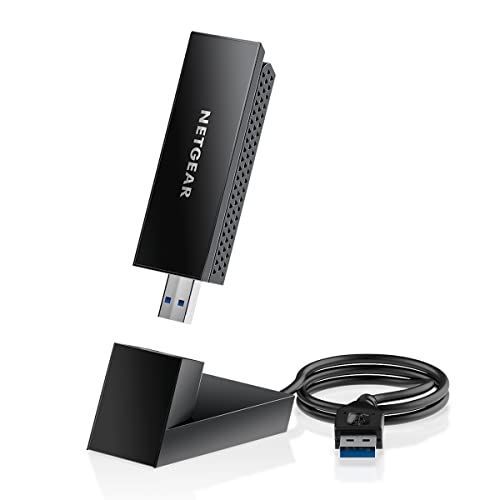
NETGEAR Nighthawk AXE3000 (A8000)
The NETGEAR Nighthawk AXE3000 is a USB 3.0 adapter that supports Wi-Fi 6E, offering access to the 6 GHz band. It delivers ultra-low latency and high speeds, ideal for serious gamers. Its foldable design makes it portable.
Pros
- Access to 6 GHz band
- High-speed performance
- Compact and portable
Cons
- More expensive
- Requires Wi-Fi 6E router
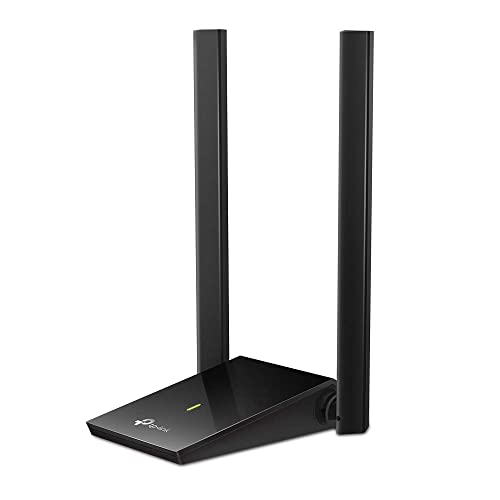
TP-Link Archer T4U
The TP-Link Archer T4U is an affordable dual-band USB adapter. It provides reliable speeds for gaming without breaking the bank. Its high-gain antenna improves range.
Pros
- Affordable
- Good range
- Easy setup
Cons
- Older Wi-Fi 5 standard
- Not as fast as Wi-Fi 6
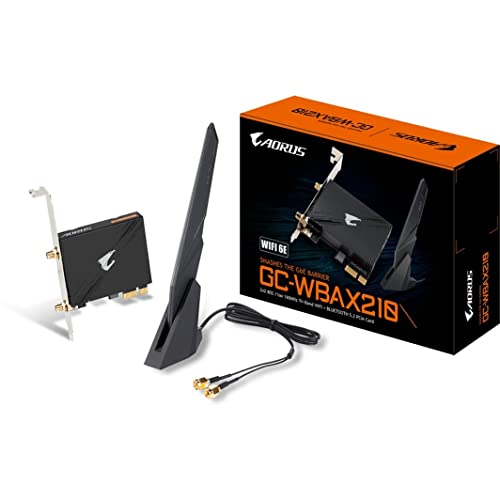
ASUS PCE-AX58BT
The ASUS PCE-AX58BT is a PCIe card that combines Wi-Fi 6 and Bluetooth 5.0. It offers excellent throughput and low latency. Its external antenna ensures strong signal.
Pros
- Bluetooth 5.0
- High-speed Wi-Fi
- External antennas
Cons
- Requires PCIe x1 slot
- Driver installation may be needed

EDUP Wi-Fi 6 USB Adapter
The EDUP Wi-Fi 6 USB Adapter is a compact device that offers dual-band connectivity. It supports MU-MIMO and OFDMA for efficient data flow. It is an easy plug-and-play solution for laptops and desktops.
Pros
- Cheap and compact
- Simple setup
- Good for travel
Cons
- Lower speed rating
- No external antenna

D-Link DWA-X1850
The D-Link DWA-X1850 is a USB 3.0 adapter that uses an external antenna to boost signal strength. It supports Wi-Fi 6 and provides stable connections for gaming. Its design allows for flexible placement.
Pros
- External antenna for better range
- Wi-Fi 6 support
- Compatible with many systems
Cons
- Bulky design
- Some users report driver issues
What matters most
How they stack up
| # | Model | Wireless Standard | Best for | Score | Price |
|---|---|---|---|---|---|
| 1 | ASUS USB-AX56 | Wi-Fi 6 (802.11ax) | Overall best USB Wi-Fi 6 adapter for gaming | 9.4 | Check price |
| 2 | TP-Link Archer TX3000E | Wi-Fi 6 (802.11ax) | Best PCIe adapter for desktop gaming | 9.2 | Check price |
| 3 | NETGEAR Nighthawk AXE3000 (A8000) | Wi-Fi 6E (802.11ax) | Best for future-proofing with Wi-Fi 6E | 9.0 | Check price |
| 4 | TP-Link Archer T4U | Wi-Fi 5 (802.11ac) | Budget-friendly USB adapter | 8.5 | Check price |
| 5 | ASUS PCE-AX58BT | Wi-Fi 6 (802.11ax) | Best for Bluetooth integration | 8.9 | Check price |
| 6 | EDUP Wi-Fi 6 USB Adapter | Wi-Fi 6 (802.11ax) | Best for portability and ease of use | 8.2 | Check price |
| 7 | D-Link DWA-X1850 | Wi-Fi 6 (802.11ax) | Best for desktop with external antenna | 8.0 | Check price |
Good to know
Will a USB network adapter improve my gaming latency?
Yes, a good USB adapter can reduce latency compared to built-in Wi-Fi, especially if your built-in adapter is older or of lower quality. Look for adapters with Wi-Fi 6 support and low latency features.
What is the difference between Wi-Fi 5 and Wi-Fi 6 for gaming?
Wi-Fi 6 offers lower latency, higher speeds, and better performance in crowded networks. It uses technologies like OFDMA and MU-MIMO to handle multiple devices efficiently, which is beneficial for gaming.
Can I use a gaming network adapter with a laptop?
Yes, USB adapters are perfect for laptops. They are plug-and-play and can provide a more stable connection than built-in Wi-Fi. Some models are compact and portable.
Do PCIe adapters perform better than USB adapters?
PCIe adapters often provide better performance due to direct connection to the motherboard and better antenna systems. They are less prone to overheating and can achieve higher speeds, making them ideal for desktop gaming.
What does Wi-Fi 6E add to gaming?
Wi-Fi 6E adds the 6 GHz band, which has less interference and more bandwidth. This can result in even lower latency and higher speeds, especially if your router supports Wi-Fi 6E.
How do I know if my router is compatible with Wi-Fi 6?
Check your router’s specifications. If it supports 802.11ax, it is Wi-Fi 6 compatible. For Wi-Fi 6E, look for 802.11ax with 6 GHz support. Your adapter must match your router’s standard to benefit.
Are there any drawbacks to using USB network adapters?
USB adapters can sometimes have higher latency than PCIe due to USB controller overhead. They also might overheat if used heavily. However, for most gamers, USB adapters are sufficient.
Do I need a network adapter if my motherboard has built-in Wi-Fi?
If your built-in Wi-Fi is Wi-Fi 5 or older, upgrading to a Wi-Fi 6 adapter can improve performance. Also, if you experience connection issues, a dedicated adapter might offer better stability.
The verdict
For most gamers, the ASUS USB-AX56 offers the best balance of performance and convenience. It provides low latency and high speeds without requiring internal installation. If you have a desktop and want the absolute best performance, the TP-Link Archer TX3000E is a solid choice. For budget-conscious gamers, the TP-Link Archer T4U delivers reliable performance at a lower price.
Marcus Chen
Marcus covered consumer electronics for enthusiast tech publications for six years before joining ChoiceCrest. He specializes in translating manufacturer spec sheets into plain-language buying advice, with a focus on audio, computing accessories and smart-home gear.