Negative Scanners That Actually Preserve Old Family Film
The Kodak Scanza digitizes 35mm, 126, and 110 negatives fastest for casual archiving without a computer. The Epson Perfection V600 adds medium format support and sharper detail for prints. The Wolverine Titan 8-in-1 covers mixed slide and negative collections at a lower cost.
The Kodak Scanza leads this list for anyone digitizing a shoebox of family negatives, converting a 35mm frame in under 3 seconds without a computer, though it only saves JPEG files.
We compared optical resolution, supported film formats, and output file types across seven scanners, weighing owner reports on scan speed for bulk archiving projects.
How to choose
What to check before buying a negative scanner Film format support should drive the decision first. Standalone units like the Kodak Scanza cover 35mm, 110, and 126 but skip medium format entirely. Flatbeds such as the Epson Perfection V600 add medium format holders at the cost of scan speed. Output file type matters just as much, since JPEG-only scanners limit later editing compared to RAW or TIFF options.
Standalone scanners vs flatbed scanners Standalone scanners run without a computer and finish a frame in seconds, which suits bulk family archives. Flatbed scanners take longer per scan but capture more optical detail, useful for prints headed for enlargement. Digital ICE dust removal, found on the Epson V600 and Plustek OpticFilm 8200i, saves cleanup time either way. Choosing between them comes down to volume versus final print quality.
Best for digitizing a large negative archive Anyone digitizing hundreds of negatives should prioritize scan speed and SD card capacity over peak resolution. The Kodak Scanza and Wolverine Titan both process a frame in under 5 seconds each. That speed difference adds up to hours saved across a full family archive. Card capacity matters more here than optical dpi.
Best for prints and enlargements Negatives destined for large prints need true optical resolution rather than an interpolated count. The Plustek OpticFilm 8200i and Epson Perfection V600 output RAW or TIFF files that hold detail through heavy editing. Interpolated sensors, like the one in the Wolverine Titan, upscale files without adding real detail. Enlargements past 8×10 inches show the difference between the two approaches.
Our top picks

Kodak Scanza Digital Film Scanner
A 14MP CMOS sensor converts 35mm, 126, 110, and Super 8 negatives to JPEG without touching a computer. Files save directly to an SD card, and a 3.5 inch tilting LCD previews each frame before it’s cropped. Basic operation needs no software install at all.
Pros
- Converts a frame to JPEG in seconds
- Runs independently of a computer
- Adapters cover four separate film formats
Cons
- Saves JPEG only, no RAW option
- Color needs manual adjustment after scanning

Epson Perfection V600 Photo Scanner
Optical resolution reaches 6400 by 9600 dpi on this flatbed, with holders for 35mm strips, mounted slides, and medium format film up to 6x22cm. Digital ICE technology strips dust and scratches out during the scan pass itself. Bundled software handles basic color correction afterward.
Pros
- Handles medium format film up to 6x22cm
- Digital ICE removes dust during scanning
- Includes photo editing software in the box
Cons
- A full-resolution pass takes several minutes
- Takes up more desk space than standalone units
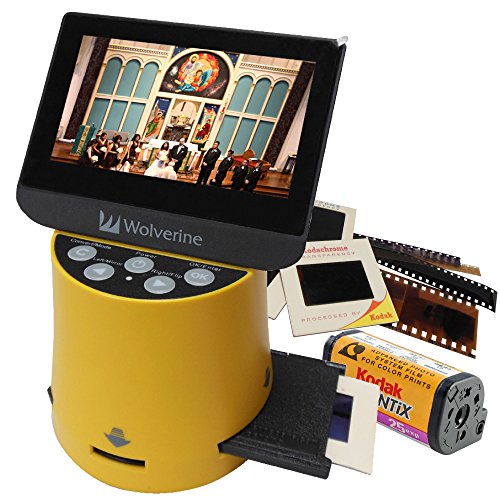
Wolverine Titan 8-in-1 Film to Digital Converter
Eight film and slide formats, including 35mm, 126, 110, and three slide sizes, feed through this converter with one-button scanning. A 20MP interpolated sensor upscales output on a 4.3 inch screen. Once set up, the unit runs without any computer connection.
Pros
- Supports eight separate film and slide formats
- One-touch scanning speeds up bulk sessions
- Ships with adapters for every supported format
Cons
- Interpolated resolution falls short of true optical detail
- Plastic housing feels less durable than metal units

Plustek OpticFilm 8200i Ai Film Scanner
Dedicated 35mm scanning at 7200 dpi pairs with infrared dust removal and SilverFast Ai software for color correction. Photographers digitizing large negative archives get RAW and TIFF output ready for editing. No medium format support limits it to 35mm strips and slides only.
Pros
- Delivers true optical detail for enlargements
- Outputs RAW files for post-processing flexibility
- Infrared scanning removes dust and scratches
Cons
- Limited to 35mm, no medium format support
- SilverFast software has a real learning curve

KODAK Slide N SCAN Film and Slide Scanner
A 5 inch screen previews 35mm, 126, and 110 negatives alongside 2×2 mounted slides on this scanner. Its 22MP sensor and adjustable feed tray speed through bulk digitizing sessions. Larger file sizes come at the cost of RAW or TIFF export options, which this model skips.
Pros
- Large screen simplifies cropping decisions
- Feeds slides quickly through bulk sessions
- Higher megapixel count than most standalone scanners
Cons
- Skips RAW and TIFF export entirely
- Feed tray needs manual alignment for warped slides

Canon CanoScan 9000F Mark II Photo Scanner
Documents, photo prints, and 35mm film all scan on this flatbed at up to 9600 dpi, with a film holder included in the box. Households that need one scanner for both old negatives and everyday paperwork get more use from it than a dedicated film unit. Film scanning speed trails purpose-built negative scanners, though.
Pros
- Doubles as a document and photo scanner
- Rated optical resolution reaches 9600 dpi
- Film holder ships in the box at no extra cost
Cons
- Film scanning runs slower than dedicated units
- Setup software feels dated compared to newer scanners
DIGITNOW 22MP Film and Slide Scanner
A compact body handles 35mm negatives and slides through a 2.4 inch screen with SD card output. Buyers digitizing a small shoebox of family negatives, rather than a large archive, are the target here. One-button operation keeps the learning curve short.
Pros
- Costs less than most dedicated film scanners
- Small footprint stores easily in a drawer
- Simple one-button operation needs no manual
Cons
- Small screen makes cropping harder to judge
- Color accuracy varies across scanning batches
The lineup, side by side
| # | Model | Sensor | Best for | Score | Price |
|---|---|---|---|---|---|
| 1 | Kodak Scanza Digital Film Scanner | 14MP CMOS | Best overall | 9.4 | Check price |
| 2 | Epson Perfection V600 Photo Scanner | 6400 x 9600 dpi | Best for medium format | 9.1 | Check price |
| 3 | Wolverine Titan 8-in-1 Film to Digital Converter | 20MP interpolated | Best value | 8.7 | Check price |
| 4 | Plustek OpticFilm 8200i Ai Film Scanner | 7200 dpi | Best for archival quality | 9.0 | Check price |
| 5 | KODAK Slide N SCAN Film and Slide Scanner | 22MP CMOS | Best for slides | 8.8 | Check price |
| 6 | Canon CanoScan 9000F Mark II Photo Scanner | 9600 x 9600 dpi | Best for mixed media | 8.6 | Check price |
| 7 | DIGITNOW 22MP Film and Slide Scanner | 22MP interpolated | Best budget | 8.1 | Check price |
Common questions
What resolution do I need to scan 35mm negatives?
A minimum of 2400 dpi captures usable detail from 35mm film. For prints larger than 8×10 inches, look for 4800 dpi or higher on a flatbed or dedicated film scanner.
Can a negative scanner handle medium format film?
Most standalone units like the Kodak Scanza only handle 35mm and smaller formats. Flatbed scanners such as the Epson Perfection V600 include holders for medium format film up to 6x22cm.
Is a standalone scanner or a flatbed scanner better for slides?
Standalone scanners are faster for bulk slide batches and skip the computer entirely. Flatbeds capture more detail per slide but take longer, so choose based on whether speed or image quality matters more.
Do negative scanners work with black and white film?
Yes, all seven models here scan black and white negatives alongside color. Some software bundles include a dedicated black and white mode for better contrast.
What file format do negative scanners save to?
Most standalone scanners save JPEG files directly to an SD card. Dedicated units like the Plustek OpticFilm 8200i also support RAW and TIFF for more editing flexibility.
How long does it take to scan a roll of 35mm film?
A 36 exposure roll takes roughly 3 to 5 minutes on a fast standalone scanner. Flatbed scanners with dust removal can take 15 minutes or more for the same roll.
Do I need a computer to use a negative scanner?
Standalone models like the Kodak Scanza and Wolverine Titan work independently with an SD card and built in screen. Flatbed scanners generally require a connected computer to run the scanning software.
Can negative scanners remove dust and scratches automatically?
Digital ICE technology, found on the Epson V600 and Plustek OpticFilm 8200i, removes dust and scratches during the scan. Budget standalone scanners typically lack this feature and need manual cleanup.
Which negative scanner is best for a large family archive?
The Kodak Scanza and Wolverine Titan both scan a frame in under 5 seconds, which matters most when digitizing hundreds of negatives at once.
Our take
The Kodak Scanza remains the pick for most people digitizing a family archive quickly without a computer. Anyone shooting medium format film or planning large prints should choose the Epson Perfection V600 instead for its higher optical resolution. Skip the DIGITNOW model if consistent color across a large batch matters more than upfront cost.
Marcus Chen
Marcus covered consumer electronics for enthusiast tech publications for six years before joining ChoiceCrest. He specializes in translating manufacturer spec sheets into plain-language buying advice, with a focus on audio, computing accessories and smart-home gear.