Which Memory Card Reader Suits Your Camera and Cards
SanDisk’s Extreme PRO SD UHS-II Reader fits most photographers, because it runs the full UHS-II bus over USB-C. Offloading a CFexpress Type B card and an SD card together calls for the ProGrade Digital dual-slot reader. Sony Type A shooters need the MRW-G1.
SanDisk’s Extreme PRO SD UHS-II Reader is the pick for stills shooters on modern SD cards. Its second pin row unlocks reads past 300 MB/s. One slot is the limit, so CFexpress owners need a different device.
Card readers bury their real ceiling in the fine print. A USB-C connector can still hide a UHS-I controller that stalls near 104 MB/s. Rankings here come from published interface specifications, listed card format support, slot behaviour and aggregated owner feedback about heat and cable failure.
Our top picks

SanDisk Extreme PRO SD UHS-II Card Reader
One UHS-II SD slot sits behind a USB-C 3.2 Gen 1 connection here. Offloads climb toward the 312 MB/s bus ceiling, which saves real minutes when several 128GB cards come back from a shoot. Owners note the shell runs warm on long copies while transfers hold steady.
Pros
- Runs SD cards at full UHS-II bus speed
- Detachable USB-C cable can be replaced
- Shell fits a camera bag lid pocket
Cons
- Single slot rules out parallel offloads
- No CFexpress or CFast support

ProGrade Digital Dual-Slot CFexpress Type B and SD UHS-II Reader
Both slots stay live in the same copy job, so a Type B card and a UHS-II SD card land on the drive together. A 10Gbps USB 3.2 Gen 2 link leaves the CFexpress side room to stretch. Its aluminium housing doubles as a heatsink during long dumps.
Pros
- Copies two cards in a single pass
- 10Gbps link keeps CFexpress from bottlenecking
- Rubber feet stop it sliding across a desk
Cons
- More reader than SD-only shooters need
- Larger footprint than a stick reader
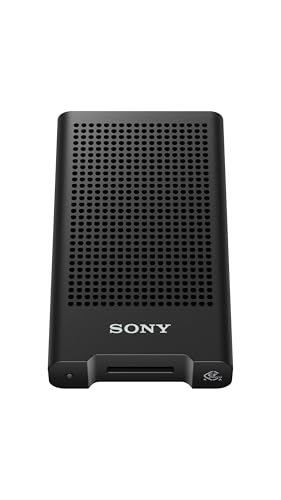
Sony MRW-G1 CFexpress Type A and SD Card Reader
CFexpress Type A cards fit almost nothing outside Sony bodies, and this reader is the practical answer. Its single combo slot accepts Type A or UHS-II SD, covering an a7S III or FX3 kit with one device. Data moves across a 10Gbps USB 3.2 Gen 2 link.
Pros
- Reads Type A cards without an adapter
- Combo slot also takes UHS-II SD
- Aluminium chassis resists flex in a bag
Cons
- Handles one card at a time
- Type B cards will not fit the slot

Lexar Professional CFexpress Type B USB 3.2 Gen 2×2 Reader
USB 3.2 Gen 2×2 lifts this reader to a 20Gbps ceiling, the highest in the group. Peak rates need a host port that also speaks Gen 2×2, and most laptops stop at 10Gbps. Even on a slower port, a 512GB Type B card clears faster than any SD reader manages.
Pros
- 20Gbps ceiling suits 8K and ProRes clips
- Drops back to 10Gbps without errors
- USB-C cable comes in the box
Cons
- Full speed needs a Gen 2×2 host port
- Reads Type B cards only

Transcend RDF9 UHS-II Multi-Card Reader
Transcend puts a UHS-II SD slot beside a microSD slot in a light plastic shell. Rated reads reach about 260 MB/s, close to what most UHS-II cards sustain in practice. Its cable is fixed, so cable damage retires the whole unit.
Pros
- Reaches UHS-II rates in a plain plastic shell
- Covers SD and microSD in one body
- Slim enough to live in a kit bag
Cons
- Attached cable cannot be swapped
- microSD slot caps at UHS-I

Anker USB-C 2-in-1 Card Reader
Plugging straight into a USB-C port takes the cable out of the equation. Both slots run at UHS-I rates, capped near 104 MB/s. Drone clips and action camera footage are the natural fit, not professional SD offloads.
Pros
- Needs no cable at all
- Mounts on iPad and Android handsets
- Small enough for a jacket pocket
Cons
- UHS-I ceiling drags on large offloads
- Body can block a neighbouring port

UGREEN USB 3.0 4-in-1 Card Reader
Four slots cover SD, microSD, CompactFlash and Memory Stick, a spread few readers still offer. Two cards can be read together over the shared 5Gbps link. Speeds sit at UHS-I levels, which suits archiving old cards rather than clearing a shoot.
Pros
- Reads legacy CompactFlash and Memory Stick
- Two slots stay active at once
- Four formats sit in one compact housing
Cons
- No UHS-II bus support
- Plastic shell flexes under pressure
What matters most
What to look for in a memory card reader Bus interface decides speed, not the plug on the end. USB-C connectors appear on UHS-I readers capped near 104 MB/s and on 20Gbps CFexpress units alike. Read the listing for the words UHS-II, CFexpress Type A or CFexpress Type B. Slot count then settles whether two cards can copy in one pass. Cable design is the quiet one: a detachable USB-C lead survives a broken connector, while a moulded cable takes the reader with it.
Matching a reader to your camera Canon R5 and Nikon Z8 bodies record to CFexpress Type B, so a Type B slot leads the shortlist. Sony a7 IV and FX3 shooters need Type A, and the two formats share nothing but a name. Fujifilm X-T5, Panasonic S5 and older Canon bodies still write to UHS-II SD. Drones and action cameras stay on microSD, usually at UHS-I rates. Two-slot cameras often mix formats, which is where a dual-slot reader earns its place.
Best card reader for laptops, tablets and travel Bus-powered sticks make sense when a laptop bag is the whole studio. Anker’s 2-in-1 seats directly in a USB-C port and leaves nothing to forget at home. iPad owners should check power draw first, since some CFexpress readers pull more than a tablet port supplies. Files on iPadOS mounts SD and microSD volumes without extra software. A short detachable lead also stops a reader hanging off the side of a laptop on a train tray.
Do you actually need a 20Gbps reader? Copy time only matters once files get big. A 32GB UHS-I card clears in minutes on any modern reader, so archive duty suits the four-slot UGREEN fine. Format coverage beats throughput once your cards are a decade old. Gen 2×2 readers pay back on 512GB Type B cards full of ProRes or 8K, and almost nowhere else. Check your laptop ports before paying for that ceiling, because Gen 2×2 hosts stayed rare.
Side by side
| # | Model | Card support | Best for | Score | Price |
|---|---|---|---|---|---|
| 1 | SanDisk Extreme PRO SD UHS-II Card Reader | UHS-II SD, SDHC, SDXC | Best overall | 9.4 | Check price |
| 2 | ProGrade Digital Dual-Slot CFexpress Type B and SD UHS-II Reader | CFexpress Type B, UHS-II SD | Best for pro workflows | 9.2 | Check price |
| 3 | Sony MRW-G1 CFexpress Type A and SD Card Reader | CFexpress Type A, UHS-II SD | Best for Sony CFexpress Type A | 9.0 | Check price |
| 4 | Lexar Professional CFexpress Type B USB 3.2 Gen 2×2 Reader | CFexpress Type B | Best for 8K video files | 8.8 | Check price |
| 5 | Transcend RDF9 UHS-II Multi-Card Reader | UHS-II SD, microSD UHS-I | Best value | 8.6 | Check price |
| 6 | Anker USB-C 2-in-1 Card Reader | SD and microSD, UHS-I | Best for laptops and tablets | 8.3 | Check price |
| 7 | UGREEN USB 3.0 4-in-1 Card Reader | SD, microSD, CF, Memory Stick | Best budget | 8.0 | Check price |
Frequently asked questions
What is the difference between UHS-I and UHS-II card readers?
UHS-II adds a second row of pins and a faster bus. Its ceiling rises from roughly 104 MB/s to around 312 MB/s. A UHS-II card still works in a UHS-I reader, just at the slower rate.
Do I need a CFexpress card reader for my camera?
Only when the camera records to CFexpress. Canon R5, Nikon Z8 and Z9 take Type B cards. Sony bodies such as the a7 IV and FX3 use Type A, which needs its own reader.
Which memory card reader is best for photographers?
Stills shooters on SD cards get the most from a UHS-II reader like SanDisk’s Extreme PRO. Mixed-format kits are better served by a dual-slot ProGrade unit. Format support should decide before speed does.
Can a card reader damage a memory card?
Pulling a card mid-transfer is the real risk. Eject the volume first, then remove the card. Loose slots also bend contacts over time, which is where build quality shows.
Which card reader works with an iPhone or iPad?
Any USB-C reader that stays inside the port power budget. Apple’s Files app mounts SD and microSD volumes directly. Power-hungry CFexpress readers may need a powered hub instead.
Is a multi-slot reader slower than a single-slot one?
Not by design, though shared bandwidth counts. Two cards copying across one 5Gbps link split that budget. On a 10Gbps reader the split rarely shows up in practice.
How fast should a card reader be for 4K video?
UHS-II SD clears 4K offloads comfortably. Long 8K or ProRes projects benefit from a 10Gbps or 20Gbps CFexpress link. Total file size sets the requirement, not resolution alone.
Why is my card reader slower than the card’s rated speed?
Rated card speeds assume an ideal host. Hubs, older ports and long cables all trim throughput. Thousands of small JPEGs also copy slower than one large clip.
Are cheap memory card readers worth it for backups?
For occasional archive work, yes. Legacy SD and CompactFlash cards rarely pass UHS-I speeds anyway. Daily offloads after paid jobs justify spending on a faster bus.
CFexpress Type A vs Type B: which one do I need?
Your camera decides, since the cards are physically different. Type A is a Sony format, smaller and slower at the top end. Type B is wider, faster and standard on Canon and Nikon flagships.
The bottom line
Most stills photographers should buy SanDisk’s Extreme PRO SD UHS-II Reader, since it delivers the full UHS-II bus in a shell that fits a bag pocket. Anyone clearing CFexpress Type B and SD after every job saves a step with the ProGrade Digital dual-slot model. Sony Type A owners have no real alternative to the MRW-G1, and buyers still on 32GB UHS-I cards should skip the fast readers entirely.
Marcus Chen
Marcus covered consumer electronics for enthusiast tech publications for six years before joining ChoiceCrest. He specializes in translating manufacturer spec sheets into plain-language buying advice, with a focus on audio, computing accessories and smart-home gear.


