Mechanical Keyboards That Fit How You Actually Type
The SteelSeries Apex Pro is the best overall mechanical keyboard, thanks to per key adjustable actuation and a durable aluminum frame. The Logitech G Pro X suits competitive gamers who want a compact hot-swappable layout, and the HyperX Alloy Origins Core is the budget pick.
The SteelSeries Apex Pro is the best overall mechanical keyboard, because its per key adjustable actuation lets one board handle fast gaming inputs and accurate typing without compromise. It costs more than fixed actuation boards, so anyone who already knows their preferred switch feel can save money with a simpler option.
We compared switch type, actuation behavior, layout size, hot-swap support, build material and extra controls using manufacturer specification sheets and owner feedback from retail listings.
What we recommend
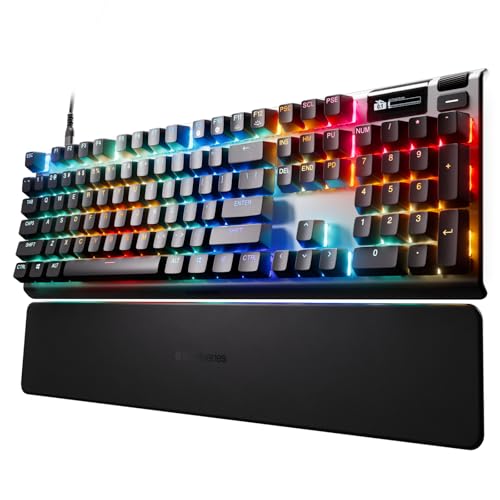
SteelSeries Apex Pro
The Apex Pro uses SteelSeries OmniPoint switches with adjustable actuation points per key, letting a typist set a light trigger for gaming and a firmer one for typing. An aircraft grade aluminum frame and a small OLED display round out the build.
Pros
- Per key adjustable actuation is unique in this lineup
- Durable aluminum frame resists flex
- OLED display shows media and game info
Cons
- Higher cost than fixed actuation keyboards
- Switches cannot be hot swapped for a different feel

Logitech G Pro X
The G Pro X drops the number pad for a compact tenkeyless layout that leaves more room for mouse movement, a format many esports players prefer. Hot swappable switches let a player change from clicky to linear without soldering.
Pros
- Hot swap sockets allow switch changes without tools
- Compact layout frees desk space for mouse swings
- Detachable cable simplifies travel to tournaments
Cons
- No dedicated media keys or volume wheel
- Lacks wireless connectivity some competitors offer

Corsair K70 RGB Pro
The K70 RGB Pro pairs per key RGB lighting with Corsair’s iCUE software for building custom macros and lighting profiles. Dedicated media controls and a volume roller sit along the top edge for quick access without alt-tabbing.
Pros
- Dedicated media keys and volume roller save time
- iCUE software supports detailed macro and lighting profiles
- Optical-mechanical switches register fast actuation
Cons
- iCUE software can feel heavy running in the background
- Full size layout takes more desk space than a TKL board

Razer BlackWidow V4 Pro
The BlackWidow V4 Pro adds a rotating command dial and five dedicated macro keys along the left edge, useful for streamers who trigger overlays or audio cues mid game. Doubleshot keycaps resist shine from years of typing.
Pros
- Dedicated macro keys separate from the main layout
- Command dial speeds up volume and lighting adjustments
- Included wrist rest adds comfort for long sessions
Cons
- One of the largest and heaviest boards in this list
- ABS keycaps show shine sooner than PBT alternatives

Keychron K8 Pro
The K8 Pro switches between Bluetooth and wired USB-C connection and ships with both Mac and Windows keycaps in the box. Hot swappable sockets accept most three or five pin mechanical switches without soldering.
Pros
- Works across Mac and Windows with included keycap sets
- Hot swap sockets support a wide range of switches
- Wireless mode frees up a USB port
Cons
- Bluetooth mode disables full per key RGB effects
- Battery life drops significantly with backlighting on

HyperX Alloy Origins Core
The Alloy Origins Core trims to a tenkeyless layout in a solid aluminum body, bringing a sturdier build than most keyboards at its price. HyperX’s own mechanical switches are rated for 80 million keystrokes.
Pros
- Aluminum frame feels sturdier than typical budget boards
- Switch durability rating exceeds most competitors
- Compact layout saves desk space
Cons
- No software for custom macros
- Fewer onboard lighting effects than pricier boards

ASUS ROG Strix Scope II
The Strix Scope II includes a dedicated stealth key that instantly mutes audio and dims lighting, built for gaming sessions that need to stay quiet around sleeping housemates. Full key rollover ensures every keystroke registers during fast inputs.
Pros
- Stealth key is a genuinely useful one-press feature
- Full N-key rollover handles complex key combinations
- Detachable cable simplifies desk setup and travel
Cons
- Software suite has a steeper learning curve than rivals
- No wireless option on this model
Before you buy
What Switch Type Actually Changes About Typing Feel Mechanical switches fall into linear, tactile and clicky categories, and that choice affects sound and feel more than almost any other spec. Linear switches, found in gaming focused boards, move smoothly with no bump. Tactile switches add a small bump at actuation that many typists prefer for accuracy. Clicky switches add an audible click on top of that bump, which some offices consider too loud for shared spaces.
Hot-Swappable Sockets Versus Fixed Switches Boards like the Logitech G Pro X and Keychron K8 Pro use hot-swap sockets, letting an owner pull out a switch and replace it with a different type without soldering. Fixed switch boards like the HyperX Alloy Origins Core commit to one switch feel from the factory. Hot-swap adds flexibility for anyone unsure which switch feel they prefer yet, at a small premium over fixed switch boards.
Full-Size, Tenkeyless or Compact: Picking a Layout A full-size board like the Corsair K70 RGB Pro keeps a number pad and dedicated media keys, useful for spreadsheet work or quick volume changes. Tenkeyless boards like the Logitech G Pro X drop the number pad, freeing desk space for mouse movement that competitive gamers rely on. The right layout depends more on desk space and mouse sensitivity than on raw features.
Extras That Matter More Than RGB Lighting Per key RGB lighting looks impressive but rarely changes how a keyboard performs day to day. Features like adjustable actuation on the SteelSeries Apex Pro, a stealth mute key on the ASUS Strix Scope II, or wireless Mac compatibility on the Keychron K8 Pro solve real problems specific to how someone works or games. Buyers should weigh these functional extras above lighting effects when comparing similarly priced boards.
The lineup, side by side
| # | Model | Switch Type | Best for | Score | Price |
|---|---|---|---|---|---|
| 1 | SteelSeries Apex Pro | OmniPoint adjustable mechanical | Best Overall | 9.5 | Check price |
| 2 | Logitech G Pro X | Hot-swappable GX mechanical | Best for Competitive Esports | 9.2 | Check price |
| 3 | Corsair K70 RGB Pro | Corsair OPX optical-mechanical | Best for RGB and Software Customization | 9.0 | Check price |
| 4 | Razer BlackWidow V4 Pro | Razer Green or Yellow mechanical | Best Full-Size With Extra Controls | 8.8 | Check price |
| 5 | Keychron K8 Pro | Hot-swappable Gateron mechanical | Best for Mac and Windows With Hotswap | 8.6 | Check price |
| 6 | HyperX Alloy Origins Core | HyperX Red or Aqua mechanical | Best Budget Pick | 8.4 | Check price |
| 7 | ASUS ROG Strix Scope II | ROG NX mechanical | Best for Late Night Gaming | 8.3 | Check price |
Good to know
What is the difference between linear, tactile and clicky switches?
Linear switches move straight down with no bump or sound, tactile switches add a bump you can feel without a click, and clicky switches add both a bump and an audible click on actuation.
Are hot-swappable mechanical keyboards worth the extra cost?
They let you change switch feel later without soldering, which helps if you are unsure which switch type you prefer or want to experiment over time. If you already know your preferred switch, a fixed switch board can save money.
Does a tenkeyless keyboard save real desk space?
Yes, removing the number pad typically saves 3 to 4 inches of width, enough to shift a mouse closer to the keyboard or fit a smaller desk mat.
Can mechanical keyboard switches wear out over time?
Switches are rated for tens of millions of keystrokes, and most casual or even heavy typists will not reach that limit during the keyboard’s useful life.
Is adjustable actuation worth it on a gaming keyboard?
Adjustable actuation, like the SteelSeries Apex Pro offers, lets a single key register faster for games and slower for accurate typing. It mainly benefits competitive gamers who also do heavy typing on the same board.
Do wireless mechanical keyboards have noticeable input lag?
Modern Bluetooth or 2.4GHz wireless mechanical keyboards show minimal lag for typing and most games, though serious competitive players sometimes still prefer a wired connection to remove any variable.
What does N-key rollover mean on a keyboard?
N-key rollover means every key pressed registers independently, even when several keys are held at once. This matters for games or shortcuts that require multiple simultaneous key presses.
Do PBT keycaps last longer than ABS keycaps?
PBT keycaps generally resist shine and wear better over years of use than ABS keycaps, which can develop a glossy look on frequently pressed keys.
The bottom line
The SteelSeries Apex Pro is the strongest overall pick, since its adjustable actuation and durable aluminum frame adapt to both gaming and typing without buying a second keyboard. Competitive players who want the lightest, most tournament ready layout should choose the Logitech G Pro X instead. Anyone on a tighter budget can get a sturdy aluminum build without the premium price from the HyperX Alloy Origins Core.
Marcus Chen
Marcus covered consumer electronics for enthusiast tech publications for six years before joining ChoiceCrest. He specializes in translating manufacturer spec sheets into plain-language buying advice, with a focus on audio, computing accessories and smart-home gear.


