Magnetic CarPlay Adapters: Matching Compatibility to Your Car
CarlinKit CPC200-CCPA converts wired CarPlay to wireless with the broadest vehicle compatibility. Ottocast U2-Air reconnects fastest for drivers who hate delays. AWESAFE’s adapter adds Android Auto, useful when a household mixes iPhone and Android owners.
CarlinKit’s CPC200-CCPA leads this group for drivers who want the safest compatibility bet across different vehicle brands, though setup takes a few extra steps the first time. Short daily commutes favor the Ottocast U2-Air instead, since it reconnects faster on repeat drives. Households splitting one car between an iPhone and an Android owner should look at AWESAFE’s adapter, which switches between both platforms.
A wired CarPlay port can be converted to wireless by a dongle that pairs with the phone over WiFi, while a magnetic puck holds the phone steady on the dash. Compatibility varies by factory head unit, which complicates what looks like a simple upgrade. We compared listed pairing times, published vehicle compatibility notes and mount hardware, then weighed owner reports of dropped connections and call lag.
The shortlist, ranked

CarlinKit CPC200-CCPA Wireless CarPlay Adapter
Plugging into an existing wired CarPlay port converts it to wireless across a wide range of vehicle brands. One pairing session sets it up, after which the phone connects automatically on future drives. A magnetic mount ships in the box for stable dash or vent placement.
Pros
- Works with a wide range of factory systems
- Automatic reconnect after first pairing
- Magnetic mount included in the box
Cons
- Initial pairing setup can be fiddly
- Occasional firmware updates needed for new phones

Ottocast U2-Air Wireless CarPlay Adapter
Reconnect times after the first setup run noticeably shorter than most rivals, useful on short daily trips. Dual band WiFi cuts the audio stutter that cheaper single band adapters show during calls. On select vehicle trims, the magnetic mount doubles as a wireless charger.
Pros
- Fast reconnect after initial pairing
- Dual band WiFi reduces call stutter
- Mount can double as wireless charger
Cons
- Wireless charging feature depends on vehicle trim
- Priced above basic single band adapters

AWESAFE Wireless CarPlay and Android Auto Adapter
Two platforms live in one adapter here, switching between wireless CarPlay and wireless Android Auto depending on which phone connects. Shared cars with both iPhone and Android drivers benefit most from that flexibility. A magnetic mount ships in the box, and each platform gets set up separately on first use.
Pros
- Supports both CarPlay and Android Auto
- Useful for shared or family vehicles
- Magnetic mount included
Cons
- Switching platforms requires a brief reset
- Feature set is more complex to configure than single platform adapters

Binize Wireless CarPlay Adapter
Core wireless CarPlay conversion comes at a lower cost here, without extra platform support. It works reliably with common factory systems, though pairing takes slightly longer than premium options. A basic magnetic mount is included and holds up for daily use.
Pros
- Lower price than premium adapters
- Reliable core wireless CarPlay function
- Includes a functional magnetic mount
Cons
- Slower pairing than higher end models
- Mount build feels less refined

JOYEAUTO Wireless CarPlay Adapter
A smaller dongle body tucks behind the dash or glovebox more discreetly than bulkier adapters. It supports the same wireless CarPlay conversion as larger units, with a magnetic mount included for phone placement. Cable routing stays tidier in smaller cabins as a result.
Pros
- Compact dongle body eases cable routing
- Same core wireless function as larger units
- Magnetic mount included
Cons
- Fewer compatibility notes published than larger brands
- Smaller antenna can mean weaker signal in some cabins

Carlinkit 5.0 2Air Wireless CarPlay Adapter
Two paired phones live in memory at once, letting couples sharing one car swap without a full re-pair. Wireless CarPlay and wireless Android Auto both work depending on which device connects. Rougher roads barely shake the magnetic mount loose.
Pros
- Remembers two paired phones
- Supports CarPlay and Android Auto
- Stable magnetic mount on rough roads
Cons
- Switching between two phones adds a short delay
- Setup menu is less intuitive than single device adapters
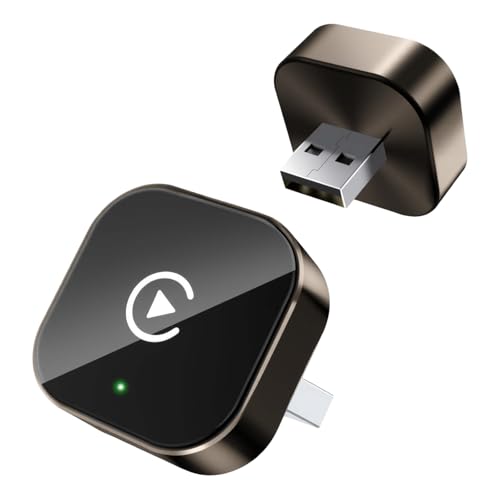
Yodeye Wireless CarPlay Adapter
Essential wireless CarPlay conversion comes at the lowest price in this group. Faster pairing and extra features from premium models are missing, but daily navigation and calls work fine. A bundled magnetic mount is functional, if visibly simpler than pricier kits.
Pros
- Lowest price point in this comparison
- Handles core navigation and calling needs
- Includes a basic magnetic mount
Cons
- Pairing is slower than premium adapters
- Fewer firmware updates than established brands
What to look for
What to look for in a wireless CarPlay adapter Vehicle compatibility matters most, since not every factory head unit accepts a wireless conversion the same way. Pairing speed after the first setup affects daily use more than any spec sheet number. A stable magnetic mount keeps the phone visible for navigation without sliding on rough roads. Outdated firmware causes most reported connection drops, so check how often an adapter gets updates.
How magnetic mount wireless adapters actually work A dongle plugs into the car’s existing wired CarPlay USB port and creates a WiFi hotspot the phone joins automatically. Once a ring case or sticker is attached, a magnetic puck on the dash or vent holds the phone in place. This setup skips the physical cable entirely after the first pairing. Most adapters remember the car and reconnect within a few seconds of the engine starting.
CarPlay only versus dual platform adapters Single platform adapters like the CarlinKit CPC200-CCPA focus entirely on wireless CarPlay, keeping setup simpler for iPhone only households. Dual platform models such as the AWESAFE and Carlinkit 5.0 2Air also support Android Auto, useful when a car gets shared between an iPhone and an Android user. Each connected phone needs its own initial setup, a small tradeoff for that flexibility.
Fixing dropped connections and call lag Outdated adapter firmware or a phone’s WiFi settings blocking automatic reconnection cause most dropped connections. Keeping the companion app updated resolves many of these issues over time. Interference drops when the magnetic mount sits away from other electronics. Switching to a dual band model like the Ottocast U2-Air often clears up lag during calls.
The lineup, side by side
| # | Model | Connection | Best for | Score | Price |
|---|---|---|---|---|---|
| 1 | CarlinKit CPC200-CCPA Wireless CarPlay Adapter | Plugs into wired CarPlay USB port | Best overall | 9.4 | Check price |
| 2 | Ottocast U2-Air Wireless CarPlay Adapter | Plugs into wired CarPlay USB port | Best for fast reconnects | 9.1 | Check price |
| 3 | AWESAFE Wireless CarPlay and Android Auto Adapter | Plugs into wired CarPlay or Android Auto USB port | Best for mixed phone households | 8.8 | Check price |
| 4 | Binize Wireless CarPlay Adapter | Plugs into wired CarPlay USB port | Best value | 8.5 | Check price |
| 5 | JOYEAUTO Wireless CarPlay Adapter | Plugs into wired CarPlay USB port | Best compact size | 8.2 | Check price |
| 6 | Carlinkit 5.0 2Air Wireless CarPlay Adapter | Plugs into wired CarPlay or Android Auto USB port | Best for dual device switching | 8.1 | Check price |
| 7 | Yodeye Wireless CarPlay Adapter | Plugs into wired CarPlay USB port | Best budget | 8.0 | Check price |
Common questions
Do I need a factory wired CarPlay system to use a wireless adapter?
Yes, these adapters convert an existing wired CarPlay port to wireless. Cars without any built in CarPlay support need a separate aftermarket head unit, not just an adapter.
How does a magnetic CarPlay adapter mount to the phone?
A thin metal ring or plate attaches to the phone case, or a magnetic sticker attaches directly to the phone back. A strong magnet in the dash or vent mount then holds the phone steady.
Can wireless CarPlay adapters work with Android phones?
Only dual platform adapters like the AWESAFE and Carlinkit 5.0 2Air support Android Auto. CarPlay only adapters work exclusively with iPhones.
Why does my wireless CarPlay adapter lag during calls?
WiFi interference or an adapter running on a single band connection usually causes the lag. Dual band models like the Ottocast U2-Air tend to hold a steadier connection during calls and navigation.
Is a wireless CarPlay adapter better than a cable?
Daily hassle of plugging in a cable disappears, though initial pairing takes longer than a wired connection. Once paired, most adapters reconnect automatically within seconds of starting the car.
Do magnetic CarPlay adapters need firmware updates?
Most do, typically through a companion app on the phone. Current firmware resolves the majority of reported dropped connections and slow pairing issues.
Can two people share one wireless CarPlay adapter?
Some models, like the Carlinkit 5.0 2Air, remember two paired phones and switch between them without a full reset. Others only store one paired device at a time.
Will a wireless CarPlay adapter drain my phone battery faster?
Wireless CarPlay does use more battery than a wired connection, since the phone stops charging through the cable. Pairing a magnetic mount with wireless charging, like the Ottocast U2-Air on supported trims, offsets that drain.
Which magnetic CarPlay adapter fits older vehicles best?
Vehicles from before 2017 have more inconsistent results, so the CarlinKit CPC200-CCPA is the safer choice given its wider published compatibility list. Checking the listed compatibility notes against a specific make and model avoids surprises.
The bottom line
Pick the CarlinKit CPC200-CCPA if you want the safest bet on compatibility across different vehicle brands. Choose the Ottocast U2-Air instead if fast daily reconnects matter more than saving a little money. Households mixing iPhone and Android drivers should skip both and go with the AWESAFE adapter for its dual platform support.
Tony Russo
Tony trained as an automotive technician and spent years in service and parts retail before moving into writing. He focuses on garage tools, car care products and accessories from a hands-on maintenance perspective.