What’s the Best Laptop Docking Station for Multiple Monitors?
Anker’s 575 USB-C Docking Station is the top pick for its port count, 85W charging and price without needing a Thunderbolt laptop. CalDigit’s TS4 suits Thunderbolt workstations driving two large displays. Plugable’s UD-3900 covers older USB-A only laptops that most docks ignore.
Anker’s 575 USB-C Docking Station leads this roundup with thirteen ports, 85W of charging and dual monitor support from a standard USB-C laptop. CalDigit’s TS4 fits anyone running heavy displays and fast storage off one Thunderbolt cable. Older machines limited to USB-A still get a proper answer in the Plugable UD-3900.
Two docks with identical port lists can behave completely differently once you factor in the laptop’s port. Some ports carry DisplayPort Alt Mode, some carry data only, and some run full Thunderbolt bandwidth. A MacBook that refuses to run two external screens and a Windows ultrabook that drives three from the same dock are both normal outcomes. We compared display limits, charging wattage, port mix, ethernet speed and driver requirements against what owners report about dropped displays and firmware updates.
How to choose
What can your laptop’s USB-C port actually do? A USB-C socket alone tells you almost nothing. Some carry video through DisplayPort Alt Mode, some carry data only, and some run full Thunderbolt with four times the bandwidth. Look up your exact laptop model before buying and confirm Alt Mode support, Thunderbolt support and the wattage it accepts for charging. A Thunderbolt dock on a data only port becomes a slow USB hub with no video.
Will a dock actually run two monitors? Windows laptops with Thunderbolt usually handle two independent displays without issue. Apple silicon MacBook Air and base MacBook Pro models often support only one external display over Alt Mode, so a dock advertising dual output may mirror instead of extend unless it uses DisplayLink. Verify the behavior for your specific machine before assuming dual screens will work.
Why the wattage on the box is not what you get Docks list both the power supply’s total size and the amount actually delivered upstream to the laptop, and listings often blur the two. A 180W dock might send only 65W to your machine. Larger laptops with discrete graphics want 90W or more, or the battery drains slowly even while docked. Match the dock’s upstream figure to your original charger.
DisplayLink solves compatibility, at a small cost DisplayLink compresses the display signal and sends it over USB data lanes, which is why those docks work with nearly any host. Expect a driver install, a little CPU used for video encoding, and occasionally softer text or minor lag during fast motion. Spreadsheets and documents look unaffected. Color work, video editing or gaming favor a dock using native DisplayPort Alt Mode or Thunderbolt instead.
The best picks, ranked

Anker 575 USB-C Docking Station (13-in-1)
Thirteen ports fit into a compact upright body, including two HDMI outputs, DisplayPort, gigabit ethernet and 85W of upstream charging. DisplayPort Alt Mode over standard USB-C means it skips the Thunderbolt requirement entirely. Owners report it works on both Windows and Mac without hunting for drivers.
Pros
- Works without a Thunderbolt host laptop
- Enough wattage for most 14 and 15 inch laptops
- Upright body takes little desk space
Cons
- Mac hosts are limited to one extended display
- Power brick is bulky for travel
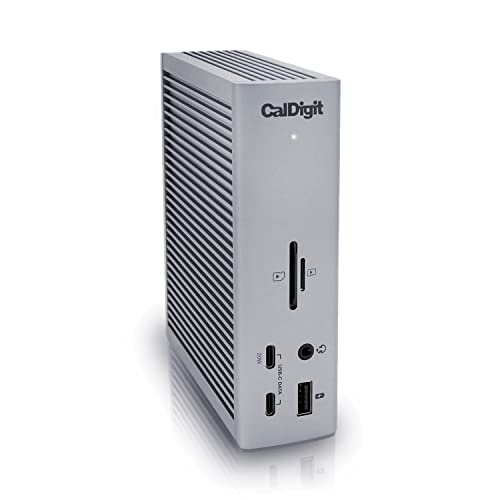
CalDigit TS4 Thunderbolt 4 Dock
One cable handles two high resolution displays, fast external SSDs and 98W of laptop charging at the same time. Eighteen ports include 2.5 gigabit ethernet, SD and microSD readers and separate audio jacks. A genuine Thunderbolt host is required to unlock that bandwidth, and the price reflects it.
Pros
- Highest bandwidth here for displays and storage together
- 98W charges larger 16 inch laptops properly
- 2.5 gigabit ethernet and full card readers
Cons
- Requires a Thunderbolt host to use fully
- Runs warm under sustained load

Kensington SD5700T Thunderbolt 4 Docking Station
Four Thunderbolt 4 ports let you decide how to split bandwidth between displays, storage and downstream devices rather than accepting a fixed layout. It drives two 4K displays at 60Hz and sends 90W to the host. Fewer legacy ports mean USB-A heavy setups need a small hub alongside it.
Pros
- Flexible Thunderbolt ports rather than fixed video outputs
- Certified for consistent dual 4K output
- Solid metal chassis dissipates heat well
Cons
- Only three USB-A ports for peripherals
- No SD card reader

Dell WD19S 130W Docking Station
Latitude, XPS and Precision owners get BIOS level integration, wake on LAN and managed firmware updates that IT departments rely on. The 130W supply sends 90W to the laptop, enough for most mobile workstations. Non Dell hardware loses several of these management features entirely.
Pros
- Deep integration with Dell business laptops
- Wake on LAN and MAC address pass through
- Modular cable head can be replaced
Cons
- Best features only apply on Dell hardware
- Older USB 3.1 speeds on downstream ports

Targus USB-C DV4K Docking Station with Power (DOCK190USZ)
DisplayLink lets this dock drive dual 4K displays from almost any USB-C laptop, including ones without DisplayPort Alt Mode support. Offices where nobody agrees on a laptop brand benefit most from that flexibility. A driver install on every machine and slightly higher CPU load are the tradeoffs.
Pros
- Works with laptops that lack DisplayPort Alt Mode
- Consistent dual display behavior across brands
- Good port spread for shared desks
Cons
- DisplayLink driver install required on each host
- 65W is light for large 16 inch laptops

Belkin Connect USB-C 11-in-1 Multiport Dock
A flat, light body slides into a bag easily, suited to people who move between a home desk and an office rather than leaving a dock wired permanently. HDMI, DisplayPort, ethernet, card readers and 100W pass through charging round out the ports. Bus powered bandwidth is shared, so two demanding displays and a spinning drive compete for the same lanes.
Pros
- Slim enough to travel with daily
- 100W pass through supports larger laptops
- Card readers built in
Cons
- Bandwidth is shared, so heavy loads compete
- Flat body slides on smooth desks

Plugable UD-3900 USB 3.0 Universal Docking Station
Plain USB-A 3.0 connection makes this the answer for laptops that predate USB-C or only spare one port for other uses. Two 1080p displays run through HDMI and DVI, alongside six USB ports and gigabit ethernet. No laptop charging and no 4K support are the price for reviving older hardware.
Pros
- Works with older USB-A only laptops
- Inexpensive way to add dual screens
- Long standing driver support
Cons
- Does not charge the laptop at all
- Limited to 1080p per display
Compared at a glance
| # | Model | Host connection | Best for | Score | Price |
|---|---|---|---|---|---|
| 1 | Anker 575 USB-C Docking Station (13-in-1) | USB-C with DisplayPort Alt Mode | Best overall | 9.4 | Check price |
| 2 | CalDigit TS4 Thunderbolt 4 Dock | Thunderbolt 4 | Best for Thunderbolt workstations | 9.2 | Check price |
| 3 | Kensington SD5700T Thunderbolt 4 Docking Station | Thunderbolt 4 | Best for dual 4K displays | 9.0 | Check price |
| 4 | Dell WD19S 130W Docking Station | USB-C with Dell module | Best for Dell laptops | 8.8 | Check price |
| 5 | Targus USB-C DV4K Docking Station with Power (DOCK190USZ) | USB-C with DisplayLink | Best for mixed laptop fleets | 8.6 | Check price |
| 6 | Belkin Connect USB-C 11-in-1 Multiport Dock | USB-C | Best for hot desking | 8.3 | Check price |
| 7 | Plugable UD-3900 USB 3.0 Universal Docking Station | USB 3.0 type A | Best budget | 8.0 | Check price |
Frequently asked questions
Do I need Thunderbolt or is USB-C enough for a dock?
USB-C with DisplayPort Alt Mode covers one high resolution display plus peripherals at a lower price. Thunderbolt earns its cost when you want two demanding displays, fast external SSDs and full speed peripherals running through one cable simultaneously.
Will a docking station charge my laptop?
Most modern USB-C and Thunderbolt docks do, but check the upstream wattage rather than the power supply’s total size. Older USB-A docks like the Plugable UD-3900 provide no charging, so the laptop still needs its own adapter.
Why does my second monitor keep disconnecting?
Loose or low quality USB-C cables cause most dropouts, followed by outdated dock firmware and graphics drivers. Owners report that switching to the cable supplied with the dock and installing the manufacturer’s firmware updater resolves most intermittent disconnects.
Can I use a docking station with a MacBook Air?
Yes, though Apple silicon Air models generally support only one external display natively. Running two screens requires a dock using DisplayLink with Apple’s driver, or a Mac model that explicitly supports multiple external displays.
Does using a dock hurt gaming performance?
Native DisplayPort Alt Mode and Thunderbolt docks pass video through with no meaningful penalty. DisplayLink docks compress the signal and add a small amount of latency, so a gaming monitor is better connected straight to the laptop.
How many displays can one dock support?
The host laptop matters more than the dock itself. Thunderbolt laptops commonly manage two 4K displays, some Windows machines handle three, and many entry level laptops manage only one. Based on specifications, a dock only exposes what the laptop’s graphics can already output.
Is gigabit ethernet worth having on a docking station?
Large file transfers, video calls or a network drive benefit from a wired connection over crowded WiFi. Docks offering 2.5 gigabit ethernet only help if the router and switch support that speed too.
Should a docking station match my laptop’s brand?
Only for business hardware from Dell, HP or Lenovo, where matching brand docks add management features like wake on LAN and BIOS integration. Everyone else typically gets more ports for the money from a third party dock.
USB-C dock vs Thunderbolt dock: what’s the real difference?
A USB-C dock relies on DisplayPort Alt Mode and tops out around one or two standard displays with modest charging. A Thunderbolt dock adds far more bandwidth for high resolution displays, fast external storage and higher wattage charging, at a higher price and a stricter host requirement.
Can a docking station replace my laptop charger?
Yes, as long as its upstream wattage meets or exceeds what your original charger delivers. Docks rated below your laptop’s charging requirement will slow charge it or let the battery drain under heavy use.
Final word
Anker’s 575 USB-C Docking Station suits most people, delivering a full port set, real charging wattage and dual display support without demanding a Thunderbolt laptop. Step up to CalDigit’s TS4 for driving two large displays and external SSDs from a Thunderbolt machine with zero compromises. Older USB-A only laptops still get a proper desk setup through the Plugable UD-3900.
Marcus Chen
Marcus covered consumer electronics for enthusiast tech publications for six years before joining ChoiceCrest. He specializes in translating manufacturer spec sheets into plain-language buying advice, with a focus on audio, computing accessories and smart-home gear.


