Keyboard Trays That Actually Fix Desk Height Problems
The Fellowes Professional Series is the strongest all-around pick, offering tilt and height adjustment that fits most standard desks. The Humanscale 6G suits buyers who want a premium ergonomic arm system, while the VIVO Keyboard Tray fits anyone furnishing a home office on a tighter budget.
The Fellowes Professional Series leads this list because its tilt and height adjustment accommodate most desk heights and typing postures without a complicated setup process. Its main limitation is weight capacity, which is lower than premium arm systems meant for heavier keyboard and mouse combinations.
We compared published weight capacity, mounting hardware, adjustability range and platform dimensions across each tray rather than running our own long-term wear tests.
The top picks, ranked

Fellowes Professional Series Adjustable Keyboard Tray
A tilt and height adjustable platform fits most desk heights, correcting the common problem of a desk sitting too high for comfortable typing. Under-desk clamp mounting avoids drilling into the desk surface. The platform includes space for both a keyboard and a separate mouse area.
Pros
- Tilt and height adjustment fit a wide range of desks
- Clamp mounting avoids drilling into the desk
- Separate mouse area keeps both inputs at the same height
Cons
- Lower weight capacity than premium arm systems
- Clamp depth may not fit unusually thick desktops
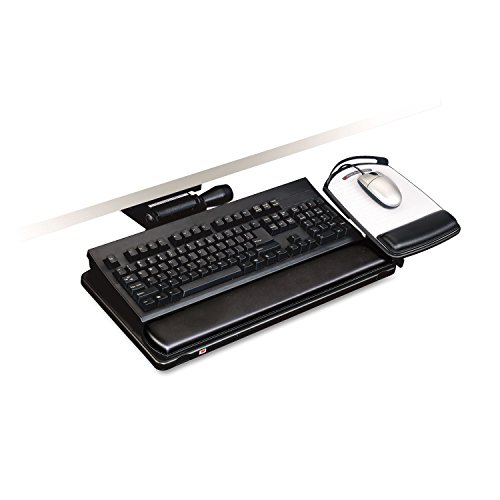
3M Adjustable Keyboard Tray AKT150LE
A gel wrist rest is built into the platform, reducing pressure points during long typing sessions compared to trays without padding. Height and tilt adjust independently to match the user’s natural wrist angle. The mechanism locks securely in place once the correct position is found.
Pros
- Built-in gel wrist rest reduces pressure during typing
- Independent tilt and height dial in natural wrist angle
- Secure locking keeps the platform from shifting
Cons
- Platform size is narrower than full-width trays
- Costs more than basic clamp-mount trays

VIVO Keyboard Tray Under Desk Mount
A wide platform accommodates a full-size keyboard and mouse together, at a lower price than premium ergonomic brands. The clamp mount attaches without tools in most cases, speeding up installation. Adjustable height and tilt cover basic ergonomic needs without extra features.
Pros
- Wide platform fits a full keyboard and mouse together
- Tool-free clamp speeds up installation
- Lower price than premium ergonomic brands
Cons
- Fewer adjustment points than high-end arm systems
- Plastic components feel less durable than metal arms
Rolodex Adjustable Keyboard Manager
A straightforward sliding tray extends from under the desk and tilts for basic ergonomic benefit. The mounting hardware attaches to the underside of most standard desks without major modification. This simple design covers basic needs without the cost of a full arm system.
Pros
- Lowest price point among keyboard trays here
- Simple slide and tilt design is easy to use
- Mounts to most standard desk undersides
Cons
- Limited height adjustability compared to arm-based trays
- Smaller platform with less room for a mouse

Humanscale 6G Keyboard System
A full articulating arm adjusts height, tilt and depth independently, going well beyond basic clamp-mount trays. The negative tilt feature angles the platform away from the body, reducing wrist extension during typing. Higher weight capacity supports larger keyboards and mechanical switches without sagging.
Pros
- Full articulating arm allows precise multi-axis adjustment
- Negative tilt reduces wrist extension during typing
- Higher weight capacity supports heavier keyboards
Cons
- Premium price well above clamp-mount alternatives
- Installation is more involved than simple clamp trays

Mount-It! Clamp-On Keyboard Tray
A straightforward clamp mount attaches to desk edges up to a standard thickness range without drilling. The platform tilts to a few fixed positions rather than offering continuous adjustment. A raised lip around the edge helps keep a keyboard from sliding off during use.
Pros
- No-drill clamp mount preserves the desk surface
- Raised lip helps prevent keyboard slippage
- Simple design installs quickly without tools
Cons
- Fixed tilt positions limit fine-tuning
- Clamp range may not fit unusually thick desks

Ergotron Neo-Flex Keyboard Arm
This arm-based tray is designed to pair with Ergotron’s monitor arm systems, letting desk setups coordinate keyboard and screen positioning together. A retractable mouse platform tucks away when not needed, saving desk space. The arm swings to the side when the keyboard is not in use.
Pros
- Coordinates well with Ergotron monitor arm systems
- Retractable mouse platform saves desk space
- Swings aside easily when keyboard is not needed
Cons
- Best value realized only when paired with a compatible monitor arm
- Higher price than simple clamp-mount trays
How to choose
What to look for in a keyboard tray Mounting type decides between clamp-on trays, which avoid drilling, and articulating arm systems, which offer more adjustment range at a higher price. Adjustability, including tilt, height and sometimes depth, determines how well the tray corrects an uncomfortable desk height. Weight capacity matters for larger keyboards or mechanical keyboards with extra heft.
Clamp-mount trays versus articulating arm systems Clamp-mount trays like the Fellowes Professional Series and VIVO Keyboard Tray install quickly and suit most standard desks without extra hardware. Articulating arm systems, including the Humanscale 6G and Ergotron Neo-Flex, offer independent height, tilt and depth adjustment for users with more specific ergonomic needs. Buyers with persistent wrist or shoulder discomfort often benefit from the extra adjustment range of an arm system.
Trays with built-in wrist support versus basic platforms Some trays, like the 3M AKT150LE, include a built-in gel wrist rest to reduce pressure during long typing sessions. Basic platforms, including the Rolodex Adjustable Keyboard Manager, skip this feature to keep cost and complexity down. Buyers who type for long stretches each day may find the added wrist support worth the higher price.
Matching a keyboard tray to desk setup and budget A simple desk setup with a standard keyboard and mouse can use a budget option like the Rolodex or Mount-It! clamp tray without missing much functionality. Setups already using a monitor arm benefit from pairing with a compatible keyboard arm like the Ergotron Neo-Flex for a more coordinated desk. Buyers investing in ergonomics long-term should weigh the Humanscale 6G despite its higher price, since its adjustment range outlasts basic clamp trays.
How they compare
| # | Model | Mounting | Best for | Score | Price |
|---|---|---|---|---|---|
| 1 | Fellowes Professional Series Adjustable Keyboard Tray | Under-desk clamp | Best Overall | 8.9 | Check price |
| 2 | 3M Adjustable Keyboard Tray AKT150LE | Built-in gel rest | Best for Ergonomics | 8.8 | Check price |
| 3 | VIVO Keyboard Tray Under Desk Mount | Full-size keyboard and mouse | Best Value | 8.5 | Check price |
| 4 | Rolodex Adjustable Keyboard Manager | Under-desk mounted track | Best Budget | 8.0 | Check price |
| 5 | Humanscale 6G Keyboard System | Articulating arm | Best Premium | 9.1 | Check price |
| 6 | Mount-It! Clamp-On Keyboard Tray | Edge clamp, no drilling | Best for Clamp Mount Simplicity | 8.3 | Check price |
| 7 | Ergotron Neo-Flex Keyboard Arm | Articulating arm | Best for Monitor Arm Integration | 8.7 | Check price |
Common questions
Do keyboard trays really help with wrist pain?
A properly adjusted keyboard tray can reduce wrist extension and shoulder strain by positioning the keyboard at a more natural height and angle, though persistent pain should be discussed with a medical professional.
How do I install a clamp-on keyboard tray?
Most clamp-on trays, like the Fellowes Professional Series, attach to the underside of a desk using an adjustable clamp mechanism that does not require drilling.
What is negative tilt on a keyboard tray?
Negative tilt angles the keyboard platform downward away from the body, which can reduce wrist extension compared to a flat or upward-tilted surface, as offered on the Humanscale 6G.
Can a keyboard tray hold a mouse as well?
Many trays, including the VIVO Keyboard Tray and Fellowes Professional Series, include a dedicated mouse platform alongside the keyboard area.
Will a keyboard tray fit any desk?
Clamp-mount trays generally fit desks within a specific thickness range, so checking the desk’s edge thickness against the tray’s compatibility range avoids a mismatch.
What is the weight capacity of a typical keyboard tray?
Weight capacity varies by design, with basic clamp trays rated for standard keyboards and mice, while arm systems like the Humanscale 6G support heavier mechanical keyboards.
Do keyboard trays work with standing desks?
Some keyboard trays can be mounted to standing desks, though the height adjustment range should be checked against the desk’s full range of motion.
Is an articulating arm keyboard tray worth the extra cost?
An articulating arm, like the Ergotron Neo-Flex, offers more adjustment range and is worth the cost for users with specific ergonomic needs beyond basic tilt and height.
Can a keyboard tray be removed without damaging the desk?
Clamp-mount trays that avoid drilling, such as the Mount-It! Clamp-On Keyboard Tray, can typically be removed without leaving permanent marks on the desk.
Our pick
For most desk setups, the Fellowes Professional Series offers the most reliable combination of adjustability and easy installation. Anyone with ongoing wrist or shoulder discomfort should invest in the Humanscale 6G instead for its full articulating arm and negative tilt option. Buyers on a tight budget who just need basic correction should skip arm systems entirely and go with the Rolodex Adjustable Keyboard Manager.
Jake Monroe
Jake worked as a residential contractor for over a decade before shifting to full-time writing. He evaluates power tools, hand tools and workshop gear through the lens of someone who has actually used them on job sites, not just read the box.


