IR Blaster Remotes for TVs, ACs and Old Receivers
SwitchBot Universal Remote leads most homes, since one handheld screen drives the TV, soundbar and air conditioner without unlocking a phone. BroadLink RM4 Pro adds 433MHz and 315MHz radio for blinds and older receivers. Pick BroadLink RM4 Mini when a single room needs Wi-Fi to infrared bridging.
SwitchBot Universal Remote fits households tired of juggling four clickers for one media stack. Buttons and a colour screen work with no app open, and infrared still reaches gear built long before smart homes existed. Control from outside the house routes through a SwitchBot account, which rules it out for anyone avoiding cloud logins.
Infrared hardware looks identical in listings, so the real gaps sit in code databases, radio support and app behaviour. We compared published specifications, assistant compatibility, emitter coverage and owner feedback about teaching unlisted remotes. Devices locked to one closed app with no learning mode ranked lower.
Before you buy
What to look for in an IR blaster remote Three factors decide the outcome: signal types, code library depth and how you issue commands. Blasters only repeat infrared, so the unit has to sit roughly where the original remote would point. Code libraries cover mainstream televisions well and thin out around fans, projectors and older receivers. Learning mode closes that gap by copying pulses from the remote already in the drawer. Decide early whether a phone or a physical handset should be the interface, because that split separates hubs from remotes.
Infrared vs RF: which signals your gear uses Infrared needs line of sight and stops dead at a closed cabinet door. Radio passes through walls and furniture, which is why blinds, garage openers and some ceiling fans use it. BroadLink RM4 Pro covers 433MHz and 315MHz, while RM4 Mini and most hubs handle infrared alone. Look for a frequency marking on the back of your existing remote before assuming a blaster will reach it. Rolling code garage openers stay off limits by design, whatever a listing claims.
Best for air conditioner control Air conditioners are the strongest use case, since almost all of them speak infrared and nothing else. State tracking matters here, because a good app remembers the current mode and setpoint instead of firing blind toggles. SwitchBot Hub 2 reads room temperature and acts on it, so cooling starts before anyone gets uncomfortable. Window unit owners report fewer sync problems when the hub sits within a couple of metres of the unit. Mini split heads mounted high want the emitter angled upward.
Placement, range and closed cabinets Position the blaster so its signal can bounce off a wall or ceiling toward the gear. Smoked glass doors block infrared far more thoroughly than most people expect. Where components hide inside furniture, a wired emitter or a SofaBaton style hub placed beside them solves it. Keep any USB powered puck off a warm receiver lid, because trapped heat shortens its life. Plan on one blaster per room that holds infrared gear rather than hoping for whole home coverage.
Our top picks

SwitchBot Universal Remote
Physical buttons and a colour screen run a living room without anyone reaching for a phone. Infrared handles legacy televisions and air conditioners, while Bluetooth talks to SwitchBot curtains, locks and plugs. Learning mode captures obscure remotes when the built in database falls short, according to owner feedback.
Pros
- Behaves like an ordinary remote with no app open
- Copies codes straight from original remotes
- Reaches SwitchBot curtains, locks and plugs too
Cons
- Away from home control needs a SwitchBot account
- Battery needs recharging, unlike plug in blasters
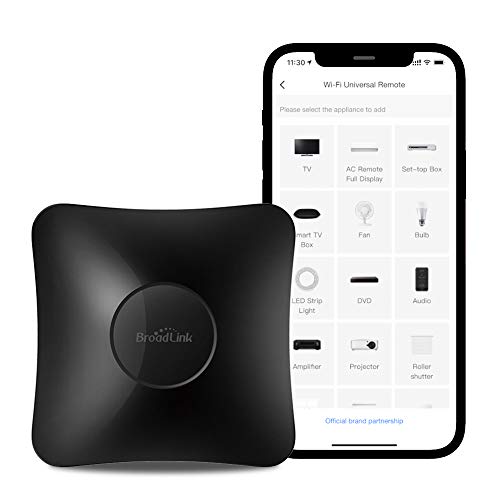
BroadLink RM4 Pro
Radio at 433MHz and 315MHz is the single reason to take this over the Mini. Those bands cover many roller blinds, garage controllers and older audio receivers that infrared never reaches. Plug in the optional HTS2 cable and routines can fire on temperature or humidity readings.
Pros
- Reaches RF gear that infrared blasters miss
- Works with Alexa, Google Assistant and IFTTT
- Small enough to hide behind a television
Cons
- Setup runs through the Broadlink app only
- Rolling code remotes cannot be cloned

SwitchBot Hub 2
Onboard temperature and humidity sensing turns air conditioner control into an automation instead of a button press. Two programmable scene buttons sit on the face for lighting and evening routines. Matter support exposes older SwitchBot devices to Apple Home and Google Home.
Pros
- Fires the air conditioner on measured room temperature
- Brings Matter to existing SwitchBot gear
- Front display shows live readings at a glance
Cons
- Infrared range depends on clear line of sight
- Has to stay plugged into wall power

BroadLink RM4 Mini
Roughly the size of a hockey puck, this covers one room and stops there. Codes pull from a large online database, and anything missing gets taught button by button. Leaving out RF means blind motors and garage openers stay beyond its range.
Pros
- Simplest route into app controlled infrared
- Learning mode captures unlisted remotes
- Footprint vanishes on a media console
Cons
- Skips RF for blinds and garage gear
- One unit per room is normally required

SofaBaton X1S
A hub sits beside the equipment while the handheld keeps real buttons and a colour screen. Activities chain devices in sequence, so one press wakes the projector, receiver and streaming box in order. Bluetooth and Wi-Fi control push it past infrared only gear.
Pros
- Activity macros collapse four remotes into one
- Hub relays signal inside a closed cabinet
- Button layout suits receivers and projectors
Cons
- Building activities takes real setup time
- More remote than a TV and soundbar need

Aqara Hub M3
Infrared blasting rides along inside a Zigbee 3.0 hub and Thread border router. An Ethernet port sits beside Wi-Fi, which helps when the media cabinet is far from the router. Automations run locally, so scenes keep firing while broadband is down.
Pros
- Removes the need for a separate Zigbee hub
- Runs many automations without the cloud
- Ethernet sidesteps Wi-Fi dead spots
Cons
- Aqara app stays the main control surface
- More hub than an infrared only home needs

MOES Smart IR Remote Control Hub
Joining the Tuya and Smart Life ecosystem puts this puck beside the plugs and bulbs many homes already run. A 360 degree emitter covers an open plan living room from one shelf. Air conditioner templates handle common brands, and anything missing can be learned by hand.
Pros
- Appears inside an existing Tuya device list
- Wide emitter angle suits open rooms
- Voice control through Alexa and Google Assistant
Cons
- App wording reads awkwardly in places
- No RF support at all
Side by side
| # | Model | Control types | Best for | Score | Price |
|---|---|---|---|---|---|
| 1 | SwitchBot Universal Remote | Infrared plus Bluetooth | Best overall | 9.4 | Check price |
| 2 | BroadLink RM4 Pro | Infrared, 433MHz and 315MHz RF | Best value | 9.2 | Check price |
| 3 | SwitchBot Hub 2 | Temperature and humidity | Best for air conditioner automation | 9.0 | Check price |
| 4 | BroadLink RM4 Mini | Infrared only | Best budget | 8.8 | Check price |
| 5 | SofaBaton X1S | Up to 15 | Best for home theatre stacks | 8.6 | Check price |
| 6 | Aqara Hub M3 | Zigbee 3.0, Thread, Wi-Fi and Bluetooth | Best for mixed smart homes | 8.4 | Check price |
| 7 | MOES Smart IR Remote Control Hub | Tuya and Smart Life apps | Best for Tuya and Smart Life homes | 8.0 | Check price |
Good to know
What is an IR blaster remote?
It repeats the same infrared pulses your original remote sends. Commands arrive from a phone app, a voice assistant or a handheld screen, then get fired at the TV, fan or air conditioner.
Can an IR blaster control my air conditioner?
Yes, as long as the unit uses an infrared remote, which covers most window units and mini splits. Favour a hub whose app tracks mode and temperature state, otherwise commands drift out of sync with the unit.
Do IR blasters work through cabinet doors?
Solid and smoked glass panels block the signal. Either place the blaster inside the cabinet beside the components, or choose a hub that accepts a wired emitter run behind the doors.
Which IR blasters work with Alexa and Google Assistant?
BroadLink RM4 Pro, RM4 Mini, both SwitchBot units and the MOES hub all support them. Apple Home coverage is thinner and usually arrives through Matter or Siri Shortcuts rather than direct integration.
Is a hub with RF support worth it?
Only when you actually own RF gear. Check whether your blinds, fans or older receivers use radio instead of infrared. If the whole room is infrared, the cheaper Mini does the same job.
How many IR blasters do I need for a whole house?
Budget one per room containing infrared gear. Signals do not travel between rooms, and bouncing a command down a hallway is unreliable even on the occasions it works.
Can one remote replace a TV, soundbar and cable box?
A macro capable device such as SofaBaton X1S or SwitchBot Universal Remote can, because it fires several commands in sequence. Plain hubs need each device triggered separately or a scene built in the app.
Do IR blasters need Wi-Fi to work?
App and voice control do. A handheld remote with its own buttons keeps sending infrared while broadband is down, which is a genuine advantage during an outage.
SwitchBot Universal Remote vs BroadLink RM4 Pro: which is better?
SwitchBot gives you a physical handset and a screen for everyday living room use. RM4 Pro is a hidden hub with 433MHz and 315MHz radio, so it suits homes with RF blinds or an older receiver.
Which IR blaster is best for a Zigbee or Thread smart home?
Aqara Hub M3 folds infrared into a Zigbee 3.0 hub and Thread border router, with Ethernet as a backup to Wi-Fi. That removes one box from the shelf if you already run Aqara sensors.
The verdict
SwitchBot Universal Remote earns the pick for most households, because it works as a real remote first and a smart device second. Anyone with RF blinds or an older receiver should take BroadLink RM4 Pro instead, and a spare bedroom TV needs nothing beyond the RM4 Mini. Where every box already responds to HDMI CEC, skip the hub route and save the shelf space.
Marcus Chen
Marcus covered consumer electronics for enthusiast tech publications for six years before joining ChoiceCrest. He specializes in translating manufacturer spec sheets into plain-language buying advice, with a focus on audio, computing accessories and smart-home gear.


