Top Internal SSDs for Speed and Reliability
The Samsung 990 PRO leads our list for its exceptional sustained performance and robust reliability, making it ideal for gamers and professionals who demand speed. However, its premium price means budget builders might prefer the Crucial P3 Plus for everyday tasks.
Upgrading to an internal SSD is the single most effective way to breathe new life into your computer. Whether you are a gamer, creative professional, or just tired of slow boot times, the right drive makes all the difference.
We analyzed performance specifications, controller technology, and user reviews to bring you a curated list of the best internal SSDs available today.
What we recommend

Samsung 990 PRO
The Samsung 990 PRO is the pinnacle of PCIe 4.0 performance, delivering top-tier read and write speeds that excel in heavy workloads. Its advanced controller ensures efficient thermal management, and the drive includes a heatsink option for sustained performance. Owners praise its consistency in real-world tasks, from gaming to 8K video editing.
Pros
- Exceptional sustained performance
- Excellent endurance rating
- Available with heatsink or bare drive
Cons
- Premium price
- Requires PCIe 4.0 for full speed

WD Black SN850X
The WD Black SN850X is built with gamers in mind, featuring a gaming mode that optimizes performance for load times and asset streaming. It offers impressive read speeds and includes a heatsink option for PlayStation 5 compatibility. Users report significant reductions in game load times and smooth gameplay.
Pros
- Gaming mode for optimized performance
- Heatsink version fits PS5
- High endurance
Cons
- Slightly lower write speed than 990 PRO
- Software can be resource-heavy

Crucial P3 Plus
The Crucial P3 Plus offers solid PCIe 4.0 performance at a budget-friendly price. It is a great entry point for those looking to upgrade from SATA SSDs without breaking the bank. While it lacks the endurance of higher-end drives, it delivers reliable speed for everyday computing and gaming.
Pros
- Great price to performance
- Good for everyday tasks
- Low power consumption
Cons
- Lower endurance rating
- Slower than top-tier rivals

Sabrent Rocket 4 Plus
The Sabrent Rocket 4 Plus stands out with capacities up to 8TB, making it ideal for content creators who need massive storage. It delivers fast sequential speeds and comes with a solid endurance rating. Users appreciate the high capacity and consistent performance for large file transfers.
Pros
- Up to 8TB capacity
- High endurance on larger models
- Good sustained write performance
Cons
- Can get hot without heatsink
- Price per GB increases at high capacities
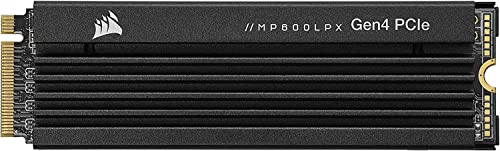
Corsair MP600 PRO LPX
The Corsair MP600 PRO LPX is specifically designed to meet PlayStation 5 requirements, with a pre-installed heatsink and speeds that align with the console’s needs. It offers a straightforward installation process and reliable performance. PS5 owners report seamless expansion and fast load times.
Pros
- Designed for PS5 with heatsink
- High read speeds
- Easy installation
Cons
- Not the best value for PC users
- Heatsink may not fit all laptops

SK hynix Gold P31
The SK hynix Gold P31 is a PCIe 3.0 drive that offers exceptional power efficiency, making it perfect for laptops where battery life matters. It runs cool and provides performance that rivals many PCIe 4.0 drives in real-world use. Users praise its low power consumption and reliability.
Pros
- Very power efficient
- Runs cool
- Reliable for laptops
Cons
- Limited to PCIe 3.0 speeds
- Smaller capacity options

Crucial MX500
The Crucial MX500 is a 2.5-inch SATA SSD that remains a top choice for upgrading older desktops and laptops that lack M.2 slots. It offers consistent performance and includes hardware encryption. Owners report significant speed improvements over traditional hard drives and high reliability over time.
Pros
- Compatible with older systems
- Hardware encryption
- Proven reliability
Cons
- SATA speeds much slower than NVMe
- Larger physical size
What to look for
Compared at a glance
| # | Model | Interface | Best for | Score | Price |
|---|---|---|---|---|---|
| 1 | Samsung 990 PRO | PCIe 4.0 NVMe | Enthusiasts and professionals | 9.6 | Check price |
| 2 | WD Black SN850X | PCIe 4.0 NVMe | Gamers | 9.4 | Check price |
| 3 | Crucial P3 Plus | PCIe 4.0 NVMe | Budget builders | 9.0 | Check price |
| 4 | Sabrent Rocket 4 Plus | PCIe 4.0 NVMe | High-capacity storage | 8.9 | Check price |
| 5 | Corsair MP600 PRO LPX | PCIe 4.0 NVMe | PlayStation 5 expansion | 8.8 | Check price |
| 6 | SK hynix Gold P31 | PCIe 3.0 NVMe | Laptop upgrades | 8.7 | Check price |
| 7 | Crucial MX500 | SATA III | Legacy systems | 8.5 | Check price |
Questions worth asking
What is the difference between SATA and NVMe SSDs?
SATA SSDs use the older AHCI interface and have speeds up to 600 MB/s. NVMe SSDs use the PCIe bus, offering much higher bandwidth and lower latency. For most users, NVMe provides a noticeable improvement in boot times and file transfers, but SATA is still a good upgrade from a hard drive.
Do I need a PCIe 4.0 SSD?
If your motherboard and CPU support PCIe 4.0, you can take advantage of faster speeds. However, for gaming and everyday tasks, the difference between PCIe 3.0 and 4.0 is often minimal. PCIe 4.0 drives are beneficial for heavy workloads like video editing or large data analysis.
How do I know if my laptop has an M.2 slot?
Check your laptop’s specifications or open the bottom panel to look for a small slot. Many modern ultrabooks have M.2 slots, but some may only support SATA M.2 drives. Refer to the manufacturer’s manual to confirm the type of M.2 slot available.
Can I use an NVMe SSD in a PS5?
Yes, the PS5 supports M.2 NVMe SSDs with a heatsink. The drive must meet Sony’s requirements: PCIe 4.0, capacity between 250GB and 4TB, and read speeds of at least 5,500 MB/s. Drives like the WD Black SN850X and Corsair MP600 PRO are popular choices.
What is TBW and why does it matter?
TBW stands for Terabytes Written, which indicates the total amount of data that can be written to the SSD over its lifetime. A higher TBW means better endurance. For typical users, even a 300 TBW drive will last many years, but for professional use, a higher TBW is recommended.
Is it worth upgrading from a SATA SSD to an NVMe SSD?
If your system supports NVMe, the upgrade can lead to faster boot times and quicker application loading, especially for large files. However, the real-world difference may be subtle for everyday tasks. If you already have a SATA SSD, consider whether your workload demands the extra speed.
How should I install an internal SSD?
For an M.2 drive, gently insert it at an angle into the slot and secure it with a screw. For a 2.5-inch SATA drive, connect it to the motherboard with a SATA cable and power from the PSU. After installation, you may need to initialize and format the drive in your OS.
Can I clone my current hard drive to an SSD?
Yes, most SSD manufacturers provide free cloning software. You can also use third-party tools. Cloning copies your OS and files to the new drive, allowing for an easy swap without reinstalling Windows. Ensure the target drive has enough capacity for your data.
What are the signs of a failing SSD?
Common signs include frequent crashes, corrupted files, and the drive becoming unreadable. You can monitor drive health using tools like CrystalDiskInfo. Always back up important data, as SSDs can fail without much warning.
Are there any compatibility issues with older motherboards?
Some older motherboards may not have M.2 slots or may only support SATA M.2 drives. For desktops, you can use a PCIe adapter card for NVMe drives, but the system must support booting from NVMe. Check your motherboard’s manual for details.
The bottom line
For most users, the Samsung 990 PRO is the best internal SSD due to its top-tier performance and reliability. If you are on a budget, the Crucial P3 Plus offers excellent value for everyday use. For gamers specifically, the WD Black SN850X provides optimized gaming features that can enhance your experience.
Marcus Chen
Marcus covered consumer electronics for enthusiast tech publications for six years before joining ChoiceCrest. He specializes in translating manufacturer spec sheets into plain-language buying advice, with a focus on audio, computing accessories and smart-home gear.