Do Incline Walking Pads Really Boost Your Workout?
Egofit’s Walker Pro leads for desk use thanks to its fixed incline and very slim height. Best value adjustable incline goes to the UREVO Strol 3, and the Goplus 2 in 1 Folding Treadmill is the pick for anyone who wants running capability too.
Egofit’s Walker Pro tops this incline walking pad ranking. The UREVO Strol 3 stands out as the value choice, and the Goplus 2 in 1 covers anyone who also wants to run. THERUN, Sperax, Citysports and Umay round out the desk friendly options.
Incline and desk clearance pull in opposite directions, which is what makes these pads tricky to shop for. Raising the front lifts the deck, so a pad that fits under a standing desk at zero degrees may not fit at five. Motors sized for walking also work harder on a gradient. We compared stated incline ranges, continuous motor ratings, deck heights and owner reports on noise and belt slip, then ranked accordingly.
What matters most
Why buy an incline walking pad at all Walking at a gradient raises heart rate and calorie burn considerably at the same slow pace, which matters most when you are typing at the same time. Fixed incline models bake that gradient in permanently. Adjustable models let you vary effort through the day instead. Decide early whether you want a constant setting or the ability to dial it back.
How to check deck height against your desk Standing desks max out at a set height, and a pad adds several inches under your feet before any incline applies. Measure your comfortable standing typing height first. Subtract the deck height at its steepest setting, then confirm your desk still reaches that number. This single check catches out more buyers than any other specification.
Why motor rating matters more on a gradient Walking uphill loads a motor harder than flat walking at the same speed, so continuous duty ratings and weight capacity deserve real attention rather than a skim. A motor rated close to your body weight runs hot and wears the belt faster. Build in margin, especially if you plan on hours per day rather than minutes.
Noise and floor protection for daily use A pad that hums quietly gets used during calls; a noisy one gets switched off. Belt noise, motor whine and footfall through the floor count as three separate problems. A dense mat underneath reduces vibration reaching rooms below and protects flooring from belt dust.
The shortlist, ranked
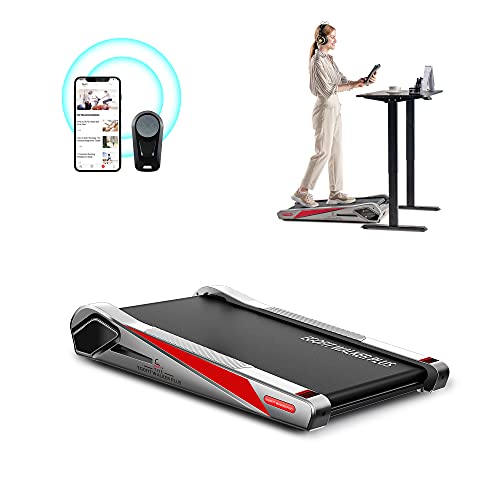
Egofit Walker Pro
This deck slides under a desk by design, with a fixed incline that adds effort without raising deck height to an awkward level. Length and height both rank among the shortest here, which is the whole point in a small office. Owners report it stays quiet enough for calls, though the belt suits walking pace only.
Pros
- Built around desk clearance from the start
- Quiet enough for video calls
- Compact footprint in a small room
Cons
- Short belt limits stride length
- Fixed incline cannot be reduced

UREVO Strol 3 Walking Pad
Stepped incline settings let you raise effort without changing pace, the main reason to choose an incline pad over a flat one. A longer deck than desk-only models gives a more natural stride. Owners report the motor handles sustained walking well, and the remote beats reaching for a panel.
Pros
- Several incline levels instead of one fixed angle
- Longer belt gives a comfortable stride
- Stores flat under furniture
Cons
- Incline levels are stepped, not continuous
- Deck height increases at maximum incline

Goplus 2 in 1 Folding Treadmill
Fold the handrail down and this works as a flat walking pad; raise it and it becomes a proper treadmill, covering both desk walking and faster sessions. A higher speed range and larger motor make it the most versatile unit here. Owners report the handrail also provides a safety point when using incline at speed.
Pros
- Covers walking and running in one machine
- Handrail folds down for desk use
- Larger motor copes with sustained inclines
Cons
- Heavier than pure walking pads
- Folded height exceeds slimmer models

THERUN Walking Pad with Incline
A multi layer deck with shock absorption makes long, low speed walking easier on knees and ankles than a hard board deck. Incline spans several settings for varying effort. Owners report the cushioning is the reason they can walk for hours rather than minutes at a desk.
Pros
- Noticeably softer underfoot than rivals
- Suits long duration, low intensity walking
- Quiet belt at desk speeds
Cons
- Thicker deck reduces desk clearance
- Heavier to reposition daily

Sperax Walking Pad with Incline
Sperax rates this pad for higher user weights than many compact units, which matters because a marginal rating shortens motor and belt life. Incline options add intensity without needing more speed. Owners report the build feels solid underfoot, with less flex than lighter pads of the same size.
Pros
- Higher stated weight capacity
- Solid feel with limited deck flex
- Simple remote operation
Cons
- Heavier than slim desk models
- Belt tracking needs occasional adjustment

Citysports Under Desk Treadmill
A lean specification keeps this at the accessible end: a straightforward walking pad, a remote and a modest speed range. Incline stays limited compared with dedicated models. Owners report it works as a sensible first purchase for anyone unsure whether desk walking will stick as a habit.
Pros
- Low cost entry to desk walking
- Slim enough to store easily
- Very little setup required
Cons
- Minimal incline compared to rivals
- Lower weight capacity and shorter belt

Umay Under Desk Treadmill
Quiet running is the focus, with a motor and belt combination that stays unobtrusive at typing pace. That matters more than most specifications for anyone sharing an office or taking calls all day. Owners report the trade off is a modest speed range and gentle incline rather than a workout machine.
Pros
- One of the quieter pads at desk speeds
- App tracking keeps a record of steps
- Light enough to move between rooms
Cons
- Gradient stays mild compared to adjustable pads
- Not intended for jogging
How they compare
| # | Model | Incline | Best for | Score | Price |
|---|---|---|---|---|---|
| 1 | Egofit Walker Pro | Fixed gradient built into the deck | Best overall for desk use | 9.4 | Check price |
| 2 | UREVO Strol 3 Walking Pad | Multiple stepped incline levels | Best value adjustable incline | 9.2 | Check price |
| 3 | Goplus 2 in 1 Folding Treadmill | Flat walking pad or upright treadmill | Best for walking and running | 9.0 | Check price |
| 4 | THERUN Walking Pad with Incline | Multi layer shock absorbing surface | Best deck cushioning | 8.8 | Check price |
| 5 | Sperax Walking Pad with Incline | Around 300 pounds | Best for higher weight capacity | 8.6 | Check price |
| 6 | Citysports Under Desk Treadmill | Up to around 3.7 mph | Best budget option | 8.3 | Check price |
| 7 | Umay Under Desk Treadmill | Quiet operation at walking speeds | Best quiet operation | 8.0 | Check price |
Questions worth asking
Does walking at an incline burn more calories?
Yes, meaningfully. Raising the gradient increases the work done against gravity at any given speed, which raises heart rate and energy expenditure. That is why an incline pad can deliver more benefit at typing pace than a flat pad running faster than you can type through.
Can I run on a walking pad?
Most are built for walking only, with speed ranges topping out around four miles per hour and short belts. Two in one models with a folding handrail, like the Goplus, extend into jogging speeds. Running on a pad not rated for it wears the motor and belt quickly.
How much desk clearance do I need for an incline pad?
Add the pad deck height at your chosen incline to your comfortable standing typing height. Most desks handle this fine, but tall users with modest desks can run out of adjustment. Check the desk’s maximum height against the pad’s specification before ordering a thick-decked model.
Are incline walking pads quiet enough for an office?
At walking speeds, most stay unobtrusive, with motor and belt noise well below conversation level. Footfall carried through the floor is often the bigger issue in shared buildings. A dense mat under the pad addresses that better than switching models.
How long should I walk at my desk each day?
Many users build up to a few hours spread through the day in blocks rather than one long session. Start with twenty to thirty minutes at a low speed while doing tasks that do not need fine mouse control. Increase gradually, and stop if you feel joint discomfort.
What maintenance do incline walking pads need?
Keep the belt clean, check tracking occasionally, and lubricate the deck per manufacturer instructions, usually with silicone oil every few months. Vacuum around and under the pad since belt dust accumulates there. Skipping lubrication is the most common cause of early motor strain.
Do walking pads work on carpet?
They do, though thick carpet can restrict airflow under the motor housing and make the belt feel spongy. A firm mat or board underneath solves both problems. On hard floors, a mat still helps by damping vibration and preventing scuffs.
Are the calorie readouts on walking pads accurate?
Treat them as rough estimates. Console figures rely on generic formulas that ignore your body composition and actual effort. Use them to compare one session against another rather than as a precise measurement of energy burned.
Egofit vs UREVO: which incline walking pad is better?
The Egofit Walker Pro wins on desk clearance, thanks to its very slim fixed-incline deck. The UREVO Strol 3 counters with stepped incline levels and a longer belt for a more natural stride. Choose the Egofit for tight desk setups, the UREVO for adjustable effort.
Our take
For under-desk use, the Egofit Walker Pro fits easiest, since it was designed around clearance rather than adapted for it. The UREVO Strol 3 makes more sense if you want to vary the gradient and stride out further. Choose the Goplus 2 in 1 when the same machine needs to handle running sessions too.
Derek Holt
Derek has a background coaching recreational and amateur athletes and has worked the sales floor at specialty fitness retailers. He focuses on equipment durability, ergonomics and realistic use cases rather than marketing claims.


