Matching a Home Security System to Your Space and Budget
SimpliSafe’s 8-Piece Wireless Home Security System leads for balanced sensor coverage and flexible monitoring. Ring Alarm Pro suits households that also want a built-in Wi-Fi 6 mesh router. Abode’s Wireless Security Kit fits owners who want local automation without a mandatory monthly plan.
SimpliSafe’s 8-Piece Wireless Home Security System suits owners who want fast DIY setup and optional professional monitoring. Cellular backup keeps it connected during Wi-Fi or power outages. It ships without a built-in Wi-Fi router, unlike Ring’s bundled option.
Coverage needs shift between apartments, houses and rentals under strict lease terms. That range makes comparison shopping confusing. We compared sensor counts, connectivity standards, camera resolution and owner feedback on false alarms across seven current listings.
How to choose
How to Match a Home Security System to Your Living Space Apartment renters usually need fewer sensors and no permanent wiring. Houses with multiple entry points call for larger kits, like Ring Alarm Pro’s 14-piece set. Lease restrictions often rule out drilled mounts, favoring peel-and-stick sensors from SimpliSafe and Wyze. Households already running a smart home hub benefit from Z-Wave or Zigbee support, which points toward Abode.
DIY Installation vs Professional Monitoring Self-installed kits from SimpliSafe, Wyze and Eufy let owners place sensors in under an hour, no technician needed. ADT still offers professional installation for buyers who’d rather a technician handle mounting and testing. Monitoring itself splits three ways: self-monitoring through an app, pay-as-you-go plans, and fixed monthly contracts. Cellular backup on the base station matters most whichever path gets chosen, since it keeps alerts flowing if Wi-Fi drops.
Camera Coverage and Night Vision for Outdoor Areas Entry sensors alone can’t identify who triggered an alarm, which is where cameras like the Arlo Pro 5S add value. Color night vision helps identify faces and vehicle details after dark, unlike older black-and-white infrared units. A 160-degree field of view cuts the number of cameras needed for a driveway or backyard. Wire-free, battery-powered mounting suits owners who can’t run cable to a porch or garage.
Is a Subscription-Free Home Security System Worth It? Owners wary of recurring fees can lean on Abode’s CUE automations or Eufy’s HomeBase, both of which run core functions without a mandatory plan. Local video storage keeps footage on a physical hub instead of a cloud server, avoiding monthly storage caps too. Pay-as-you-go monitoring from Wyze and Abode fits renters who want coverage only during vacations. Full-featured professional monitoring, by contrast, still requires an ongoing contract with providers like ADT.
The best picks, ranked

SimpliSafe 8-Piece Wireless Home Security System
This kit pairs a base station and keypad with three entry sensors and one motion sensor for whole-room coverage. Cellular backup keeps the system connected when Wi-Fi or power drops. Monitoring runs self-managed through the app, or upgrades to a paid 24/7 plan.
Pros
- Setup needs no drilling or wiring
- Cellular backup holds the connection during outages
- Monitoring plan can be added or canceled anytime
Cons
- Base kit skips an outdoor camera
- Advanced automations need the paid monitoring tier

Ring Alarm Pro 14-Piece Kit
Ring Alarm Pro builds an eero Wi-Fi 6 mesh router into the base station, covering networking and intrusion detection together. The 14-piece kit adds eight contact sensors and two motion detectors for larger floor plans. A built-in battery keeps the router and alarm running for up to 24 hours during an outage.
Pros
- Replaces a separate home router purchase
- Eight contact sensors cover larger homes
- Mesh eero nodes extend Wi-Fi range
Cons
- Full smart features need a Ring Protect Pro subscription
- Setup takes longer than single-purpose alarm kits

Abode Wireless Security Kit (Gen 7)
Abode’s Gen 7 kit runs CUE automations locally, so sensors can trigger alerts without a monthly plan. Its gateway supports Wi-Fi, Z-Wave and Zigbee, letting it absorb existing smart home devices. Pay-as-you-go professional monitoring covers nights away from home.
Pros
- Core alarm functions work with no ongoing fee
- Zigbee and Z-Wave support add third-party devices
- Pay-as-you-go monitoring suits occasional travel
Cons
- Starter kit covers only two entry points
- Zigbee and Z-Wave setup asks more technical comfort

Wyze Home Monitoring Core Kit
Wyze’s Core Kit bundles a base station, keypad, two entry sensors and one motion sensor at an entry-level price point. Monitoring runs pay-as-you-go with no long-term contract required. The base station adds cellular backup, so alerts still reach Wyze’s monitoring center if Wi-Fi drops.
Pros
- No contract keeps monthly cost low
- Cellular backup ships on the base station
- Expands easily with other Wyze smart devices
Cons
- Two-sensor starter kit suits small apartments only
- Camera sold separately from the core kit

Arlo Pro 5S 2-Camera Security System
Arlo Pro 5S cameras record 2K HDR video with color night vision and a 160-degree diagonal field of view. Wire-free, rechargeable batteries let owners mount them without running power cables. Footage saves locally through an Arlo SmartHub or syncs to a cloud subscription.
Pros
- Color night vision aids license plate and face detail
- Wire-free mounting skips drilling for power runs
- Wide 160-degree view reduces blind spots per camera
Cons
- This kit focuses on cameras, not entry sensors
- Full cloud video history needs a paid plan
ADT Self Setup Home Security System
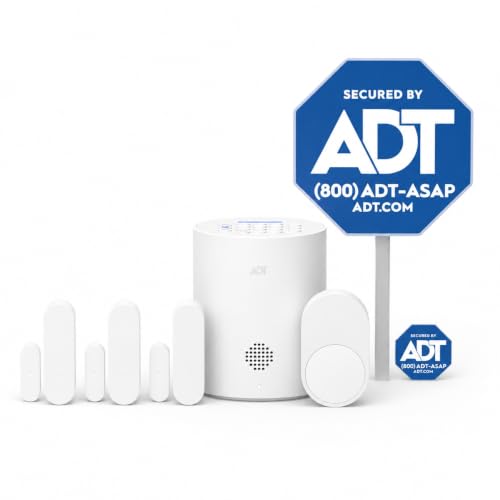
ADT’s Self Setup kit ships a hub, keypad, three door and window sensors and one motion sensor for DIY installation. Around-the-clock professional monitoring runs through ADT’s own centers rather than a third party. Cellular backup on the hub keeps monitoring active if home Wi-Fi goes down.
Pros
- Monitoring runs through ADT’s own established network
- Cellular backup covers Wi-Fi or router outages
- Professional installation option exists for non-DIY owners
Cons
- Professional monitoring carries a recurring monthly fee
- Three sensors may not cover larger multi-room homes
Eufy Security 5-Piece Home Alarm Kit
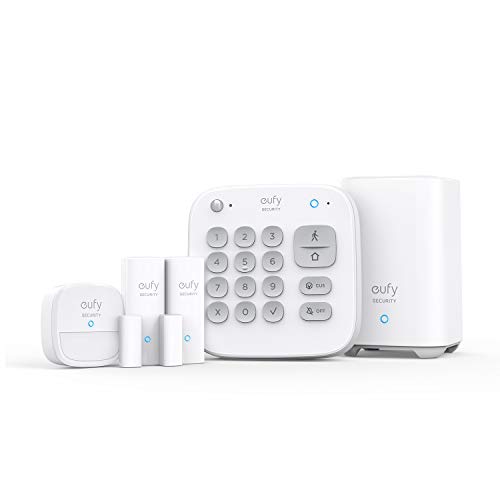
Eufy’s 5-piece kit centers on a HomeBase that stores footage locally, avoiding a mandatory cloud subscription. The set includes a keypad, two entry sensors and one motion sensor sized for smaller floor plans. It pairs with existing Eufy cameras and video doorbells for added coverage.
Pros
- Local HomeBase storage avoids recurring video fees
- Compact kit suits apartments and small homes
- Expands with the wider Eufy camera lineup
Cons
- 2.4GHz-only Wi-Fi can lag on congested networks
- Two entry sensors won’t cover a multi-door house
How they compare
| # | Model | Included hardware | Best for | Score | Price |
|---|---|---|---|---|---|
| 1 | SimpliSafe 8-Piece Wireless Home Security System | Base station, keypad, 3 entry sensors, 1 motion sensor | Best overall | 9.4 | Check price |
| 2 | Ring Alarm Pro 14-Piece Kit | eero Wi-Fi 6 mesh | Best for whole-home Wi-Fi and security combo | 9.1 | Check price |
| 3 | Abode Wireless Security Kit (Gen 7) | Gateway, keypad remote, 2 door/window sensors, 1 motion sensor | Best for subscription-free local monitoring | 8.8 | Check price |
| 4 | Wyze Home Monitoring Core Kit | Base station, keypad, 2 entry sensors, 1 motion sensor | Best budget | 8.6 | Check price |
| 5 | Arlo Pro 5S 2-Camera Security System | 2K HDR with color night vision | Best for outdoor camera coverage | 8.3 | Check price |
| 6 | ADT Self Setup Home Security System | Hub, keypad, 3 door/window sensors, 1 motion sensor | Best for professional monitoring from a national brand | 8.1 | Check price |
| 7 | Eufy Security 5-Piece Home Alarm Kit | HomeBase, keypad, 2 entry sensors, 1 motion sensor | Best for apartments needing local video storage | 8.0 | Check price |
Frequently asked questions
What is the best home security system overall?
SimpliSafe’s 8-Piece Wireless Home Security System balances sensor coverage, cellular backup and flexible monitoring for most households. Ring Alarm Pro suits homes that also want a built-in Wi-Fi 6 router in the same purchase.
Is a DIY home security system as good as a professionally installed one?
DIY kits from SimpliSafe, Wyze and Eufy use the same sensor and cellular backup technology as professionally installed systems. The main difference is who mounts the hardware, not the underlying detection capability.
Do home security cameras need a monthly subscription?
Not always. Eufy’s HomeBase and Abode’s CUE automations store footage locally and run core alerts without a mandatory plan. Cloud video history and professional monitoring typically still require a paid subscription.
What is the best home security system for an apartment?
Wyze’s Home Monitoring Core Kit or Eufy’s 5-piece kit fit apartments well, since both cover a couple of entry points without permanent wiring. Peel-and-stick sensors avoid drilling into rented walls.
Ring Alarm vs SimpliSafe, which is better?
Ring Alarm Pro adds a built-in eero Wi-Fi 6 mesh router, useful for homes that also need network coverage. SimpliSafe focuses purely on intrusion detection, with simpler setup and no router functions.
Can I install a home security system myself?
Most current kits, including SimpliSafe, Wyze, Abode and Eufy, ship with peel-and-stick sensors built for self-installation. ADT still offers a professional installation option for buyers who prefer a technician.
Are wireless security cameras reliable without Wi-Fi?
Wireless cameras like the Arlo Pro 5S still need Wi-Fi or a hub connection to send alerts and stream footage. Base stations with cellular backup, common on SimpliSafe and Wyze, keep the alarm portion active if Wi-Fi fails.
What is the best home security system without a contract?
Wyze’s Core Kit and Abode’s Wireless Security Kit both offer pay-as-you-go monitoring with no long-term contract. Eufy’s local HomeBase storage also skips a mandatory monthly fee.
How many sensors does a typical house need?
Coverage depends on entry points, but most single-family homes need sensors on every exterior door and ground-floor window. Kits like Ring Alarm Pro’s 14-piece set fit larger layouts, while 2 to 3 sensor kits suit apartments with fewer entries. Adding a motion sensor covers open floor plans between rooms.
The bottom line
SimpliSafe’s 8-Piece Wireless Home Security System earns the top recommendation for most owners, thanks to balanced sensor coverage, cellular backup and monitoring that can be canceled anytime. Renters who want zero recurring fees should look at Abode’s Wireless Security Kit or Eufy’s 5-piece kit instead. Households already shopping for a new router may prefer Ring Alarm Pro for its built-in eero Wi-Fi 6 mesh.
Marcus Chen
Marcus covered consumer electronics for enthusiast tech publications for six years before joining ChoiceCrest. He specializes in translating manufacturer spec sheets into plain-language buying advice, with a focus on audio, computing accessories and smart-home gear.