HDMI Switches That Handle 4K Without Dropouts
The Kinivo 501BN leads this group for reliable switching across five sources with a usable remote. The OREI 4K60 Switch suits anyone running newer 4K HDR devices that need full bandwidth. The Zettaguard ZW410 fits budget setups needing just four ports.
The Kinivo 501BN stands out as the most dependable all-around pick, offering five ports and a remote that reaches across a room without line-of-sight problems. Its main limitation is a cap at 1080p, which rules it out for newer 4K sources. HDMI switches look similar on the outside, but bandwidth support and switching reliability vary more than most buyers expect.
An HDMI switch that cannot pass full 4K HDR bandwidth will downgrade picture quality even if every cable and display supports it. This comparison leans on published bandwidth specifications, long-term owner reliability reports, and real differences in remote range and auto-switching behavior rather than listed port count alone.
Our top picks

Kinivo 501BN 5-Port HDMI Switch
This switch has stayed a consistent recommendation for years thanks to clean source switching without the handshake delays some cheaper switches show. An included IR remote and auto-switching on power-up cover most living room setups. It caps out at 1080p, which fits most streaming boxes and older consoles but not newer 4K players.
Pros
- Reliable switching with no signal dropouts
- Remote control included
- Auto-switch detects active source
Cons
- No 4K or HDR support
- Needs USB power rather than passing through HDMI power
OREI 4K60 HDMI Switch
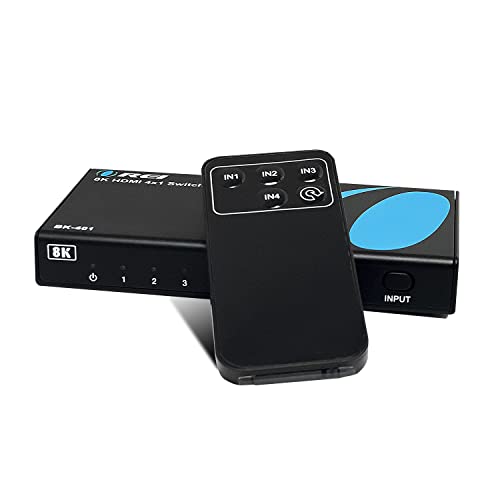
OREI built this switch around full 18Gbps bandwidth, which supports 4K at 60Hz with HDR metadata intact. That matters for anyone running a current game console alongside a 4K Blu-ray player on the same display. An EDID management feature helps prevent resolution mismatches between older and newer connected devices.
Pros
- Full 4K60 HDR bandwidth support
- EDID management reduces resolution conflicts
- Compact metal housing
Cons
- Only 3 input ports
- Remote range is shorter than the Kinivo’s

J-Tech Digital 4×1 HDMI Switch
This switch adds Audio Return Channel support, which lets a connected soundbar pull audio back through the same HDMI line. Four ports cover a typical mix of a console, streaming box, and cable box without running out of room. J-Tech Digital’s build has a reputation for consistent long-term reliability in enthusiast home theater forums.
Pros
- ARC support for soundbar audio return
- Four ports fit most setups
- Auto-detect switches without a remote
Cons
- 4K is limited to 30Hz, not full 60Hz
- Boxier housing than some rivals
Zettaguard ZW410-EDID
Zettaguard keeps this switch focused on dependable basic switching rather than extra features, which keeps the price down. Manual EDID settings help it pair correctly with older displays that otherwise negotiate resolution incorrectly. A simple button-press interface skips the need to pair a remote at all.
Pros
- Affordable for a 4-port switch
- EDID settings help with older displays
- No remote pairing required
Cons
- No remote control included
- Manual button switching only

Avedio Links 4K HDMI Switch 3×1
A smaller housing than most switches here makes this a fit for crowded media cabinets with limited shelf space. It still supports 4K at 30Hz, which covers most streaming and cable sources even if it falls short of high frame rate gaming. A pigtail HDMI cable design skips a separate output cable entirely.
Pros
- Compact size fits tight spaces
- Built-in output cable saves a connector
- Includes a remote
Cons
- Only 3 input ports
- 4K capped at 30Hz limits fast-motion gaming

SGEYR 4K60Hz 3×1 HDMI Switch
SGEYR targets gamers specifically, supporting full 4K at 60Hz across all three inputs for console and PC sources. Auto-switching detects which device just powered on without needing a manual button press. A smaller three-port count keeps the price lower than switches with full HDR pass-through on more ports.
Pros
- Full 60Hz at 4K for smooth gaming motion
- Auto-detect switching
- HDR10 pass-through included
Cons
- Only 3 ports limits total connected devices
- No ARC support for soundbar audio return

Portta 4K 4×2 HDMI Matrix Switch
Unlike a standard switch, this matrix version can send any of four sources to either of two connected displays independently. That fits setups running both a TV and a projector off the same source library. The tradeoff is a higher price and a more complex remote layout than a simple switch needs.
Pros
- Matrix routing sends sources to two displays
- Useful for TV and projector combo setups
- Remote covers all routing combinations
Cons
- More expensive than a standard switch
- 4K capped at 30Hz, not full 60Hz
How they compare
| # | Model | Ports | Best for | Score | Price |
|---|---|---|---|---|---|
| 1 | Kinivo 501BN 5-Port HDMI Switch | 5 input, 1 output | Best overall | 9.0 | Check price |
| 2 | OREI 4K60 HDMI Switch | 3 input, 1 output | Best for 4K HDR sources | 8.8 | Check price |
| 3 | J-Tech Digital 4×1 HDMI Switch | 4 input, 1 output | Best for mixed source types | 8.5 | Check price |
| 4 | Zettaguard ZW410-EDID | 4 input, 1 output | Best budget | 8.1 | Check price |
| 5 | Avedio Links 4K HDMI Switch 3×1 | 3 input, 1 output | Best compact option | 7.9 | Check price |
| 6 | SGEYR 4K60Hz 3×1 HDMI Switch | 3 input, 1 output | Best for gaming setups | 7.8 | Check price |
| 7 | Portta 4K 4×2 HDMI Matrix Switch | 4 input, 2 output | Best for dual-display setups | 7.7 | Check price |
What to look for
What an HDMI Switch Actually Does and Why Bandwidth Matters An HDMI switch lets several source devices share one input on a TV or receiver without unplugging cables. Bandwidth rating determines whether a switch can pass full 4K at 60Hz with HDR, or whether it silently downgrades the signal. Checking a switch’s Gbps rating against your most demanding source, usually a current game console or 4K Blu-ray player, avoids picture quality surprises after installation.
Best for Simple Cable and Streaming Box Setups Older streaming boxes, cable boxes, and most 1080p sources work fine on a switch like the Kinivo 501BN or Zettaguard ZW410, since neither needs full 4K bandwidth. Auto-switching on power-up saves a step for anyone who does not want to pick up a remote. These setups rarely need ARC or matrix routing, so a basic switch keeps cost down without losing functionality.
Best for Gaming and 4K HDR Home Theaters Current-generation consoles and 4K Blu-ray players need full 18Gbps bandwidth to pass 4K at 60Hz with HDR intact, which is where the OREI 4K60 and SGEYR switches earn their place. EDID management becomes more important here too, since mismatched resolution negotiation between a console and an older AV receiver can cause a blank screen until EDID settings are corrected manually.
When a Matrix Switch Makes More Sense Than a Standard One Households running a source library across two displays, such as a living room TV and a bedroom monitor or projector, outgrow a standard switch’s one-output design. The Portta 4×2 matrix switch solves that by routing any input independently to either output. This setup costs more and adds remote complexity, so it only pays off once you actually need two separate displays active from the same source pool.
Good to know
Can an HDMI switch support 4K and 1080p sources at the same time?
Yes, most switches handle mixed resolution sources fine, since each input negotiates its own resolution independently with the connected display.
Do HDMI switches need their own power source?
Some do, like the Kinivo 501BN which needs USB power, while others draw enough power through the HDMI connection itself to skip a separate power cable.
What does EDID management do on an HDMI switch?
EDID controls how a source device negotiates resolution and audio format with a display. Manual EDID settings help when an older display and a newer 4K source disagree on the correct resolution automatically.
Is ARC support necessary on an HDMI switch?
Only if a soundbar or AV receiver needs to pull audio back through the same HDMI connection rather than using a separate audio cable or optical connection.
Why does my 4K HDMI switch show a black screen sometimes?
This usually points to an EDID mismatch or insufficient bandwidth rating for the connected source and display combination, which manual EDID switches on models like the OREI can resolve.
Can an HDMI switch handle gaming without input lag?
Quality switches add negligible delay, though checking for full bandwidth support at your console’s target resolution and frame rate avoids any signal renegotiation delay during fast scenes.
How many ports do I need on an HDMI switch?
Count your actual source devices first. Three ports cover a console and streaming box with room to spare, while four or five ports suit households layering in a cable box and a Blu-ray player too.
Does a matrix HDMI switch cost much more than a standard switch?
Generally yes, since matrix switches like the Portta 4×2 need more internal switching hardware to route sources independently to multiple outputs.
Will an HDMI switch work with a soundbar connected through ARC?
Only if the switch explicitly lists ARC support, such as the J-Tech Digital 4×1, since standard switches do not pass the return audio channel.
Do I need a remote with an HDMI switch, or can I switch manually?
A remote is convenient but not required. Several switches here, including the Zettaguard ZW410, rely on a front panel button instead.
Our take
The Kinivo 501BN remains the safest pick for typical cable, streaming, and older console setups where 1080p is enough. Anyone running a current game console or 4K Blu-ray player should choose the OREI 4K60 Switch instead, since full bandwidth support avoids a silent resolution downgrade. Households needing two independent displays from one source pool should look at the Portta 4×2 matrix switch rather than a standard one.
Marcus Chen
Marcus covered consumer electronics for enthusiast tech publications for six years before joining ChoiceCrest. He specializes in translating manufacturer spec sheets into plain-language buying advice, with a focus on audio, computing accessories and smart-home gear.

