GPS Navigation Units Worth Adding to Your Vehicle
Most drivers should choose the Garmin DriveSmart 76 for its bright 7 inch screen, voice control and live traffic. Budget shoppers do well with the Garmin Drive 53, and the TomTom GO Discover suits anyone who prefers TomTom’s mapping and Wi-Fi updates.
Most cars are best served by the Garmin DriveSmart 76, with the Garmin Drive 53 covering the same job for less and the TomTom GO Discover appealing to drivers who prefer TomTom’s routing. Each keeps working where phone signal does not, still the main reason to own one.
Choosing gets tricky because units split by vehicle type rather than by price. A car unit will happily route a 13 foot high motorhome under an 11 foot bridge, while a trucking unit adds regulations a car driver never needs. We compared screen size and readability, offline map coverage, how traffic data arrives, vehicle profile support and what owners report about mount stability.
Our top picks

Garmin DriveSmart 76
A 7 inch high resolution display stays readable in daylight, and voice control lets you set a destination without touching the unit. Live traffic arrives through the Garmin Drive app on a paired phone, alongside alerts for sharp curves, speed changes and school zones. Owners report the larger screen is the single upgrade they notice most over a 5 inch unit.
Pros
- Large, bright display that beats a phone mount
- Voice control works without touching the unit
- Free lifetime map updates
Cons
- Needs a paired phone for live traffic
- 7 inch body takes real windscreen space

Garmin Drive 53
Voice control and Bluetooth calling are gone, but the essentials remain: preloaded maps, a clear 5 inch display, driver alerts and TripAdvisor points of interest. This is the unit to buy for reliable offline navigation and nothing else. Based on specifications it covers the same map region as units costing considerably more.
Pros
- Straightforward and quick to learn
- Compact enough for a small windscreen
- Free map updates included
Cons
- No voice control or hands-free calling
- 5 inch screen is small for older eyes
TomTom GO Discover
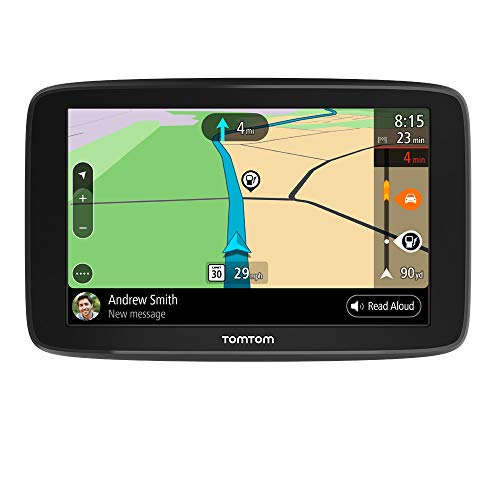
Maps and software update over the unit’s own Wi-Fi connection instead of a computer, removing the most annoying part of owning a GPS. TomTom Traffic is well regarded for accurate arrival times, and the interface uses larger tap targets than Garmin’s. Owners report the world map option is useful for anyone who drives across borders.
Pros
- Updates over Wi-Fi with no computer needed
- Strong traffic and arrival time accuracy
- Large, legible interface
Cons
- Traffic service renews after the included period
- Fewer vehicle-specific profiles than Garmin

Garmin dezl OTR700
Routing here accounts for truck height, weight, length and hazardous load restrictions, plus a directory of truck-friendly stops and load-to-dock guidance. A 7 inch screen and custom truck alerts for bridge heights and sharp curves make this a working tool rather than a car accessory. Owners report the truck parking database sees daily use on the road.
Pros
- Routing respects legal truck restrictions
- Extensive truck stop and service data
- Clear warnings for low clearances
Cons
- Overkill for ordinary car drivers
- Truck data needs regular updating

Garmin RV 795
Motorhome or trailer dimensions get factored into every route, avoiding low bridges, tight turns and weight-restricted roads that a car unit ignores entirely. Campground directories from major RV networks come built in, alongside a driving-and-arrival planner for long trips. Based on specifications this is the safer choice for anything taller than a van.
Pros
- Avoids clearance and weight hazards
- Built-in campground listings
- Voice control included
Cons
- A bigger outlay than an equivalent car unit
- Profile must be set accurately to be useful

Garmin DriveCam 76
This is essentially the DriveSmart 76 with an integrated dash cam, removing a second device and cable from the windscreen. It records loop footage, saves incident clips automatically and adds forward collision and lane departure warnings. Owners report the combined unit looks neater, though a dedicated dash cam still records better night footage.
Pros
- One mount and one cable instead of two
- Automatic incident clip saving
- Full DriveSmart navigation feature set
Cons
- Night video trails dedicated dash cams
- Camera angle is tied to navigation viewing angle

Garmin Overlander
Built for tracks rather than tarmac, this unit pairs a rugged housing with topographic mapping, public land boundaries and offline trail data for overlanding and remote travel. On-road navigation still works, including RV size profiles, so it doubles as a highway unit between trailheads. Its specialist outlay only makes sense for drivers who genuinely leave paved roads.
Pros
- Genuinely useful off pavement
- Rugged, water resistant build
- Works as a road unit as well
Cons
- Highest outlay in this group
- Feature set is wasted on pure road drivers
The lineup, side by side
| # | Model | Screen | Best for | Score | Price |
|---|---|---|---|---|---|
| 1 | Garmin DriveSmart 76 | 7 inch capacitive touchscreen | Best overall | 9.4 | Check price |
| 2 | Garmin Drive 53 | 5 inch touchscreen | Best value | 9.2 | Check price |
| 3 | TomTom GO Discover | 6 or 7 inch HD touchscreen by version | Best alternative mapping | 9.0 | Check price |
| 4 | Garmin dezl OTR700 | 7 inch touchscreen | Best for truck drivers | 8.8 | Check price |
| 5 | Garmin RV 795 | 7 inch touchscreen | Best for RVs and towing | 8.6 | Check price |
| 6 | Garmin DriveCam 76 | 7 inch touchscreen | Best with a dash cam | 8.3 | Check price |
| 7 | Garmin Overlander | 7 inch rugged glass touchscreen | Best for off-road use | 8.0 | Check price |
How to choose
How do I match a GPS unit to my vehicle type? The single biggest mistake is buying a car unit for a tall or heavy vehicle. Car navigation has no idea a motorhome stands 12 feet high or a rig weighs 40 tons, and it will route straight into a bridge strike or a weight-restricted road. RV, trailer or commercial drivers should start with the dezl or RV models and treat car units as out of scope.
Is a bigger GPS screen worth it? Owners consistently report the jump from a 5 inch to a 7 inch display as the upgrade they notice most, since junction views, lane guidance and street names become readable at a glance. Weigh that against windscreen real estate and local laws on obstruction. A 6 inch unit is a solid compromise in a smaller car.
How do GPS map and traffic updates actually work? Garmin units generally update maps through a computer or the Garmin Drive app, and free lifetime map updates are common. TomTom’s GO Discover downloads over its own Wi-Fi, which many owners find simpler. Live traffic varies too, since some units use a paired phone’s data connection while others use a built-in receiver.
When does a dedicated GPS beat a phone for navigation? Phone navigation works well with signal and a charged battery. A dedicated unit wins in rural dead zones, on long drives where the phone is needed for calls, in vehicles where the phone stays out of reach, and for anything needing size-aware routing. Buy one for those reasons rather than city driving alone.
Good to know
Do GPS navigation units still work without internet or cell service?
Yes, and that is their main advantage. Maps are stored on the device and positioning comes from satellites, so routing works in canyons, deserts and rural areas with no signal at all. Only live traffic, weather and search suggestions need a data connection.
Are lifetime map updates really free?
On most current Garmin car units, yes, for the useful life of the device. Traffic services and speed camera databases are more often subscription based, and TomTom typically includes a traffic period that renews later. Check the specific listing rather than assuming, since terms differ by model.
How accurate are GPS arrival time estimates?
With live traffic connected, both Garmin and TomTom are usually within a few minutes on a typical commute. Without traffic data, estimates rely on posted speed limits and run optimistic in rush hour. TomTom in particular is well regarded by owners for arrival accuracy.
Can I use a car GPS unit in an RV?
You can, but should not rely on it. A car unit does not know height, weight or length, so it will route under low bridges and down roads too tight to turn. The Garmin RV 795 exists precisely because that gap causes real damage.
Suction mount or adhesive mount: which holds better?
Suction cups are the norm and work fine on clean glass, though they let go in extreme heat or cold. Owners who hit that problem switch to a dashboard adhesive disc or a friction-weighted dash mount. Cleaning the glass with alcohol before mounting fixes most complaints.
Do GPS units warn about speed cameras and red light cameras?
Many do, either built in or as a subscribed database. Availability and legality vary by region, so check local rules first. Driver alerts for school zones, sharp curves and sudden speed limit drops are standard on the Garmin picks here regardless.
Is a combined navigation and dash cam unit a good idea?
It keeps the windscreen tidy, and the Garmin DriveCam 76 does both competently. The camera has to point where the navigation screen is comfortable to view, and dedicated dash cams still record better in low light. Keep them separate if dash cam footage matters for insurance.
How long do GPS navigation units typically last?
Owners commonly report five to eight years of use, with the internal battery weakening first. That matters little since the unit runs from vehicle power anyway. The bigger limit is when the manufacturer stops publishing map updates for that model generation.
What is the best GPS navigation unit for towing a trailer?
The Garmin RV 795 routes by height, weight and length, avoiding the low bridges and tight turns that damage tall or long vehicles.
Our pick
For everyday car use, the Garmin DriveSmart 76 is the unit to buy, with a screen and voice control that make it easier to live with than a phone on a vent mount. The Garmin Drive 53 covers the same core job for less, and the TomTom GO Discover is worth a look for its Wi-Fi updates. Anyone driving an RV or a truck should skip the car units entirely and go straight to the RV 795 or the dezl OTR700.
Tony Russo
Tony trained as an automotive technician and spent years in service and parts retail before moving into writing. He focuses on garage tools, car care products and accessories from a hands-on maintenance perspective.