Top Gaming SSDs for Fast Load Times and Smooth Play
The Samsung 990 PRO is the top pick for most gamers, offering blazing PCIe 4.0 speeds and excellent reliability, but its premium price may be overkill for budget builds. For those seeking value, the Crucial P3 Plus provides solid performance at a lower cost, though it lacks DRAM. Meanwhile, the WD_BLACK SN850X stands out for its gaming-focused features and high endurance.
Upgrading to an SSD is the single most impactful change for gaming performance. Load times shrink, texture pop-in disappears, and system responsiveness soars. But not all SSDs are created equal for gaming.
This roundup compares the best gaming SSDs currently on the market. We focused on PCIe 4.0 and 3.0 models that offer the best balance of speed, capacity, and price for gamers.
What matters most
The top picks, ranked

Samsung 990 PRO
The Samsung 990 PRO is a PCIe 4.0 NVMe SSD that delivers near-maximum interface speeds. It uses Samsung’s in-house controller and V-NAND technology, offering exceptional sequential read/write speeds up to 7,450/6,900 MB/s. Gamers will appreciate its low latency and high random read/write performance, which translates to faster level loading and smoother open-world streaming. The drive also features a nickel-coated controller for efficient heat dissipation, ensuring consistent performance during long gaming sessions. With capacities up to 4TB, it’s a top choice for serious gamers who demand the best.
Pros
- Exceptional performance
- High endurance
- Reliable brand
Cons
- Premium price
- Requires heatsink for best performance on some boards

WD_BLACK SN850X
The WD_BLACK SN850X is built with gamers in mind. It offers PCIe 4.0 speeds up to 7,300 MB/s read and 6,600 MB/s write, and comes with exclusive gaming features like Game Mode 2.0, which helps reduce latency and improve frame pacing. Available in capacities up to 4TB, it’s perfect for storing large game libraries. The drive also has a robust heatsink option for PlayStation 5 compatibility. With a high endurance rating and a five-year warranty, it’s a dependable choice for enthusiasts.
Pros
- Gaming-specific features
- High capacity options
- Excellent performance
Cons
- Can run hot without heatsink
- Slightly pricey

Crucial P3 Plus
The Crucial P3 Plus is a PCIe 4.0 NVMe SSD that offers impressive speeds for its price. It delivers sequential reads up to 5,000 MB/s and writes up to 4,200 MB/s, which is plenty for gaming. Available in capacities up to 4TB, it provides ample space for game libraries. The drive uses QLC NAND, which is less durable than TLC, but for casual gaming, it’s a cost-effective solution. It’s also backed by Crucial’s reputation for reliability and a five-year warranty.
Pros
- Affordable
- Good PCIe 4.0 performance
- Large capacity options
Cons
- QLC NAND lower endurance
- Lacks DRAM

Sabrent Rocket 4 Plus
The Sabrent Rocket 4 Plus is a high-performance PCIe 4.0 NVMe SSD that uses TLC NAND and a Phison controller. It achieves sequential speeds up to 7,100 MB/s read and 6,600 MB/s write. The drive is known for its excellent sustained write performance, making it ideal for content creators who also game. It comes with a heatsink option and is available up to 8TB, offering massive storage capacity. With a high endurance rating, it’s built to last.
Pros
- Very high endurance
- Sustained performance
- Large capacity options
Cons
- Can be expensive
- Heatsink may be needed
Seagate FireCuda 530
The Seagate FireCuda 530 is a PCIe 4.0 NVMe SSD that excels in gaming consoles and PCs. It delivers sequential read speeds up to 7,300 MB/s, and its write speeds reach 6,900 MB/s. The drive is built with TLC NAND and has a high endurance rating, making it reliable for heavy use. It comes with a integrated heatsink option that is specifically designed for the PlayStation 5, ensuring compatibility and optimal thermal management. With capacities up to 4TB, it’s a top pick for console gamers.
Pros
- Excellent performance
- PS5 ready with heatsink
- High reliability
Cons
- Premium pricing
- Heatsink version may not fit all PCs

Kingston KC3000
The Kingston KC3000 is a PCIe 4.0 NVMe SSD that offers top-tier speeds of up to 7,000 MB/s read and 7,000 MB/s write. It uses TLC NAND and features a low-profile graphene heat spreader, making it suitable for laptops and slim builds. Available in capacities up to 4TB, it provides a great balance of performance and capacity. The drive is also backed by a five-year warranty and offers solid endurance ratings.
Pros
- Fast write speeds
- Slim design
- Good value
Cons
- No built-in heatsink
- Warranty can be tricky
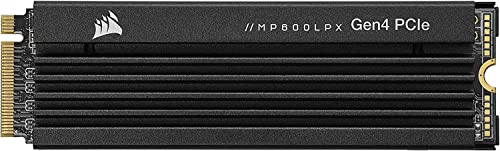
Corsair MP600 PRO LPX
The Corsair MP600 PRO LPX is a PCIe 4.0 NVMe SSD with a low-profile design that includes a pre-installed aluminum heatsink. It offers sequential speeds up to 7,100 MB/s read and 5,800 MB/s write. The drive is available in capacities up to 4TB and is compatible with the PlayStation 5. Its compact size makes it ideal for small form factor PCs and laptops. With a five-year warranty, it’s a reliable option for gamers who need performance in tight spaces.
Pros
- Low-profile heatsink
- PS5 compatible
- Good thermal performance
Cons
- Write speeds slightly lower
- Heatsink not removable
How they compare
| # | Model | Interface | Best for | Score | Price |
|---|---|---|---|---|---|
| 1 | Samsung 990 PRO | PCIe 4.0 x4 NVMe | Top-tier performance and reliability | 9.6 | Check price |
| 2 | WD_BLACK SN850X | PCIe 4.0 x4 NVMe | Gaming-specific features and high capacity | 9.4 | Check price |
| 3 | Crucial P3 Plus | PCIe 4.0 x4 NVMe | Budget-conscious gamers seeking NVMe speed | 8.8 | Check price |
| 4 | Sabrent Rocket 4 Plus | PCIe 4.0 x4 NVMe | High endurance and sustained performance | 9.0 | Check price |
| 5 | Seagate FireCuda 530 | PCIe 4.0 x4 NVMe | PS5 expansion and heavy gaming | 9.2 | Check price |
| 6 | Kingston KC3000 | PCIe 4.0 x4 NVMe | Versatile high-speed storage | 8.9 | Check price |
| 7 | Corsair MP600 PRO LPX | PCIe 4.0 x4 NVMe | Compact builds and consoles | 8.5 | Check price |
Common questions
Do I need a PCIe 4.0 SSD for gaming?
Not necessarily. Most games load faster on any NVMe SSD, but PCIe 4.0 offers faster speeds for future titles and heavy multitasking. If your motherboard supports PCIe 4.0, it’s worth the investment for longevity.
Will an SSD improve my FPS?
No, an SSD does not directly increase FPS. It reduces loading times and eliminates stutter caused by slow data streaming, which can make gameplay feel smoother, but frame rates are determined by your GPU and CPU.
What is the best capacity for a gaming SSD?
For a gaming PC, 1TB is the minimum recommended, as modern games can take up over 100GB each. 2TB is ideal if you have a large library, and 4TB is for enthusiasts who want to store everything without deleting.
Can I use a PCIe 4.0 SSD in a PCIe 3.0 slot?
Yes, PCIe 4.0 SSDs are backward compatible with PCIe 3.0 slots, but they will run at PCIe 3.0 speeds. The drive will still perform well, but you won’t get the full speed advantage.
How do I install an M.2 SSD in my PC?
Locate the M.2 slot on your motherboard, insert the SSD at a 30-degree angle, and secure it with a screw. Some motherboards have heatsinks that need to be removed first. Always consult your motherboard manual.
What is the difference between NVMe and SATA SSDs?
NVMe uses the PCIe interface and offers much higher speeds than SATA, which is an older interface. NVMe drives are more expensive but provide better performance for gaming and heavy workloads.
Are gaming SSDs worth it over regular SSDs?
Gaming SSDs often have higher endurance, better thermal management, and sometimes features like Game Mode. However, any reputable NVMe SSD will work well for gaming. The main difference is marketing and slightly tuned firmware.
How long does an SSD last?
SSDs can last many years, often beyond 5 years with typical usage. The endurance (TBW) rating indicates how much data can be written before failure. For gaming, you are unlikely to hit the limit before upgrading.
Do SSDs need a heatsink?
Some high-performance SSDs can throttle if they get too hot, so a heatsink is beneficial, especially in confined spaces like laptops or small form factor PCs. Many motherboards come with heatsinks, and some drives include them.
Can I use an external SSD for gaming?
You can, but external SSDs typically use USB interfaces, which are slower than internal NVMe. This can lead to longer load times. For best performance, use an internal drive. External SSDs are fine for storing games you are not playing.
The verdict
After comparing all options, the Samsung 990 PRO stands out as the best overall gaming SSD due to its top-tier performance, high endurance, and proven reliability. For budget gamers, the Crucial P3 Plus offers excellent value without sacrificing too much speed. If you own a PS5, the Seagate FireCuda 530 with heatsink is the most reliable choice. Ultimately, any of these SSDs will significantly improve your gaming experience, but the 990 PRO is the one to beat.
Marcus Chen
Marcus covered consumer electronics for enthusiast tech publications for six years before joining ChoiceCrest. He specializes in translating manufacturer spec sheets into plain-language buying advice, with a focus on audio, computing accessories and smart-home gear.


