Gaming Desks Built for More Than Just a Monitor
The Secretlab MAGNUS Pro fits most serious setups with its sit stand electric height adjustment. The Arozzi Arena Gaming Desk suits buyers wanting a curved design built for triple monitor setups. The GTRACING Computer Gaming Desk fits budget conscious buyers needing basic desk space.
The Secretlab MAGNUS Pro is the best overall pick here, combining a steel frame electric sit stand mechanism with a desktop rated for serious weight, from multiple monitors to a full PC tower. Its main limitation is a higher cost than fixed height gaming desks, since the electric motor and steel construction add real expense over a basic frame.
Gaming desks differ mainly in three areas: desktop shape and size for monitor arrangement, height adjustability for posture, and cable management built into the frame rather than added after the fact. This comparison weighs published weight capacity, desktop dimensions, and owner feedback on stability under a full gaming setup.
Our top picks

Secretlab MAGNUS Pro
Secretlab’s MAGNUS Pro uses a steel frame with dual motors to shift between sitting and standing height smoothly, rated to support a heavy multi monitor and PC setup without wobble. Built in cable management channels route power and peripheral cables cleanly under the desktop. Owners cite the stability at full height extension as noticeably better than cheaper electric desks.
Pros
- Stable at full height even under a heavy setup
- Built in cable management keeps cords organized
- Smooth electric height adjustment between sit and stand
Cons
- Higher cost than fixed height gaming desks
- Setup and assembly take longer than a basic frame
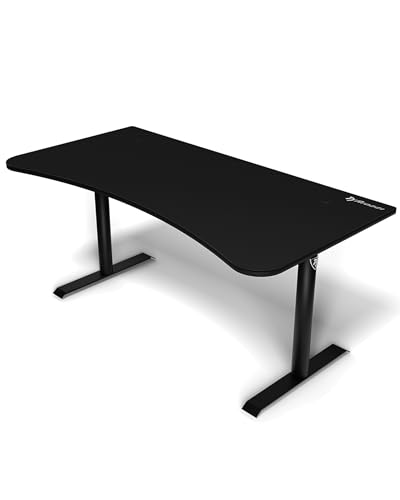
Arozzi Arena Gaming Desk
Arozzi curves the desktop to follow the natural arc of a triple monitor setup, keeping each screen roughly equidistant from a seated player rather than forcing outer monitors farther away. A carbon fiber textured surface resists scratches from sliding peripherals around during gameplay. Owners running three monitors cite the curve as genuinely improving the viewing angle compared to a flat desk.
Pros
- Curved shape suits a triple monitor arc well
- Scratch resistant carbon fiber textured surface
- Wide desktop accommodates a full gaming setup
Cons
- Fixed height with no sit stand adjustment
- Curved shape wastes some corner space compared to an L-shape

RESPAWN RSP-2020
RESPAWN designs the RSP-2020 as part of a matched furniture line, sized and styled to pair visually with its racing style gaming chairs. A reversible desktop surface offers a wood grain finish on one side and a carbon fiber look on the other. Owners who want a coordinated gaming room aesthetic cite the matched chair and desk combination as the deciding factor.
Pros
- Reversible surface offers two finish options
- Designed to visually pair with matching gaming chairs
- Compact size fits smaller rooms
Cons
- Smaller desktop than most desks in this comparison
- Fixed height with no adjustment

Eureka Ergonomic 60-Inch Gaming Desk
Eureka Ergonomic keeps the desktop flat rather than curved, favoring maximum usable surface area for keyboard, mouse, and desk accessories over a monitor specific shape. A monitor stand shelf elevates a single display while leaving desk space underneath for a keyboard tray. Owners who also use the desk for work alongside gaming cite the flat, wide layout as more versatile than a curved gaming specific shape.
Pros
- Wide flat desktop suits both gaming and work tasks
- Elevated monitor shelf improves ergonomic screen height
- Sturdy frame at a mid range price
Cons
- No height adjustment for standing use
- Monitor shelf fixed height may not suit every chair setup

Vitesse 55-Inch Carbon Fiber L-Shaped Gaming Desk
Vitesse’s L-shape wraps a desk into a room corner, splitting the surface between a main monitor area and a side wing for a laptop, controller charging station, or reference materials. A carbon fiber look surface matches the style of other gaming desks in this comparison. Owners with a corner to fill cite the L-shape as making better use of room space than a straight desk against one wall.
Pros
- L-shape makes efficient use of a room corner
- Side wing adds space for a laptop or accessories
- Scratch resistant carbon fiber surface
Cons
- Requires more total floor space than a straight desk
- Fixed height with no sit stand adjustment

GTRACING Computer Gaming Desk
GTRACING keeps the frame simple and the price low while still including a cup holder and headphone hook molded into the desktop edge. Basic cable management grommets route cords through the back of the desk. Owners setting up a first gaming desk on a tight budget cite the included accessories as a nice touch not found on similarly priced competitors.
Pros
- Lowest cost gaming desk in this comparison
- Built in cup holder and headphone hook
- Simple assembly for a first time setup
Cons
- Smaller desktop than most competitors here
- Lower weight capacity limits heavier multi monitor setups

X Rocker Dual Position Gaming Desk
X Rocker’s dual position frame converts between a standard desk height and a lower floor seating height, suited to a room where a floor gaming chair sometimes substitutes for a standard office chair. A compact footprint fits smaller bedrooms better than wider desks in this comparison. Owners who switch between a desk chair and a floor rocker setup cite the dual position frame as uniquely useful.
Pros
- Converts between standard and low floor seating heights
- Compact footprint suits smaller rooms
- Lightweight frame simplifies moving or repositioning
Cons
- Smallest desktop size in this comparison
- Lowest weight capacity among the desks compared here
Side by side
| # | Model | Height range | Best for | Score | Price |
|---|---|---|---|---|---|
| 1 | Secretlab MAGNUS Pro | Electric adjustable, sit to stand | Best overall | 9.3 | Check price |
| 2 | Arozzi Arena Gaming Desk | Curved, fixed height | Best for curved triple monitor setups | 8.9 | Check price |
| 3 | RESPAWN RSP-2020 | Flat, fixed height | Best for a racing style gaming chair pairing | 8.4 | Check price |
| 4 | Eureka Ergonomic 60-Inch Gaming Desk | Flat, fixed height | Best for a large flat workspace | 8.6 | Check price |
| 5 | Vitesse 55-Inch Carbon Fiber L-Shaped Gaming Desk | L-shaped, fixed height | Best for corner placement and dual use | 8.5 | Check price |
| 6 | GTRACING Computer Gaming Desk | Flat, fixed height | Best budget | 8.0 | Check price |
| 7 | X Rocker Dual Position Gaming Desk | Flat, dual position | Best for small spaces needing flexibility | 8.2 | Check price |
What matters most
Flat, Curved, or L-Shaped Desktop Desktop shape should follow monitor setup more than aesthetic preference. A curved desktop like the Arozzi Arena suits triple monitor arrangements by keeping outer screens closer to eye level distance. An L-shape, like the Vitesse 55-Inch, works best in a room corner and adds side space for secondary tasks. A flat desktop, the simplest and most common shape here, remains the most flexible choice for single or dual monitor setups and doubles easily as a general work desk.
Best for Standing Breaks During Long Sessions Long gaming or work sessions benefit from the option to stand periodically, which only the Secretlab MAGNUS Pro in this comparison offers through its electric sit stand mechanism. Fixed height desks keep cost down but commit a user to one posture for the full session. Anyone who already experiences back or neck strain from long sitting sessions should weigh the extra cost of an adjustable desk against the ergonomic benefit.
Best for Cable Management With Multiple Peripherals A gaming setup with a PC, multiple monitors, speakers, and peripherals generates far more cable clutter than a single laptop ever would. The Secretlab MAGNUS Pro and RESPAWN RSP-2020 both build grommet holes or dedicated channels into the frame specifically for this, rather than relying on aftermarket cable trays. Sorting cables by function, power separate from data cables, during initial setup makes future troubleshooting easier regardless of which desk is used.
Best for Small Rooms and Tight Budgets Not every setup needs a 60 inch wide desk with electric height adjustment. The GTRACING Computer Gaming Desk and X Rocker Dual Position Gaming Desk both keep footprint and cost down for a smaller bedroom or a first gaming setup. The X Rocker’s dual position frame adds unique flexibility for a room that also uses a floor style gaming chair some of the time, a scenario the other desks in this comparison do not address.
Questions worth asking
How wide a desk do I need for a dual monitor setup?
A desktop around 48 to 55 inches wide generally fits two standard monitors comfortably with some room left for a keyboard and mouse, which covers desks like the Eureka Ergonomic 60-Inch and Vitesse 55-Inch in this comparison.
Are electric standing desks worth it for gaming?
They add real ergonomic value for long sessions, letting a user change posture without leaving the setup, though the Secretlab MAGNUS Pro’s electric mechanism costs noticeably more than a fixed height alternative.
Can a gaming desk hold a full PC tower on top?
Only desks rated for higher weight capacity, like the Secretlab MAGNUS Pro at 220 pounds, comfortably support a full tower alongside monitors and peripherals. Lower capacity desks generally expect the tower to sit on the floor instead.
What is the benefit of a curved gaming desk?
A curved desktop, like the Arozzi Arena, keeps a triple monitor setup at a more consistent viewing distance across all three screens, reducing the need to turn the head as far to see the outer displays.
Do gaming desks need a cable management system?
Not strictly, but built in grommets or channels, found on the Secretlab MAGNUS Pro and RESPAWN RSP-2020, keep cables from tangling or dangling, which improves both appearance and reduces the risk of accidentally unplugging something.
How much weight can a typical gaming desk hold?
Capacity in this comparison ranges from about 90 pounds on the compact X Rocker Dual Position Desk up to 220 pounds on the Secretlab MAGNUS Pro, so matching capacity to a setup’s actual weight matters before buying.
Is an L-shaped desk better than a straight desk for gaming?
It depends on room layout. An L-shaped desk like the Vitesse 55-Inch makes good use of a corner and adds extra surface area, but it needs more total floor space than a straight desk placed against a single wall.
Our take
The Secretlab MAGNUS Pro earns the top spot for most serious setups thanks to its stable electric height adjustment and strong weight capacity. Anyone running a triple monitor arrangement should choose the Arozzi Arena Gaming Desk instead, since its curved shape fits that layout better than a flat desktop. Buyers on a tighter budget or in a smaller room still get a functional setup from the GTRACING Computer Gaming Desk.
Marcus Chen
Marcus covered consumer electronics for enthusiast tech publications for six years before joining ChoiceCrest. He specializes in translating manufacturer spec sheets into plain-language buying advice, with a focus on audio, computing accessories and smart-home gear.


