Floor tablet stands that hold steady, not wobble
VIVO Tablet Floor Stand is the steadiest all round pick, pairing a weighted steel base with a 30 to 45 inch range. CTA Digital Height-Adjustable Gooseneck Floor Stand curls over beds where a straight pole cannot reach. Lamicall Tablet Floor Stand covers plain sofa and desk duty.
VIVO Tablet Floor Stand suits home offices and kitchens, because a weighted steel base kills the bounce that ruins lighter stands. Its clamp spans roughly 7 to 13 inch tablets, and the pole climbs from seated desk height to standing counter height. No casters are fitted, so moving it means lifting the base.
Most floor stands fail in one predictable way. A light base lets the screen rock every time a finger lands on it, and every extra inch of arm reach multiplies that movement at the head. We compared published height ranges, base construction, clamp widths and rotation options, then read owner feedback about arm droop and drift during video calls.
The shortlist, ranked
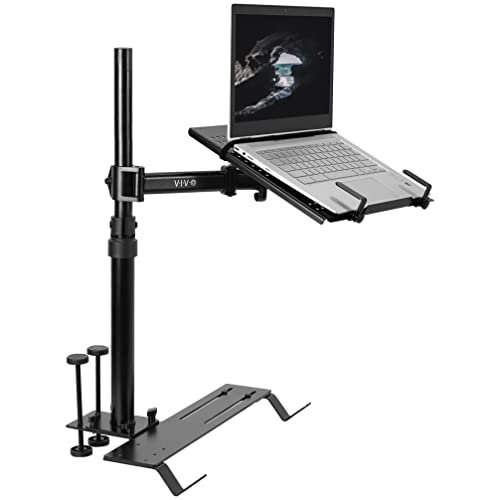
VIVO Tablet Floor Stand
Structural work here falls to a steel pole and a weighted disc rather than a long flexible neck. Clamp jaws open far enough for a 12.9 inch iPad Pro and close down onto a 7 inch slate. Loosening one collar sets the pole anywhere from a 30 inch seated desk to 45 inches for standing kitchen use.
Pros
- Weighted steel base absorbs taps without rocking
- Clamp spans small slates up to a 12.9 inch iPad Pro
- Head turns fully between portrait and landscape
Cons
- Repositioning means lifting, since no casters are fitted
- Height collar creeps downward unless firmly tightened
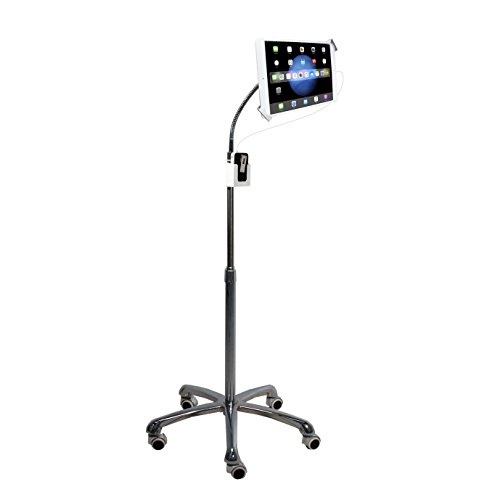
CTA Digital Height-Adjustable Gooseneck Floor Stand
Its gooseneck bends over a mattress, a sofa arm or a treadmill console. A telescoping pole handles height separately, so reach and eye level get set without one undoing the other. Sag is the price of that freedom, and a 13 inch tablet on a fully stretched neck drifts down within an hour.
Pros
- Reaches across furniture that blocks a straight pole
- Pole height and arm angle adjust independently
- Same clamp holds a phone for bedside video
Cons
- Neck droops under heavier tablets when fully extended
- Curved arm sweeps a wider floor area than a straight pole

Lamicall Tablet Floor Stand
Plain aluminium pole, ball joint head, one clamp that grips a phone or a 13 inch tablet. Assembly needs only the hex key in the box and takes a few minutes. Reach falls short of a gooseneck, so park it beside a chair rather than above a mattress.
Pros
- Aluminium pole stays rigid for how little it weighs
- Ball joint sets any viewing angle in one motion
- Single clamp covers phones and full size tablets
Cons
- Short arm will not extend over a bed
- Disc base slides on polished wood or tile

Tryone Gooseneck Tablet Floor Stand
Four folding legs spread the load instead of a single disc, and the whole stand stores flat against a closet wall. Metal runs through the core of the gooseneck, so a set angle holds rather than creeping down. Those splayed legs slide under a bed frame, bringing the screen close without moving furniture.
Pros
- Legs fold flat for storage between trips or seasons
- Metal cored arm resists the slow droop of plastic necks
- Low legs tuck under bed and sofa frames
Cons
- Thick carpet leaves it less planted than a weighted disc
- Clamp padding can leave marks on soft silicone cases

Mount-It! Anti-Theft Tablet Floor Stand
Reception counters, retail floors and booth displays need a tablet nobody can pocket. Mount-It! seals the device behind a keyed enclosure and threads the charging lead down inside the pole. Height is fixed near 47 inches, which is standing eye level for a visitor signing in.
Pros
- Keyed enclosure deters walk off theft in public rooms
- Cable runs inside the pole, out of reach of visitors
- Steel plate keeps it upright on hard commercial flooring
Cons
- Fixed height rules out seated or bedside viewing
- Enclosure accepts a narrower band of tablet sizes than a clamp

AboveTEK Tablet Floor Stand
Two pole sections and a spring loaded clamp keep the parts count down. Setup runs about five minutes and needs no separate tools. Ordinary tablets sit fine; a 13 inch model inside a rugged case will pull the head downward over weeks of use.
Pros
- Goes together in minutes with minimal hardware
- Spring clamp grips without thumbscrews to fiddle with
- Small round base tucks beside a desk leg
Cons
- Head sags under heavier tablets in thick cases
- Pole finish scratches where sections slide together

Suptek Tablet Floor Stand with Rolling Base
Casters answer the problem the rest of this group ignores: shifting a tablet from kitchen to workbench to living room. Brakes lock the wheels once the stand is parked. Its 34 to 51 inch range sits highest here, which suits recipe reading and shop manuals at standing height.
Pros
- Rolls room to room with no lifting involved
- Locking casters hold position once braked
- Reaches 51 inches for standing work
Cons
- Caster spread needs more clearance than a disc base
- Wheels catch on rug edges and thick carpet
How to pick the right one
What to look for in a floor tablet stand Stability rests on base mass and base diameter, not on how thick the pole looks. Ten inches of weighted steel counters the leverage a tablet creates three feet in the air. Reach multiplies that leverage, which is why a gooseneck stretched twelve inches moves more than a rigid pole at equal height. Check the stated device weight limit as well, since a 12.9 inch tablet in a folio case weighs roughly double a small Android slate. Clamp range, rotation and cable routing then decide how livable the stand is day to day.
Gooseneck vs straight pole: which arm should you pick? Position is what a gooseneck buys you: over a mattress, past a sofa arm, above a treadmill console. Rigidity is what a straight pole buys, and that matters when you type, sketch or tap repeatedly. CTA Digital and Tryone take the flexible route here, while VIVO and Lamicall stay stiff. Watching video makes the slight sag of a gooseneck easy to forgive. Constant touch input does not, so interactive users should stay with the pole.
Best for bedside reading, kitchen counters and video calls Bedside viewing needs an arm that clears a mattress, which favours the Tryone design whose legs slide under the frame. Kitchen work wants height near standing eye level and a base that wipes clean, the pattern VIVO follows. Calls need the camera at face height on a head that will not drift mid sentence, so a ball joint or rotating clamp beats a soft neck. Garages and craft rooms reward the Suptek rolling base, since the tablet follows the job. Match the stand to the room you actually use it in, not the one in the product photo.
Case fit, charging and stands for public spaces Measure your tablet with the case on. Clamp ranges are quoted for bare devices, and a rugged shell can add half an inch per side. Note where the charging port sits relative to the clamp arms too, because a bottom grip often blocks USB-C in portrait orientation. Cable clips along the pole keep a lead out of walkways. Shared and public rooms raise the bar past tidiness, and that is where the keyed Mount-It! enclosure separates itself from every consumer clamp here. Anyone wanting one stand for both home and a booth should buy two instead, since fixed kiosk height is miserable from a sofa.
Side by side
| # | Model | Height range | Best for | Score | Price |
|---|---|---|---|---|---|
| 1 | VIVO Tablet Floor Stand | Adjustable, roughly 30 to 45 inches | Best overall | 9.4 | Check price |
| 2 | CTA Digital Height-Adjustable Gooseneck Floor Stand | Adjustable, roughly 30 to 51 inches | Best for adjustability | 9.2 | Check price |
| 3 | Lamicall Tablet Floor Stand | Adjustable, roughly 26 to 44 inches | Best value | 9.0 | Check price |
| 4 | Tryone Gooseneck Tablet Floor Stand | Adjustable, roughly 30 to 51 inches | Best for bedside use | 8.8 | Check price |
| 5 | Mount-It! Anti-Theft Tablet Floor Stand | Fixed kiosk height, around 47 inches | Best for kiosk and trade show use | 8.6 | Check price |
| 6 | AboveTEK Tablet Floor Stand | Adjustable, roughly 27 to 43 inches | Best budget | 8.3 | Check price |
| 7 | Suptek Tablet Floor Stand with Rolling Base | Adjustable, roughly 34 to 51 inches | Best for moving between rooms | 8.0 | Check price |
Questions worth asking
What is the best floor tablet stand for an iPad Pro?
VIVO Tablet Floor Stand carries a 12.9 inch iPad Pro on a weighted steel base without drifting. Skip long goosenecks at that size, because the extra mass pulls a stretched arm downward.
Do floor tablet stands wobble when you tap the screen?
Light plastic bases do, badly. Weighted steel and a shorter arm cure most of it. At matching height, a gooseneck will always move more than a rigid pole.
Which floor tablet stand is best for bed?
Tryone Gooseneck Tablet Floor Stand fits bedside use, since its folding legs pass under the bed frame and the metal cored arm holds an angle over a mattress.
How tall should a tablet floor stand be?
Roughly 30 inches suits seated use beside a chair or sofa. Standing use in a kitchen or workshop wants 44 inches upward. A 30 to 51 inch range covers both without compromise.
Can a floor stand hold a tablet in portrait and landscape?
Yes, provided the head rotates. VIVO and Suptek both rotate fully at the clamp. Ball joint heads such as the Lamicall manage it too, though the tilt needs resetting after each turn.
Gooseneck vs straight pole tablet stand: which is better?
Gooseneck wins for reach over furniture and lying down viewing. Straight pole wins for typing, drawing and calls, because it stays rigid under repeated touch.
Are floor tablet stands good for video calls?
They work when the head sits at face height and locks firmly. Pick a rigid pole so the camera holds framing, and confirm the clamp does not cover the front lens.
How do I keep a tablet charged on a floor stand?
Route the cable along the pole with the supplied clips, and verify the clamp arm clears the charging port. Internal routing, as on the Mount-It! kiosk model, hides the lead completely.
Is a rolling tablet stand worth it?
Worth it if the tablet follows you between kitchen, garage and desk. Suptek adds braked casters for that. Anyone leaving the stand in one corner gains nothing and loses floor clearance.
Our take
Buy the VIVO Tablet Floor Stand for a home or office: weighted steel and a rigid pole remove the sway that spoils cheaper stands, and 30 to 45 inches covers a desk chair or a kitchen counter. Readers who watch from bed should take the CTA Digital gooseneck instead and accept a little droop for the reach. Reception areas and trade show booths need the keyed Mount-It! model, whatever the consumer picks offer.
Dana Whitfield
Dana spent eight years buying and merchandising for a regional kitchenware retailer before moving into editorial work. She has handled thousands of SKUs across cookware, small appliances and kitchen organization, and focuses on the practical differences that matter once a product is actually in daily use.