Top Flight Sticks for Gamers Who Want Real Control
The Thrustmaster T.16000M FCS is the best flight stick for most gamers because it offers precise hall-effect sensors, a comfortable grip, and a throttle unit at a reasonable price. Its main limitation is the plastic construction, which may not feel as durable as metal alternatives.
Flight simulators demand precise control, and a good flight stick can make all the difference. Whether you’re piloting a fighter jet in DCS World or navigating a spaceship in Star Citizen, the right stick provides the immersion and accuracy you need.
Our roundup covers sticks for every budget and skill level. We’ve compared specifications, read user reviews, and considered ergonomic design to help you choose the best flight stick for your gaming setup.
What to look for
The top picks, ranked

Thrustmaster T.16000M FCS Flight Pack
The Thrustmaster T.16000M FCS is a popular choice among flight sim enthusiasts. It uses Hall-effect sensors for accurate and durable input. The package includes a throttle and rudder pedals, making it a complete setup for beginners and intermediate players.
Pros
- Accurate and durable sensors
- Complete setup with throttle and pedals
- Comfortable grip for long sessions
Cons
- Plastic build feels less premium
- Software setup can be complex

Logitech Extreme 3D Pro
The Logitech Extreme 3D Pro is a classic budget stick that has been around for years. It offers a twist handle for rudder control and a throttle lever on the base. It’s a great entry point for flight sims without breaking the bank.
Pros
- Very affordable
- Simple plug and play setup
- Twist rudder control
Cons
- Less accurate than pricier options
- Feels lightweight and plastic

Thrustmaster Hotas X
The Thrustmaster Hotas X is a flight stick and throttle combo that works on both PC and PlayStation 4. It has a unique design that can be separated for a more realistic setup. Owners appreciate its affordability and console compatibility.
Pros
- Works on PC and PS4
- Integrated throttle and rudder twist
- Good value for the price
Cons
- Not compatible with Xbox
- Build could be sturdier

Logitech G X56 H.O.T.A.S.
The Logitech G X56 is a high-end HOTAS system with a separate throttle and stick. It features a large number of buttons, switches, and mini joysticks for extensive control mapping. It’s ideal for complex simulators like DCS and Elite Dangerous.
Pros
- Excellent button layout and customization
- Smooth and accurate movement
- Adjustable resistance
Cons
- Large footprint requires desk space
- Price is on the higher side
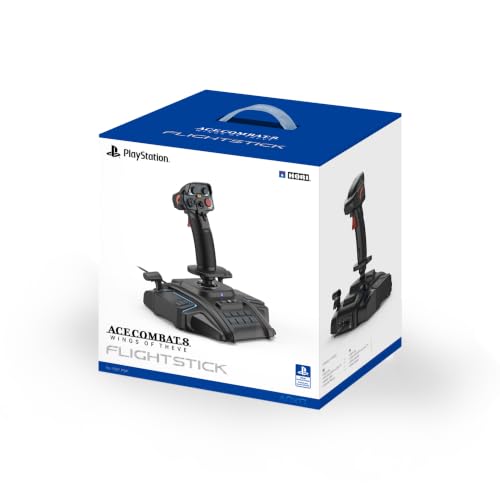
HORI Flight Stick for PS4
The HORI Flight Stick is an official licensed product for PS4 and PC. It’s designed for flight games like Ace Combat 7. It features a sturdy build, comfortable grip, and a throttle lever. It lacks advanced features but fulfills its purpose well.
Pros
- Official license for PS4
- Solid construction
- Simple setup
Cons
- No Hall-effect sensor
- Limited button count
VKB Gladiator NXT EVO
The VKB Gladiator NXT EVO is a top-tier flight stick known for its exceptional build quality, precision, and modularity. It uses a contactless sensor system and offers customizable cams and springs. It’s a favorite among hardcore flight simmers.
Pros
- Superb build quality and precision
- Customizable resistance and cams
- Excellent ergonomics
Cons
- Expensive
- Throttle not included

Turtle Beach VelocityOne Flight
The Turtle Beach VelocityOne Flight is an integrated flight deck with a yoke, throttle quadrant, and rudder pedals all in one unit. It’s designed for Xbox Series X|S and PC, offering a console-like experience with multiple displays and controls.
Pros
- Works with Xbox and PC
- All-in-one design with pedals
- Lots of programmable controls
Cons
- Large and heavy
- High price point
How they compare
| # | Model | Sensor | Best for | Score | Price |
|---|---|---|---|---|---|
| 1 | Thrustmaster T.16000M FCS Flight Pack | Hall-effect magnetic sensors | Best overall for most flight sim gamers | 9.4 | Check price |
| 2 | Logitech Extreme 3D Pro | Precision potentiometer | Best budget flight stick | 8.2 | Check price |
| 3 | Thrustmaster Hotas X | Hall-effect sensor | Best for console and PC versatility | 8.0 | Check price |
| 4 | Logitech G X56 H.O.T.A.S. | Hall-effect sensor | Best for immersive multi-function controls | 8.8 | Check price |
| 5 | HORI Flight Stick for PS4 | Potentiometer | Best for PlayStation 4 exclusive players | 8.1 | Check price |
| 6 | VKB Gladiator NXT EVO | Contactless magnetic sensor | Best premium upgrade for serious simmers | 9.0 | Check price |
| 7 | Turtle Beach VelocityOne Flight | Yoke and throttle quadrant | Best all-in-one flight control system | 8.6 | Check price |
Good to know
What is the best flight stick for beginners?
The Logitech Extreme 3D Pro is a great starting point due to its affordability and simplicity. However, if you can spend a bit more, the Thrustmaster T.16000M FCS offers better accuracy and a full HOTAS setup.
Are flight sticks worth it for casual gamers?
If you play flight sims or space games occasionally, a flight stick can enhance the experience. Even budget sticks provide more immersion than a mouse and keyboard or a gamepad.
What is a HOTAS system?
HOTAS stands for Hands On Throttle And Stick. It separates the throttle and stick into two units, allowing for more realistic control and easier access to buttons without moving your hands.
Do flight sticks work with Microsoft Flight Simulator?
Yes, most flight sticks are compatible with Microsoft Flight Simulator on PC. Some may require additional configuration, but the game supports a wide range of controllers.
Can I use a flight stick on a Mac?
Some flight sticks may have limited support on Mac. Many are designed for Windows, but a few like the Logitech Extreme 3D Pro may have drivers for Mac. Check product specifications for Mac compatibility.
What is the difference between a flight stick and a joystick?
They are essentially the same. Flight sticks are designed specifically for flight simulation, featuring a throttle and multiple buttons. Joysticks are more generic and may be used for other games.
How many buttons do I need on a flight stick?
It depends on the games you play. For basic flight, 10-12 buttons are usually sufficient. For complex simulators, more buttons and switches allow you to map essential functions without using a keyboard.
Are wireless flight sticks available?
Most flight sticks are wired to ensure low latency and reliable connection. Wireless options exist but are rare and may have latency issues. For competitive play, wired is recommended.
How do I calibrate a flight stick?
Most modern flight sticks are plug and play. You can calibrate them in the operating system’s game controller settings. Some sticks come with software for advanced calibration and button mapping.
What is the best flight stick for DCS World?
For DCS World, a high-end stick like the VKB Gladiator NXT EVO or the Logitech G X56 is recommended due to the many controls needed for aircraft systems. The Thrustmaster T.16000M is also popular among DCS players.
Our pick
For most gamers, the Thrustmaster T.16000M FCS is the clear winner because it combines accuracy, a complete package, and a reasonable price. If you are on a tight budget, the Logitech Extreme 3D Pro will serve you well. For those who demand the best precision and quality, the VKB Gladiator NXT EVO is worth the investment.
Marcus Chen
Marcus covered consumer electronics for enthusiast tech publications for six years before joining ChoiceCrest. He specializes in translating manufacturer spec sheets into plain-language buying advice, with a focus on audio, computing accessories and smart-home gear.