Flatbed Scanners Built for Film, Photos, and Paper Alike
Epson Perfection V600 combines photo, film, and document scanning at 6400 dpi, a solid fit for most home offices. Large film archives suit the Epson Perfection V850 Pro’s dual-lens design better. Desk space tight? The Canon CanoScan LiDE 400 runs on USB power alone and folds flat.
Epson Perfection V600 tops this comparison for buyers who scan a mix of prints, negatives, and everyday paperwork. Its built-in transparency unit handles 35mm film scanning out of the box, no extra hardware required. That said, the 8.5 x 11.8 inch bed rules out oversized art prints or blueprints.
Listed optical resolution, bed dimensions, and film capability drove this comparison across current Amazon listings. Owner feedback on build quality and software reliability broke close ties between similarly specced models. Each entry below fills a different use case instead of repeating the same buyer profile.
What we recommend

Epson Perfection V600 Photo Scanner
A 6400 x 9600 dpi optical sensor pairs with a built-in transparency unit for 35mm slides and negatives. Digital ICE strips dust and scratches from film scans automatically, cutting down on post-scan editing. Owners report the same unit handles everyday paperwork and photo restoration equally well.
Pros
- Scans film and prints without extra hardware
- Digital ICE removes dust and scratches automatically
- Handles full letter-size documents at native resolution
Cons
- Bed size excludes oversized posters or artwork
- Full-resolution scans run noticeably slower than document mode
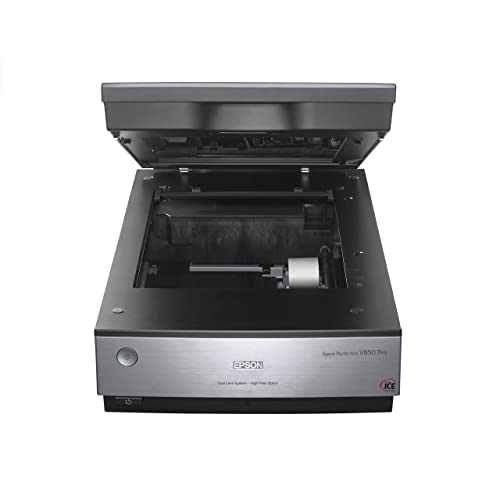
Epson Perfection V850 Pro
Dual lenses switch between standard and high-resolution optics depending on film batch size. Up to eight 35mm strips, four medium-format strips, or one 8×10 sheet load in a single pass. Photographers digitizing large archives credit the fluid mounting option with cutting Newton rings on negatives.
Pros
- Dual lens system sharpens detail on large film batches
- Fluid mounting reduces Newton rings on negative scans
- Handles medium and large format film alongside standard prints
Cons
- Price sits well above document-focused flatbed models
- Bulkier footprint needs permanent desk space

Canon CanoScan LiDE 400
USB bus power alone runs this model, so no AC adapter clutters the desk. Its body folds to about an inch thick, easing storage between scanning sessions. A 4-line color contact image sensor keeps 4800 dpi output sharp for documents and casual photos.
Pros
- Single USB cable replaces a power adapter entirely
- Folds flat for drawer storage between uses
- One-touch buttons send scans straight to PDF or cloud
Cons
- No film or negative adapter included
- Resolution ceiling trails dedicated photo scanners

Epson Expression 12000XL
A 12.2 x 17.2 inch bed swallows A3 documents, blueprints, or two letter pages side by side. Dual lenses switch between document and photo modes, while Digital ICE cleans up film scans. Design studios and archivists rely on it for oversized artwork that letter-size beds can’t hold.
Pros
- Bed size fits A3 pages and oversized art in one pass
- Dual lens keeps text and photo scans equally sharp
- Digital ICE removes dust from film scans too
Cons
- Large chassis demands significantly more desk space
- Overkill for buyers scanning only letter-size paper
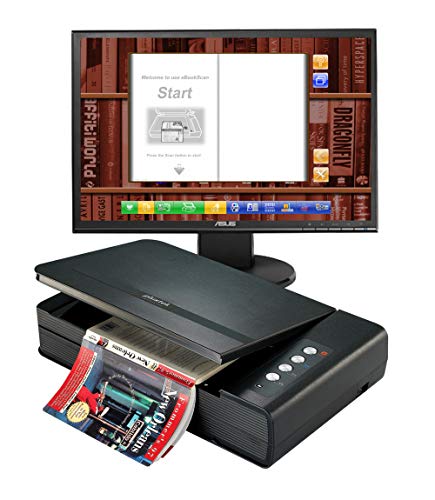
Plustek OpticBook 4800
Plustek’s BookEdge design sets the scan glass flush with the case edge, so spine-adjacent text avoids shadow loss. A 1200 x 1200 dpi sensor favors text clarity over photo-grade detail. Bundled ABBYY FineReader OCR software turns scanned pages into editable, searchable text.
Pros
- Captures spine-adjacent text without shadow loss
- Bundled OCR software makes scans searchable
- Lightweight body travels well for library or archive work
Cons
- Optical resolution trails photo-focused flatbed models
- No support for scanning film or negatives

Epson Perfection V39 II
A film holder for 35mm negatives and slides ships standard, a feature many budget flatbeds skip. Its 4800 x 4800 dpi sensor covers letter-size documents and snapshot photos alike. Epson’s scan-to-cloud software routes files directly to services like Google Drive and Dropbox.
Pros
- Film holder included at a document-scanner price point
- Scan-to-cloud shortcuts skip the need for desktop software
- Compact size suits occasional home office use
Cons
- Resolution ceiling limits large photo enlargements
- Plastic film holder feels less durable than metal trays

Epson Perfection V19 II
Scanning here stays essential: letter-size bed, 4800 dpi sensor, one-touch buttons for scan, copy, and email. Skipping the film adapter found on the V39 II keeps cost down for paper-only buyers. Setup needs just a single USB cable and Epson’s bundled software.
Pros
- Costs less than film-capable models in the same lineup
- One-touch buttons simplify scan, copy, and email tasks
- Small footprint suits crowded desks
Cons
- No option to scan negatives or slides
- Plastic lid hinge feels less sturdy than pricier models
Side by side
| # | Model | Optical Resolution | Best for | Score | Price |
|---|---|---|---|---|---|
| 1 | Epson Perfection V600 Photo Scanner | 6400 x 9600 dpi | Best overall for mixed photo, film, and document scanning | 9.4 | Check price |
| 2 | Epson Perfection V850 Pro | 6400 x 9600 dpi | Best for professional photo and film restoration | 9.2 | Check price |
| 3 | Canon CanoScan LiDE 400 | 4800 x 4800 dpi | Best compact scanner for tight desk space | 8.9 | Check price |
| 4 | Epson Expression 12000XL | 2400 x 4800 dpi | Best for large-format and oversized documents | 8.7 | Check price |
| 5 | Plustek OpticBook 4800 | 1200 x 1200 dpi | Best for scanning books and bound documents | 8.6 | Check price |
| 6 | Epson Perfection V39 II | 4800 x 4800 dpi | Best budget scanner with film scanning included | 8.3 | Check price |
| 7 | Epson Perfection V19 II | 4800 x 4800 dpi | Best value for basic home document scanning | 8.0 | Check price |
What to look for
Why a Flatbed Beats a Phone Camera for Digitizing Flat glass beds keep documents and photos perfectly level, avoiding the lens distortion common in phone shots. Dedicated scanners reach 4800 to 9600 dpi optical resolution, well beyond typical phone camera output. Some models run entirely on USB bus power, trading a permanent footprint for portability. Fragile items, like old photographs, bound books, and 35mm film, stay untouched instead of being repeatedly handled.
Matching Scan Resolution to the Source Material Letter-size documents scan cleanly at 300 dpi, since text only needs enough detail for OCR or printing. Old photographs benefit from 600 to 1200 dpi, keeping enlargements sharp. Negatives and slides need 2400 dpi or higher, because the source image starts so much smaller than a print. Bit depth matters too: 48-bit color captures more shadow detail than 24-bit when restoring faded prints.
How to Scan Photos, Slides, and Negatives Without a Lab Transparency units, built into models like the Epson V600 and V850 Pro, light film from behind instead of reflecting light off it. Digital ICE reads an infrared layer alongside the visible image to detect dust and scratches, then removes them automatically. Medium and large format film needs a scanner rated for it specifically. Only the V850 Pro here accepts 8×10 sheets; smaller units cap out at 35mm strips.
Handling Books and Oversized Documents Bound books present a problem standard flatbeds can’t solve: text near the spine falls into a shadow gap. Plustek’s BookEdge design closes that gap, letting the glass sit flush with the scanner’s edge. Oversized pages need a different fix entirely. The Epson Expression 12000XL extends its bed to 12.2 x 17.2 inches, covering A3 sheets and blueprints in one pass.
Questions worth asking
What’s the difference between a flatbed and a sheet-fed scanner?
A flatbed holds an item still under a glass bed, working for books, photos, and fragile documents. A sheet-fed scanner pulls single pages through rollers, faster for stacks of loose paper but risky for anything that can’t survive the feed mechanism.
How many dpi is enough for old family photos?
600 dpi covers most 4×6 prints if you’ll only view them on screen. Enlarging beyond the original size calls for 1200 dpi or higher to avoid a blurry result.
Can a flatbed scanner digitize 35mm slides and negatives?
Only models with a built-in transparency unit or backlight, such as the Epson V600 or V39 II, scan film properly. Standard flatbeds without that feature produce a dark, low-contrast image from backlit film.
Does scanning damage a book’s spine?
Standard flatbeds require pressing the book flat to bring the spine area into focus, which can strain older bindings. A BookEdge-style scanner like the Plustek OpticBook 4800 avoids that by placing the scan glass at the case’s edge.
Do flatbed scanners work with Mac and Chromebook?
Most current Epson and Canon flatbed models ship with drivers for both Windows and macOS. Chromebook support is thinner and usually depends on a web-based or app-based scanning option rather than a full desktop driver.
What does Digital ICE actually do?
Digital ICE reads an extra infrared pass to detect dust, scratches, and fingerprints on film or prints. Software then blends that data into the final image, removing defects without manual retouching.
Is a flatbed scanner still worth it over a phone scanning app?
Phone apps handle quick document capture fine but distort images from angle and lighting. A flatbed produces flat, evenly lit results at a fixed resolution, which matters for archiving photos, negatives, or legal documents long term.
How long does scanning a box of old photos take?
A single 4×6 print at 600 dpi typically finishes in under a minute, including preview and save steps. Owners scanning full shoeboxes often split the job across several sessions, especially at higher resolutions.
Which flatbed scanner is best for large-format documents?
The Epson Expression 12000XL’s 12.2 x 17.2 inch bed covers A3 pages, blueprints, and oversized artwork in a single pass. Most other flatbeds top out at a standard letter-size bed.
Our pick
Epson Perfection V600 stands out as the strongest all-around pick for anyone splitting time between document scans, prints, and the occasional roll of film. Photographers digitizing large negative or medium-format archives get more from the Epson Perfection V850 Pro’s dual-lens system and bigger film capacity. Buyers converting bound books or archival texts should skip both and pick the Plustek OpticBook 4800 for its spine-friendly bed instead.
Marcus Chen
Marcus covered consumer electronics for enthusiast tech publications for six years before joining ChoiceCrest. He specializes in translating manufacturer spec sheets into plain-language buying advice, with a focus on audio, computing accessories and smart-home gear.